

What if better entry oversight could make arrivals feel simpler, not more restrictive? For property owners, digital security can connect clearer visitor records with a smoother welcome. The property owner benefits of digital security start with better visibility into activity across gates or buildings, without relying on scattered paper logs and manual check-ins.
It’s reasonable to ask whether a digital process will feel intrusive or add steps for guests. A clear visitor workflow can set expectations before arrival: visitors can be pre-registered, use QR-based entry, and follow a consistent process, while staff refer to digital registration information instead of recording every detail by hand. Security and hospitality don’t have to compete.
This guide explores practical ownership and operational benefits, compares digital visitor management with manual entry, and considers how visibility, privacy, and visitor experience fit together. You’ll also see how MyGatePass features, including Visitor History, real-time updates, the Administrative Dashboard, Connected Network, and UAE Pass integration, support a more connected approach to managing arrivals.
Key Takeaways
- Understand the property owner benefits of digital security, from clearer visitor records to more consistent entry workflows.
- See how pre-registration, QR-based entry, and visitor history can connect in a digital visitor journey.
- Compare manual and digital processes for recordkeeping, visibility, and coordination.
- Map entry points, visitor types, and current records to define the visibility your property needs.
- Explore how MyGatePass features support a more connected and welcoming approach to property entry.
Property owner benefits of digital security: what changes in daily operations?
Property owners need to manage who enters while making arrivals feel clear and welcoming. That balance matters across residential communities, offices, and mixed-use properties in the UAE, where visitors may arrive at different gates, reception desks, or building entrances. Digital security can help teams follow a consistent process, review visitor activity, and rely less on handwritten notes or disconnected records. The property owner benefits of digital security are practical: organized information, clearer oversight, and an entry journey that is easier for visitors and staff to follow.
Digital security for property entry uses software-supported visitor registration and recordkeeping to help property teams oversee entry activity.
Its role is specific: visitor-management software organizes registration and entry information. Physical access measures and broader cybersecurity practices remain separate parts of property operations. The broad concept of Physical Security includes protecting people and premises through measures such as access control and surveillance. Digital visitor workflows can complement those measures, but they aren’t a substitute for them or a guarantee against unauthorized access, cyber incidents, or data breaches.
How digital entry supports visibility and operational clarity
Structured visitor information gives property teams a consistent record to refer to, rather than scattered notes or separate spreadsheets. Depending on the workflow, records can show who has registered and help staff identify the entrance associated with a visit. For owners overseeing several gates or buildings, a centralized view can make it easier to review registration activity across locations without piecing together separate accounts.
Real-time registration information can also support day-to-day coordination. For example, when a visitor registers before arrival, staff can refer to the registration details and guide the person through the property’s entry process. A dashboard is most useful when records are kept accurate, staff responsibilities are clear, and the workflow matches how the property is managed.
Why visitor experience belongs in a property security decision
Entry is part of a visitor’s first impression of a building. If the process is unclear, guests may not know where to go or what to do. A straightforward digital journey can set expectations before arrival and make the steps at the entrance more consistent. The goal is to make controlled entry easier to follow, not to add technology for its own sake.
Convenience and security can work together when the process is proportionate and easy to understand. Consider whether visitors know what to expect, staff can find the information they need, and the same basic workflow applies across entrances. These are useful measures of operational fit when comparing entry processes.
- Look for visibility: Can the team review visitor activity across the entrances or buildings it manages?
- Check for consistency: Are registration and recordkeeping steps clear for visitors and staff?
- Keep the scope clear: Treat visitor software as one layer of property operations, alongside physical security and broader cybersecurity practices.
How digital visitor security works across a property
Digital visitor security uses software to organize registration, entry information, and operational visibility. Instead of treating each gate or building as a separate paper-based process, property teams can use a connected workflow to review registration activity and maintain a digital visitor record. The exact steps depend on the property’s procedures, but the journey can begin before arrival and continue through entry to a history staff can review.
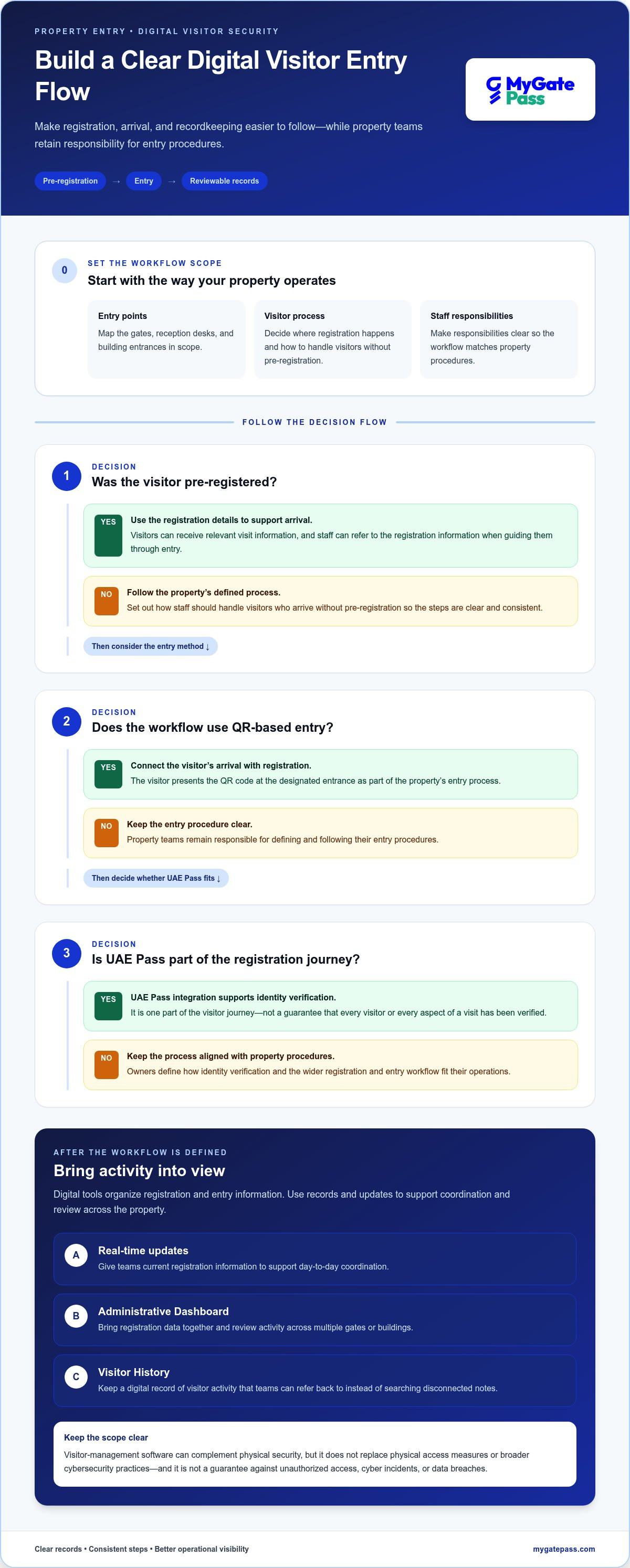
A digital visitor journey can connect pre-registration, QR-based entry, real-time updates, and recorded visitor history, while leaving property teams responsible for their entry procedures.
From visitor pre-registration to QR-based entry
With pre-registration, visitor details are submitted ahead of arrival through a digital workflow. The visitor can then use QR-based entry at the property, connecting the arrival with the registration. Real-time updates give teams current registration information to support coordination. These tools structure the process, while staff follow the property’s entry procedures.
For a guest, the steps can be straightforward: receive the relevant visit information, arrive at the designated entrance, and present the QR code as part of the entry process. Property teams can decide where registration happens, which entrances use the workflow, and how to handle visitors who arrive without pre-registration. Defining those steps helps staff apply the process consistently. For more context on entry workflows, the digital gate pass apps guide explores related standards for visitor-facing processes.
UAE Pass integration supports identity verification through UAE Pass. It is one part of the visitor journey, not a guarantee that every visitor or every aspect of a visit has been verified. Owners can define how it fits into their registration and entry procedures.
What visitor history and a central dashboard make visible
Visitor History provides a digital record of visitor activities, giving teams a place to refer back to recorded activity instead of searching through disconnected notes. The Administrative Dashboard brings registration data together, with real-time visibility across multiple gates or buildings. For an owner or operator, that central view can clarify where registrations are taking place and how activity is distributed across the property.
Records support operational visibility, but they don’t determine how long information should be kept. Property owners should set recordkeeping practices in line with operational needs and applicable obligations. A dashboard is a source of information, not a substitute for clear staff responsibilities, sensible data handling, or decisions about access to records.
To assess whether this workflow suits your property, map the registration, entry, and record-review steps across each location you manage. Then compare those needs with a digital visitor management platform, including MyGatePass features such as pre-registration, QR-based entry, real-time updates, Visitor History, and the Administrative Dashboard.
Digital security versus manual entry: compare the trade-offs
Choosing between manual and digital entry is a workflow decision, not a choice between security and convenience. A paper log may suit a straightforward entrance with a small number of visitors, while a property with several gates or buildings may benefit from centralized digital records. The property owner benefits of digital security depend on whether the process fits the site, staff roles, and visitor needs.
A digital record documents visitor activity; a physical security measure controls or protects access to a place. The two can complement one another, but they do different jobs. Neither a visitor log nor visitor-management software guarantees that unauthorized access or a data breach won’t occur.
| Consideration | Manual entry | Digital workflow |
|---|---|---|
| Records | Information is written in a log or other paper record, which staff may need to review manually. | Visitor activity is recorded digitally and can be reviewed within the system. |
| Visibility | Records may be kept separately at different entrances, making a property-wide view harder to assemble. | Centralized registration information can support oversight across multiple gates or buildings. |
| Coordination | Staff may rely on handovers or individual records to share visitor details. | Digital information can give relevant staff a shared reference point, depending on the workflow. |
Where digital records can improve consistency
Paper records can be useful, but finding a particular visit may mean locating and reviewing a physical log. Digital records offer another way to review visitor activity, while centralized registration information can help owners see activity across entrances without gathering separate logs first. This can support a more consistent process, though record quality still depends on how staff use the workflow.
Consider a property where visitors arrive at different buildings. With separate manual logs, each team records activity in its own place. A digital process can bring registration information into a shared view, helping staff refer to the same record. Clear instructions, accurate data entry, and sensible access to visitor information still matter.
What digital visitor management does not replace
Visitor-management software and physical guarding or gate hardware have different roles. Owners still need to define site procedures, assign staff responsibilities, and decide how exceptions are handled. Digital visitor management also isn’t a substitute for broader cybersecurity and privacy practices. Digital records create information that must be managed thoughtfully; digitizing a process alone doesn’t determine appropriate access or handling.
To keep a digital process welcoming, make the visitor-facing steps clear: explain what to do, where to go, and what information is needed. A simple, consistent journey can support controlled entry while helping visitors feel informed. To explore how a digital workflow could fit your property, review MyGatePass visitor management alongside your current process.
How property owners can assess digital security readiness
A useful readiness review starts with the way people actually enter and move through your property. The property owner benefits of digital security are easiest to assess when you define what needs to be visible, where current processes are unclear, and how staff and visitors will use a digital workflow. This keeps the decision grounded in operational needs rather than technology alone.
Map visitor journeys and operational needs
List the gates, entrances, and buildings where visitors arrive, then note which teams manage each location. Map distinct journeys, such as those for a scheduled guest, contractor, or delivery, without assuming every visitor follows the same steps. This gives you a practical view of where registration happens and where staff need information to coordinate entry.
Next, review how visitor details are currently recorded and shared. Identify specific gaps: logs may be kept separately, staff may be unsure which entrance a guest should use, or managers may have difficulty seeing registration activity across buildings. Turn those observations into clear objectives, such as more consistent records or better visibility for the teams responsible for arrivals.
- Inventory entry points: Record each gate, reception area, and building entrance involved in visitor access.
- Group visitor journeys: Note how guests, contractors, and deliveries are expected to register and arrive.
- Define visibility needs: Decide which staff need to see registration activity and at which locations.
- Set practical goals: Focus on outcomes such as clearer records, coordinated handovers, or a simpler visitor journey.
Set expectations for records, access, and staff workflows
Before selecting a digital process, decide who needs access to visitor information and for what operational purpose. Consider how records will be reviewed and managed, and assign responsibility for keeping the workflow consistent. These choices help align the system with daily operations; they don’t establish legal retention periods or replace a review of applicable requirements.
Plan for people, too. Staff onboarding should explain each person’s role, the steps for handling a registration, and what to do when a visitor’s situation doesn’t match the usual process. Visitor instructions should make arrival steps easy to understand, including where to go and what information to present. A clear process supports both oversight and a welcoming experience.
If identity integration is part of your review, consider how it fits into the visitor journey. The UAE Pass building integration guide explains this topic in a building context. Keep the decision tied to your identity-verification needs and the way staff will use the workflow.
Once you’ve mapped entry points, visitor journeys, staff roles, and visibility goals, you’ll have a focused basis for evaluating a digital process. Explore MyGatePass visitor management to consider how digital registration and records could fit your property.
How MyGatePass supports simpler, more visible property entry
Once you’ve mapped entry points and decided what staff need to see, match those needs with a visitor workflow. MyGatePass brings together visitor registration and entry information to support a clearer journey for property teams and guests. The aim is practical: make visitor activity easier to review while keeping the arrival process straightforward.
A connected visitor journey for participating properties
Visitors can be pre-registered, use QR-based entry, and have their activity recorded in Visitor History. Real-time updates help teams follow registration activity, while the Administrative Dashboard provides a centralized view of registration data across multiple gates or buildings. Together, these features connect steps that might otherwise be handled through separate records and handovers.
For properties connected through the Connected Network, integration across participating buildings supports smoother access between those locations. UAE Pass integration supports identity verification within the visitor journey. It doesn’t guarantee risk-free access or replace other security measures.
The visitor experience can also extend beyond the entrance. Exclusive Offers give members perks and deals from participating businesses and venues, adding a community-focused element to the platform. This sits alongside the operational purpose of organizing visitor registration and entry information.
MyGatePass has processed 150 k+ visitor entries. The 20 % QR pre-registration rate describes the share of visitors using that step. These figures provide context about platform activity, not a measure of reduced waiting times, incidents, or a particular security outcome.
A clear next step for property owners
For owners who need clearer entry oversight and centralized visitor information, MyGatePass offers a software-based way to organize registration and review activity across participating locations. The property owner benefits of digital security are most relevant when these capabilities align with the property’s visitor journeys, staff responsibilities, and visibility needs.
MyGatePass supports digital registration and records as part of a broader property security approach. Property teams continue to define site procedures and responsibilities, including physical entry processes. Review the platform in relation to the visitor journeys you’ve mapped.
Unlock a world of simplicity. Register today. Join MyGatePass: Get Started.
Make your next step a practical one
Start with one clear question: where would a more consistent visitor process make property operations easier to oversee? Use your readiness notes to identify an entry journey, the staff involved, and the information they need to coordinate arrivals. That gives you a focused way to evaluate a digital workflow without trying to change every procedure at once.
The property owner benefits of digital security come into focus when the process supports operational clarity and a respectful visitor experience. Keep the human side central: make instructions easy to follow, give staff clear responsibilities, and handle visitor information thoughtfully. Digital tools can support those goals, while property teams remain responsible for the wider entry process.
If you’re ready to explore a connected approach to visitor management, register with MyGatePass and get started.
A clearer entry journey can begin with one well-chosen improvement. Build from there with confidence.
Frequently Asked Questions
Is digital security worthwhile for property owners?
It can be worthwhile if your current process makes visitor activity difficult to review or coordinate. The property owner benefits of digital security are most relevant when they address a specific operational gap, such as separate logs at different entrances or unclear handovers between teams. Before adopting a system, identify the issue you want to improve and decide how you’ll assess whether the new workflow suits your property.
Can digital visitor management replace physical security personnel?
No. Visitor-management software organizes digital registration and records; it doesn’t replace the people responsible for site procedures. For example, a property team still needs to decide who responds when a visitor arrives at the wrong entrance or their visit details can’t be matched. Keep software and on-site responsibilities distinct, so staff understand which decisions remain part of their role.
How does digital security make visitor entry more visible?
It can give authorized staff a shared place to review recorded registration activity instead of relying on separate notes. MyGatePass includes Visitor History and an Administrative Dashboard with real-time registration data for multiple gates or buildings. Owners can decide which teams need visibility into which locations, then make those expectations part of staff procedures. These records show recorded activity, not necessarily every event at a property.
What happens if a visitor has not pre-registered?
Staff should follow a procedure the property has defined for unregistered arrivals. For instance, the process might direct the visitor to a designated contact or reception point while staff establish the purpose of the visit and the next step. Decide in advance who handles these cases, how the visitor is kept informed, and how the interaction is recorded. Don’t assume software automatically approves, checks in, or routes an unregistered visitor.
Can one digital security approach work for residential and commercial properties?
Digital visitor management can support both, but the workflow should reflect the property’s visitor types and operating practices. A residential building may need to consider guests arriving for residents, while a commercial property may handle scheduled meetings, contractors, or deliveries. MyGatePass serves residential and commercial building operators, as well as property owners and facility managers. Map the different journeys before deciding how registration should work at each site.
Does digital visitor management guarantee protection from data breaches?
No. Visitor-management software can organize entry information, but it can’t guarantee that data breaches or unauthorized access won’t occur. Organizations should consider the broader systems and practices involved in handling visitor information, including who can access records and how staff are trained to use them. A history or dashboard is one operational tool, not a complete cybersecurity programme. Avoid treating a digital record as proof that every risk has been addressed.


