

The longest feature list may be the wrong VMS. A search for “VMS” can return visitor management software alongside video and workforce systems, making comparisons confusing before you even reach the shortlist. A polished feature grid also won’t show whether registration, approvals, gate staff and visitor records work together in practice. The IT manager checklist for VMS selection starts with the workflow, not the sales pitch.
Assess security, integrations, reporting and ease of use together, then turn those priorities into criteria stakeholders can apply consistently. This guide shows you how to distinguish visitor management systems from other VMS categories, map your organisation’s gate workflows and rank requirements before comparing platforms. It also provides a repeatable framework for reviewing identity, operational visibility, data handling and staff adoption, including how to assess visitor-focused platforms such as MyGatePass and its UAE Pass integration. The result is a focused shortlist and a clearer view of whether a system fits the way people enter and move through your organisation.
Key Takeaways
- Confirm you’re evaluating visitor management software, not video management or vendor management tools.
- Use an IT manager checklist for VMS selection to rank essential visitor, security, administration, reporting and usability needs.
- Compare integration and identity requirements against real gate scenarios rather than assuming every system connects to the same tools.
- Run consistent scenarios with visitors, security personnel and administrators, then gather stakeholder feedback before choosing.
- See how MyGatePass brings visitor-facing, security and administrative workflows together through its apps, dashboard and UAE Pass integration.
What Does VMS Mean in Visitor Management, and Why Does the Distinction Matter?
Before comparing products, make sure every stakeholder means the same thing by “VMS.” In this article, a visitor management system is software that helps an organisation organise visitor entry and maintain visit records. Depending on the platform, this can include registering a visit, managing arrival at an entrance and recording visitor information. The focus is the visitor journey and how it connects with the people responsible for entry. A foundational overview of a Visitor Management System can help establish the category, but your own gate process should guide the requirements.
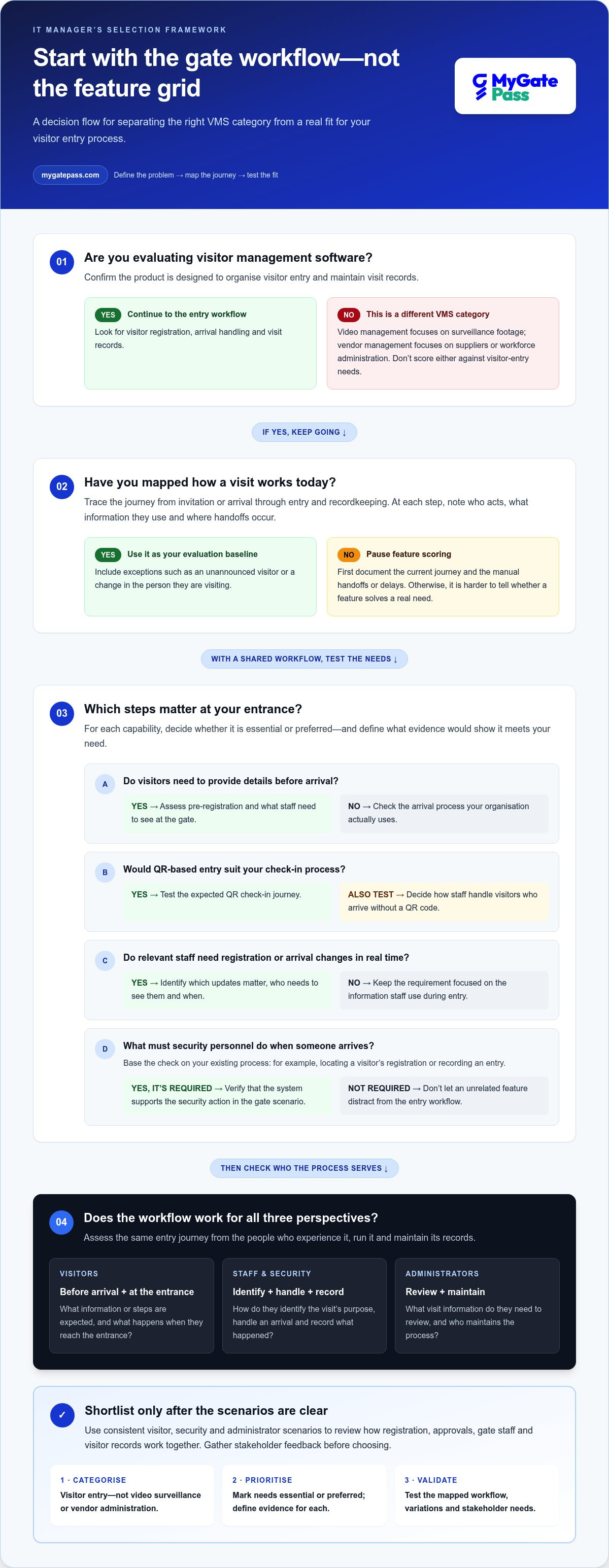
The distinction matters because search results use the same acronym for unrelated software. An IT manager checklist for VMS selection should begin by naming the business problem: managing visitors entering a building, not managing surveillance footage or sourcing contract workers. Otherwise, your team could spend time scoring tools against needs that have nothing to do with its entry process.
How is a visitor management system different from other VMS software?
A visitor management system supports the registration and entry-record workflow. Video management software, by contrast, is concerned with organising and reviewing surveillance video. It may be part of a wider security environment, but it doesn’t serve the same purpose as software focused on visitor registration and entry records.
Vendor management systems address another distinct problem: managing suppliers, workforce sourcing or contingent labour administration. Their selection criteria may focus on supplier processes and workforce programmes, not what happens when a guest, contractor or other visitor arrives at a gate.
Start each comparison by confirming the product category and intended users. Look for capabilities related to visitor registration, arrivals and visit records. Then check that demonstrations and proposals address those entry workflows. A shared acronym is not evidence that two products solve the same operational need.
Which teams should help define the visitor management problem?
Bring together IT, facility management, security personnel and relevant building operators. Each group sees a different part of the entry experience. IT can define system and data requirements; facilities teams understand how entrances operate; security personnel can explain how arrivals are handled; and building operators can highlight differences between sites or gates.
Capture the needs of three perspectives separately:
- Visitors: What information or steps are expected before arrival, and what happens when they reach the entrance?
- Staff and security personnel: How do they identify the purpose of a visit, handle an arrival and record what happened?
- Administrators: What visit information do they need to review, and who is responsible for maintaining the process?
Describe the current journey before discussing software features. Follow a typical visit from invitation or arrival through entry and recordkeeping. At each step, note who acts, what information they use and where delays or manual handoffs occur. Include exceptions, such as an unannounced visitor or a change in the person they’re visiting. This shared workflow becomes the baseline for evaluation, so teams can judge how well a system fits the way their organisation manages entry.
Which Visitor Management System Capabilities Belong on an IT Selection Checklist?
A useful checklist reflects the way people enter your organisation, not the number of features on a product page. Group requirements by visitor journey, security operations, administration, reporting and user experience. Mark each item as essential or preferred, and define what evidence would show that a system meets it. This keeps a polished dashboard or a long feature list from distracting the team from the basics: a workable entry process and records that support operational needs.
How should IT assess visitor registration and entry workflows?
Map the process from the first invitation or pre-registration step to the visitor’s arrival and the recording of entry. At each point, note who acts, what information they need and what should happen next. This makes it easier to judge whether a capability solves a real handoff or simply adds another step.
Assess each part of the journey against your organisation’s needs:
- Pre-registration: Decide whether visitors should be able to provide details before arrival and what staff need to see at the gate.
- QR-based entry: Consider whether a QR code suits your check-in process, including how staff handle visitors who arrive without one.
- Real-time updates: Identify which arrival or registration changes need to be visible to relevant staff, and when that information is useful.
- Security actions: Record the steps personnel take during arrival, such as locating a visitor’s registration or recording an entry, based on your existing process.
Keep the visitor experience in view, too. A streamlined process should make required steps clear without creating unnecessary friction at the entrance. Test the expected journey against common variations, such as a visitor arriving before their host is ready, and record what the visitor and staff need to do next.
What should the system provide to administrators and decision-makers?
Define the administrative view by the decisions people actually need to make. Do administrators need to review visitor histories, see current registration data or oversee activity across multiple gates or buildings? Write down the information required, who needs it and how it will be used before treating a particular dashboard layout as a requirement. A report is useful when it answers an operational question, not simply because it looks comprehensive.
Reporting needs may differ by role. Security personnel may need information relevant to arrivals, while administrators may need a broader view of registrations and records. Specify who needs access to which information and what they need to do with it. Include your organisation’s requirements for data access, retention and privacy in the checklist.
Checklist summary: Must-haves are capabilities tied to a defined visitor, security or administrative workflow. Useful extras may improve convenience, but they don’t resolve a stated operational need.
Use the IT manager checklist for VMS selection to make priorities visible to stakeholders and keep comparisons consistent. For a practical example of visitor, security and administrative workflows in one platform, explore MyGatePass visitor management, which includes pre-registration, QR-based entry, real-time updates and digital visitor history.
How Can IT Managers Compare VMS Integration, Identity, and Security Fit?
Integration should solve a defined handoff, not just appear on a feature list. Start with the systems and identity processes your organisation already uses. For each proposed connection, record what information needs to move, who needs to see it and what action follows. Then define how the team will assess whether the connection supports the workflow.
How should teams evaluate identity and integration requirements?
List the identity processes required for different visitor types and why each is needed. For example, your organisation may need a way to verify visitor identity before entry or associate a registration with the person arriving. If verified visitor identification is part of that requirement, assess UAE Pass integration as a specific criterion. MyGatePass integrates with UAE Pass for verified visitor identification. For more context on this identity workflow, see the UAE Pass integration guide for buildings.
Apply the same discipline to other integrations. Ask what information is exchanged, which team uses it and what happens if a process still requires a manual step. Don’t assume a system connects to access control, identity tools or other business software just because those integrations are common in the market. Record each connection as a requirement to evaluate, with a clear purpose and an example of the handoff it should support.
| Comparison area | Evaluation question |
|---|---|
| Workflow fit | Can the system represent the entry steps your visitor and security teams actually follow? |
| Identity needs | Does it support the identity process required for the visitor types you handle, including UAE Pass where relevant? |
| Records | Can authorised users find the visitor registration or history information they need? |
| Administration | Does the administrative view provide the registration visibility required across your gates or buildings? |
| User experience | Are the steps clear and manageable for visitors, security personnel and administrators? |
How can buyers compare usability and operational fit fairly?
Use identical scenarios for every shortlisted system. Compare a visitor who has pre-registered, an arrival that needs staff attention and an administrator reviewing a visitor record. Note the actions each role takes, where information appears and whether the scenario can be completed as your process requires. This keeps the assessment focused on real work rather than a polished demonstration of unrelated capabilities.
For security and privacy, evaluate each option against your organisation’s own requirements. Document who should access visitor information, which records are needed, and how your internal teams assess data handling and retention. Involve the relevant security, IT and privacy stakeholders, and assess evidence against your requirements rather than treating a product statement as proof of compliance.
A practical IT manager checklist for VMS selection records each criterion, its priority, the scenario used to test it and any gap or trade-off. A longer feature list isn’t automatically a better fit. Choose based on the workflows your organisation needs to support and the evidence gathered through consistent comparison.
What Should an IT Manager Include in a VMS Evaluation and Pilot Checklist?
A repeatable evaluation turns demonstrations into comparable evidence. Set the criteria before demos begin, test the same visitor and gate workflows with each shortlisted system, and document who owns each decision. This gives IT, facilities and security teams a shared basis for weighing operational fit, adoption and implementation responsibilities instead of relying on impressions from a single presentation.
How should teams create a repeatable VMS scorecard?
Define required outcomes separately from optional preferences. Use one rating scale for every system, such as “meets,” “partly meets” and “does not meet,” and record the evidence behind each score. Include IT, facility and security stakeholders in the review so a strong technical result doesn’t obscure friction for the people using the system at the entrance. If some requirements matter more than others, agree on their relative priority before reviewing products.
Evaluation process
- Gather requirements. Bring together the teams involved in visitor entry and agree on the operational problem the system should address. Capture mandatory workflows, identity needs, record requirements and integration questions.
- Set priorities and scoring rules. Mark each criterion as essential or preferred before demonstrations. Agree on a shared rating scale and what evidence counts, such as completing a defined task or locating the relevant visitor record.
- Assign responsibilities. Identify who will lead technical review, coordinate the evaluation, assess staff adoption and document implementation tasks. Include the people who will use the system, not only project sponsors.
- Run consistent scenarios. Give each shortlisted option the same visitor, security and administrator tasks. Record steps, handoffs, questions and points of friction as they occur.
- Review records and decide. Compare the evidence against essential criteria, note unresolved gaps and trade-offs, and discuss results with stakeholders. Make the decision using the agreed priorities, not a last-minute feature count.
Which scenarios should a visitor-management pilot test?
Keep the evaluation centred on a complete visit and the roles involved. Observe what each person needs to do and what information is available at each stage, then document where the process fits or creates friction.
- Visitor: Complete pre-registration, use QR-based entry as intended and experience the arrival steps.
- Security personnel: Follow the organisation’s entry process and observe how relevant visitor updates appear during the scenario.
- Administrator: Review a visitor history and registration information, then assess whether the records support the required administrative work.
- Project team: Note adoption questions, training needs, implementation ownership and any record-handling issues for follow-up.
Use the IT manager checklist for VMS selection to keep each score tied to an observed task. A scenario that exposes a trade-off is useful evidence, not a failed evaluation. It helps your team distinguish a manageable gap from a mismatch with an essential workflow.
To explore a visitor-management example with visitor and security apps, an Administrative Dashboard, pre-registration, QR-based entry, real-time updates and digital visitor history, explore the MyGatePass visitor management platform.
How Does MyGatePass Fit a Visitor Management System Selection?
Once your team has ranked its requirements, compare a platform against those criteria rather than treating its feature list as a score by itself. MyGatePass is a visitor management platform for organisations in the UAE, with visitor-facing, security and administrative tools. Assess how those tools align with your organisation’s entry process, identity needs and recordkeeping priorities.
Which stated MyGatePass features map to visitor-management criteria?
Use your scorecard to connect each capability to a practical workflow:
- Visitor journey: The MyGatePass Visitor App supports pre-registration, QR-based entry and real-time updates. Consider how these features align with the steps your visitors follow before and during arrival.
- Security operations: The MyGatePass Security App supports the security team’s role in visitor management. Assess it against the actions your personnel take at the gate, including the information they need during entry.
- Identity: MyGatePass integrates with UAE Pass for verified visitor identification. Include this criterion when verified identification is part of your organisation’s requirements.
- Administration and records: The MyGatePass Admin Dashboard provides real-time visitor registration data across multiple gates or buildings. Visitor History provides a digital record of visitor activity. Consider how these views match administrators’ needs.
- Connected Network: This connects participating buildings to support smoother access across them. Assess its relevance if your visitor workflows involve more than one participating building.
MyGatePass has processed 150 k+ visitor entries, and its reported QR pre-registration rate is 20%. Treat these figures as context for the platform, not a substitute for testing your own scenarios. Your team should still assess how each capability fits its visitor types, gate processes and administrative responsibilities.
How can readers take the next step after completing the checklist?
Before exploring a product, summarise your essential requirements in one place: the visitor steps to support, the security team’s operational needs, the records administrators use, and any identity or multi-building criteria. Then compare the product’s stated capabilities against that list. This keeps the decision anchored to your organisation’s priorities and makes stakeholder review more focused.
For hospitality teams, the visitor journey also includes how a guest experiences arrival and entry. The digital gate pass app guide offers a related perspective on digital gate passes and hospitality workflows.
Use your IT manager checklist for VMS selection as the basis for a structured review of MyGatePass or another platform under consideration. Join MyGatePass and get started.
Turn Your VMS Shortlist Into a Confident Next Step
Your selection process doesn’t end with a scorecard. Use the results to agree on the workflows that matter most, identify open questions and decide what your team needs to see in a practical evaluation. A clear record of priorities helps keep the next conversation focused on fit, not feature volume.
If visitor registration, QR-based entry and verified identification are central to your requirements, MyGatePass offers a relevant platform to consider. It integrates with UAE Pass for verified visitor identification, has processed 150 k+ visitor entries and reports a 20% QR pre-registration rate. Use those details as a starting point for evaluating how its visitor and security workflows align with your requirements.
Put your IT manager checklist for VMS selection into action by comparing MyGatePass with the criteria your stakeholders have agreed on. Join MyGatePass and get started. Your next step can bring greater clarity to the entry experience for visitors and the teams who manage it.
Frequently Asked Questions
What does VMS mean in an IT manager’s selection checklist?
In this context, VMS means visitor management system, software for handling visitor entry and related records. The acronym can also refer to video management or vendor management systems, so spell out “visitor management system” in procurement documents and meeting notes. That small step helps prevent teams from evaluating surveillance tools or workforce platforms against requirements for guest registration, building entry and visit records.
How do I choose a visitor management system for my organisation?
Choose by matching the system to your organisation’s entry process, users and recordkeeping needs. Start with the visitor types you receive and the steps each follows, then consider what staff must do at arrival and what administrators need to review afterward. The IT manager checklist for VMS selection should also capture identity requirements, adoption needs and implementation ownership, so stakeholders can compare options using shared priorities rather than personal preferences.
Can a visitor management system integrate with UAE Pass?
Yes. MyGatePass integrates with UAE Pass for verified visitor identification. This may be relevant when your organisation’s visitor process requires identity verification, but the right evaluation starts by defining which visitors need it and at what stage. Include the identity workflow in your system assessment, then consider how it fits with visitor registration and the actions staff take at the entrance.
Is visitor management software the same as video management software?
No. Visitor management software supports processes related to visitor entry and visit records, while video management software is used to manage surveillance video. They may sit within a broader physical security environment, but they serve different purposes and shouldn’t be scored against the same core requirements. For example, footage review doesn’t replace a process for registering an expected guest or recording that person’s arrival.
What should an IT manager test during a visitor management system pilot?
Test a complete visit from the visitor’s perspective, then repeat it from the staff and administrator perspectives. Include a visitor who has registered ahead, an arrival requiring staff attention and a later review of the visit record. Observe how people find the information they need, where manual work remains and whether the process is clear without extra explanation. Record issues and questions rather than assuming the system will handle them automatically.
What happens if a VMS does not fit our current gate workflow?
Don’t force a workflow change without understanding the impact. Identify the exact step that fails, who performs it and whether the mismatch affects security, visitor experience or recordkeeping. Then decide with the relevant teams whether the process should be redesigned or the system ruled out. Document the decision and any new responsibilities so a workaround doesn’t become an unplanned burden for gate staff.
How can I compare visitor management systems without focusing only on features?
Compare each option using the same scenarios and a short set of prioritised criteria. Score how well it supports required tasks, how much manual effort remains, and whether visitors, staff and administrators can complete their parts clearly. Keep evidence beside each score, such as observed steps or missing information. This makes trade-offs visible and helps the team distinguish essential workflow fit from optional features that don’t address a defined need.


