

A smoother school exit starts before the first car reaches the gate. A school student pick up system can help reduce car lines by coordinating digital family check-in with staggered dismissal windows spaced 10-15 minutes apart. It can also record when a student leaves, show pickup updates and support checks that help staff release children to authorized adults.
Long queues, rushed handovers and uncertainty about who is collecting a child can make dismissal stressful for families and school teams. A clear, connected school student pick up system helps everyone know what happens next and makes student release procedures easier to follow.
This guide explains how pickup systems work, how schools can organize traffic and document releases, and what steps support identity and authorization checks. You’ll also learn how to assess a digital approach for your school’s dismissal needs in the UAE, while keeping the human coordination that makes the process calm and welcoming.
Key Takeaways
- Plan dismissal with coordinated pickup windows and clear vehicle and pedestrian rules to help keep traffic moving.
- Use a documented release process that records when students leave, giving school teams a consistent reference.
- Give families a way to view pickup progress and receive updates about a child’s entry or exit.
- Keep each student’s authorized pickup roster current, including photos, so staff can follow a clear handover process.
- Explore how digital visitor and security tools can support pickup coordination alongside the school’s existing procedures.
What Is a School Pickup Drop Safety System?
A school pickup system coordinates student dismissal, family arrival updates and authorized handovers. It connects school staff and parents through a shared process instead of relying on separate paper notes.
Arrival and Release Notifications
Notifications can tell administrators when a family requests pickup, help drivers know when to approach a collection point, and update parents as dismissal progresses. For example, staff can receive an arrival alert, a teacher can prepare the named child, and the guardian can receive a release update after handover. Decide which event triggers each message and who should receive it.
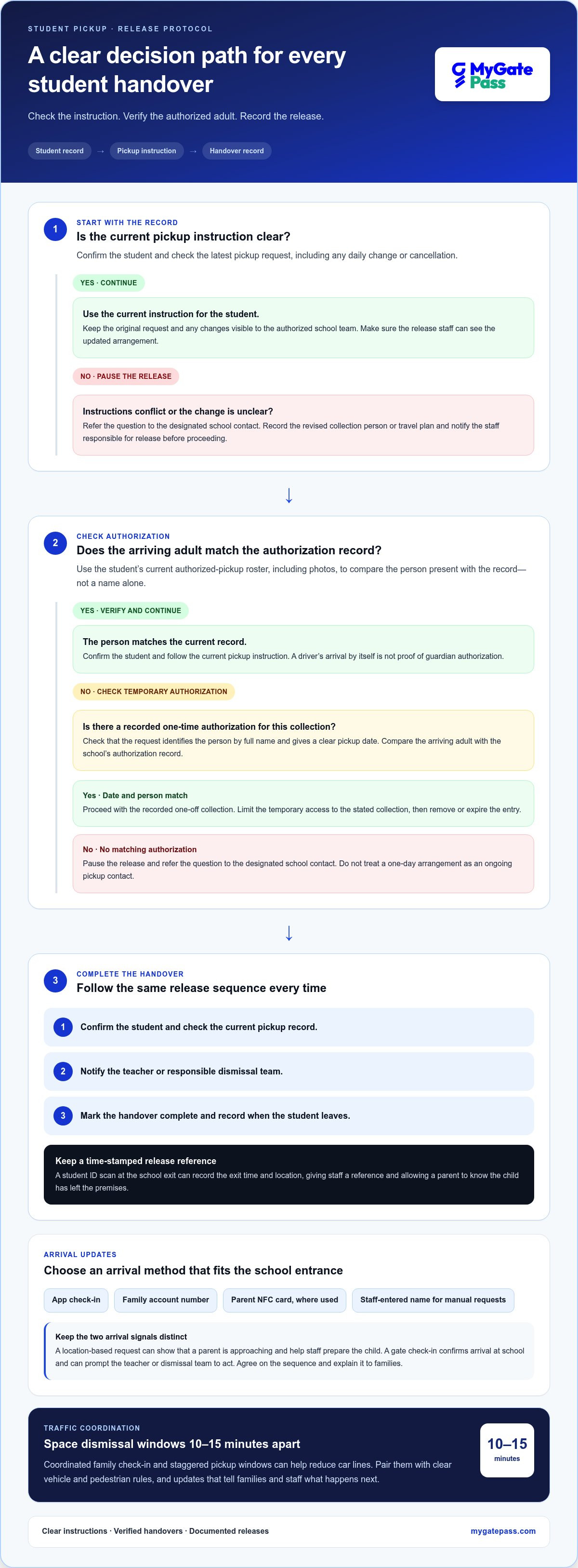
A student ID scan at the school exit can record the exit time and location. This gives staff a time-stamped reference and lets a parent know the child has left the premises. For younger children, especially those aged 2-6 years, clear guardian release updates help staff follow the handover process carefully.
Parent Arrival Notification Options
Schools can let parents report their arrival through an app check-in, family account number or parent NFC card, where used. Staff can also enter the child’s name when a family needs a manual option. Choose a method that identifies the student clearly and fits the school’s entrance workflow, rather than creating a separate queue for every notification method.
A location-based request can help staff see that a parent is approaching, while a gate check-in confirms arrival at school. These are separate steps: the first can help staff prepare the child, and the second can prompt the teacher or dismissal team to act. Agree on the sequence and tell families how to report their arrival before the first school day.
Features, Costs, and Available Software
Useful features include parent and staff notifications, student search, release logging, pickup status, and an authorized-guardian roster. In the UAE, schools can consider paper registers, standalone pickup apps, or broader school and facility management platforms. Software cost depends on the school’s needs, user access, integrations, and setup scope; pricing is provided after a quote request.
Digital systems replace repeated calls and handwritten updates with a shared record, while paper systems rely on staff recording and relaying each change. A paper log can still support a fallback process, but may not show parents the current pickup status. The practical difference is how quickly staff can find a student’s record and communicate the next step.
For UAE schools, treat student names, guardian details, arrival information and exit records as personal data. Build privacy into the process: collect only the details needed for dismissal, limit staff access by role, and set clear retention and sharing practices in line with applicable UAE data-protection requirements. Explain to families what the system records and how that information supports pickup.
Set up the workflow in a clear order: register each student and authorized guardian, choose arrival methods, notify the teacher when pickup is requested, then record the release. Keep the roster current, including photos of authorized adults, so staff can compare the person present with the student’s record instead of relying on a name alone.
Documented pickup and release protocols
Set up student records, pickup permissions, change deadlines, staff roles and release logging. Then give families and staff clear instructions for daily changes and handovers.
Daily Pickup Changes
A daily change process lets a parent update or cancel a pickup before dismissal. Set a clear school cutoff, record the revised collection person or travel plan, and notify the staff responsible for release. For example, if a different guardian will collect a child, staff should see the updated instruction before sending the student out.
Keep the original request and any changes visible to the authorized school team. A mobile form or school app can record the student, date, revised arrangement and submitting parent. If a family calls instead, assign a staff member to enter the change and note who received it. This creates a consistent handoff between the office and dismissal team.
Use a release record to document when each child is sent out and which pickup instruction staff followed. A practical sequence is to confirm the student, check the current pickup record, notify the teacher and mark the handover complete. If instructions conflict, pause the release and refer the question to the designated school contact.
Assign driver tasks by linking each pickup request to the right student, vehicle and responsible driver. Give the driver only the details needed for that collection, such as the student’s name and designated pickup point. The school team remains responsible for confirming the release. A driver’s arrival is not proof of guardian authorization.
For recurring arrangements, create monthly pickup tasks from a family’s approved schedule, then review them when a parent reports a change. Each task should identify the student, assigned driver, pickup location and any relevant handover instruction. Record exceptions separately so a one-day change doesn’t silently replace the regular arrangement for the rest of the month.
Temporary Pickup Authorization
Temporary pickup authorization covers a one-off collection by someone outside the usual routine. Ask the parent to submit the person’s full name and a clear pickup date, then record the request against the student. Before releasing the child, staff can compare the arriving adult with the school’s authorization record.
Limit temporary access to the stated collection, then remove or expire the entry. For example, a relative collecting a student on one school day shouldn’t automatically become an ongoing pickup contact. If the parent changes the arrangement, update the record and alert the teacher and dismissal team before calling the student.
Managing pickup congestion and car lines
Congestion builds when transport, family arrivals, and student release converge at one school gate. A coordinated plan links each pickup request to a dismissal window, collection point, and staff action. For schools with more than 200 students, an unmanaged peak period is described as averaging 35 minutes. Digital flow management is stated to bring that period under 15 minutes, a 60% reduction.
Start with a centralized pickup plan. Keep dismissal windows, student lists, assigned exits and family updates in one shared view, so office staff and teachers follow the same instructions. For example, if a parent changes a pickup arrangement, the team can update the plan before calling the student. A current record reduces reliance on separate messages and handwritten lists.
Staggered dismissal can spread arrivals across the available collection area. Assign pickup windows 10-15 minutes apart, then communicate each family’s window and entrance route before dismissal. This helps avoid sending every vehicle to the school gate at once. Reinforce vehicle and pedestrian rules at the start of the school year and during the first weeks, when families are learning the routine.
- Group arrivals: Assign families to pickup windows 10-15 minutes apart, with a clear route to the collection point.
- Coordinate release: Match each family request to the student, teacher, and designated exit before the child is called.
- Manage exceptions: Update changed pickup details in the central plan so staff don’t act on an outdated instruction.
- Review flow: Use recorded release times to identify where vehicles or students wait longest.
Digital family check-in is stated to reduce pickup time by up to 60% in schools with more than 150 students. With digital pickup management and family check-in, average wait time is stated as 5-10 minutes per student. These figures describe different measures, so schools should distinguish total peak congestion from an individual student’s wait when reviewing performance.
A comparison example illustrates the potential difference: digitally managing dismissal for 300 students takes under 15 minutes, while dismissal of 300 students without digital check-in takes 40 minutes. Centralized management makes each request visible to the staff responsible for the next step. That shared status can help teams coordinate student release and transport rather than relying on repeated calls at the gate.
Review the plan after dismissal by checking release records, arrival patterns and points where the transport queue slows. If the school has several exits, compare which collection points create bottlenecks and adjust the flow. Consistent records turn each dismissal into useful operational information, helping the school refine its schedule while maintaining safe, orderly handovers.
Parents viewing pickup status
Parents need clear updates on whether a pickup request has been received, whether their child is preparing to leave and whether the handover is complete. Define these stages before dismissal and explain what each status means. For example, “request received” should confirm that the family’s message reached the school, not that the child has already been called.
Build parent-facing status updates around verified events. When a parent uses an app to request pickup, the system can check the distance between the parent’s current location and the school. This can help staff see that a family is approaching, while the request identifies which child needs to be prepared. A distance check does not confirm that pickup is complete.
After the teacher sends the student out, an ID card scan at the school exit can record the exit time and location. This gives the school a clear basis for notifying the parent. Keep the sequence easy to understand: request received, student called, then exit recorded. If the school uses different labels, explain them to parents before dismissal begins.
Use a short status guide so families know what action, if any, comes next:
- Request received: The school has the family’s pickup request.
- Preparing for release: Staff are coordinating the student’s movement to the exit.
- Exit recorded: The student’s ID scan has logged the time and exit location.
- Pickup completed: Staff have recorded the handover under the school’s release process.
Separate school updates from parent tasks. If the status still shows “request received,” parents can follow the school’s stated arrival process instead of sending repeated messages. If a pickup arrangement changes, they should submit the change through the designated channel. Staff can then update the record and share the revised instruction with the teacher responsible for release.
For families collecting more than one child, show each child’s status by name. Gate staff may call all children linked to a family account or only a particular child. Parents collecting siblings can then see who has been called rather than assume both are ready. Explain whether one request covers the family or whether each student needs a separate request.
Set expectations for notifications at the start of the school year. Explain which events trigger a message, what an exit record confirms and whom parents should contact if a status seems incorrect. A precise event trail supports calm communication: parents see the update, staff see the same recorded event, and the school can review the student’s release time and location.
Pickup authorization and identity verification
A clear authorization process helps staff confirm who may collect each student before release. Maintain an up-to-date roster for every child, with a photo of each approved adult rather than a name alone. This gives the teacher and gate staff a visual reference when the arriving person isn’t familiar.
For elementary students up to grade 5, the described process releases a child to a parent or guardian after verifying the parent ID card. When staff scan that card, the system displays the linked children’s names to the teacher, who can send the right student toward the exit. A school should make the handoff steps clear to families and staff before dismissal.
If a parent forgets the card, gate staff can search for the child by name or ID number. They can also enter the child’s name manually to initiate a pickup request. These options help staff locate the correct record, but they don’t replace the school’s authorization check. The person collecting the child must still match the student’s approved pickup information.
Use a consistent sequence at the gate:
- Find the student record using the parent ID card, child’s name, or ID number.
- Review the current authorized pickup roster and the adult’s photo.
- Confirm the child’s name with the teacher before sending the student out.
- Record the release so attendance and dismissal records reflect what happened.
Children aged 2-6 years are a group for whom pickup authorization control is especially critical. For these younger students, staff should use the roster and the school’s release steps every time, including when a familiar adult arrives. A regular face does not automatically show that the person is authorized to collect that child.
Keep family records current when guardians or approved collectors change. Ask parents to submit additions or removals through the school’s designated process, then update the roster before the next pickup. If a temporary collector is approved, record the specific person and collection arrangement. This helps prevent an outdated list from guiding a later release.
Train staff who manage attendance, gate searches and teacher notifications on the same workflow. A simple practice scenario can cover a scanned parent card, a forgotten card and a name that doesn’t appear on the roster. Staff should know when to pause the handover and refer the case to the designated school contact.
Schools organizing connected student and staff records can explore digital attendance tracking as part of a consistent release workflow.
MyGatePass: MyGatePass Visitor App
MyGatePass Visitor App can help schools connect visitor handling with a more organized digital entry process. For dismissal workflows, MyGatePass Security App and MyGatePass Admin Dashboard provide digital tools for security teams and centralized facility management. The UAE Pass Integration Module supports verified visitor identification, helping schools manage entry records alongside student release procedures.
These tools are most relevant when a school wants to coordinate visitor and security processes digitally rather than rely solely on disconnected manual records. They do not replace the school’s pickup authorization roster, teacher handover steps or family communication rules. Those procedures still define how each student is released.
Contact MyGatePass to discuss how its digital tools can fit your school’s visitor and security workflows.
Make your school’s next step a clear one
Use your dismissal plan as a starting point for reviewing the school’s wider digital workflows. Identify where families, school staff and security teams need shared information, then decide which processes should remain separate. A school student pick up system should fit the school’s release procedures, not replace the people responsible for confirming each handover.
MyGatePass offers the MyGatePass Visitor App, MyGatePass Security App and MyGatePass Admin Dashboard. These tools support visitor and security management through dedicated apps and a centralized dashboard. Schools considering a digital approach can explore how these offerings relate to their wider entry and facility-management needs, while keeping student pickup rules and authorization decisions under school control.
Start by outlining the steps your school wants to improve and the staff who need access to relevant information. Then contact MyGatePass about school pickup to discuss how its digital tools may fit your workflow. A thoughtful process review can help your school move toward dismissal that feels more coordinated for families and staff.
Frequently Asked Questions
How do you avoid car lines in front of the school?
Separate arriving vehicles from the student waiting area, and assign staff to guide cars through the collection route. Ask families to keep the pickup lane moving rather than stopping to discuss changes at the gate. For example, direct questions about a changed arrangement to the school office while vehicles continue toward the designated exit. Review where cars pause after dismissal and adjust staff positions or route instructions.
How do you control who can pick up the students?
Give each student an up-to-date list of authorized adults, including a photo for each person. At collection, staff compare the adult present with that record and follow the school’s release procedure. For elementary students up to grade 5, the described process verifies a parent ID card before handover. If the card is forgotten, staff can search by the child’s name or ID number and then complete the authorization check.
How do you organize pickup at a school with many classes?
Give each class a defined release point and assign a staff member to communicate with its teacher. The office can sequence class calls according to the school’s transport layout, while staff direct families to the correct area. For example, one group can wait inside until its collection point is clear instead of joining students already moving toward the exit. Share the same current instructions with teachers, office staff and gate personnel.
How do you organize pickup for early childhood students?
Use a closely supervised handover process for younger children, especially those aged 2-6 years, when authorization control is particularly important. Keep each child with the assigned teacher or class team until the approved adult is identified. For a sibling collection, staff can call all children associated with a family account or only the specific child requested. Confirm which children are included before they leave their supervised area.
What is a school student pick-up system and how does it work?
A school student pick-up system organizes how families request collection, staff prepare students and the school records releases. A parent submits a pickup request, the relevant teacher receives the instruction, and staff follow the school’s authorization steps before handover. Depending on the setup, the record may also show the child’s exit time and location. The school defines the workflow, user roles and events that trigger family updates.
How do parents register and authorize people to pick up a student?
Parents provide the student’s details and the names and photos of approved pickup adults through the school’s chosen registration process. They should update the record when an authorized person changes or a temporary collector is needed. For example, a parent can submit a relative’s details for a specific collection, allowing staff to compare the person at the gate with the recorded authorization before releasing the student.
How can schools manage car-line pickup, buses, and walk-up dismissal?
Set separate procedures and collection points for vehicles, school transport and families arriving on foot. Assign staff to each route, and give teachers a clear signal for when each group can be released. For example, bus students can assemble in a supervised area while car-line students wait for their collection call. Record exceptions, such as a student switching from bus travel to parent pickup, before dismissal begins.
What safety risks can a student pick-up system help prevent?
A structured pickup process can reduce the risk of releasing a child to an unauthorized adult, following an outdated family instruction or sending the wrong student to an exit. It can also help staff identify missed handover steps by reviewing the student’s pickup record. Clear responsibilities matter: the system supports staff decisions, while school personnel still verify the adult and follow the school’s safeguarding procedures.


