

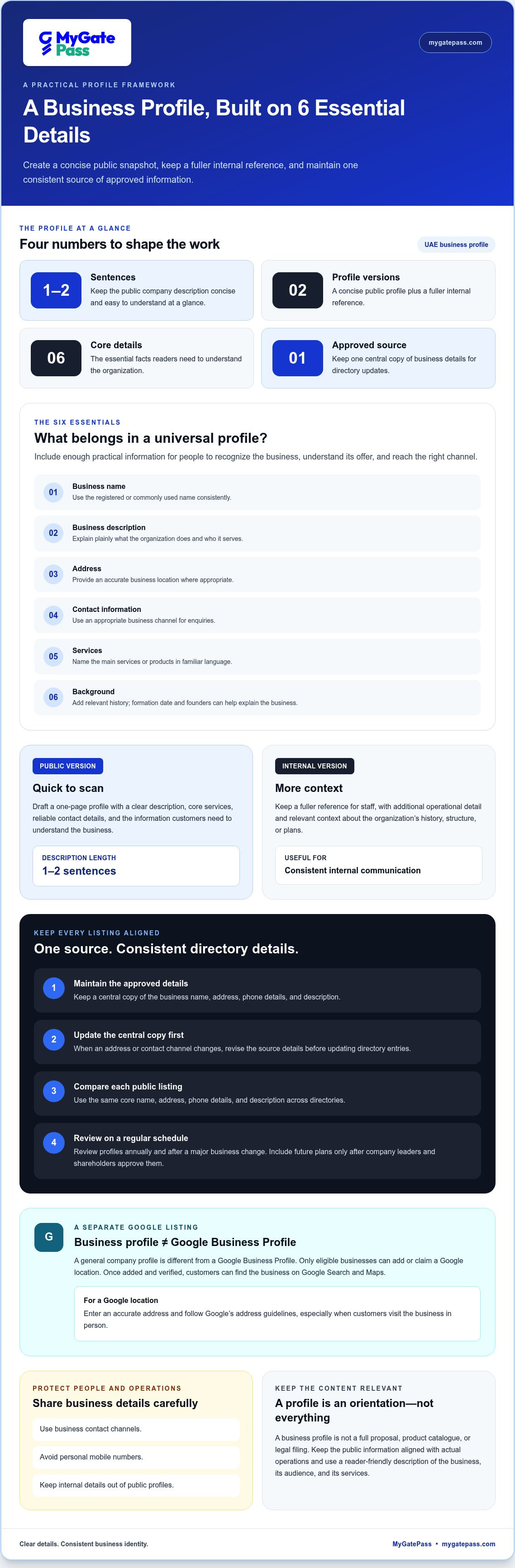
A universal business profile gives people a clear snapshot of what your business does, who it serves and how to reach it. For a UAE business, prepare a concise version for public sharing and a fuller profile as an internal reference. Keep the public company description to one or two sentences.
A business profile is more than a formality. Clear, consistent information helps customers and partners understand your business without unnecessary back-and-forth. This guide explains what to include, how to adapt a profile for different uses and how to keep it current. It also clarifies the difference between a business profile and a Google Business Profile, and how digital visitor and facility management can support daily operations.
Key Takeaways
- Build a concise public profile and keep a fuller version for internal use.
- Use clear, consistent business details so customers and partners can understand what you do and how to reach you.
- For multiple locations, organize each address and its related details clearly while maintaining a consistent company identity.
- Include the essentials, such as your business description, contact information, services and background, and keep the content current.
- Explore digital visitor management when you need a more streamlined way to coordinate access and visitor information.
Creating a Business Profile
Start with a clear public profile that explains your business and gives people reliable details. In the UAE, prepare a concise version for sharing and a fuller internal reference.
Information in a Universal Business Profile
A universal business profile brings together your organization’s key details, including its name, description, address, contact information, services and background. A concise version gives customers a quick overview, while a longer internal version can include more operational detail. Keep the public company description to one or two sentences so readers can understand your offer at a glance.
Build the profile from information your business can maintain. Use its registered or commonly used name consistently, describe its main services plainly and provide contact details for an appropriate business channel. For example, a consultancy can state its specialty, office address and general enquiry contact without adding personal employee details. Include the formation date and founders in the historical background when they help explain the business.
A general company profile is different from a Google Business Profile. Only eligible businesses can add or claim a location on Google. Once a Google Business Profile is added and verified, customers can find the business on Google Search and Maps. Enter an accurate address and follow Google’s address guidelines, especially if customers visit the business in person.
According to the International Organization for Standardization (ISO), the record states “60.60 2015-12-16 International Standard published.” Treat standards references as distinct from your company description: include one only when it genuinely applies to the information being presented. A standards entry should not replace practical details such as your services, contact channel or business location.
Consistent Details Across Directories
Consistency means using the same core business name, address, phone details and description across every directory where your business appears. This helps customers recognize the same organization in search results, map listings and company pages. Keep a central copy of approved details and compare each public listing against it before publishing changes.
Update the central copy first when an address or contact channel changes, then revise each directory entry. Review profiles regularly and after a major business change. Include future plans, such as expansion or new services, only after company leaders and shareholders have approved them. This keeps public information aligned with actual operations.
Public details can also create privacy and security risks. A published address or direct contact can expose staff or operational information. Use business contact channels, avoid personal mobile numbers and keep internal details out of public profiles.
- Draft a one-page public profile and a longer internal reference.
- Check the address against Google’s guidelines before adding a Google location.
- Keep one approved source of business details for directory updates.
- Review the profile annually and after approved changes.
Purpose of a business profile
A business profile gives customers, partners and potential employees a useful snapshot of your organization. For example, a design consultancy could describe its specialities, the clients it serves and how to make an enquiry. That context helps readers decide whether to take the next step instead of guessing from the company name alone. A universal business profile also gives the organization a consistent reference for public and internal communication.
It supports decisions at different stages of a business relationship. A prospective customer can compare a company’s stated services with their needs, while a supplier can understand its role before discussing a project. For example, a professional catering business can clarify whether it serves corporate events, private gatherings or both. Specific descriptions set expectations and help direct enquiries to the right team.
- Introduce the business: Explain its purpose and the people or organizations it serves.
- Clarify its offer: Name core services or products, using familiar language instead of internal shorthand.
- Support an enquiry: Give readers a relevant next step, such as a general contact channel.
- Align communications: Give staff a shared reference when describing the organization.
Within a company, a profile helps different teams communicate from the same source. Sales and operations staff should describe the same service scope, even when speaking to different audiences. A useful profile gives them common language without forcing every conversation into a script. It can also help new team members understand the company’s audience, priorities and approved description.
A profile is most useful when it matches the decision a reader needs to make. A customer-facing version should lead with the service and audience, while an internal version can add context about the organization’s history, structure or future plans. For example, a technology firm introducing itself to a supplier may emphasize its specialities and project approach. An internal reference can retain additional background for staff.
Keep the purpose specific. A profile isn’t a full proposal, product catalogue or legal filing. It should orient the reader and help them choose a sensible next action, such as exploring a service or making an enquiry. A UAE company expanding into a new customer segment can use its profile to explain that focus clearly, then adapt supporting materials for each audience without changing the facts about the business.
What information is included in a universal business profile?
A useful profile combines the facts readers need to understand your organization with enough context to judge its relevance. For a UAE architecture firm, that means more than a name: describe its work, intended clients, business location and appropriate contact route. Organize details so a customer can quickly distinguish what the firm does from what it doesn’t offer.
Begin with the organization’s identity. Use its business name consistently, then add a concise description of its purpose and main activities. Choose terms that customers recognize, rather than internal department labels. For example, a Dubai-based design company might describe its work as “commercial interior design” instead of using an unexplained project-team acronym.
- Company overview: State the business name, purpose, main activities and customer groups.
- Services or products: Describe core offerings in plain language and clarify their scope.
- Contact and location: Provide the relevant business address and enquiry channels.
- History: Add the formation date and founders when this background helps explain the organization.
- Supporting details: Include relevant credentials, milestones or approved plans when they clarify the business.
A service description should be specific enough to guide an enquiry. A Sharjah-based logistics company, for instance, could distinguish warehousing from freight coordination rather than presenting both as a broad “logistics solution.” Explain who each service suits and what the organization handles. Clear boundaries help prospective customers approach the right team with a useful request.
Location details need context. A business serving clients at its office can identify that location, while one serving customers remotely can describe its operating model without implying it has a public storefront. If a Google Business Profile is relevant, enter an accurate address that follows Google’s guidelines. Keep a separate profile record for each actual business location instead of combining addresses in one confusing entry.
History can add useful credibility when it is factual and relevant. Include the formation date and founders as part of the organization’s background, then select milestones that explain its development. A UAE technology company might mention a shift from local consulting to regional software projects, provided that change is accurate. Avoid turning the profile into a long timeline that distracts readers from current activities.
Finally, tailor supporting information to the reader. A supplier introduction may explain purchasing contacts and business capabilities; a customer-facing profile should make services and enquiries easy to understand. Add future plans, such as expansion or new services, only after company leaders and shareholders approve them. This keeps the profile informative, focused and aligned with the organization’s actual direction.
Keep the historical background focused on the formation date and founders, presenting these details as context for the organization rather than as a substitute for describing its current work. The Udemy article recommends including a company's formation date and founders in its profile's historical background. Use only information that can be stated accurately, and keep the note concise so readers can take in the organization’s origins alongside its purpose and main activities.
Can one universal business profile manage multiple locations?
Yes. One universal business profile can provide a shared company-level reference for a business with several locations. It should not replace the separate details customers need for each site. A company with multiple branches, for example, can keep its name and core description consistent while identifying each branch’s actual address and contact route.
Treat the profile as a master record, not a replacement for location-specific listings. Keep shared information, such as the organization’s name and core services, in the central version. Add each location’s address, contact details, available services and visitor instructions separately. This helps people looking for one branch avoid confusion with another.
Only eligible businesses can add or claim a location on Google. Once a business adds and verifies its Google Business Profile, customers can find it on Google Search and Maps. Businesses with multiple eligible locations should organize each genuine site accurately. One combined listing can make it unclear which branch a customer needs.
- Keep shared details aligned: Use the same business name and core description across locations.
- Separate local details: Record each site’s address, contact route and available services.
- Assign responsibility: Give a named team or role ownership of each location record.
- Label each entry: Use a clear branch name or internal identifier for easy reference.
Start with a location register. Create an entry for every office, showroom or customer-facing site, then record the details that differ. One branch, for example, may offer product collection while another handles consultations. Document these differences so staff can share accurate information and customers can choose the appropriate site.
Central oversight matters whenever the network changes. If a branch moves, update its location record and the directories showing its old address. Keep a change log with the location identifier, updated detail and responsible person. This reduces the risk of pairing one branch’s new address with another branch’s contact information.
A universal business profile works best when it preserves one company identity while allowing accurate local information. Review the shared description alongside each branch record so changes to core services reach every relevant location. Keep location-specific updates attached to the correct entry. This structure helps central teams manage the profile without losing the details customers need at each site.
How do you keep business details consistent across directories?
Use one approved record as the source for every public listing. Store the business name, address, phone number, website, description and services in a shared document. When details change, update that record first, then revise each directory. If an office moves, for example, replace the old address everywhere, not just on the company website.
Standardize how each detail appears. Choose one version of the business name, one format for each address and one main phone contact. Keep abbreviations and punctuation consistent where directories allow. A business named “Example Trading LLC” shouldn’t appear elsewhere as “Example Trading” if the shortened name could confuse customers. Record any unavoidable format differences in the central document.
Use a simple directory tracker to manage updates. Include the platform, listing name, location, last review date, responsible person and any changes needed. For a company with several offices, track each branch separately. This helps prevent one location’s opening hours or contact details from being copied onto another branch’s listing.
- Centralize approved details: Keep current information in one shared record.
- Assign ownership: Give a named team member responsibility for directory updates.
- Record changes: Note what changed, which listing needs attention and when it was updated.
- Review annually: Revisit and update business profiles annually.
Check location details against the real customer experience. A Google Business Profile should use an accurate address that follows Google’s address guidelines. Only eligible businesses can add or claim a location on Google. After adding and verifying a profile, customers can find the business on Google Search and Maps. Make sure the displayed address points to the correct branch, not a head office elsewhere in the UAE.
When a directory shows conflicting information, use the central record to identify the approved detail. Correct the listing and note the change in the tracker. If a map listing has an outdated phone number, for example, replace it with the current business contact and record the update. This creates a clear trail for the next review and helps staff avoid repeating the same correction.
Set a recurring annual review and assign responsibility before the next cycle. A shared tracker keeps the process visible, while one approved record reduces inconsistent edits across teams. For smoother visitor coordination alongside accurate business information, explore digital visitor management.
For the customer journey, keep the same approved details in materials used to coordinate visits or respond to enquiries. Route proposed changes through the person responsible for the shared record, then use the tracker to identify and correct affected listings. If a directory requires a different format, record the approved variation instead of letting staff improvise. This keeps the underlying business information aligned and makes necessary differences visible to the team.
The same care can apply when approved details are reused in other business documents. The European Union adopted Directive 2014/55/EU on electronic invoicing in public procurement. Keep that reference separate from directory updates, and continue to check each listing against the central record. After a correction, note what was changed and mark the relevant entry complete. At the next review, staff can see which details were confirmed, which formats vary and who is responsible for resolving any remaining inconsistency.
MyGatePass: MyGatePass Visitor App
MyGatePass helps businesses in the UAE connect visitor coordination with facility management through digital tools. The MyGatePass Visitor App supports the visitor journey, while the MyGatePass Security App gives security personnel a dedicated operational app. The MyGatePass Admin Dashboard brings administration into a centralized interface.
Businesses managing visitor access can use the UAE Pass Integration Module for verified visitor identification. These tools suit reception and security teams looking for a more organized way to manage visitor processes alongside facility tasks. They complement a business profile by supporting the on-site visitor experience, rather than replacing the company information customers use to understand the business.
To discuss how MyGatePass can support your visitor management needs, visit mygatepass.com.
Make the next step easier for every visitor
A universal business profile can shape a visitor’s first impression, while their experience at your premises carries it forward. Consider how guests go from learning about your organization to arriving at the right place, and where staff need a smoother way to coordinate that journey. Connecting public-facing information with clear visitor processes can make each transition easier to follow.
A universal business profile explains what your organization does; visitor tools support the practical experience at its premises. MyGatePass offers the MyGatePass Visitor App, MyGatePass Security App and MyGatePass Admin Dashboard. These tools support visitor interactions, security personnel and administration without replacing your business profile.
If you’re exploring how a universal business profile can connect with a more organized visitor experience, contact MyGatePass for support. Take the next step at a pace that fits your organization.
Frequently Asked Questions
What does this kind of profile mean?
A universal business profile is a shared overview that helps people understand an organization in different contexts. It gives teams a consistent foundation for introductions, proposals and public-facing materials. For example, a consultancy can adapt its profile for a supplier presentation or website, adjusting the detail for each audience while keeping the company’s core description consistent.


