

What if visitor approval could move from a series of disruptive calls to one clear decision-to-entry workflow? A visitor approval system for apartments helps residents communicate who they’re expecting, gives security staff a consistent way to handle entry, and makes visitor activity easier to review. The goal isn’t to slow guests down. It’s to make approvals clear while keeping the arrival process welcoming and organized.
Calls can interrupt residents and gate staff. Separate records across entrances or buildings can also make it harder for managers to understand what’s happening. A practical process balances a smooth arrival with appropriate oversight. Start by clarifying who approves visits, how that decision reaches the gate, and where visitor activity is recorded.
This guide explains a practical visitor-approval workflow, compares manual and digital approaches, and outlines what to consider when improving visibility across gates or buildings. It also covers how MyGatePass connects pre-registration, QR-based entry, real-time updates, and digital visitor history through a centralized dashboard. The aim is a more organized process that supports everyday convenience and informed oversight.
Key Takeaways
- Clarify who shares visitor details, makes the approval decision, handles entry, and maintains the record.
- A visitor approval system for apartments should connect the approval decision to gate entry and visitor records, rather than treating each step as a separate task.
- Compare manual calls and registers with digital workflows by considering resident effort, clarity at the gate, access to records, and visibility across buildings.
- Before introducing a new process, map current responsibilities and explain expectations to residents, visitors, and security personnel in plain language.
- Explore how MyGatePass connects pre-registration, QR-based entry, real-time updates, and Visitor History through a centralized dashboard for multiple gates or buildings.
What Does a Visitor Approval System for Apartments Actually Do?
A visitor approval system for apartments is the process of requesting, deciding on, and communicating permission for a visitor to enter a community. It clarifies who can authorize a visit and how that decision reaches the person handling entry. The process might use a resident’s phone confirmation, or it might be part of a digital workflow. Approval supports a clear entry process, but it does not guarantee security.
Approval is one part of broader visitor management. Visitor management can also include registration, entry procedures, and records of visitor activity. Permission answers whether a visit is authorized; visitor management covers what happens before, during, and after arrival. For a useful foundation on the broader concept, see What is a Visitor Management System?
Clear responsibilities help prevent the same arrival from being handled differently at different gates or by different staff. Residents need to know how to approve expected guests. Security personnel need a consistent way to handle arrivals and record activity. Managers need a process that can be explained and followed across the community. Defining these roles makes gaps easier to spot, such as an approval that never reaches the gate or an entry that is not recorded.
How Is Visitor Approval Different from Visitor Logging?
Approval is the authorization decision; logging is the record of visitor activity. They’re related, but they aren’t interchangeable. A log can show that someone arrived without showing whether a resident approved the visit. Approval without a corresponding entry record may leave managers with little visibility into whether the guest arrived.
For example, a resident confirms that a friend may visit. That confirmation is the approval. When the friend reaches the apartment gate, the security team handles entry according to the community’s process and records the visit. Together, these steps connect the resident’s decision to the arrival record while keeping each action distinct.
Who Takes Part in an Apartment Visitor Approval?
A workable process assigns responsibilities instead of leaving each arrival to guesswork. The resident authorizes an expected visitor. The security team handles the gate interaction and records visitor activity as required. The manager sets the community-wide process, including how approvals are communicated and what information is recorded. Each role should be clear to the people involved.
- Resident: Confirms whether an expected guest is authorized to visit.
- Security team: Handles the arrival and entry process, then records visitor activity as required.
- Manager: Establishes consistent expectations so residents and staff understand their responsibilities.
A digital workflow can connect these handoffs and make approval and visitor history easier to follow. The aim is clarity: a resident’s decision, a gate-level action, and a record that supports community oversight.
How Does an Apartment Visitor Approval Workflow Move from Request to Entry?
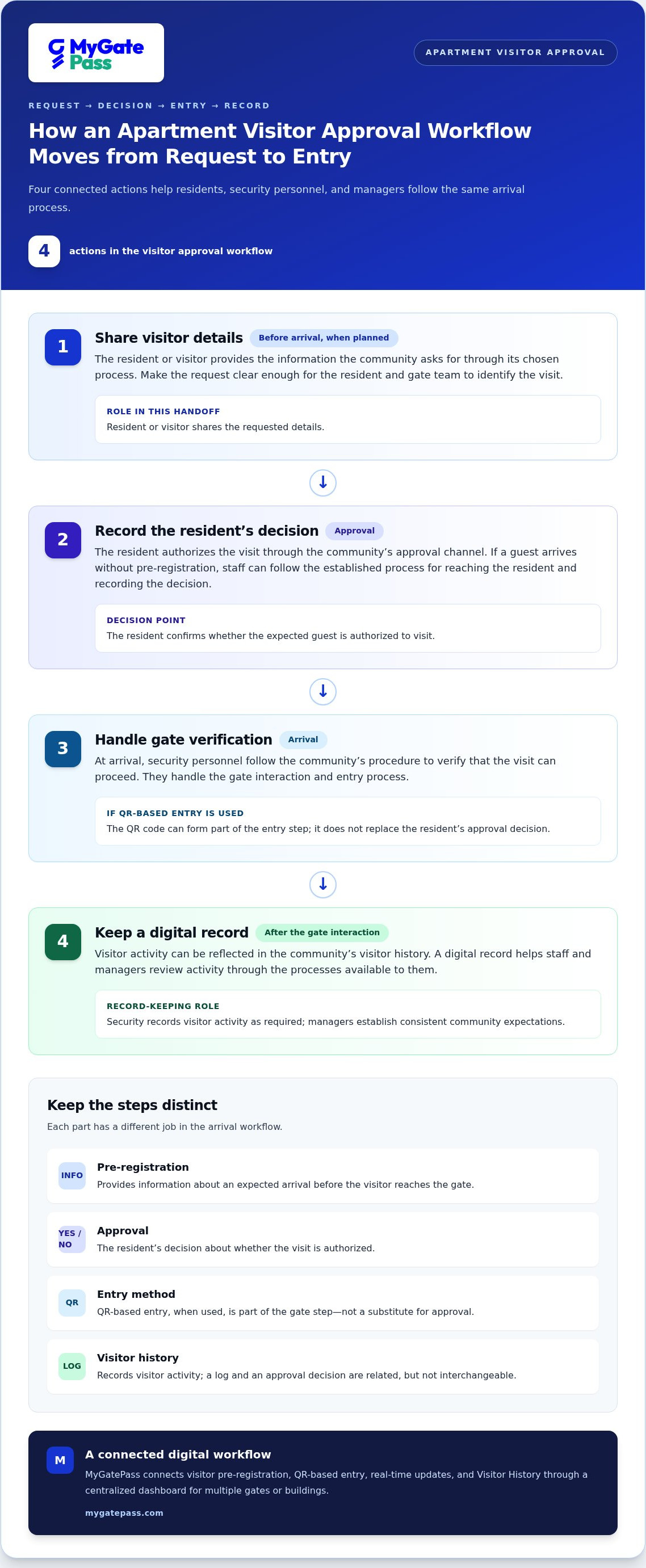
A useful visitor approval system for apartments connects four actions: sharing visitor details, recording the resident’s decision, handling the arrival at the gate, and keeping a digital record. Adapt the steps to the community’s process. Pre-registration helps prepare for an expected visit, but it is not the same as approval and does not replace the gate’s arrival procedure.
- Share visitor details. The resident or visitor provides the information the community asks for through its chosen process. For a planned visit, this can happen before arrival. Make the request clear enough for the resident and gate team to identify who the visit relates to.
- Record the resident’s decision. The resident authorizes the visit through the community’s approval channel. If a guest arrives without pre-registration, staff can follow the established process for reaching the resident and recording the decision.
- Handle gate verification. At arrival, security personnel follow the community’s procedure to verify that the visit can proceed. If QR-based entry is used, the QR code can form part of this step. It is an entry method, not a substitute for the approval decision.
- Keep a digital record. After the gate interaction, visitor activity can be reflected in the community’s visitor history. A digital record helps staff and managers review activity through the processes available to them.
What Happens When a Visitor Is Pre-Registered?
Pre-registration gives a community information about an expected arrival before the visitor reaches the gate. It can make the handoff more orderly, but the resident’s decision and the community’s arrival process still matter. MyGatePass supports visitor pre-registration and QR-based entry, connecting these steps in a digital visitor-management process. The community’s workflow determines how each step is used, so explain how pre-registration relates to approval and arrival procedures.
What Should Security Personnel Do When a Visitor Arrives?
At the gate, security personnel follow the community’s defined process: identify the visit, use the available approval information, and handle entry according to the resident’s decision and community procedure. MyGatePass brings the Security App together with the Visitor App and visitor-management tools. Real-time updates and digital visitor history help connect gate activity with a record, without assuming specific data fields or actions.
Before rollout, managers can decide how the workflow handles both pre-registered arrivals and guests who need approval at the gate. That keeps the process practical without assuming every arrival follows the same route. For more on visitor pre-registration and entry, see the MyGatePass visitor-management platform.
Which Visitor Approval Approach Fits Your Apartment Community?
The right visitor process depends on how residents, gate staff, and managers work together. A community with a straightforward entry routine may find calls and registers sufficient. A community with several gates or buildings may place more value on digital records that are easier to review centrally. Compare approaches against everyday needs, not just the number of features they offer.
This table highlights practical trade-offs. Use it as a starting point for assessing a visitor approval system for apartments, not as a rule that every community should use the same method.
| Approach | Resident effort | Gate clarity | Records and visibility |
|---|---|---|---|
| Manual calls or registers | Residents may need to respond to calls or provide details directly. | Staff rely on the community’s call and entry procedures. | Records may be handwritten or kept in separate logs, which can take effort to review. |
| Digital pre-registration | Visitor details can be shared ahead of an expected arrival. | Advance information can help staff prepare, while the community still defines how approval is handled. | Digital registration records can be easier to access than paper entries. |
| Connected approval workflow | Pre-registration and approval steps can be brought into a connected process. | Staff have a defined process for handling the arrival; QR-based entry may be part of it. | A centralized dashboard can support visibility across multiple gates or buildings. |
When Can a Manual Approval Process Become Hard to Manage?
Manual processes aren’t automatically ineffective. They can become harder to manage when repeated calls interrupt residents or gate staff, handwritten entries are difficult to read, or finding a past visit takes too long. These are reasons to review the workflow, not proof that it has failed. Ask where handoffs slow down and whether staff can find the records they need for routine oversight.
Focus the review on specific operational questions: Do calls regularly need repeating? Are register entries consistent enough for managers to interpret? Can staff find relevant visitor activity without searching through multiple logs? If the answers point to friction, compare process changes before deciding whether to digitize some or all of the workflow.
What Should Managers Compare in a Digital Approval System?
Start with role clarity. Residents should understand how approval is handled, security personnel should know how to process arrivals, and managers should be able to oversee the agreed process. Then consider whether digital visitor history and real-time registration data make day-to-day review clearer. For communities with multiple gates or buildings, centralized visibility may be especially useful.
MyGatePass includes QR-based entry and an Administrative Dashboard with real-time visitor registration data across multiple gates or buildings. These features support a connected approach. The community’s requirements should guide which steps it uses and how responsibilities are assigned.
How Can Apartment Managers Introduce Visitor Approval Without Adding Friction?
A new process works best when it makes existing responsibilities easier to follow, not when it adds steps without purpose. Before introducing a digital workflow, map how visitor requests are handled today: who receives the details, who makes the approval decision, what security personnel do at arrival, and where completed activity is recorded. Include exceptions, such as an unexpected guest or a resident who can’t respond immediately, so the process works beyond the ideal scenario.
Use that map to introduce the visitor approval system for apartments in manageable stages:
- Document the current handoffs. Note where residents, security personnel, and managers act, and where calls, messages, or records pass between them.
- Agree on a simple process. Define how expected visits and unplanned arrivals should be handled, including who is responsible for communicating a decision.
- Explain the change plainly. Give each group concise instructions that describe what to do and where to find guidance.
- Review the rollout. Gather feedback on confusing steps and check whether managers can access visitor registration data as intended.
What Should an Apartment Visitor Approval Policy Clarify?
Keep the policy practical and readable. Residents should know how to handle expected visitors. Security personnel should know what to do when someone arrives without advance details or an approval exception arises. Managers should explain how completed visitor activity is recorded and how the process applies across the community. Use plain language rather than technical or legal phrasing. The policy should guide daily operations, not present itself as legal advice.
A short reference for each audience can make expectations easier to remember. Residents need the approval steps, security teams need the arrival procedure, and managers need to know who oversees the process. Keep the instructions aligned so people don’t receive conflicting versions.
How Can Teams Make the New Process Easier to Adopt?
Introduce the workflow in stages instead of changing every handoff at once. Explain the same steps to residents and security personnel, then invite feedback after they’ve had a chance to use them. Look for recurring questions: they can reveal where instructions need clearer wording or responsibilities remain uncertain. Managers can also review whether visitor registration data is accessible in the way their oversight process requires.
For UAE communities considering identity verification as part of visitor management, read the UAE Pass integration guide for buildings. MyGatePass visitor-management tools connect visitor and security operations through a digital workflow.
How MyGatePass Connects Apartment Visitor Approval and Gate Entry
MyGatePass is a digital visitor-management platform for communities in the UAE. It connects visitor pre-registration, QR-based entry, real-time updates, and visitor records in one process. For a community shaping its visitor approval system for apartments, these tools can link advance visitor information with the gate workflow and make activity easier for managers to review. The platform supports visitor and security operations while the community sets its own approval rules and staff responsibilities.
MyGatePass has processed 150 k+ visitor entries, and its reported QR pre-registration rate is 20%. These figures give context for the platform’s use of pre-registration and QR-based entry. Each community can define how those capabilities fit its resident approval and arrival procedures.
How Do MyGatePass Features Support a Connected Entry Journey?
Pre-registration lets visitor details be shared ahead of an expected arrival. QR-based entry can form part of the gate process, connecting pre-registration with the visitor’s arrival without implying that a QR code itself grants approval. Real-time updates provide visibility into visitor activity as it is registered, while Visitor History provides a digital record of visitor activities for later reference.
Connected Network supports integration across participating buildings for smoother access. This can help communities operating across more than one building connect their visitor processes. The community still determines how residents authorize visits and how security personnel handle arrivals.
What Can Apartment Managers See Through the Administrative Dashboard?
The MyGatePass Administrative Dashboard centralizes real-time visitor registration data across multiple gates or buildings. Managers can access registration information centrally rather than treating each location as an entirely separate view. This supports operational awareness without suggesting that the dashboard provides unlisted analytics or makes approval decisions on a manager’s behalf.
MyGatePass also supports UAE Pass integration for verified visitor identification. This identity-verification capability does not guarantee compliance or replace a community’s own data-handling practices. Managers can consider how it fits alongside their established visitor process.
Together, pre-registration, QR-based entry, real-time updates, Visitor History, and centralized registration data give communities connected tools for managing visitor activity. Their practical value comes from aligning them with clear responsibilities and a process residents and security personnel can follow.
Learn more about the MyGatePass digital visitor-management platform.
Make Your Next Visitor Process Easier to Follow
A smoother visitor experience starts with a shared understanding of what happens at each handoff. Before changing tools or procedures, choose an everyday arrival scenario and walk through it with residents, security personnel, and managers. Notice where someone might hesitate, need to repeat information, or be unsure who makes the next decision. These points of friction are a practical place to begin.
Turn what you learn into a clear process your community can apply consistently. A well-planned visitor approval system for apartments should fit the way people use the property while giving managers a workable view of entry activity. Keep expectations simple, listen to feedback, and refine the process as community needs evolve.
Ready to make visitor management simpler for your community? Get started with MyGatePass.
Frequently Asked Questions
What is a visitor approval system for apartments?
A visitor approval system for apartments is a defined way for a resident or authorized person to approve a guest’s visit before entry is handled. It can rely on calls, written records, or digital tools. For example, a community might specify how residents confirm a planned family visit and what staff should do if the guest arrives before confirmation is available. Clear instructions help everyone know what to expect.
How does visitor approval work in an apartment building?
Typically, a visitor identifies the apartment they’re visiting, the resident provides or confirms approval, and the community follows its entry procedure. The details vary by building. Consider an arrival outside the usual pattern, such as a guest reaching the gate before the resident sees a request. Staff should know the next step, who can make the decision, and how the interaction fits the community’s process.
Can apartment visitors be pre-approved before they arrive?
Yes. A resident can arrange approval in advance through the method their community uses, helping staff know that a visit is expected. Digital pre-registration is another option. MyGatePass supports pre-registration and QR-based entry. Communities should explain how advance approval relates to arrival checks, since pre-registration and permission to enter are not automatically the same thing. Clear guidance also helps guests understand what to do if their plans change.
What is the difference between visitor approval and visitor management?
Visitor approval is the decision that authorizes a particular visit. Visitor management is the wider set of processes for handling visitor activity, which may include registration, entry procedures, and maintaining records. A community could approve a guest by phone and record the visit in a separate log. Keeping the terms distinct helps managers identify whether they need clearer resident decisions, better entry coordination, more accessible records, or a combination.
Is a digital visitor approval system suitable for every apartment community?
Not necessarily. A community’s needs depend on its existing routines, number of entry points, recordkeeping needs, and residents’ ability to follow the proposed process. A smaller building with a straightforward procedure may not need the same setup as a community coordinating several gates or buildings. Managers can map current handoffs first, then assess whether digital registration and shared records address a real operational challenge without adding unnecessary steps.
How can apartment managers keep visitor approval simple for residents?
Give residents one clear set of instructions: how to submit or confirm a visit, what to tell their guest, and what happens if the guest arrives unexpectedly. Use familiar wording and make the steps easy to find, rather than distributing conflicting versions through multiple channels. After introducing the process, collect questions from residents and staff. Repeated confusion is a useful signal to simplify the instructions or clarify who handles a decision.


