

Education visitor management can streamline school check-ins and give staff a clearer view of who is on campus. Visitors can provide their name, contact details, reason for the visit and host, then check in and out so the school can track who is onsite. Temporary access can be matched to the visit’s purpose.
A welcoming arrival matters, but staff also need to know where visitors are expected to go and whether they have left. Schools need a process that handles both without turning reception into a bottleneck.
This guide explains how digital check-ins, temporary credentials and visitor activity records can work together across a UAE campus. Learn how to improve arrivals, manage different access needs and get a clearer picture of campus activity, from routine appointments to busy school events.
Key Takeaways
- Make arrivals easier by collecting visit details in advance and giving each visitor a clear check-in and check-out process.
- Shape workflows around the visit, so parents, contractors and other guests can be handled according to their purpose and approval needs.
- Use temporary access controls to help keep visitors within the areas relevant to their visit.
- Keep activity and approval records together to support follow-up, reviews and a clearer view of who is on campus.
- Explore how MyGatePass Visitor App, Security App, Admin Dashboard and UAE Pass Integration Module can support connected visitor operations.
Real-time check-in and check-out visibility
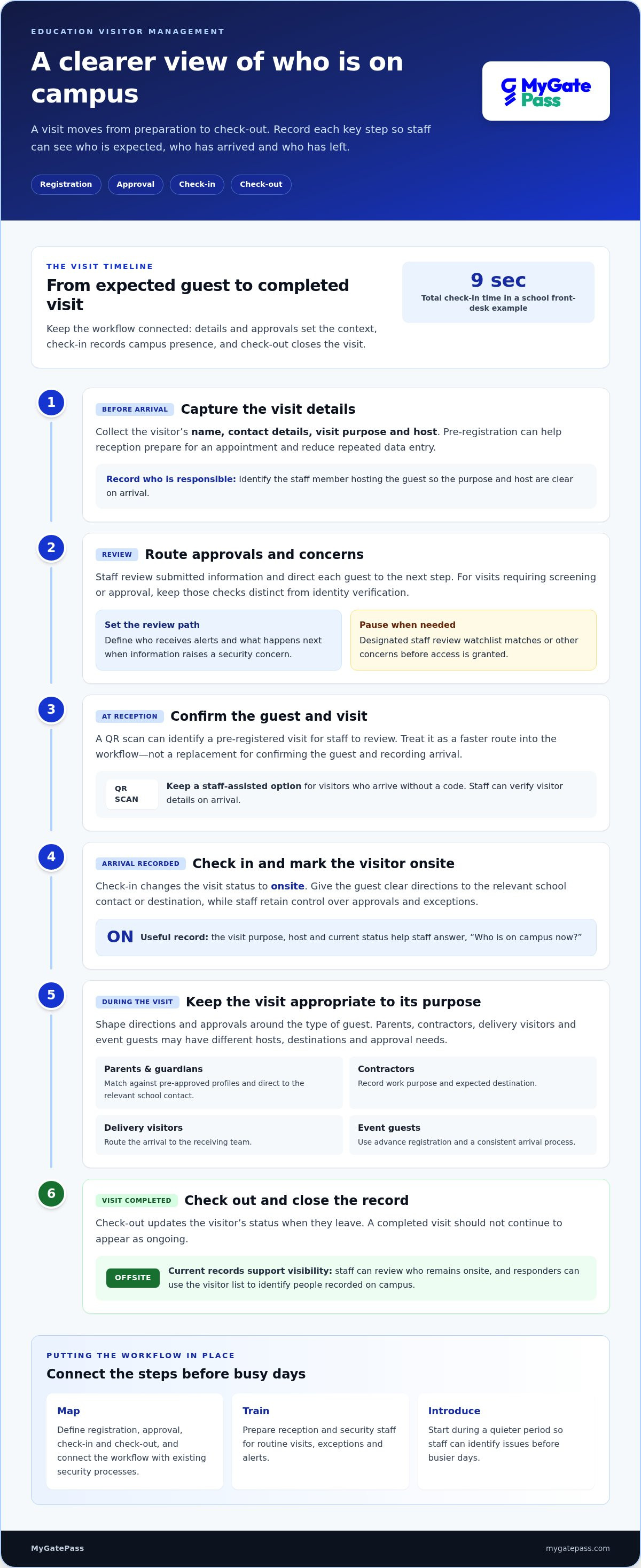
A digital arrival workflow records who is visiting, why they came and whom they are meeting. Check-out closes the visit record, giving staff a clearer view of who remains onsite.
To implement a system, map registration, approval, check-in and check-out, then connect the workflow with existing security processes. Train reception and security staff to handle routine visits, exceptions and alerts. Introduce the process during a quieter period so staff can identify issues before busier days.
Digital Visitor Check-In Workflows
During registration, visitors can enter their name, contact details, visit purpose and host. Staff can review the information and direct each guest to the next step. Check-in marks a visitor as onsite; check-out updates their status when they leave. Choose a workflow that records both events, not registration alone.
This gives staff a practical answer to “Who is on campus now?” during daily operations and emergency response. A current visitor list can help responders identify people recorded onsite. Check-out records also help staff avoid treating a completed visit as ongoing.
Pre-Registration and QR Code Check-In
Pre-registration lets a visitor submit details before arrival, helping reception prepare for the appointment and reducing repeated data entry. The visit record can identify the staff member responsible for the guest, so the purpose and host are clear when the visitor arrives. A school front-desk example gives a total check-in time of 9 seconds.
When a system supports QR check-in, scanning can identify a pre-registered visit for staff to review. Treat it as a faster route into the workflow, not a substitute for confirming the guest and recording their arrival. Keep a staff-assisted option for visitors who arrive without a code.
Keep identity checks separate from any required background screening. Staff can verify visitor details on arrival, while the school’s own process records whether required screening or approval is complete before access is granted. A system may also alert staff when submitted information matches a watchlist or raises a security concern. Set who receives each alert and what happens next, so reception knows when to pause check-in and escalate.
- Capture the visitor’s name, contact details, purpose and host during registration.
- Record check-in and check-out so the onsite list reflects visit status.
- Use pre-registration to prepare for appointments and assign a responsible staff member.
- Route watchlist matches or other concerns to designated staff for review.
For school teams, the key question is whether each step leaves a useful record. Clear procedures for registration, alerts and check-out make daily arrivals easier to manage and campus presence easier to review.
How does a visitor management solution improve the visitor experience for schools?
A school visitor management system can improve arrivals by matching check-in to the purpose of each visit. It can reduce repeated questions, route approval requests and give staff a clearer operational record. Schools should also limit personal information to what is needed, protect visitor data and delete it when it is no longer required.
Start by identifying the visitor groups using each campus. A parent meeting, contractor visit, delivery and prospective-family tour involve different hosts, destinations and approvals. A tailored workflow can request relevant details, route the request to the right staff member and explain what happens next. For higher-risk visits, school leadership or safeguarding staff can review the request before arrival.
- Parents and guardians: Match visitors against pre-approved profiles, then direct them to the relevant school contact.
- Contractors: Record the work purpose and expected destination, so staff can distinguish a maintenance visit from a family appointment.
- Delivery visitors: Route the arrival to the receiving team, rather than sending the driver through unrelated school areas.
- Event guests: Use advance registration for open houses or graduations, then guide guests through a consistent arrival process.
These distinctions help reception handle each guest appropriately. Visible badges and clear directions make the next step easier to understand, while staff retain control over approvals and destinations.
For a school with several campuses, decide whether each site needs local workflows, shared oversight or both. Centralized management can support consistent processes, while campus-level settings can reflect different entrances, hosts and visitor patterns. For example, a central team could review shared procedures while each reception team manages its own appointments. During an evacuation, a current visitor list can help staff identify guests recorded onsite.
Assess your needs before selecting a visitor management system. Consider school size, visitor volume, previous security incidents and number of campuses. Compare ease of use, scalability, support, approval options and the quality of visitor records. Test the arrival process with reception staff and a sample visitor group, noting unclear instructions, unnecessary form fields and steps that cause delays.
Keep the process proportionate. Collect information relevant to each visit, restrict access to records and delete data when it is no longer needed. A system supports the school’s workflow, but staff still need clear procedures for approvals, badges and exceptions.
To map these needs into a connected campus workflow, review visitor management system options alongside your school’s visitor types, locations and approval steps.
Temporary credentials and restricted campus access
Temporary credentials link a visitor’s identity and purpose to the areas they are approved to enter. Schools can set access controls for each visit instead of giving every guest the same access.
For UAE schools, registration and identity checks can form part of a consistent visitor procedure. Collect relevant details, protect the resulting records and make it possible to delete them when they are no longer needed.
Temporary Credentials and Access Codes
A temporary badge can display a visitor’s name, photo and purpose, helping staff and students recognise an approved guest. Ask visitors to wear it visibly, and ensure its information matches their recorded details.
If a school uses an access code, link it to the approved visit and intended destination. The code should support access for that visit, not replace checking the visitor’s identification against their registration.
Visitor Access Permissions
Set permissions according to the visit’s purpose. A parent attending a meeting may need access to reception and a meeting room, while a contractor may need access to an approved work area.
Specify the permitted building or zone, record the visit duration and end access when the visit expires. Where visitor approvals connect with physical access controls, align the recorded approval with access to approved areas.
Visitor Types and Access Authorization
Manage visitors separately from students, staff and contractors. Use each visitor’s category and purpose to guide the required identification, approval and destination.
For a parent or guardian visit, compare the visitor’s details with a pre-approved profile instead of relying only on a self-declared relationship. For contractors, use the work purpose, approved area and visit duration to determine the appropriate authorization.
Identity checks can include scanning official identification or documents and comparing the details with a pre-registered profile. A school can also capture a photo to compare with the presented identification. Checks may flag invalid or expired identification for staff review, allowing reception to pause the process before granting access.
For a practical setup, define the decision sequence: identify the visitor, confirm the visit purpose, apply the relevant approval and assign limited access. Keep visitors within approved buildings or zones, and set temporary permissions to expire. This gives staff a clear view of each visit’s status without granting every guest broad campus access.
Integration matters when a school already uses physical access controls. Connect visitor approvals with those controls where possible, then test a parent visit and a contractor visit separately. Confirm that each profile leads to the intended areas and that completed visits no longer retain active access.
Review the process when visitor types or campus layouts change. A new student event, for example, may need a distinct guest route, while maintenance work may require a different approved zone. Clear categories, visible identification and time-limited permissions help staff apply these distinctions.
Visitor activity records and overstay reporting
Digital records help schools review who visited, why they came and how each visit ended. A useful school system also makes incomplete check-outs easier to spot and investigate.
Digital Visitor Logs
A digital log can bring visitor activity into one record, including approvals, declarations and onsite presence. Centrally stored, timestamped records give staff a clear sequence to review.
For example, if a visitor’s arrival is recorded but no departure appears, staff can review the entry and follow the school’s process to resolve it. This can flag a possible overstay without treating an incomplete record as proof that someone remains onsite.
Schools and universities can review historical visitor data for recurring patterns. A report might show frequent contractor visits through a particular entrance, prompting a review of how those appointments are scheduled and recorded.
Compliance Reports and Audit Trails
An audit trail should make visitor activity, approvals, inductions, declarations and onsite-presence records retrievable. Check that staff can find a visit by details such as visitor, host or purpose, then review the recorded steps.
Keep visitor logs separate from student and staff attendance records. A visitor record documents a temporary visit; attendance reporting follows separate school processes. This prevents campus reports from mixing guests with students or employees.
Automated records can reduce reliance on paper sign-in sheets, but staff oversight remains essential. Assign responsibility for reviewing incomplete check-outs, correcting errors and escalating unresolved entries. For an audit, a consistent process matters as much as digital records.
Use reports to answer practical questions: which visits lack a recorded departure, whether required approvals were captured, and whether visitor declarations can be retrieved. These checks show whether the process is being followed, without relying on memory or scattered paper logs.
Historical records can also guide improvements. If reviews find repeated missing check-outs after a school event, staff can adjust departure instructions or reception procedures for the next one. If contractors regularly visit a particular campus area, the school can review how those visits are documented.
Protect visitor information throughout its lifecycle. Limit records to relevant visit details, store them securely and delete them when they are no longer needed. Clear access and retention procedures support accountability without keeping visitor information indefinitely.
Build a regular review routine: examine unresolved entries, confirm recorded approvals and declarations, then document any process changes. This turns visitor analytics into practical improvements for schools and universities while preserving a retrievable account of each visit.
Campus-wide visitor oversight
Campus-wide oversight connects visitor identity, purpose and location into a useful operational picture. Schools can use it to coordinate routine arrivals, busy events and emergency response.
Start before arrival by classifying visitor types and recording each visit’s purpose, duration, campus and intended location. A parent meeting, contractor maintenance visit and graduation guest each need different context. Staff can use these details to route approvals and prepare the right reception team. This also helps visitors understand where their visit is approved to take place.
Formal identity verification is a useful control for schools, early learning centres and sensitive areas on tertiary campuses. For parents and guardians, compare details with a pre-approved profile instead of relying only on a self-declared relationship. A visitor database can also cross-reference submitted information with relevant school records, helping staff review potential concerns before access is approved.
Campus-wide visibility involves more than a visitor list. Larger schools may need to track visitor movement within their premises, particularly when appointments span buildings or zones. Record acknowledgements for site safety, emergency procedures, child safety and conduct so visitors receive consistent instructions before proceeding.
- Before arrival: Assign a visitor type, purpose, duration, campus and destination.
- At approval: Verify identity and compare parent or guardian details with pre-approved profiles.
- On campus: Keep the approved location and any required acknowledgements linked to the visit.
- During an emergency: Use onsite records to identify visitors recorded on the premises.
Events need a coordinated plan. Annual functions, sports programmes, graduations and open houses can bring many guests within a short period. Advance planning can group arrivals by event, campus or destination while keeping each visitor’s record distinct. This helps reception direct guests without losing visibility across the site.
Emergency readiness depends on accurate onsite information and clear staff procedures. Visitor records can help responders identify people recorded as onsite, while evacuation plans should account for guests as well as students and staff. Decide who reviews the list, how updates reach response teams and how staff handle incomplete departure records.
For a school with multiple campuses, use shared categories and consistent data fields, then adapt destinations and approval steps to each site. Review the workflow after an event or drill. Identify unclear directions, missing acknowledgements or records that were difficult to retrieve, then use those findings to improve campus procedures.
Map your campus visitor oversight workflow around visitor types, approved locations and emergency visibility.
MyGatePass: MyGatePass Visitor App
MyGatePass Visitor App gives schools a digital way to manage arrivals as part of a connected campus workflow. For teams coordinating visitor registration and security activity, MyGatePass also offers MyGatePass Security App and MyGatePass Admin Dashboard.
The UAE Pass Integration Module supports verified visitor identification through UAE Pass. Schools can use it alongside digital visitor records, security-team workflows and centralized administration. The right combination depends on how the school organizes reception and campus oversight.
If your school is reviewing its visitor process, map current arrival, approval and recordkeeping workflows against these tools. Visit mygatepass.com to explore how MyGatePass can support your campus visitor management needs.
Make Your Campus Workflow Work Better
Turn your school’s visitor process into a clear, repeatable workflow. Identify where staff lose time, where approvals need better visibility and which campus teams need access to visitor records. These priorities give your education visitor management approach a practical foundation tailored to how your school operates.
MyGatePass offers the MyGatePass Visitor App, MyGatePass Security App and MyGatePass Admin Dashboard to support visitor and campus management workflows. Consider how these tools could fit your school’s current processes and help teams coordinate their work more clearly.
Bring your priorities and questions into a conversation about what a suitable workflow could look like. Contact MyGatePass to discuss your needs and take a considered next step toward a more connected campus experience.
Frequently Asked Questions
How do visitor badges work in schools?
A visitor badge helps school staff recognise a guest and understand why they are onsite. It can display the visitor’s name, photo and visit purpose, making it easier to distinguish a parent attending a meeting from a contractor completing work. Issue the badge only after the relevant arrival checks, and ask visitors to wear it visibly. At departure, collect or deactivate it as part of the sign-out routine.
Can contractors sign safeguarding or DBS declarations at check-in?
A check-in process can include a contractor’s declaration, such as acknowledgement of school conduct or safety instructions. Distinguish a signed declaration from background screening: signing a form does not itself perform a DBS check. Set required declarations and approvals before the contractor arrives, then record their completion with the visit. Staff can check the record before directing the contractor to an approved work area.
What happens in an emergency?
Visitor records can help staff and first responders identify guests recorded as onsite. The school’s emergency procedure should specify who retrieves the current visitor list, how it reaches response teams and who checks visitors at the assembly point. For example, reception can share the list with the designated response lead, who can compare it with the people accounted for. A visitor system supports the process, but staff still need practiced evacuation procedures.
What types of notifications can staff receive?
Staff notifications can flag visitor records that match a watchlist or raise a security concern. Decide which role receives each alert, such as reception for an arrival requiring review or a designated safeguarding lead for an approval concern. Define the next action, including whether staff should pause entry or escalate the case. Clear routing helps prevent alerts from being overlooked or sent to people without responsibility.
What is an education visitor management system?
An education visitor management system is software that helps a school organize visitor registration, approval and visit records. It gives staff a consistent way to handle an invited speaker, parent appointment or campus event. Its value depends on how well it fits school procedures, not simply on replacing a paper log. Staff should know what information to enter, who can view it and how to correct an inaccurate record.
What features should schools look for in visitor management software?
Look for configurable visitor workflows, approval steps, identity checks, searchable records and a clear way to prepare emergency lists. Schools with several entrances may also need consistent procedures across reception points. Test a routine parent appointment and an unusual case, such as a contractor arriving without recorded approval. The test can show whether staff know what to do, whether the record is useful and whether the process remains welcoming.
How does school visitor management work from arrival to sign-out?
A typical visit begins with registration or an invitation, followed by staff review of the purpose and host. At arrival, reception checks the visitor’s details, records their presence and provides directions or a badge. During the visit, staff can refer to the approved destination if questions arise. At departure, the visitor signs out or staff record their exit, giving the school a completed visit history to review.
How do visitor management systems screen visitors and print badges?
A system can collect identification details, compare them with a pre-registered profile and flag invalid or expired identification for staff review. Schools can also set alerts for watchlist matches or other security concerns. After approving a visit, a system with badge-printing capability can produce a temporary badge showing details such as the visitor’s name, photo and purpose. Staff should review flagged cases before granting access or issuing a badge.


