

What if a government building could welcome legitimate visitors while keeping a clear record of who is on site? Government building visitor management brings public access, identity checks, and accountable records together, while making the arrival process clear and respectful.
That balance takes more than replacing a paper log with a digital check-in form. The workflow must fit the facility’s approval rules, privacy requirements, and daily operations. A smoother arrival should support useful oversight, not weaken it.
This guide gives you a practical framework for comparing visitor management approaches and defining what your building needs. It covers planned visits, QR-based entry, digital visitor history, and visibility across gates or participating buildings. It also sets out questions to consider when reviewing data handling and access policies. Capabilities such as UAE Pass integration can support identity-related workflows, but they do not replace a review of applicable requirements. The aim is a visitor journey that feels organized and welcoming, with records and procedures suited to your facility.
Key Takeaways
- Evaluate government building visitor management by how well it supports public access, controlled entry, and useful oversight together.
- Compare manual logs, digital registration, and integrated platforms for traceability, staff effort, accessibility, and governance.
- Set a workflow that defines the visit, registers the visitor, applies agency policy, records arrival, and manages records appropriately.
- Treat a QR code as a check-in aid, not proof of identity. Have legal, privacy, security, and operations teams review requirements before procurement.
- MyGatePass features such as pre-registration, real-time updates, and digital Visitor History can help organize visitor processes.
Why Government Building Visitor Management Must Balance Access and Security
A government building serves people with different reasons for arriving: asking for information, attending an appointment, delivering supplies, or meeting staff. The arrival process should be welcoming and straightforward while following the facility’s rules for approval, entry, and oversight. Government building visitor management coordinates these steps so staff can see who is expected, where visitors need to go, and what activity has been recorded.
Visitor registration records a person’s visit; identity verification checks who that person is; access authorization determines whether they may enter a defined area. These actions are related, but they are not interchangeable. A registration form or QR code can organize check-in, but neither proves identity nor grants permission on its own. Facility policies and designated staff determine how each step is handled.
Which visitors and visits does the building need to manage?
Start by mapping the types of visits the facility receives. Members of the public may arrive for a service without an appointment, while scheduled guests, vendors, contractors, and invited groups may follow different routes and approval steps. A single process may not suit every visitor type.
Define entry and approval policies for each visit type. For example, a scheduled appointment may require a host or department to be recorded in advance, while a delivery visit may need a clearly identified destination. The visit’s purpose helps reception staff determine what information to capture and whom to notify. Collecting only the information needed for the defined workflow can also make registration simpler for visitors and easier for staff to manage.
What does a visitor management system contribute?
A visitor management system gives staff a consistent way to organize registration details and document visitor activity. Depending on the workflow, records can help authorized staff see who was expected, whether arrival was recorded, and where follow-up may be needed. A Visitor Management System Overview offers general background on the category, but government facilities should shape its use around their own roles and procedures.
A digital record is useful, but it is not a complete security process. It does not automatically establish that an identity has been verified, a visit approved, or entry to every area authorized. Those decisions rely on facility policy and the appropriate people or systems. Keeping the distinctions clear prevents a completed check-in from being mistaken for proof that every control has been satisfied.
Visitor software is one part of a broader environment. It can support registration and recordkeeping, but it is not physical guarding, gate or door hardware, or the full access-control infrastructure. These functions may work alongside one another, but each has a distinct role. In the United Arab Emirates, the Government of the UAE provides a national context for digital public services; individual facilities still need to define their own visitor procedures rather than assume every agency follows the same process. Clear boundaries make the system easier to evaluate and help keep the public-facing experience organized, not obstructive.
How Government Visitor Workflows Handle Registration, Identity, and Records
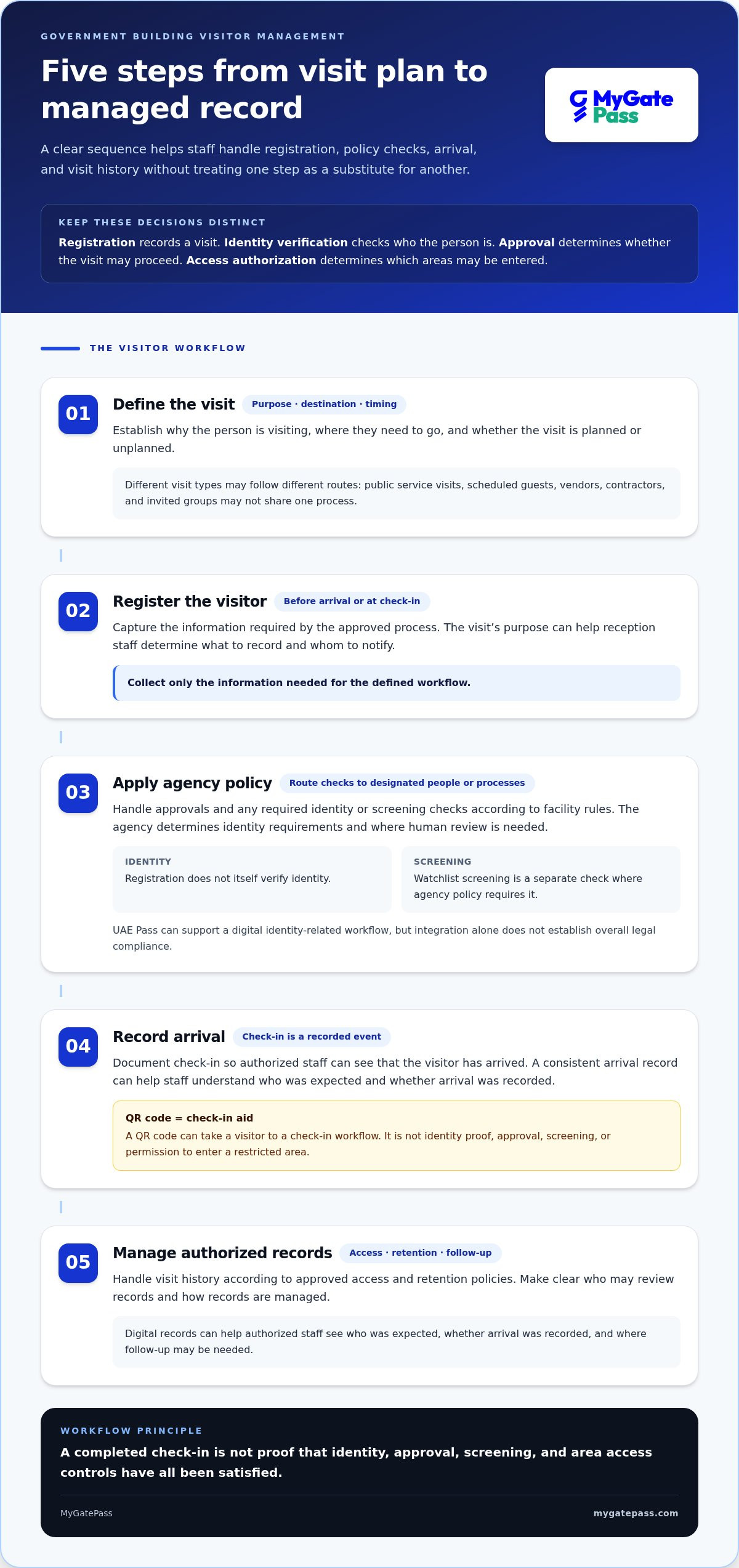
A dependable visitor workflow makes each decision visible without treating one action as a substitute for another. Registration captures visit details; identity verification checks a person’s identity; visit approval determines whether the visit may proceed; watchlist screening, where required by agency policy, is a separate check; and access authorization determines which areas a visitor may enter. Government building visitor management works best when these responsibilities and decision-makers are clearly defined.
Use a sequence staff can follow consistently:
- Define the visit. Establish its purpose, destination, and whether it is planned or unplanned.
- Register the visitor. Record the information required by the approved process, either before arrival or at check-in.
- Apply agency policy. Route approvals and any required identity or screening checks to the designated people or processes.
- Record arrival. Document check-in so authorized staff can see that the visitor has arrived.
- Manage authorized records. Handle visit history according to approved access and retention policies.
A QR code can simplify arrival by taking a visitor to a check-in workflow. It is not identity proof, approval, screening, or permission to enter a restricted area. Keeping these steps separate helps staff respond consistently when a visit is incomplete, unexpected, or requires human review.
Where should identity checks fit into the visitor journey?
The agency sets identity requirements and decides where human review is needed. For example, registration may happen before arrival, while an authorized staff member handles an identity check or approval at a designated point. UAE Pass can support a digital identity-related workflow, but integration alone does not establish overall legal compliance. Review agency-specific verification rules with the appropriate legal and security teams. The UAE Pass integration guide for buildings provides additional identity and compliance context.
What should visitor records make visible to authorized staff?
A traceable digital history can help authorized staff understand recorded visitor activity and follow up through established procedures. The aim is useful visibility, not access for every employee to every record. Define who can access visitor information and how long records are retained through approved agency policies, involving the relevant privacy and legal teams.
A visitor record documents activity; it does not guarantee security. A check-in entry can show that an arrival was recorded, but it does not prove that identity checks, approvals, screening, or area permissions were completed. Clear labels and defined handoffs help staff interpret records accurately instead of inferring controls the record does not represent.
For teams planning a digital arrival workflow, the MyGatePass visitor management platform supports pre-registration, QR-based entry, real-time updates, and digital Visitor History. Agency policies remain central to how each step is used.
Comparing Government Building Visitor Management Approaches
The right approach depends on how visitors arrive, how staff handle approvals, and what oversight the facility needs. When comparing government building visitor management options, assess the workflow, not just the feature list. The table below highlights common differences. Digital tools vary, so do not assume their capabilities or governance controls are identical.
| Approach | Traceability | Staff workload | Visitor accessibility | Oversight and governance |
|---|---|---|---|---|
| Manual logs | Records are paper-based and may take more effort to search or review consistently. | Staff write entries and retrieve records manually. | A familiar process, though visitors may need staff help to complete it. | Handling, storage, access, and retention depend on local procedures. |
| Digital registration workflow | Can organize records for easier search, depending on the system and its setup. | May reduce repeated data entry, while staff still manage policy decisions. | Can support advance registration or digital check-in, with an accessible staff-assisted option where needed. | Requires defined user access, record handling, and retention rules. |
| Integrated visitor-management platform | May connect visitor records across selected locations, depending on the platform and configuration. | Can give authorized teams a more consolidated view of visitor activity. | Can provide a consistent process across participating sites, if shared workflows suit the agency. | Needs clear boundaries for shared visibility, permissions, and site-level responsibilities. |
Manual logs versus digital visitor records
Paper can be straightforward at a low-volume reception point, but finding a past entry may require searching physical files. Handwriting and inconsistent procedures can also make review harder. Digital registration can make records easier to organize and retrieve, but reporting, security, and retention controls depend on the system and its setup. A transition needs practical planning: assign staff responsibilities, explain check-in steps to visitors, and establish who may view records and how they are managed.
Keep optional controls separate from core registration. Watchlists or signed visit agreements may be relevant to a facility’s approved process, but they are not inherent requirements of every visitor workflow. Their use should follow risk assessment and agency policy, not a default feature checklist.
Standalone workflows versus connected, multi-building visibility
Separate site records can support distinct local procedures, while centralized oversight can help authorized teams review visitor-flow information across multiple locations. Shared workflows can improve consistency when sites have compatible approval roles, access rules, and record practices. Decide whether visibility should be location-specific or shared, and define who can access each level. Connected access may cover participating buildings rather than every location in an organization.
An adjacent-sector example is the digital gate pass standards guide for hospitality. It can illustrate digital gate-pass practices, but it is not a government benchmark. For any approach, match controls to the facility’s risk profile and approved policies, then assess whether staff can run the process clearly and consistently.
A Government Buyer’s Checklist for Requirements, Privacy, and Pilots
A procurement decision is easier to justify when requirements come from the facility’s actual visitor journeys, not a generic list of software features. For government building visitor management, agree on the operational need first. Then have legal, privacy, security, and operations teams review the proposed workflow before procurement. Requirements can differ by facility and agency, so document decisions and assign clear owners.
Use this checklist to structure the evaluation:
- Visitor types: Identify public visitors, appointment guests, vendors, contractors, and groups. Note how planned and walk-in visits differ.
- Approval roles: Map who can request, review, approve, or escalate each visit type.
- Entry records: Define what activity needs to be recorded and how staff will use the resulting history.
- Reporting needs: Specify which authorized roles need visibility and whether oversight is local or across participating buildings.
- User access: Set who may view or manage visitor information and how access decisions will be reviewed.
How should agencies assess privacy and security requirements?
Ask the relevant teams to identify current UAE and agency-specific requirements rather than assume one rule applies to every government facility. For each data category, document its purpose, approved use, and who needs access. Treat collection, access, storage, and retention as separate governance decisions. Set role-based review and incident procedures through approved processes, and record who owns each decision so responsibilities remain clear after implementation.
What belongs in a practical pilot and procurement scorecard?
Keep a pilot contained: select defined users, visit types, locations, and workflow boundaries, then set a review date before starting. Test planned and walk-in scenarios, staff handoffs, and the instructions visitors receive. Score each scenario against stated needs rather than assumptions about what a platform should do.
A useful scorecard can assess:
- Usability: Can staff and visitors follow the intended process without avoidable confusion?
- Record visibility: Can authorized users find the information they need for their role?
- Policy fit: Does the workflow reflect approved identity, approval, and access procedures?
- Consistency: Do staff handle similar visits in a predictable way?
Name decision owners before the pilot begins. At the review, compare observations with the scorecard, document gaps, and agree whether to refine, continue, or stop. Keep the rollout within the pilot scope until responsible teams have reviewed the results and governance arrangements.
A measured evaluation keeps convenience, oversight, and data handling in view together. Explore MyGatePass visitor management as you assess how digital registration and visitor records fit your defined workflow.
How MyGatePass Supports Government Building Visitor Management
MyGatePass is a visitor-management platform for organizations in the UAE and GCC. For teams assessing government building visitor management, its features provide practical tools for organizing arrivals: visitor pre-registration, QR-based entry, real-time updates, and digital Visitor History. The agency’s procedures determine who may approve visits, what identity checks apply, and how records are governed.
These features can support different stages of the visitor journey. A planned guest can be pre-registered and then use QR-based entry as part of check-in. Real-time updates and digital Visitor History help staff keep track of visitor activity. The QR code supports the entry workflow; it does not verify identity or authorize access by itself.
What MyGatePass capabilities can government teams assess?
Visitor History provides a digital record of visitor activities. Teams can align that record with their authorized review process and approved access and retention rules. The MyGatePass Administrative Dashboard centralizes real-time visitor registration data for multiple gates or buildings, giving relevant teams a consolidated view across that scope.
For organizations operating across locations, Connected Network access works across participating buildings. Teams can align it with the agency’s building structure and policies without assuming every site is included. MyGatePass also offers a UAE Pass Integration Module for identity-related workflows. Integration can support an identity process, but it does not establish regulatory compliance by itself. Agency requirements and data-governance decisions remain essential.
Platform-wide figures provide context, not results for government facilities: MyGatePass has processed 150 k+ visitor entries, and its reported QR pre-registration rate is 20%. The rate is not a government-building result or a forecast for a particular facility.
What are the next steps toward a more organized visitor journey?
Before selecting a workflow, bring together the agency’s requirements: visitor types, approval roles, identity and access procedures, record access, retention decisions, and pilot measures. Then assess how pre-registration and QR-based entry fit the approved process, including how staff will handle exceptions and review visitor activity.
A focused evaluation helps teams determine whether these features suit day-to-day needs without confusing software functions with agency controls. Review the workflow with responsible teams, assess results against agreed measures, and decide whether it fits before expanding beyond the intended scope.
Explore the MyGatePass visitor-management platform and consider how its capabilities can support your organization’s entry workflow.
Make the Next Step a Clear One
The strongest visitor journey is designed around the people who use it and the teams responsible for it. As your agency moves from evaluation to action, keep the workflow connected to its governance decisions. A smoother arrival should support the facility’s approved process, not bypass it.
Use your agreed requirements to guide the next step. Bring operational, security, privacy, and legal perspectives together, then consider how a digital approach fits the facility’s needs. That shared foundation helps keep government building visitor management practical, accountable, and welcoming for the public.
Ready to explore a more organized way to manage visitor entry? Explore MyGatePass for streamlined visitor entry and take the next step toward a visitor journey that works for your organization.
Thoughtful planning can make every arrival easier to manage. Start with your priorities and build from there.
Frequently Asked Questions
Can visitors check in digitally without downloading a mobile app?
Agencies can include a staff-assisted route, such as registration at reception, for visitors who do not use a mobile app. Treat this as part of the facility’s workflow design. Give visitors clear instructions before arrival and at the entrance, and ensure staff record assisted check-ins consistently so the visit history remains useful.
Does a QR code verify a visitor’s identity?
A QR code can identify or open a registration or check-in record, but it should not be treated as proof of the person’s identity. The agency should specify whether staff compare an identity document, use an approved digital identity method, or follow another procedure. QR-based entry and UAE Pass identity integration are distinct: the QR code supports the visit workflow, while identity checks depend on the selected method and agency policy.
How long should a government building keep visitor records?
Do not assume one retention period applies to every agency or visit type. An appointment record may serve a different purpose from a contractor visit record, so set schedules according to applicable legal requirements, agency policy, and the documented purpose. Have privacy and legal stakeholders review the schedule, including who may authorize exceptions and how routine disposal is handled.
Can visitor management software replace security personnel?
No. For government building visitor management, software can organize registration, preserve records, and give authorized teams operational visibility, but it does not provide physical guarding or take over an agency’s security responsibilities. The organization decides staffing levels, who responds to an issue, and how escalation works. For example, define who handles an unapproved arrival and ensure the digital workflow supports established responsibilities rather than replacing them.
Is UAE Pass integration enough to make a visitor management process compliant?
No. UAE Pass integration may support an identity-related step, but it does not establish that the full visitor process complies with applicable requirements. Agencies should review why data is collected, how it is handled, who can access it, how long it is retained, and how internal procedures work together. The authorized compliance team should assess the integration as part of the complete workflow.
What should a government building do when a visitor arrives without an appointment?
Set a walk-in policy before staff have to improvise. It should explain who reviews the request, what visit information is recorded, how the destination is identified, and what decision determines whether entry is permitted. For instance, reception can follow a defined referral path when the intended staff member is unavailable. The workflow can document the outcome, while the agency sets approval criteria and exceptions.


