

A faster gate doesn’t always start with a faster barrier. An automated gate pass system UAE facilities use can organize visitor details, pass approvals, and arrival information before someone reaches the entrance. The gate controls physical access; digital workflows help teams manage the information around it.
Manual entry processes can slow arrivals and leave security teams working with incomplete or inconsistent records. But “automated” can mean visitor-management software, physical gate hardware, or both. Knowing the difference helps you identify what your facility needs and evaluate each part separately.
This guide explains how digital gate pass workflows work and what to compare, from visitor usability and security visibility to identity verification with UAE Pass. It also shows how MyGatePass visitor and security apps, an admin dashboard, and related modules can support coordinated facility operations. Use the practical criteria below to assess workflow fit without confusing software with a physical barrier.
Key Takeaways
- An automated gate pass system UAE facilities can use organizes entry information and workflows. Physical access remains a separate operational decision.
- Map how visitors, security teams, and administrators share pass-related information to identify gaps and clarify responsibilities.
- Compare paper and digital processes by record organization, staff coordination, visitor experience, and administrative visibility.
- Assess user groups, entry workflows, identity needs, and any delivery or staff attendance requirements before choosing a software approach.
- MyGatePass brings visitor and security apps, an admin dashboard, UAE Pass integration, delivery management, and staff attendance tracking into a connected facility-management ecosystem.
What an automated gate pass system in the UAE actually manages
An automated gate pass system UAE facilities use provides a digital way to organize pass-related information and the workflows around it. Instead of relying on disconnected messages, paper forms, or spreadsheets, visitors, security personnel, and administrators can use a more coordinated process to manage entry details.
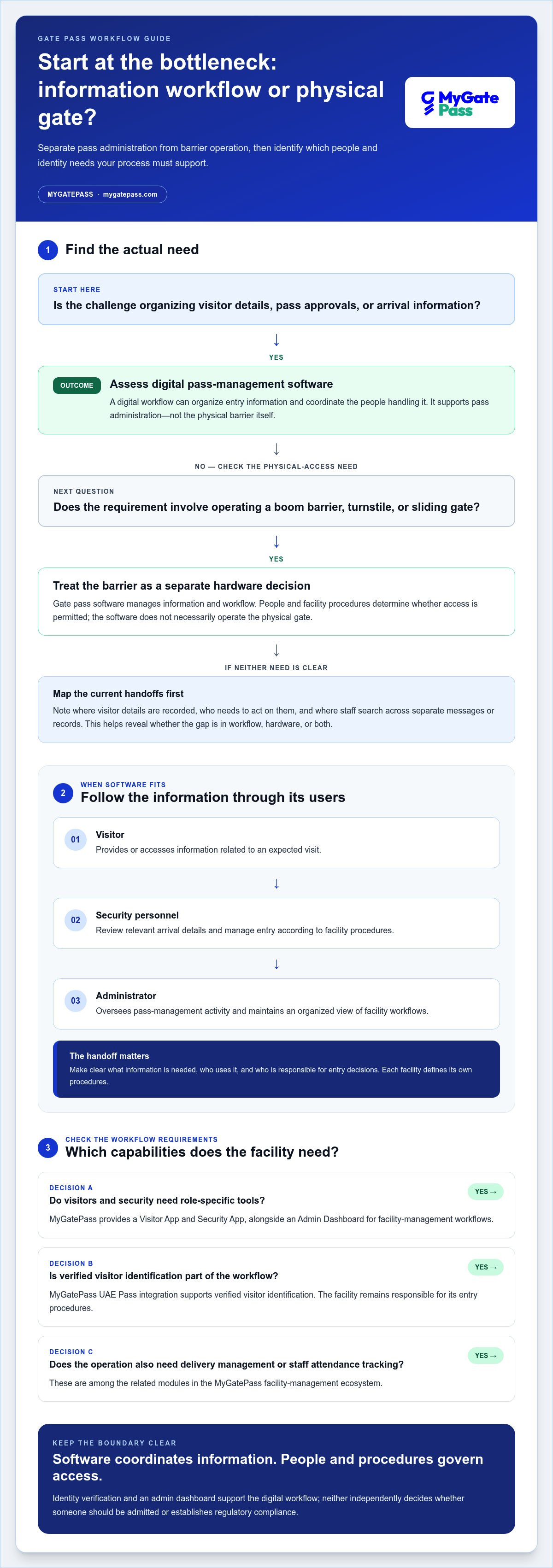
A gate pass system manages information and workflow; it does not necessarily operate the physical barrier. A boom barrier, turnstile, or sliding gate is hardware. Pass-management software supports the administrative process around entry, while people and facility procedures determine whether access is permitted. For a broader foundation, see this overview of understanding access control systems.
Which entry tasks can a digital gate pass workflow support?
A digital workflow brings pass-related information into a shared process, with each participant focused on their role. Visitors need a clear way to provide or receive relevant entry information. Security personnel need information they can use when handling arrivals. Administrators need oversight of facility workflows and records, rather than scattered updates that are difficult to reconcile.
- Visitors: Provide or access information related to an expected visit.
- Security personnel: Review relevant arrival details and manage entry according to facility procedures.
- Administrators: Oversee pass-management activity and maintain an organized view of facility workflows.
MyGatePass provides a Visitor App, Security App, and Admin Dashboard, bringing visitor, security, and administrative functions into a connected software ecosystem. Its UAE Pass integration supports verified visitor identification. These tools support digital pass administration; they do not manufacture gates or automatically open a physical barrier.
Who benefits from an automated gate pass system?
Residential communities, commercial facilities, and other managed premises can benefit when entry information is easier to organize and use. Administrators gain a more structured view of the process, and security teams can work from relevant information instead of piecing details together from separate records. Visitors can also have a clearer arrival experience when the facility’s steps are easy to follow.
To assess whether software fits, identify where information is currently recorded, who needs to act on it, and where handoffs become unclear. For example, note whether visitor details are recorded in more than one place or whether staff have to search separate messages for arrival information. This helps distinguish useful workflow improvements from assumptions about physical access equipment. For additional context on visitor-focused digital workflows, explore the digital gate pass app guide.
How automated gate pass software connects visitors, security, and administrators
A digital workflow is most useful when each person can access information relevant to their role without relying on separate messages or records to fill gaps. In an automated gate pass system UAE facilities can use, pass-related information moves through a coordinated process, while facility personnel remain responsible for entry decisions.
A general workflow may look like this:
- Information is provided. A visitor or relevant facility representative supplies details needed to organize an expected visit.
- Security reviews what’s relevant. Security personnel use the available information as part of the facility’s entry procedures.
- Administrators maintain oversight. Facility administrators use centralized tools to manage the broader pass workflow and its records.
This is a general model, not a fixed set of MyGatePass process steps. Each facility defines responsibilities and procedures to suit its operations. The aim is to make handoffs clear: visitors know what information to provide, security teams have an organized view of arrivals, and administrators can oversee the process in a structured way.
What changes for visitors and security personnel?
With fragmented manual handling, a visitor’s details may be spread across forms, messages, or spreadsheets. A coordinated digital approach brings entry-related information into a shared workflow. MyGatePass has separate apps for visitors and security personnel, so each group has an interface designed for its role.
Before adopting software, map the handoff: what information is needed, who uses it, and how security staff follow facility procedures. Clear roles matter as much as a digital interface. They prevent confusion about who makes entry decisions and what the software is intended to support.
Where do UAE Pass and the admin dashboard fit?
UAE Pass integration supports verified visitor identification within the digital identity workflow. It provides an identity-verification component, while the facility remains responsible for its own entry procedures. The MyGatePass Admin Dashboard centralizes facility-management workflows, giving administrators a dedicated place to oversee the administrative side. Neither component determines whether a person should be admitted or, by itself, establishes regulatory compliance.
Identity and data handling deserve careful attention in any digital process. For more context on identity and compliance considerations, see this UAE Pass integration guide for buildings. The wider focus on UAE cybersecurity initiatives and digital infrastructure also reinforces why organizations should treat digital facility workflows as part of their broader technology environment.
For a closer look at how these components fit together, explore the MyGatePass digital facility-management ecosystem.
Manual gate passes vs digital systems: compare security and convenience
Paper forms and spreadsheets can work for a simple process, but information may end up in different places or be handled differently by each team member. A digital workflow provides a more structured way to organize entry-related records. The practical comparison is how easily people can find, share, and oversee the information they need.
Use this comparison to pinpoint where a digital process could help. The benefits depend on how the workflow is configured and used.
| Area | Paper or spreadsheet process | Digital workflow |
|---|---|---|
| Record organization | Details may be spread across forms, files, or separate spreadsheets. | Pass-related information can be organized within a shared software workflow. |
| Staff coordination | Teams may need to relay updates manually or refer to different records. | Relevant information can be made available through connected workflow tools. |
| Visitor experience | Visitors may need to follow steps that depend on forms or in-person explanations. | Digital tools can make information handling more structured and accessible. |
| Administrative visibility | Reviewing activity may require collecting or reconciling separate records. | Centralized software can support a clearer administrative view of pass workflows. |
Digitization can support consistency, but it does not set a facility’s security policy or guarantee that every record is complete and accurate. Treat an automated gate pass system UAE facility teams select as software for managing information and workflows. Physical access-control equipment, such as barriers or turnstiles, is a separate category. Software should not be mistaken for equipment that controls or opens a gate.
What can digital records improve without guaranteeing outcomes?
A structured digital process can make information easier to organize and give administrators a more consistent view of pass-related activity. It cannot, by itself, guarantee shorter queues, fewer errors, or fewer security incidents. Before implementation, record how the current process works. Then review facility-specific measures such as how long staff take to locate a record, whether required information is captured consistently, and how clearly teams understand their responsibilities.
How should facilities balance security with a welcoming arrival?
A well-managed arrival should be understandable for visitors and workable for staff. Review each step from the visitor’s perspective: Is it clear what information is needed and how to provide it? Then consider the security team’s perspective: Is relevant information presented in a way that supports established procedures? Accessible workflows reduce unnecessary friction, while defined responsibilities keep the process orderly. Convenience should not bypass facility rules, and unclear security procedures leave both visitors and staff guessing.
How to evaluate an automated gate pass system for a UAE facility
Start with the work your facility needs the software to support, not a feature list. An automated gate pass system UAE organizations evaluate should fit the people, handoffs, and information needs already present in their operations. Separate pass administration from physical gate equipment, then compare how well each software option supports the actual workflow.
Evaluate software by how clearly it serves users, organizes workflows, supports administration, and fits identity needs. These criteria keep the comparison practical and grounded in day-to-day facility management.
Map facility workflows before comparing software
Write down who takes part in entry-related work and where information moves between them. Include visitors, security personnel, administrators, and any teams responsible for deliveries or staff attendance. Note existing handoffs and information gaps, such as details recorded in more than one place. This creates an operational picture you can use to compare software against real needs.
- Visitor processes: Identify what information visitors need to provide or access, and which facility roles use it.
- Security responsibilities: Define what information personnel need to handle arrivals under facility procedures.
- Administrative oversight: Clarify which workflows administrators need to organize and oversee.
- Delivery operations: Decide whether delivery management belongs in the same software scope or should remain a separate process.
- Staff attendance: Record attendance needs separately from visitor passes, even if both matter to facility operations.
- Physical access equipment: Document existing barriers or access-control equipment as a separate operational category. Do not assume pass-management software operates or integrates with it.
Keep these categories distinct. Your facility may need visitor workflows, delivery management, staff attendance tracking, or a combination. State each requirement clearly before comparing platforms so you can judge whether their scope fits your needs.
Assess identity, usability, and operational visibility
Next, consider identity needs. If verified visitor identification is relevant to your process, assess whether UAE Pass integration fits that workflow. Then review usability from each perspective: visitors need a clear experience, security personnel need useful information, and administrators need an organized view of facility workflows. These are practical evaluation criteria, not a substitute for your own procedures or compliance assessment.
Consider how the software will fit alongside existing operations. Digital pass administration supports information management; it is not a physical barrier or an automatic access decision. MyGatePass brings visitor and security apps, an admin dashboard, and UAE Pass integration into one facility-management software ecosystem.
Explore how MyGatePass supports facility workflows and assess how its software components align with your facility’s requirements.
How MyGatePass brings UAE gate pass workflows into one software ecosystem
Choosing an automated gate pass system UAE facilities can use means looking beyond the pass itself. The software should reflect how visitors, security personnel, and administrators take part in facility operations. MyGatePass brings these roles together through a digital visitor and facility-management ecosystem, with dedicated apps, a central administration component, and modules for related operational needs.
MyGatePass supports digital workflows, not physical guarding or gate hardware manufacturing. It organizes information and administration around facility entry, while the facility manages its physical access equipment and procedures.
Connect visitor management with security and administration
Different users need different ways to engage with a facility workflow. The MyGatePass Visitor App and Security App serve visitor and security roles, while the MyGatePass Admin Dashboard centralizes facility-management administration. Together, these components provide a connected software approach, with tools for each user group.
For facilities where identity verification is relevant, the UAE Pass Integration Module supports verified visitor identification. It can form part of the visitor identity workflow alongside the facility’s own entry procedures. This software capability does not promise automatic admission, barrier operation, or a particular compliance outcome.
Other facility needs can be managed alongside visitor workflows:
- Visitor management: A dedicated app for visitors.
- Security workflows: A dedicated app for security personnel.
- Administration: A dashboard for centralized facility-management workflows.
- Related operations: Delivery management and staff attendance tracking modules.
Take the next step toward a more organized facility workflow
Before exploring the platform, answer four practical questions: Who will use the software? What identity needs belong in the visitor process? Which operational modules matter, including delivery management or staff attendance? How well does the software fit the procedures your facility already follows? Clear answers help decision-makers focus on workflow fit rather than expecting pass software to replace physical access equipment.
MyGatePass brings visitor, security, administrative, identity, delivery, and attendance capabilities into a UAE-focused software ecosystem. Facility teams can assess the components that align with their operations and how they support a more connected management approach. The aim is a clearer process for the people using and overseeing facility workflows.
Discover the MyGatePass software suite and explore how its digital components can support your facility’s workflow needs.
Make your next step a clearer facility workflow
Start with one entry-related process. Identify who takes part and what information each person needs to do their part. This gives your team a practical way to assess whether an automated gate pass system UAE facility operations can use fits its needs, while keeping software responsibilities distinct from physical access equipment.
As your requirements take shape, consider how visitor and security apps, a centralized admin dashboard, and UAE Pass integration could support your approach. Delivery management and staff attendance modules may also fit when those workflows are part of your facility’s scope. Aim for a setup that is understandable to the people using it and manageable for the people overseeing it.
Explore the platform with your user roles, identity needs, and operational priorities in mind. Explore the MyGatePass software suite and take a confident next step toward a more organized facility workflow.
Frequently Asked Questions
Does an automated gate pass system open a physical gate?
Not necessarily. Gate-pass software organizes entry information; a physical barrier is separate equipment. A visitor’s pass information, for example, may be managed digitally while security personnel follow facility procedures to permit entry. Do not assume that an automated gate pass system means barriers will open automatically. Treat software and physical access equipment as distinct parts of facility operations, each with its own purpose and responsibilities.
Can a gate pass system work without UAE Pass?
UAE Pass is an identity verification option, not the definition of a gate pass system. A facility can base its identity process on its own entry procedures, while UAE Pass integration supports verified visitor identification where it fits. MyGatePass offers UAE Pass as an integration module. Define which identity information your workflow needs and how personnel should use it when handling arrivals.
Can security staff use a digital gate pass system on a mobile device?
MyGatePass includes a dedicated Security App for security personnel. Consider how staff will use it during their shifts, including which team members need access and how app use fits existing duties. For example, identify who handles visitor arrivals at each entrance and ensure relevant staff understand the workflow. The app supports a digital process; it does not replace facility procedures or security staff responsibilities.
Can an automated gate pass system manage deliveries as well as visitors?
Yes, when the software includes delivery-management functionality. MyGatePass offers a Delivery Management System alongside its visitor-management components. Map delivery handling separately from guest visits, since the people involved and information needed may differ. For instance, define which delivery details are relevant and which personnel use them, then establish how the process fits facility procedures.
How should a facility protect visitor information in a digital gate pass system?
Start by collecting only information that serves a clear facility purpose, and limit access to people who need it for their roles. Set internal rules for how records are stored, reviewed, and removed, and explain the information process to visitors in clear language. Train staff to protect account access and avoid sharing visitor details through informal channels. UAE organizations should also consider applicable privacy requirements when designing data-handling practices.
Can a gate pass system also track employee or contractor attendance?
A platform can include staff attendance tracking as a separate operational function. MyGatePass offers Staff Attendance Tracking for facility attendance workflows. Contractor records may follow different procedures, so define how contractors are classified and handled before including them in an attendance process. Keeping attendance records distinct from visitor pass information helps teams apply the appropriate workflow to each group.


