

What if the biggest entry bottleneck isn’t the gate, but the handoffs between residents, visitors, and security staff? For decision-makers searching “gated community security app UAE,” the key question is how well the tools connect the people and processes behind each visit. When visitor details, delivery procedures, and staff activity are managed through separate messages or paper records, it can be harder for a community team to keep the process clear.
A security app can make daily operations easier to coordinate, but software has a specific role. It can support visitor and facility management, while physical guarding and gate hardware remain separate parts of a community’s security setup.
This guide compares app capabilities against real community workflows. You’ll see how visitor and security apps, a central admin dashboard, UAE Pass integration, delivery management, and staff attendance tracking can contribute to a connected operational picture. You’ll also find practical ways to compare tools, map responsibilities, and plan a rollout without mistaking software for physical security.
Key Takeaways
- Assess a gated community security app UAE by the everyday visitor and site-operation workflows it supports, not by assuming software replaces physical security.
- Compare how visitor, security personnel, and administrator tools connect across the community’s entry process.
- Use practical criteria such as identity verification, administrative oversight, delivery management, and staff attendance to guide your comparison.
- Plan a rollout around existing procedures: map workflows, assign roles, configure processes, and review adoption.
- MyGatePass brings together a visitor app, security app, admin dashboard, UAE Pass integration, delivery management, and staff attendance tracking.
What a gated community security app in the UAE should actually manage
A community manager brings several roles together: visitors arriving at the entrance, security personnel handling on-site procedures, and administrators overseeing facility operations. Assess a gated community security app UAE by how its software supports those workflows, not by whether it appears to offer a complete security system. A gated community is a residential area with controlled access, but each community sets its own procedures and responsibilities.
That distinction matters when comparing products. Software can organize information and connect roles, while physical guards, barriers, cameras, and access-control hardware perform separate functions. Start by listing the people who take part in routine visits, what each person needs to do, and where information passes from one role to another. A process designed for one entrance and a small team may not suit a larger site with multiple user groups.
Which gated-community workflows can software support?
Visitor management is a shared process, not just a screen at the gate. A visitor interacts with the digital process, security personnel handle the on-site workflow, and administrators oversee how that process fits community operations. A connected visitor app, security app, and admin dashboard give each role a place in the workflow. When assessing a system, trace a routine visit from the visitor’s first step through the security team’s role to administrative oversight. This can show where the software supports existing procedures and where staff still need to make decisions.
Other activity has different requirements. Delivery management concerns how deliveries move through community procedures, while staff attendance tracking concerns recording staff attendance. Treat these as distinct operational workflows rather than assuming they are automatically part of visitor management.
- Visitors: A defined digital process can support the steps a community uses to manage a visit.
- Security personnel: A dedicated security app can support their role in the visitor workflow.
- Administrators: A centralized dashboard can support facility-management oversight.
- Deliveries and staff: Dedicated modules can address delivery management and staff attendance as separate operational needs.
When roles and modules connect, a community can rely less on scattered messages and paper-based coordination. That does not guarantee faster entry or remove the need for staff judgement. It gives the community a software structure to align with its own procedures. For a useful comparison, ask whether each tool has a clear user, a defined task, and a place in the community’s process.
What an app can and cannot replace at the gate
An app supports software-based coordination and information management. A community can use digital tools to organize how visitors, security personnel, and administrators take part in the entry process. MyGatePass provides dedicated visitor and security apps, a centralized admin dashboard, delivery management, and staff attendance tracking. UAE Pass integration supports verified visitor identification; it does not, by itself, guarantee compliance with UAE laws.
An app coordinates information; it does not replace guards, barriers, cameras, or gate hardware. Physical security measures remain separate from software. A useful buying comparison asks which workflows the app supports, who uses each part, and how those digital processes fit the community’s existing on-site arrangements. Treat software and physical security as complementary parts of an operational setup, not interchangeable solutions.
How visitor, security, and admin apps connect in a UAE community
A connected workflow gives each person a clear role in the visitor process. The visitor uses a visitor-facing app, security personnel use a dedicated security app, and community administrators use a central dashboard for facility-management operations. Together, these tools can help organize responsibilities across a visit instead of treating the gate, security team, and administrative office as separate processes.
For anyone comparing a gated community security app UAE, the useful question is how these roles relate in practice. The software should reflect the community’s procedures: who participates, which information is needed, and where administrative oversight fits. UAE communities are also part of a wider digital environment, with UAE's cybersecurity initiatives highlighting the country’s focus on secure digital services.
The visitor and security personnel experience
The visitor app is the visitor-facing part of the suite, while the security app is a dedicated tool for security personnel. Each serves a different role in the same entry workflow. A visitor interacts with the visitor app; security personnel use their app as part of their on-site responsibilities. Giving users role-appropriate tools can make responsibilities clearer than asking everyone to work through the same interface.
To assess the fit, write down the steps visitors and security staff already follow, then map each step to the user responsible for it. For example, identify which parts belong to the visitor and which remain part of the security team’s on-site duties. The software supports coordination, while the community’s procedures continue to guide how personnel handle entry.
The administrator dashboard and UAE Pass integration
The centralized admin dashboard provides an administrative view for facility-management operations. It connects the visitor and security roles to broader oversight, giving administrators a dedicated software component for their work. UAE Pass integration supports verified visitor identification, adding an identity-verification capability to the workflow. It should not be treated as a blanket assurance of compliance with UAE laws.
For more context on identity verification and compliance considerations, see the UAE Pass integration guide for buildings. Identity tools can inform a community’s process, but they do not replace the need to set appropriate procedures for handling visitor information.
Quotable summary: Role-based software connects visitor-facing steps, security personnel workflows, and administrative oversight in one operational picture.
To assess whether that picture fits your community, trace a routine visit from the visitor’s interaction through the security team’s role to the administrator’s oversight. Note where each app supports the process and where an existing on-site procedure remains responsible. This exercise can reveal whether the tools align with how your community operates, without assuming features beyond the stated components.
MyGatePass brings these roles together through its visitor app, security app, and admin dashboard, with UAE Pass integration supporting visitor identification. Explore MyGatePass community workflow tools as you consider how digital coordination could fit your operating model.
How to compare gated community security apps before choosing
A useful comparison starts with the community’s actual work, not broad promises about “smarter security.” List the people and processes the software needs to support, then distinguish stated capabilities from details that depend on setup or operating procedures. This makes it easier to assess a gated community security app UAE against real requirements, without assuming every platform handles each task in the same way.
Match app functions to community requirements
Map each function to a role: visitors use the visitor-facing tool, security personnel use their dedicated app, and administrators need an administrative view. Then decide whether deliveries and staff attendance belong in the same evaluation. Before comparing dashboards, write down the administrative oversight and reporting the community needs. That turns a general feature discussion into a specific assessment of operational fit.
Use a comparison table to record the capability and the practical question it raises for your community:
| Comparison area | Capability to assess | What to validate for your community |
|---|---|---|
| Visitor workflow | A visitor app supports the visitor-facing part of the process. | How it fits the community’s existing visitor procedures and user roles. |
| Security personnel | A dedicated security app supports the personnel role. | How the tool aligns with the team’s on-site responsibilities. |
| Identity | UAE Pass integration supports verified visitor identification. | How identity verification fits the intended process and information handling. |
| Administration | A centralized admin dashboard supports facility-management operations. | Whether its administrative view meets the oversight and reporting needs the community has defined. |
| Operational modules | Delivery management and staff attendance can be evaluated as distinct workflows. | Whether these processes belong in the community’s digital operations and how each will be used. |
MyGatePass provides the visitor app, security app, admin dashboard, UAE Pass integration, delivery management, and staff attendance tracking. Keep those capabilities distinct from implementation questions, such as how permissions, reporting, or deployment are configured. Assess such details against the community’s requirements rather than assuming them from a feature label. A short requirements list can help the team compare options consistently and identify which questions need a clear answer during evaluation.
Evaluate identity, privacy, and operational fit
For identity, consider where UAE Pass verification belongs in the visitor journey and what role it plays in community procedures. Integration supports verified visitor identification, but it is not a blanket compliance assurance. Data handling, access permissions, and retention should be reviewed against current, authoritative UAE guidance and the community’s own requirements. Broader context on digital passes is available in this digital gate pass app guide for UAE hospitality standards.
As expectations for connected city services develop, AI in UAE smart cities offers wider technology context. Community buyers should still compare only functions relevant to their own operations.
Buyer checklist: Compare each app by the role it serves, the workflow it supports, and the operational details your community needs to assess.
Use this framework to map requirements before selecting a system, then explore MyGatePass community management tools as an option for connecting visitor, security, and administrative workflows.
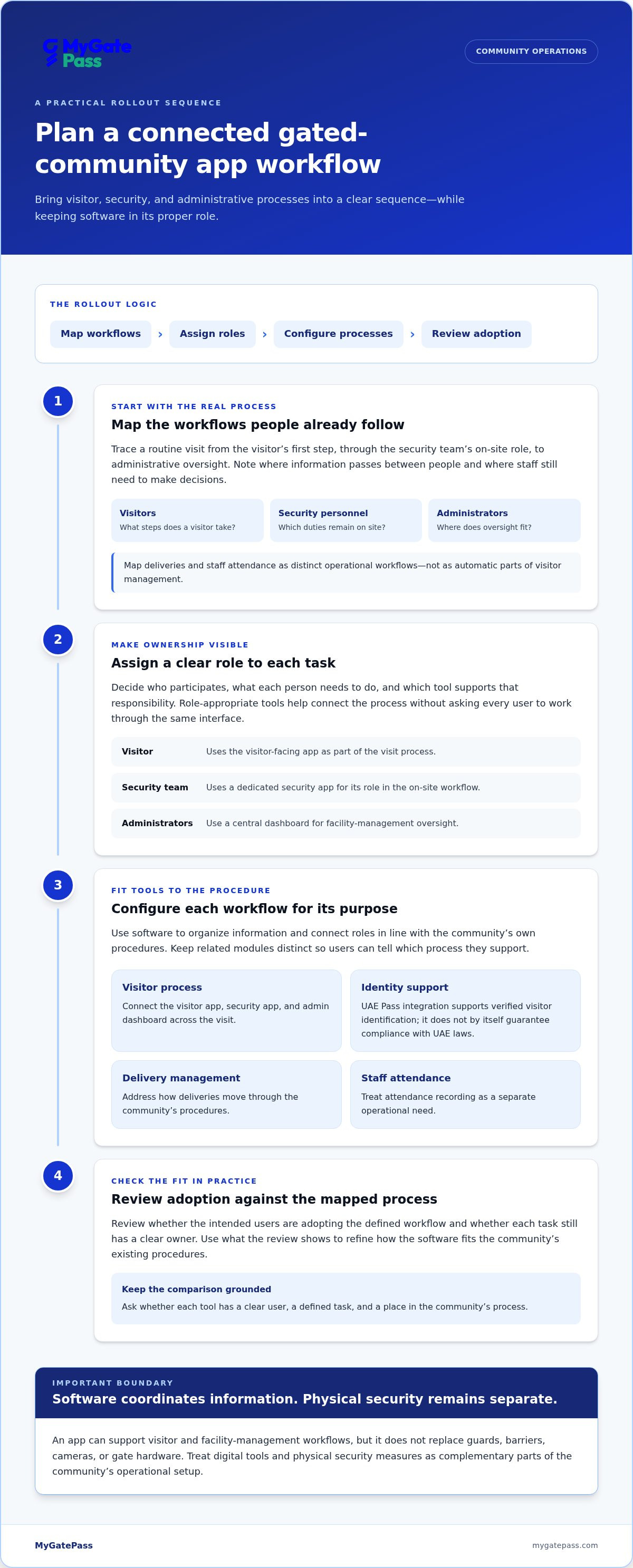
Plan a practical rollout for a gated community security app
A smooth rollout starts with the way the community already works. Before changing a visitor process or adding digital steps, document how visitors, deliveries, and staff are handled today. This gives administrators and security personnel a shared reference, helps identify overlapping responsibilities, and keeps the technology aligned with actual operating procedures.
Use a four-stage plan to turn that understanding into a workable approach for a gated community security app UAE:
- Map workflows. Write down the current steps for a visitor’s arrival, delivery handling, and staff attendance. Note who acts at each stage and where the process depends on manual coordination.
- Assign roles. Identify who uses the visitor app, who uses the security app, and who oversees facility-management operations through the admin dashboard. Make responsibilities clear, including who maintains the community’s procedures.
- Configure processes. Align the digital workflow with agreed procedures. Decide how visitor identification, including UAE Pass verification where used, fits into the visitor process. Treat delivery management and staff attendance as separate workflows with their own defined steps.
- Review adoption. Gather feedback from people using each part of the process. Look for unclear instructions, duplicated steps, or ambiguous responsibilities, then refine the community’s guidance.
Map roles and processes before configuration
Start with the handoffs. For a visitor, record who is responsible at arrival and which steps belong to security personnel versus administrators. For deliveries, document the current handling procedure; for staff attendance, identify what the community wants to manage digitally. Administrators should define who oversees day-to-day procedures and how they are communicated. This groundwork makes configuration a response to known needs rather than guesswork.
Keep the workflow map practical. A short process document can describe each role’s responsibility and the next step in routine situations. If visitor, delivery, or staff procedures differ across buildings or entrances, record those differences before applying a single digital process throughout the site. Clear documentation also gives the team a common reference when explaining the process to residents, visitors, and staff.
Support adoption and review the workflow
Prepare simple guidance for each user group. Visitors need clear instructions for the visitor-facing process; security personnel need guidance that reflects their on-site responsibilities; administrators need to understand their oversight role in the dashboard. Use consistent terms across instructions so residents and staff are not left interpreting different versions of the process.
Once the workflow is in use, review it internally at an interval that suits the community’s operations. Ask whether users understand what to do, whether a handoff is confusing, and whether the documented process still matches daily practice. This is a review of clarity and fit, not a promise of a particular performance result. It gives the community a structured way to update guidance as its needs change.
For a connected digital setup, explore MyGatePass visitor and security workflow tools, including its visitor app, security app, admin dashboard, delivery management, and staff attendance tracking.
Why MyGatePass fits a connected UAE community security workflow
Communities looking for software to support visitor, security, and facility-management workflows need more than a feature list. They need to understand how each tool relates to a real role and process. MyGatePass brings together dedicated visitor and security apps, a centralized admin dashboard, and modules for visitor identification, delivery management, and staff attendance. This makes it relevant to buyers comparing a gated community security app UAE for connected day-to-day operations.
Where the MyGatePass software suite aligns with buyer priorities
The visitor and security apps serve different users in the community’s entry workflow. The visitor app is the visitor-facing tool, while the security app is designed for security personnel. A centralized admin dashboard supports facility-management operations and gives administrators a central software component for their oversight responsibilities. Together, these tools let communities consider visitor, on-site, and administrative needs as parts of one operating model.
UAE Pass integration supports verified visitor identification. For a community evaluating identity processes, this is a specific capability to consider within its visitor workflow, not a general promise about security or legal compliance. The platform also includes a Delivery Management System and Staff Attendance Tracking. These modules can support operational priorities around delivery handling and staff attendance, while remaining distinct from visitor management.
The fit depends on what the community needs to organize. A team focused on visitor coordination can prioritize how the visitor and security apps relate to its entry procedures. Administrators concerned with broader facility operations can assess the dashboard, while communities with delivery and staff processes in scope can include those modules in their evaluation. Connect each tool to responsibilities the community has already defined.
Choose the next step for your community
Before reviewing a software suite, list your priority workflows: visitor handling, security personnel processes, administrative oversight, delivery management, and staff attendance. Note who is responsible for each and where a digital tool could support the current process. This turns a broad product review into a focused assessment of community needs.
MyGatePass is software for visitor and facility-management workflows. It does not replace physical guarding or gate hardware, so assess it as the digital layer alongside the community’s separate on-site security arrangements. Keeping that distinction clear helps decision-makers evaluate the platform for the work it supports.
Ready to explore how the components relate to your community’s priorities? Explore MyGatePass and bring your visitor, security, and administrative workflow needs into the review.
Make your community’s next step a clear one
The strongest choice is one your team can put into practice with confidence. Before moving forward, agree on the community’s priorities, the people responsible for each workflow, and how you’ll review whether the process remains clear as needs evolve. That gives every stakeholder a shared basis for evaluating a gated community security app UAE, beyond feature lists or broad promises.
Keep the focus on the experience you want to create: a well-coordinated community where digital processes are straightforward for visitors, practical for security personnel, and useful to administrators. You do not need to redesign every procedure at once. Start with the workflows that matter most, then consider how connected software can support the next step.
Explore MyGatePass for your community and consider how its software can align with your operational priorities. A focused review of visitor, security, and administrative workflows is a practical place to begin.
Frequently Asked Questions
What does a gated community security app do?
A gated community security app UAE communities can use helps organize digital processes linked to entry and site operations. Depending on its capabilities, it may support visitor handling, security personnel workflows, administrative oversight, deliveries, or staff attendance. Before comparing options, list routine tasks that currently rely on calls, messages, or paper records. This makes it easier to judge whether software addresses a real coordination need rather than adding an unnecessary digital step.
How does a security app help manage visitors in a UAE community?
A security app can support the roles involved in a visitor process through dedicated digital tools for visitors and security personnel, alongside an administrative view for community operations. For example, a community can document what should happen when a guest arrives and identify which role handles each step. The software supports that defined procedure, while staff continue to apply the community’s on-site rules and judgement.
Does UAE Pass integration verify a visitor’s identity?
Yes. UAE Pass integration supports verified visitor identification within a digital visitor workflow. A community should decide where that identity check belongs in its process and how the result informs the next step for the visitor and security personnel. Integration is an identity-verification capability, not a guarantee that the community meets every legal or privacy obligation. Review data handling separately against current, authoritative UAE guidance.
Can a community security app manage deliveries and staff attendance?
It can if the software includes dedicated modules for these operational tasks. MyGatePass offers delivery management and staff attendance tracking as specialized modules. Consider each process separately: a community may want a digital approach to deliveries while keeping staff attendance within a distinct administrative procedure. Define who is responsible for each workflow and what the community needs to manage before deciding which modules belong in its evaluation.
Is a security app a replacement for guards or gate hardware?
No. A security app is software for coordinating information and operational workflows; it is not a physical guard, barrier, camera, or gate mechanism. Communities should assess the app as one part of their operational setup and keep the responsibilities of software distinct from those of on-site personnel and physical equipment. This boundary prevents feature comparisons from implying that a digital tool performs physical security functions.
What should a community compare when choosing a security app?
Compare the workflows supported, the people who use each tool, identity capabilities, administrative needs, and relevant operational modules. Then separate stated functions from details that depend on configuration or community procedures. A practical test is to take a routine visitor case and trace how each role would use the proposed system. This reveals process-fit gaps more clearly than a broad claim such as “complete security.”
How can a gated community plan the rollout of a security app?
Start by recording existing visitor, delivery, and staff procedures, then assign responsibilities and decide which processes should move into digital tools. Prepare concise instructions for residents, visitors, security personnel, and administrators that explain their respective steps. Once the workflow is in use, schedule an internal review to identify confusing handoffs or outdated guidance. Adjust the process based on feedback rather than assuming the first version will suit every user.
Does MyGatePass include visitor, security, and administrator tools?
Yes. MyGatePass includes a dedicated visitor app, a security app for security personnel, and a centralized admin dashboard for facility-management operations. Its UAE Pass integration supports verified visitor identification, while delivery management and staff attendance tracking are available as specialized modules. Communities can assess these tools against their own responsibilities and processes, then prioritize the workflows most relevant to their operations.


