

A delivery can be dispatched on time and still stall at a building entrance. For teams searching for delivery management software UAE, the practical question is how to manage delivery activity at the property and make responsibilities clear from arrival through handoff.
That is different from managing vehicles on the road. Fleet dispatch tools organise drivers and journeys, while building teams need a process for handling activity at the property. Defining the difference helps you evaluate software against the actual problem instead of a broad list of features.
This guide explains how to map building-side delivery processes, compare them with fleet dispatch needs, and prepare for a software evaluation. MyGatePass includes a Delivery Management System within its wider software ecosystem for visitor and facility management. The platform also offers visitor and security apps, an Admin Dashboard, and UAE Pass integration. Each module has a distinct role, so begin with the workflow you want to organise.
Key Takeaways
- Identify where delivery handoffs create friction at the building, then define the operational issue you want to address.
- Map building access, delivery coordination, and fleet or order management as separate stages before deciding what to digitise.
- Use the comparison of delivery management software Dubai and fleet dispatch tools to identify which system fits your building’s responsibilities.
- Document current handoffs, process owners, and the information each role needs before evaluating software.
- MyGatePass’s Delivery Management System is part of a wider ecosystem that includes visitor and security apps, an Admin Dashboard, and UAE Pass integration.
What delivery management software means for UAE building operations
A delivery’s journey does not end at the road. For a building team, the process includes what happens when a delivery arrives, who handles it, and where responsibility passes to the recipient or another party. Delivery management software supports the organisation of delivery activity, while fleet software focuses on vehicles, drivers, and journeys.
This distinction helps when assessing delivery management software Dubai. Building operators need to understand how delivery activity fits with property entry procedures and staff responsibilities. If ownership is unclear, staff may have to rely on calls, messages, or separate records to work out who should handle an arrival. Start by identifying where that uncertainty occurs, then decide which part of the process a digital tool should support.
Delivery coordination is one part of the wider movement of goods from supplier to recipient. The Supply Chain Management Overview provides context for that broader process. A building’s entry procedure is one operational boundary within it, not a substitute for systems that manage orders, transport, or last-mile logistics.
Where building delivery workflows begin and end
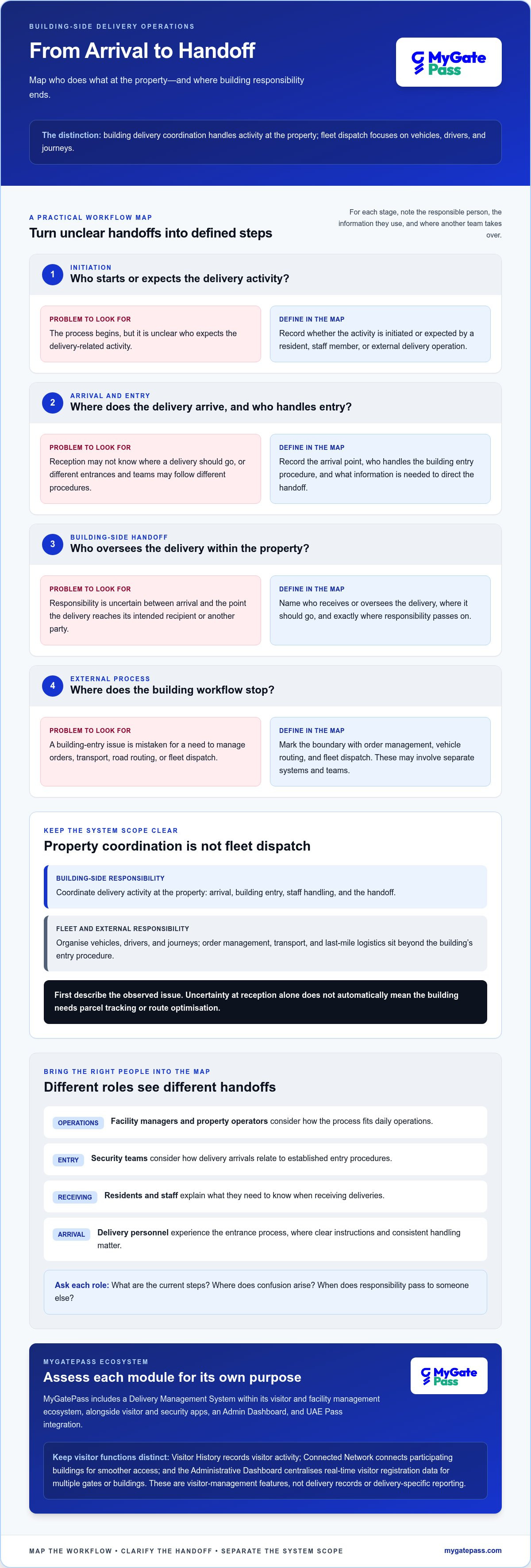
Map the building-side workflow from arrival to handoff. First, identify where a delivery is expected to enter the property and who receives the relevant information. Next, record how the building handles entry and who directs the delivery to its intended recipient or handoff point. Finally, note where the building’s responsibility ends and another process takes over.
For example, the map may show that a courier arrives but reception does not know where the delivery should go. It may also reveal that different entrances or teams follow different procedures. These are workflow questions, not automatic reasons to adopt route planning or parcel tracking. Road routing and fleet dispatch concern vehicles and journeys; building entry concerns coordination at the property. Define each need separately before deciding whether the processes should connect.
Who evaluates delivery management software in a building
Evaluation usually involves people with different responsibilities. Facility managers and property operators consider how a process fits daily operations. Security teams consider how delivery arrivals relate to established entry procedures. Together, they can define a workflow that is clear for staff and practical for people using the building.
Residents and staff can explain what they need to know when receiving deliveries. Delivery personnel experience the process at the entrance, where clear instructions and consistent handling matter. Ask each stakeholder to describe the current steps, where confusion arises, and when responsibility passes between roles. This gives the team a grounded starting point for deciding whether the priority is building coordination, fleet dispatch, or a handoff between separate processes.
How digital delivery workflows connect with building entry management
A digital workflow is most useful when it reflects what people actually do. If you are comparing delivery management software Dubai, trace each handoff and distinguish building access from transport and order fulfilment. Logistics covers a wider set of activities, as explained in ASCM’s Defining Logistics Management. A building’s entry process is one part of that picture.
Map the people, handoffs, and information in your process
Before selecting tools, document the workflow in sequence. For each stage, record the responsible person, the information they use, and the point where another team takes over:
- Initiation: Identify who expects or initiates delivery-related activity, such as a resident, staff member, or external delivery operation.
- Arrival and entry: Record where the delivery team arrives, who handles the building’s entry procedure, and what information is needed to direct the handoff.
- Building-side handoff: Define who receives or oversees the delivery within the property and where responsibility passes to the intended recipient or another party.
- External process: Mark the boundary with order management, vehicle routing, and fleet dispatch. These may involve separate systems and teams.
Use the map to separate observed needs from assumptions. Uncertainty at reception, for example, does not automatically mean the building needs parcel tracking or route optimisation. Describe the issue first, then assess which tools address it.
Understand the role of the building’s digital tools
MyGatePass’s Delivery Management System is part of a wider software ecosystem for visitor and facility management. The suite also includes the MyGatePass Security App, MyGatePass Visitor App, and MyGatePass Admin Dashboard. When setting requirements, distinguish delivery management from visitor, identity, and fleet processes so each is assessed for its own purpose.
MyGatePass’s visitor features include Visitor History, a digital record of visitor activity, and Connected Network, which connects participating buildings for smoother access. The Administrative Dashboard centralises real-time visitor registration data for multiple gates or buildings. These features support visitor management and should not be mistaken for delivery records or delivery-specific reporting.
Identity workflows are a separate consideration. The UAE Pass Integration Module integrates with UAE Pass, while delivery coordination concerns how delivery activity fits building procedures. For more on identity workflows, read this guide to UAE Pass integration for buildings.
Once your process map identifies the building-side need, explore the MyGatePass building management ecosystem. Keep the evaluation centred on the handoffs your team wants to organise, while treating delivery, visitor, identity, and fleet processes as related but distinct parts of the operation.
Delivery management software versus fleet dispatch: compare the right scope
The right system depends on where your operational responsibility begins. A building operator may need to coordinate activity at an entrance, while a delivery business or fleet owner may need to manage vehicles and journeys. These needs can overlap, but one software category does not automatically replace another. Compare delivery management software Dubai options with your documented workflow, not just the product label.
| Area of focus | Typical responsibility | Questions to consider |
|---|---|---|
| Building-entry coordination | How delivery activity meets a property’s entry procedures and staff handoffs. | Who oversees the arrival, and where does the building’s responsibility end? |
| Fleet dispatch | How vehicles and drivers are assigned and managed during delivery journeys. | Does the operation need dispatch planning, vehicle tracking, or route management? |
| Broader delivery operations | How orders, transport, delivery teams, and recipient processes fit together. | Which external systems or teams handle order information and delivery evidence? |
These categories describe different scopes, not a ranking. A building may use entry procedures alongside a carrier’s dispatch tools. A delivery business may need dispatch capabilities without managing building access. A fleet owner may focus on vehicles and journeys, while property staff remain responsible for the building-side handoff.
When a building-focused delivery workflow is the priority
Start with facility operations if the main challenge is coordinating delivery activity at the property, clarifying staff responsibilities, or fitting entry procedures to the handoff. MyGatePass’s Delivery Management System is part of its software ecosystem for building operations. Define the workflow you want to manage, then evaluate the system against that need.
Keep requirements precise. If the documented need is building-side coordination, assess the process around that need rather than assuming a fleet platform will resolve it. Likewise, distinguish a delivery management requirement from visitor functions such as QR-based entry or visitor history.
When fleet dispatch or last-mile tools are also relevant
Routing, vehicle tracking, and delivery evidence are distinct operational requirements. Fleetmanagement.ae, for example, positions its coverage around fleet and dispatch operations. Shyphan.com describes custom last-mile delivery systems. These examples illustrate different scopes; they do not mean every building needs those capabilities or that one tool covers every handoff.
Before comparing software, list the tasks each stakeholder owns, from property entry to the carrier’s journey and order handling. Mark which needs are building-focused and which belong to a delivery business or fleet owner. Then compare the documented workflow with each system’s stated scope. Clear boundaries help you identify what should be managed together and what should remain a separate process.
How to prepare a building for delivery management software
A useful software evaluation starts with a clear picture of the current process. Before comparing delivery management software Dubai options, bring together the people who oversee building operations and record what happens from arrival through handoff. This gives the team a shared reference, surfaces unclear responsibilities, and keeps the evaluation focused on actual needs rather than assumed features.
Document current roles and delivery handoffs
Trace the building-side process and record who is responsible at each stage. Include the staff who manage entry, the person or team that receives delivery-related information, and the role that oversees the handoff. Note where information currently sits, such as in a shared record, a local process, or a staff member’s knowledge. Then identify who needs access to it to carry out their role.
- List the people involved in receiving, directing, and overseeing delivery activity.
- Record what information is used at each handoff and where it is captured.
- Mark points where responsibility is unclear or information is difficult to locate.
- Separate what staff observe from what they assume a software tool could do.
Keep the record factual. Do not assume a particular delivery volume or that every building follows the same routine. If different entrances or teams work differently, note the variation rather than forcing it into one process. This helps the team decide whether it needs a consistent workflow or must account for distinct building procedures.
Set evaluation criteria and a realistic scope
Turn the process map into a short set of evaluation criteria. Prioritise the building’s needs: clear coordination, appropriate operational oversight, and alignment with existing entry procedures. Separate these from requirements owned by delivery businesses or fleet teams, such as road routing or vehicle management. A feature may sound relevant but still sit outside the building’s workflow.
- Essential: The specific building-side handoff or coordination issue the team wants to address.
- People: The roles that need to take part and understand their responsibilities.
- Information: What staff need to access and where the current process makes that difficult.
- Out of scope: Fleet or last-mile tasks handled separately from building entry.
Separate process measures from software capabilities. For example, note where handoffs are unclear, then assess whether a proposed workflow addresses that issue. Do not treat a feature list as a promise of a particular operational improvement. For additional context on building entry processes, see this guide to digital gate pass apps in the UAE.
With roles, handoffs, and priorities documented, you have a practical foundation for evaluating MyGatePass’s Delivery Management System within your building’s needs. Explore MyGatePass’s building management software as a next step.
How MyGatePass fits delivery management into a connected building ecosystem
Delivery activity is one part of a building’s wider daily operations. MyGatePass includes a Delivery Management System within an ecosystem that also offers visitor and security tools. Building operators can assess delivery management alongside other entry-related processes while keeping each workflow’s purpose clear. Start with the needs of the delivery process rather than assuming visitor or security features cover them.
What MyGatePass brings to building operations
MyGatePass focuses on smooth, secure gate entry across the UAE and GCC. Its software suite includes the MyGatePass Visitor App, MyGatePass Security App, MyGatePass Admin Dashboard, and UAE Pass Integration Module, as well as the Delivery Management System. Together, these modules support visitor and facility management, with distinct roles for each operational need.
The visitor platform includes QR-based entry, Visitor History, and Connected Network. The Administrative Dashboard provides centralised, real-time visitor registration data across multiple gates or buildings. These features support visitor and entry management; they are not delivery-specific records or reporting.
MyGatePass has processed 150 k+ visitor entries. This is a platform-level figure about visitor entries, not a delivery count or a measure of delivery performance. For building operators, the relevant step is to define their own workflow and identify which parts of the platform relate to it.
A connected ecosystem lets teams consider related operational tools in one broader setting without confusing their roles. Visitor registration, security workflows, identity integration, and delivery management can all matter to managed entry, but each serves a different purpose. Begin with the process you want to address, then consider how the relevant module fits into the building’s wider approach.
Explore a simpler approach to managed entry
Digital building workflows can help teams organise responsibilities and information. Start with the process: who manages each handoff, what the building needs to oversee, and which delivery or fleet activities sit outside that scope. Then assess tools based on their stated roles rather than assuming one system replaces every other process.
If your evaluation points to a building-side delivery need, consider MyGatePass’s Delivery Management System as part of its wider software ecosystem for managed entry. Review the modules against your building’s priorities and identify the workflow you want to make clearer. Explore MyGatePass for a more connected approach to building operations.
Make your next building workflow easier to assess
Your next step does not need to be a large-scale software decision. Choose one delivery handoff that feels unclear, bring the relevant process owners together, and agree on what a well-managed process should make easier to understand. That shared starting point helps you assess delivery management software Dubai against the way your building operates, rather than a broad list of features.
Keep the focus on clarity: who is responsible, where the building’s role begins and ends, and which delivery or fleet activities sit elsewhere. With those boundaries in view, it becomes easier to consider how digital tools can fit alongside existing building processes and support managed entry.
Ready to take the next step? Register today and get started with MyGatePass.
A clear process is a strong foundation for a more confident, well-managed building experience.
Frequently Asked Questions
What does delivery management software do for a building?
It helps building teams organise delivery activity at the property. For example, a facility manager can define who handles an arrival, where staff find process information, and who takes responsibility for the handoff. Map the building’s needs first and distinguish them from carrier activities such as managing orders or journeys.
How is delivery management software different from dispatch software?
Delivery management can address coordination at a building, while dispatch software focuses on assigning and managing delivery work in transit. A delivery company might use dispatch tools to organise drivers, while a property team follows its own procedures for entry and internal handoffs. Clarify whether the main need belongs to the building, the delivery operation, or both.
Can delivery management software replace a fleet management system?
Not necessarily. A building-focused delivery workflow and a fleet management system serve different operational scopes. Fleet teams may need tools for vehicles and journeys, while building operators focus on procedures at the property. If both areas matter, list the responsibilities each system must support and identify where information or handoffs pass between teams.
What should a facility manager compare when choosing delivery management software?
Compare each option against the building’s priorities: who will use it, which handoffs it should address, what information staff need, and how it fits current entry procedures. For delivery management software Dubai, separate building requirements from fleet or order-management needs. Use specific scenarios, such as a delivery arriving at a staffed entrance, to assess whether the software’s stated scope matches the process you want to organise.
How can a building prepare for a digital delivery workflow?
Record the current process with the people involved. Note who receives delivery-related information, who handles building entry, where staff find instructions, and where responsibility transfers to another person or team. Mark unclear steps and any differences between entrances. This gives process owners a practical baseline for deciding what information or responsibilities a digital workflow should support.
Does MyGatePass offer a Delivery Management System?
Yes. MyGatePass offers a Delivery Management System as part of its software ecosystem for visitor and facility management. It sits alongside the MyGatePass Visitor App, MyGatePass Security App, and MyGatePass Admin Dashboard. Assess the delivery module against your building’s defined workflow, separately from visitor-management capabilities and any fleet or order systems used by other teams.
Can visitor management software and delivery management software be part of one platform?
Yes. A software platform can include modules for visitor management and delivery management, each with a distinct operational purpose. MyGatePass brings visitor and security apps, an Administrative Dashboard, and a Delivery Management System into one wider ecosystem. The dashboard’s centralised data concerns visitor registration, so treat it as visitor information rather than delivery reporting.


