

A calendar entry can be the start of a smoother visitor arrival, not another reception task. Visitor management system calendar integration connects meeting details with visitor invitations and pre-registration, helping teams prepare for guests before they reach reception. It can also link the visit to check-in, check-out and on-site tracking.
It makes sense to expect a visitor system to work with the calendars and email your team already uses. This guide explains how those connections support the guest journey, what information can move between systems, and which features matter when choosing an approach for a UAE workplace. You’ll learn how an employee can invite a guest from a scheduled meeting, what to do when plans change, and how reception and security teams can use visit records to see who is on-site. The aim is to show how connected scheduling can reduce duplicate admin while keeping arrivals organized and welcoming.
Key Takeaways
- See how connecting meeting details to visitor records can reduce duplicate data entry and help keep visit information current.
- Learn how pre-registration and invitations can prepare guests before arrival and make reception check-in smoother.
- Understand how check-in and check-out records help teams track who is on-site during a visit.
- Discover where MyGatePass Visitor App fits into a more connected visitor experience.
Visitor check-in, check-out, and real-time tracking
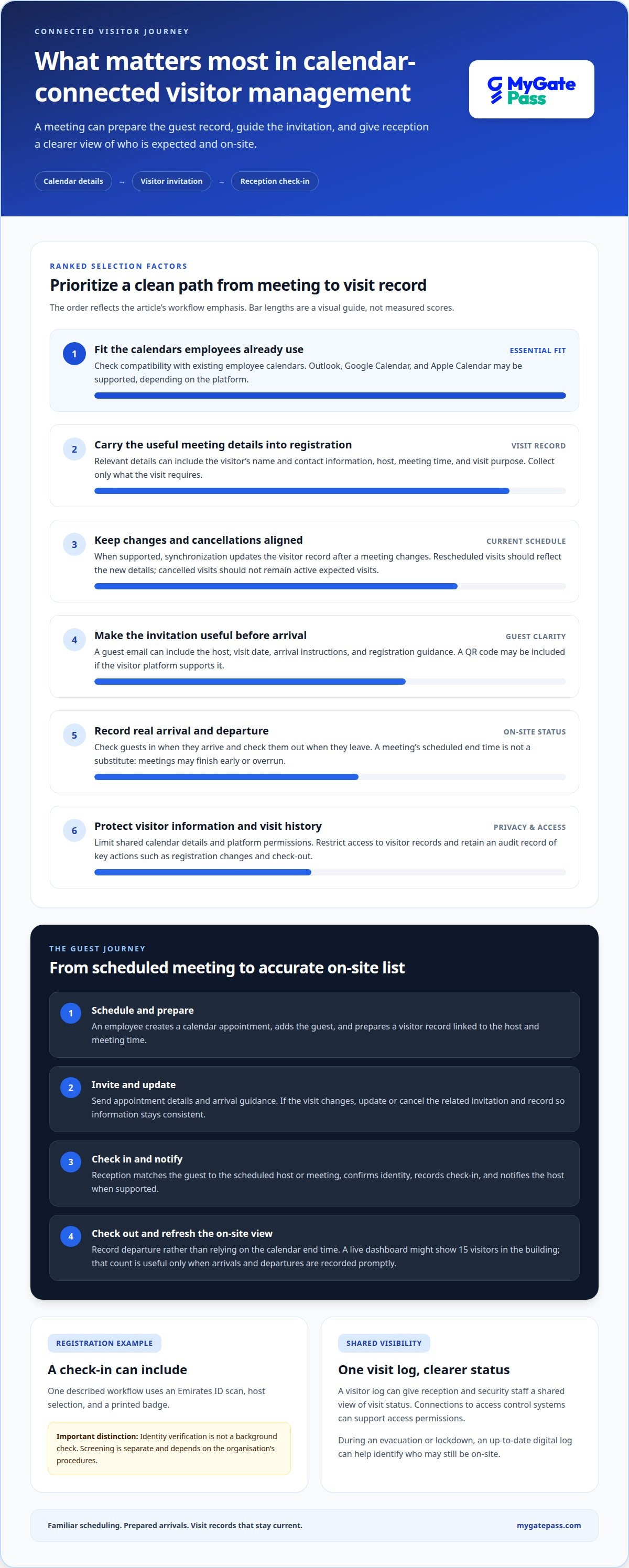
A visitor management platform records a guest’s arrival, visit status, and departure in one digital log. At check-in, reception can match the visitor to a scheduled host or meeting; at check-out, staff close the record so the on-site list reflects who has left. For example, a live dashboard might show 15 visitors currently in the building. That count is useful only when arrivals and departures are recorded promptly.
Registration can include identity verification. In a common workflow, a visitor scans an Emirates ID, selects a host and receives a printed badge. This can help staff identify guests, but identity verification is not the same as a background check. A visitor platform should not be assumed to conduct screening; background checks are separate and depend on the organisation’s procedures.
A clear process helps reception work efficiently: locate the visit record, confirm the guest’s identity, record check-in and notify the host when the system supports it. At departure, record check-out rather than relying on the meeting’s scheduled end time. Meetings can overrun or finish early. Connections to access control systems can support access permissions, while a visitor log gives reception and security staff a shared view of visit status.
Calendar integration can create privacy and security risks if meeting details or visitor information are shared too widely. Sync only the information registration requires, restrict platform permissions and manage access to visitor records. Keep an audit record of key actions, such as registration changes and check-out, so authorised staff can review visit history. During an evacuation or lockdown, an up-to-date digital log can help identify who may still be on-site. Clear data ownership and careful access settings make tracking more useful while reducing unnecessary exposure.
Pre-registration from Outlook or calendar systems
Visitor management systems can connect with Outlook and other employee calendars to support meeting-based invitations. Google Calendar and Apple Calendar can also serve as sources when the platform supports those connections.
A calendar connection can bring meeting details into visitor registration and reduce manual re-entry. The most useful setup is one that fits the calendars employees already use.
Supported Calendar Systems
Supported calendar systems are the employee calendars a visitor platform can connect to and synchronize with. Outlook is one example used to schedule meetings and invite visitors. Google Calendar and Apple Calendar may also be relevant, depending on the platform’s connections. Compatibility matters: a system that fits existing calendars lets employees follow a familiar scheduling process and reduces the need to maintain visitor information separately.
Appointment Creation and Pre-Registration
Appointment creation begins when an employee schedules a meeting and adds visitor details to the invitation or registration process. The visitor’s name, contact information, host, meeting time and visit purpose can help prepare a pre-registration record. A calendar invitation can then share appointment details with the guest before arrival. Collect only information needed for the visit to keep registration focused and the record useful for reception.
When a meeting changes, updated appointment details should flow into the visitor record if the integration supports synchronization. This keeps the scheduled visit aligned without requiring staff to re-enter every change manually.
Scheduling Visitor Pre-Registrations
Scheduling links a visitor’s registration to a meeting’s date and time. For example, an employee can create a calendar appointment, add a guest and use the connected process to prepare the visit record. The meeting time gives reception a reference for expected arrivals, while the host field links the guest to the right employee.
Changes still need attention: a rescheduled meeting should be reflected in the associated visitor information, and a cancelled appointment should not remain an active expected visit. A clear process for updating invitations helps keep schedules and registration records aligned.
For a more connected guest journey, explore visitor registration workflows alongside calendar-based scheduling.
Calendar and email integration for visitor invitations
After a meeting is scheduled in Outlook, connected software can use its details to prepare an email invitation. The message can include the host, visit date, arrival instructions and information the guest needs before coming. A clear, personalized welcome helps make the visit smoother, while keeping the invitation tied to the actual appointment.
An invitation can explain how to complete registration and what to expect at reception. For example, it may include a QR code for check-in if the visitor platform supports that process. The code should relate to the correct appointment, helping staff match the guest with the expected visit rather than search through unrelated calendar entries.
Email reminders can help guests remember an upcoming meeting and review its details before arrival. If the software supports reminders, they can be triggered by the scheduled visit and updated when its time or other details change. This matters when an appointment moves, because an earlier message may no longer reflect the plan.
For a smooth process, the invitation and visitor record need consistent information. A practical sequence is to create the calendar event, add the visitor’s details, send the invitation, then update or cancel the related visit if plans change. Reception can use the schedule to anticipate expected guests, while the host has a clear record of whom they invited.
Keep the email focused. Include the meeting purpose, host name, arrival instructions and a way to review or update the appointment. Avoid copying unnecessary calendar information into a guest message. If details in the invitation have changed, send an update to prevent confusion on arrival. Well-planned email integration connects scheduling with registration without making guests interpret internal calendar notes.
Visitor management system integration with employee calendars
Connecting employee calendars with visitor records can reduce duplicate scheduling work and help teams coordinate arrivals. A useful setup links relevant meeting details without exposing unrelated calendar information.
Connecting Employee Calendars
Calendar integration lets a visitor system use employee meeting schedules to prepare visit records. For Microsoft 365 or Google Workspace, the connection typically involves authorizing access, selecting relevant calendars, and mapping meeting fields to visitor details. The exact setup depends on the system and permissions. With visitor management system calendar integration, employees can schedule meetings through familiar tools while reception gains a clearer view of expected guests.
For a UAE organisation with multiple sites, include the meeting location and host in each appointment. These details help reception direct guests and prepare the appropriate badges. They also support a consistent first impression when employees arrange meetings across shared calendars.
Calendar Integration Features
Integration features vary. Compare whether a system creates visitor records from meetings, reflects appointment changes, supports shared calendars and limits data to what registration needs. These capabilities matter more than a simple compatibility label.
For example, one setup may import only the meeting time and host, while another may also support visitor invitations and updates. Visitor management system calendar integration works best when employees can keep scheduling in their calendars while reception gets a practical visitor view. Consider how the workflow handles cancellations so outdated appointments don’t remain on expected-arrival lists.
Permissions and Shared Calendar Data
Permissions define which calendars and details the visitor system can access. Limit the connection to relevant schedules and fields, such as appointment time, host and location. Private meeting descriptions need not be shared if they are unnecessary for registration.
For UAE teams coordinating across locations and time zones, consistent calendar settings and clear site details help prevent booking confusion. Shared calendars can support coordination, while named hosts make responsibility clear. The principle is simple: connect relevant calendars, share essential fields and define who manages changes.
To align visitor registration with employee schedules, explore visitor management options.
MyGatePass: MyGatePass Visitor App
MyGatePass Visitor App gives organisations a digital way to manage visitor processes. It is part of a visitor and facility management ecosystem that includes the MyGatePass Security App and MyGatePass Admin Dashboard, bringing visitor and security operations into a connected view.
For UAE organisations that need verified visitor identification, the UAE Pass Integration Module connects with UAE Pass. The Delivery Management System also supports organisations managing deliveries alongside visitor workflows. Each offering addresses a distinct part of facility operations, so the right fit depends on which processes you want to bring together.
Ready to discuss visitor management for your workplace? Contact MyGatePass to take the next step.
Make the Next Visit Easier to Manage
Start by mapping how a meeting becomes a visitor record in your workplace. Decide which calendar details reception needs, who can access them, and how to handle changes or cancellations. A focused plan keeps visitor information useful without bringing unnecessary meeting details into check-in.
For UAE organisations, the right visitor management system calendar integration should fit existing scheduling habits and create a clear handoff between employees, reception and security. Start with the workflow that causes the most friction, then define what a smoother arrival should look like for guests and staff.
MyGatePass brings visitor and facility management tools together, giving organisations a place to explore a more connected approach to their entry processes. If you’re ready to discuss the next step, contact MyGatePass. A clearer visitor journey starts with a practical conversation about how your workplace operates.
Frequently Asked Questions
What is Visitor Management Software and which features are essential?
Visitor management software helps an organisation record and oversee guest visits, from registration to departure. Essential capabilities depend on the site, but commonly include a searchable visitor log, host details, check-in and check-out records, and a way to identify visitors on-site. For a shared office, clear records can help reception distinguish scheduled guests from contractors or delivery visitors.
What is calendar integration in a visitor management system?
Calendar integration connects meeting schedules with visitor processes, so an appointment can provide context for a guest’s visit. The host and meeting time, for example, can help reception identify which employee is expecting someone. This is useful when staff already schedule meetings in digital calendars and want visitor records to align with appointments rather than maintain separate schedules.
How does calendar integration work for visitor invitations, bookings, and check-ins?
An employee schedules a meeting and adds the visitor through a connected invitation or registration process. The guest receives visit details, and the meeting information helps staff prepare. On arrival, reception can use the guest’s name or appointment details to find the visit record. If the meeting changes, update the booking before the guest arrives.
Does visitor management calendar integration sync both ways and update changes in real time?
The direction and timing of synchronization depend on how the calendar connection is configured. Some setups pass meeting details into visitor records, while others may also send changes back to a calendar. Handle changed or cancelled events according to the integration’s supported process. For instance, a moved meeting may require an updated visitor booking so reception sees the correct expected arrival.
What visitor management systems offer calendar integration, and how do their features compare?
Visitor management systems that connect with employee calendars such as Outlook, Google Calendar or Apple Calendar can support meeting-based visitor registration. Features vary: compare whether a system creates visitor records, updates changed or cancelled appointments, supports shared calendars, sends invitations and limits synced data to what registration needs.


