

A visitor’s arrival should end with a clear decision, not a confusing queue. The MyGatePass app can guide the process from visitor registration and identity verification to host approval or rejection, pass issuance, and recorded entry and checkout. Each scenario follows a traceable path, whether an expected visitor arrives, a delivery is made, or a host has not yet responded.
A welcoming arrival can still give security teams a reliable view of who is on-site. A digital pass brings key details together, including the visitor’s identity, visit purpose, host, date and time, and pass validity, so staff can manage arrivals with greater clarity.
This guide explains how common visitor situations are handled, what a pass may contain, and why its validity window and checkout record matter. It also shows how entry and exit records support reporting and help maintain an accurate picture of activity at the site.
Key Takeaways
- Understand how a digital pass connects registration, approval and entry into a clearer visitor journey.
- Recognize which pass details help security teams identify a visitor and define the visit’s permitted window.
- See why recording checkout matters for knowing who remains on-site and reviewing visitor activity.
- Explore how MyGatePass brings visitor, security and administrative workflows together for facility management.
Audit trails and reporting
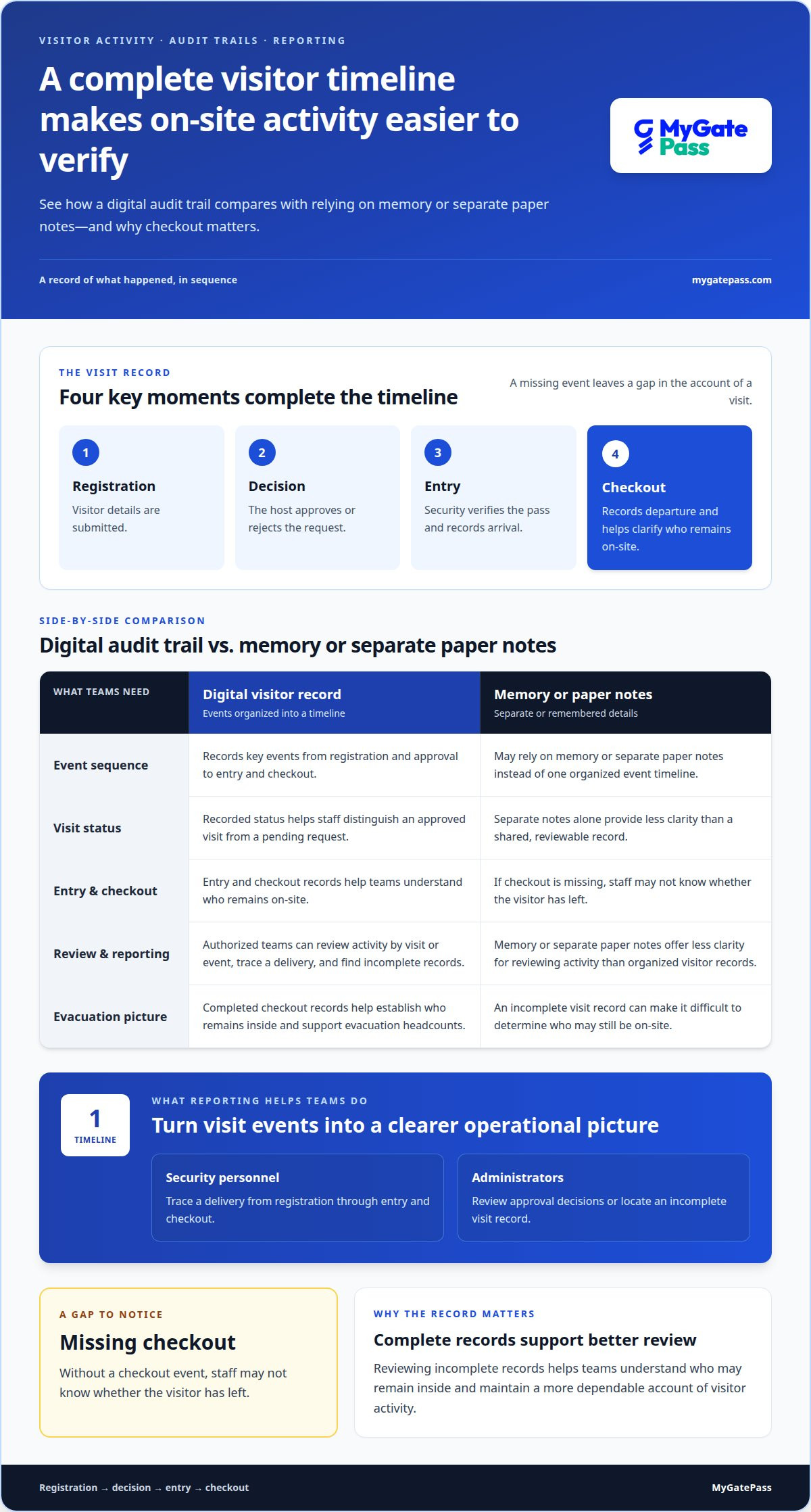
A digital visitor audit trail records key events, from registration and approval to entry and checkout. Reports organize these events into a timeline, helping teams review site activity and spot incomplete visit records.
Visitor Activity Records
A visitor activity record is a time-ordered log of registration, identity verification, host approval or rejection, pass generation, entry, checkout, and relevant security actions. Each event helps clarify what happened during a visit. If checkout is missing, for example, staff may not know whether the visitor has left. Checkout records help teams understand who remains on-site and support evacuation headcounts.
How does MyGatePass compare with other UAE visitor management apps? Compare the events recorded, verification options, approval workflow, and reporting access. The right fit depends on your organization’s visitor process and the records your teams need to review.
Reporting Features
Reporting organizes visitor records so authorized teams can review activity by visit or event. Security personnel can trace a delivery from registration through entry and checkout, while administrators can review approval decisions or find an incomplete visit record. These details give teams a clearer operational picture than memory or separate paper notes alone.
Who can use MyGatePass in the UAE? Visitors, hosts, and security personnel can participate when their organization uses the system. How do I download and register for the MyGatePass app? Use the app or registration route provided for the relevant building, then submit the requested visitor details.
Which UAE communities and buildings support MyGatePass? A community or building can use the system when it has deployed it; availability is not universal across UAE properties. How does MyGatePass handle privacy and personal data? Secure login credentials and encryption protocols help protect sensitive information, alongside organizational access controls and data-handling policies.
Useful reporting depends on a complete sequence for each visit: registration, decision, entry, and checkout. A missing event leaves a gap in the timeline. Reviewing incomplete records helps teams understand who may remain inside and maintain a more dependable account of visitor activity.
GatePass maintains records of visitor entries, exits, and communications. Organizations should treat checkout as essential: missing records can make it difficult to determine who is on-site, while completed checkout records help establish who remains inside and support emergency evacuation headcounts.
What Is a Digital Gate Pass System?
A digital gate pass replaces a handwritten entry slip with a visitor record that staff can review on arrival. In a UAE building, the process connects a visitor’s request with host approval and security confirmation.
Digital Gate Pass Purpose
A digital gate pass is an electronic record that identifies a visitor and documents permission to enter a site. It gives visitors, hosts, and security staff a shared reference, rather than relying only on paper or verbal instructions.
For example, a visitor can submit their name, visit purpose, and host details before arrival. The host can approve or reject the request, and security can review its status at the entrance. Verification may use a QR code or a one-time password sent to the visitor’s registered mobile number. The recorded status helps staff distinguish an approved visit from a pending request.
Creating a Visitor Pass
To create a visitor pass using the MyGatePass Visitor App, enter the requested visitor and visit details, then submit the request for host approval. After approval, the visitor can present the pass at the entrance for security verification.
Enter accurate visit and host details. For a delivery, identifying the receiving person or department helps route the request appropriately. If MyGatePass isn’t working or you can’t receive a pass, review the submitted details and check whether host approval is pending. The host or building security desk can clarify the request’s status and entry process.
At entry, security can verify the pass using its QR code or a one-time password. An organization may also require an additional identity check for access to a high-security area. These steps align entry decisions with the site’s chosen verification process.
For a connected visitor journey, explore this digital visitor pass workflow.
A digital gate pass system can notify a visitor’s host through an app, SMS, or email, allowing the host to review the request and approve or reject it. The decision can be made while the request is active, so the visitor receives an outcome instead of being left waiting without a clear status.
Digital pass details and validity
A digital pass links a visitor’s identity and visit purpose to an authorized entry window. In a UAE building, accurate details help security match the pass to the planned visit.
A pass typically includes the visitor’s name, photo, visit purpose, host or department, date and time, and a QR code or pass ID. Each field serves a practical role. A host name directs the request to the right person, while the visit purpose distinguishes a meeting from a delivery or service visit. The QR code or pass ID gives security a reference to verify.
What information or documents are required to register a visitor? Core details commonly include the visitor’s name, photo, purpose, host or department, and intended date and time. Verification can use a QR code or a one-time password sent to the visitor’s registered mobile number. Organizations can also require extra identity checks for high-security areas.
- Identity: Name and photo help staff identify the person arriving.
- Visit context: Purpose and host or department connect the visitor with the right destination.
- Timing: Date and time define when the visit is planned.
- Pass reference: A QR code or pass ID supports verification at entry.
Validity is the period during which a pass is intended to be used. Organizations should enforce that window so a pass cannot be reused outside its intended period. For example, a pass created for a scheduled meeting should not remain available for a later, unrelated visit. A clear window helps security distinguish an expected arrival from an outdated pass.
Before issuing a pass, the host or registration workflow should match the visitor’s details to the actual appointment. If the host, purpose, or date changes, update the record to reflect the new visit information. This makes the pass more useful at the entrance and gives security a consistent reference for the authorized visit.
Digital versus paper gate passes
At a UAE reception, both paper and digital passes can identify a visitor and record a visit. The key difference is how teams verify approval, capture movement, and retrieve the record later.
A paper pass depends on someone writing the details, handing over the slip, and recording arrival or departure. If a visitor leaves without checkout being noted, for example, staff may not know who remains inside. A digital workflow can connect registration, host approval, verification, entry, and checkout in a recorded sequence. Security can review that sequence instead of relying only on handwritten notes.
- Verification: Digital passes can use a QR code or a one-time password sent to the visitor’s registered mobile number.
- Approval: A host can receive a request through an app, SMS, or email, then approve or reject it in real time.
- Entry record: Security confirmation can create a timestamped entry record, while checkout can be captured through a desk, QR scan, kiosk, or another digital workflow.
These features make it easier to follow a visit from request to departure. Consider a delivery person arriving for a named department: a digital request can be routed for approval, checked at entry, and recorded at checkout. A paper slip can also document the visit, but staff must keep the details legible and connect separate entry and exit notes.
Digital doesn’t automatically mean secure. Protection depends on configuration, organizational policies, and how the underlying data is safeguarded. Secure login credentials and encryption protocols can protect sensitive information, while additional identity checks can be required for high-security areas. Paper records also need clear handling procedures, including controlled access to completed records.
Choose the process that fits the site’s visitor flow and recordkeeping needs. For a connected visitor entry process, explore digital visitor management.
MyGatePass
MyGatePass brings visitor, security, and administrative workflows together in a connected digital system. The MyGatePass Visitor App and MyGatePass Security App support the visitor and security sides of entry, while the MyGatePass Admin Dashboard gives administrators a centralized view. The UAE Pass Integration Module supports verified visitor identification.
Consider a digital system when paper records make approvals, entry tracking, or reporting harder to manage consistently. A connected workflow helps visitors, hosts, security personnel, and administrators follow clearer processes while keeping visitor management aligned with the facility’s needs.
Planning a more organized visitor management process? Contact MyGatePass to discuss your requirements.
Make Visitor Access Work for Your Site
The next step is to shape the process around how people arrive at your facility. Decide who submits a visit request, who handles an unanswered approval, and how staff record exceptions such as an unexpected delivery. Clear ownership of these decisions helps a gatepass app support a welcoming arrival and consistent oversight.
MyGatePass helps organizations consider how visitor access fits their operational needs. Start with your current arrival process, the roles involved, and the records your team needs to review. This gives you a practical basis for considering a digital workflow without adding unnecessary steps for visitors or staff.
Contact MyGatePass to discuss visitor access and take the next step toward a more organized entry experience.
Frequently Asked Questions
What Happens in Different Visitor Scenarios?
The visit’s status determines what happens next. An approved request can proceed to entry verification; a rejected request does not grant permission to enter. If a host hasn’t responded, the request remains unresolved until the organization’s escalation process addresses it. For a delivery, routing the request to its intended recipient helps staff distinguish it from a personal visit.
What is the MyGatePass app and what does it do?
MyGatePass is a visitor-management platform that helps facilities coordinate visitor access. Visitors can be pre-registered, use QR-based entry, receive real-time updates, and have their activity recorded in digital visitor history. Facility managers can review visit records later, while visitors and staff follow a connected process for entering the building.
How does Gatepass compare with other UAE visitor management apps?
Compare the events recorded, verification options, approval workflow, and reporting access. The right fit depends on your organization’s visitor process and the records your teams need to review.
Which UAE communities and buildings support Gatepass?
A community or building supports Gatepass when it has deployed the system; availability is not universal across UAE properties.


