
Managing security across multiple locations shouldn’t mean switching between disconnected systems. A centralized dashboard for multi-site security brings visitor activity, permissions, and records into one management view, helping teams apply shared processes and understand what is happening across their facilities. MyGatePass provides a centralized Admin Dashboard alongside dedicated visitor and security apps for managing digital visitor workflows.
That single view is only part of the picture. The system behind it matters: access control, staff and visitor workflows, monitoring, and reliable records all contribute to how well multiple sites work together. This guide explains centralized management, multi-site access control, and how compliance evidence can be organized. You’ll also see the key components of a centralized security system and how they connect, making it easier to understand what the dashboard can support across facilities in the UAE.
Key Takeaways
- Bring site-level security activity into one management view to spot unusual patterns and coordinate responses more consistently.
- Set access permissions by role and manage changes centrally so people have appropriate access across locations.
- Keep access records and reviewable activity logs organized to support audit preparation and evidence collection.
- Map the system’s components, from access workflows to monitoring and reporting, to see how they work together across your facilities.
1. What is Centralized Management?
A centralized dashboard for multi-site security brings information from separate locations into one management view. A security team can monitor access activity at an office and a warehouse without switching between separate interfaces. The dashboard delivers visibility across environments, while shared reporting helps teams notice unusual activity or site outages.
Central management also makes policies and permissions easier to apply consistently. Administrators can set access rules centrally, then assign credentials according to a person’s role, such as employee, visitor, or vendor. When someone changes roles or leaves, updating their permissions centrally helps keep access aligned across locations. Teams should review access activity and adjust permissions when responsibilities change.
The main benefit is coordinated oversight, not simply fewer screens. A central view can help teams compare visitor activity, spot patterns, and coordinate follow-up. Managing each location separately gives local teams more control, but separate records can make organization-wide reporting harder. A shared administrative view can support consistent oversight while leaving room for site-specific processes.
To compare leading providers, examine how each platform handles multi-site visibility, permission management, alerts, reporting, and integration with existing systems. The strongest fit depends on whether those capabilities match your sites’ workflows and operating environments. Software cost depends on the case, including site count, connected systems, user needs, and implementation scope; pricing is provided after a quote request.
Centralized platforms can concentrate risk: compromised administrator credentials may expose information across several sites, while excessive permissions can widen the impact. Reduce these risks with role-based access, appropriate authentication, restricted administrator privileges, and regular log reviews. For example, a local operator may need access to visitor activity at one facility, not every location.
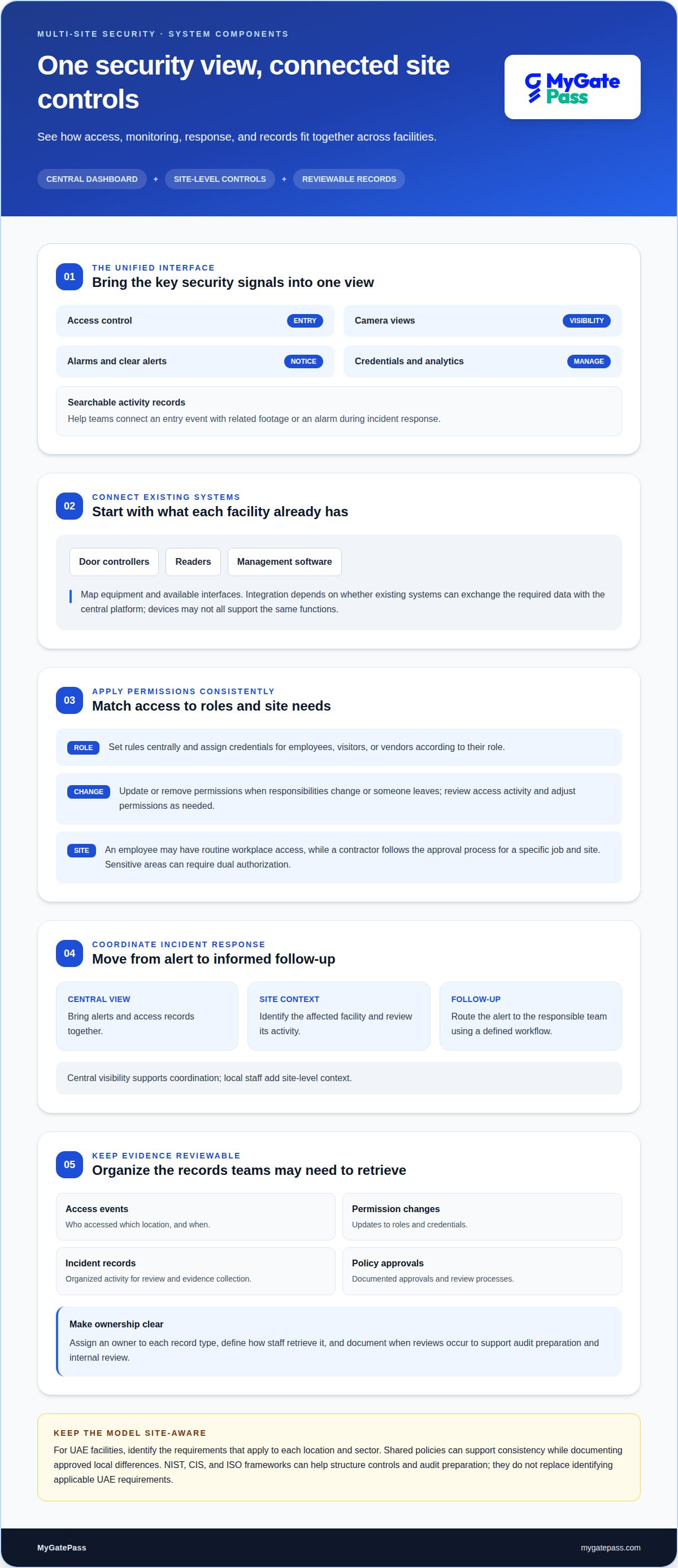
For incident response, a central dashboard can bring alerts and access records into one view, helping teams identify the affected site and review activity. A defined workflow can then direct the alert to the responsible team and guide consistent follow-up. Central visibility supports faster coordination, while local staff provide site-level context.
2. What is Multi-Site Access Control?
Multi-site access control applies an organization’s entry procedures across separate facilities through connected records and controls. For example, a contractor visiting an office and a warehouse can follow an approval process, while each site retains its own entry procedures. Shared policies help keep decisions consistent across the network.
What features should a multi-site security dashboard include? It should bring access control, camera views, alarms, credentials, and analytics into a unified interface, with searchable activity records and clear alerts. This helps teams connect an entry event with related footage or an alarm during incident response.
Existing physical access control systems may include different door controllers, readers, or management software. Integration depends on whether those systems can exchange the required data with a central platform. Mapping each site’s equipment and available interfaces helps define what can be viewed or managed together, without assuming every device supports the same functions.
Policies work best when they translate into permissions people need for their roles. An employee may have routine access to their workplace, while a visiting contractor follows the approval process for a specific job and site. For sensitive areas, dual authorization can require approval from both the host site and another designated authority before entry.
Access reviews help keep permissions relevant. Administrators can review role changes, remove outdated credentials, and examine logs for unusual or disputed entry events. A consistent record of who accessed which location, and when, can support audit preparation and compliance evidence. Regular reviews also reveal permissions that no longer match someone’s responsibilities.
For teams coordinating visitor approvals and site access, centralized visitor access workflows can connect entry processes with day-to-day security operations.
3. Compliance requirements and evidence collection
For UAE sites, identify the requirements that apply to each location and sector before setting surveillance procedures. Build a documented approach around camera purpose, authorized access, retention decisions, and review. A policy used across several facilities should leave room for local differences rather than assume one process fits every location.
Compliance evidence is easier to assemble when platforms record consistent, traceable activity. For example, keep access events, permission changes, incident records, and policy approvals in an organized reporting workflow. Assign an owner to each record type, define how staff retrieve it, and document when reviews occur. This reduces manual searching during an audit or internal review.
Reference frameworks can help organizations structure controls. NIST, CIS, and ISO frameworks can map security practices to control areas and support audit preparation. They are frameworks, not a substitute for identifying applicable UAE requirements. A practical step is to map each internal policy to its control, evidence record, responsible team, and review process.
Cross-site consistency matters. A distributed organization can set shared rules for user permissions, visitor records, and incident escalation, then document approved local variations. For example, if one facility has a different access workflow, record the reason, approver, and review date. Central oversight makes differences visible and helps teams address outdated procedures.
Remote access to compliance records should follow defined permissions. Limit evidence access to staff who need it, and record administrative changes. A centralized system can make review more efficient, but broad access or unclear retention decisions can create avoidable exposure. Separate operational dashboards from evidence exports where appropriate, and document who can retrieve each record.
To prepare a reporting pack, gather the relevant policy version, access and change logs, incident records, and review notes. Match each item to the control it supports, then record gaps and corrective actions. This gives organizations a repeatable process across sites, while keeping evidence connected to the applicable requirement and responsible team.
4. Centralized security system components
A multi-site security system connects devices and data sources to a shared management layer. That layer can collect information from endpoints, servers, applications, network devices, security tools, and cloud environments. For an enterprise with offices in Dubai and Sharjah, a unified view helps security teams relate activity across facilities instead of treating each site as an isolated system.
Monitoring agents gather operational signals, while dashboards organize them by location and type. Alerts can flag device failures, security incidents, bandwidth spikes, or application errors. A failed network device at one office, for example, can appear alongside access activity from that location, helping teams distinguish a local infrastructure issue from a wider disruption.
Detection tools add another layer. AI-driven video analytics can scan footage for anomalies or suspicious behavior, while person and vehicle detection, occupancy tracking, and behavior-based alerts can highlight events for review. These tools support awareness; security teams still need clear procedures to assess an alert and decide whether it requires action.
Response workflows connect detection to follow-up. A predefined alert can guide a team to review the relevant site, check associated records, and follow an agreed protocol. For example, a device failure may need technical investigation, while an access incident may require a security review. Shared instructions help teams coordinate across locations without losing local context.
Reliable infrastructure matters as systems grow. Dedicated network segments for security devices can help isolate their traffic, while resilient connections and failover paths support continuity. Open interfaces can also help platforms exchange data with existing tools. The key takeaway: prioritize components that collect useful signals, present them clearly, and connect each alert to an actionable response.
To bring visitor and security workflows into a connected setup, explore integrated security management.
MyGatePass: MyGatePass Security App
MyGatePass Security App supports security teams managing visitor activity across facilities, while the MyGatePass Admin Dashboard provides a centralized management interface. The MyGatePass Visitor App provides a digital channel for visitor workflows, and the UAE Pass Integration Module supports verified visitor identification. Together, these tools help organizations connect visitor processes and improve visibility for security personnel.
Consider this approach when teams need a more organized way to handle visitor entry and security operations across locations. MyGatePass brings visitor, security, and administrative workflows into a digital ecosystem, including a centralized dashboard for visitor registration data across multiple gates and buildings. Get started with MyGatePass to discuss your facility management needs.
Make Your Next Security Decision Count
Before changing systems, define what a smoother security operation should look like for the people who use and manage each site. Map an important workflow, such as welcoming a visitor, recording an approval, or responding to an access alert. This gives your team a practical starting point for deciding how a centralized dashboard for multi-site security should support daily work, rather than add complexity.
MyGatePass offers the MyGatePass Visitor App, MyGatePass Security App, and MyGatePass Admin Dashboard to support visitor, security, and administrative workflows. Get started by discussing the facilities and processes you want to connect with MyGatePass.
Contact MyGatePass to discuss your security and explore a clear path toward more connected site management. A thoughtful first step can make everyday access easier to oversee.
Frequently Asked Questions
What is Centralized Management?
Centralized management lets an organization oversee security processes for multiple locations through a shared administrative approach. For example, a facilities team can coordinate how visitor approvals are handled at separate buildings, while keeping local operating details distinct. The goal is a clearer view of site activity and more consistent administration, rather than making every facility operate identically.
How Does a Centralized Security System Work?
A centralized system gathers information from connected security and facility tools, then presents relevant activity to authorized staff. A team reviewing a visitor entry, for example, can use available records to understand who was expected and whether the visit followed the facility’s process. The system’s practical capabilities depend on its integrations, data sources, and configured workflows.
What is Multi-Site Access Control?
Multi-site access control coordinates entry permissions and records for more than one facility. An organization might allow an employee to enter their assigned workplace while arranging a separate approval for a temporary visit elsewhere. Clear site-specific rules help prevent a credential intended for one location from being treated as permission for every facility.
Which platforms integrate video surveillance, access control, alarms, and analytics?
Platforms differ in the systems and devices they can connect, so the right choice depends on the existing environment and required workflows. A useful evaluation starts by listing the camera, access, alarm, and analytics systems in use, then identifying which data needs to appear together. MyGatePass supports visitor and facility management workflows through its apps and centralized administrative dashboard.
How do you set up a centralized security dashboard across multiple locations?
Start by documenting each location’s processes, systems, and reporting needs. Next, decide which information should be visible centrally and which actions remain local. Connect compatible systems, assign appropriate administrative roles, and test a representative workflow, such as a visitor approval, at each site. Use the test results to refine configurations before expanding the setup.
How can dashboards manage user permissions and site-specific access?
Dashboards can organize access around user roles and location needs, so staff receive permissions aligned with their responsibilities. For example, a site administrator may manage visitor activity for one facility, while a central manager oversees broader records. Review role assignments when responsibilities change, and keep approval processes clear so local access does not exceed its purpose.


