

A smoother visitor journey is not simply the one with the fewest steps. It is the one that gives guests and gate teams a clear process. When comparing MyGate and MyGatePass, look at how each handles guest details, expected visit duration and entry notifications. These practical differences matter more than broad feature labels.
For facilities in the UAE, convenience and controlled entry need to work together. Guests need a straightforward way to share relevant details, while security teams need a clear process for managing expected arrivals. The right workflow should suit the way your community, school or workplace operates.
This comparison looks at guest information, visit duration and arrival notifications. Use these criteria to assess which workflow suits your facility and how visitor registration fits into its wider access-control process.
Key Takeaways
- Choose guest details that support a clear entry process, and set visit-duration rules that fit your facility’s needs.
- Compare how residents invite visitors and how guests complete registration before arrival.
- Assess what identity verification involves and how each system’s privacy and security approach fits your UAE facility.
- Use your operational needs, including visitor volume and existing access processes, to decide whether a dedicated visitor management platform is the right fit.
What guest details and visit duration should you record?
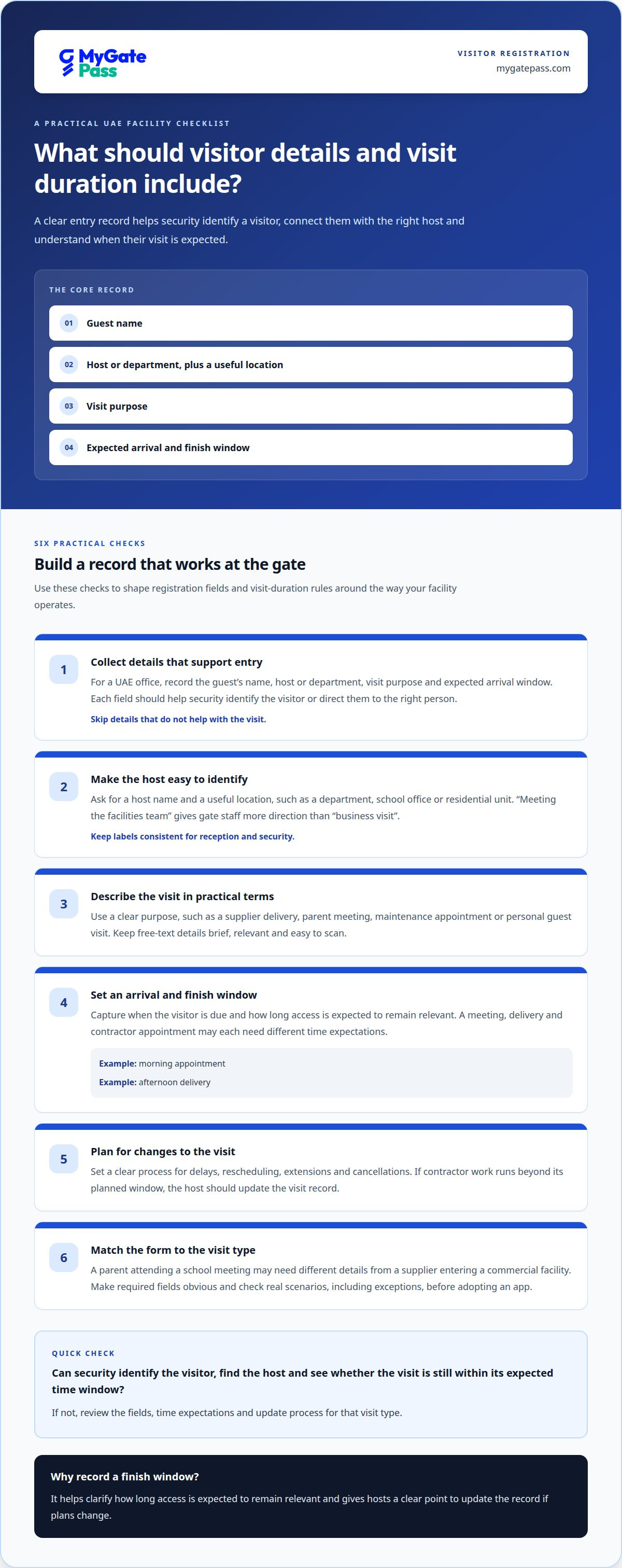
- Choose fields that support entry and coordination. For a UAE office, record the guest’s name, host or department, visit purpose and expected arrival window. Each field should help security identify the visitor or direct them to the right person. Avoid collecting details simply because a form can accommodate them.
- Make the host easy to identify. Ask for a host name and a useful location, such as a department, school office or residential unit. For example, “meeting the facilities team” gives gate staff more direction than “business visit”. Use consistent labels so reception and security interpret each entry in the same way.
- Describe the visit in practical terms. Use a purpose such as a supplier delivery, parent meeting, maintenance appointment or personal guest visit. A clear category helps staff understand the expected arrival without relying on a vague note. Keep free-text details brief, relevant and easy to scan during a busy entry process.
- Record an expected arrival and finish window. A meeting, delivery and contractor appointment may each need different time expectations. Capture when the visitor is due and how long access is expected to remain relevant. Use a morning appointment or an afternoon delivery as examples, then align the system’s available fields with your operating schedule.
- Plan for changes to the visit. Hosts may delay, reschedule or extend an appointment. Set a clear process for updating the expected time and cancelling a visit that will not proceed. For a contractor attending a maintenance task, the host should update the visit record if the work runs beyond its planned window.
- Keep the registration flow proportionate. A parent attending a school meeting may need different details from a supplier entering a commercial facility. Match each form to the visit type, and make required fields obvious. Before adopting an app, map its guest-detail and duration fields against these real scenarios, including how staff handle exceptions.
How do residents and visitors register and use MyGate or MyGatePass?
- Map the resident invitation process. Identify how a resident starts an invitation, enters visitor details and shares entry instructions in each app. Use a real example, such as inviting a family member to a UAE apartment. Note whether the resident can review or update the invitation before the guest arrives.
- Follow the visitor’s registration journey. Trace the steps a guest completes before reaching the gate. One platform supports registration once and reuse of a live QR code for entry. Consider whether the registration process is practical for returning visitors.
- Assess the identity step. UAE Pass integration is one available identity-verification approach. Identify where it appears in the guest journey and what action the visitor takes. Compare it with the other app’s process, without treating a QR code or visitor record as identity verification by itself.
- Test a first-time visit. Walk through an invitation for a parent visiting a school or a supplier attending an office. Note where the visitor receives instructions, presents an entry credential and may need help from the host or reception team. This can reveal unclear steps before rollout.
- Test a repeat visit and a changed plan. Use a returning guest as the example. Consider whether registration can be reused, then trace how a host handles a postponed appointment or a visitor arriving at a different time. Include cancellation and correction steps in your comparison.
- Compare the gate-side hand-off. Trace what happens after a visitor reaches security. Record how staff identify the visit, connect the guest with the host and handle an unexpected arrival. A resident app and security workflow should make each person’s next action clear.
- Judge the complete journey. Compare invitation, registration, entry and exception handling across both apps. A reusable QR code may suit repeat entry, while UAE Pass integration may fit a facility’s identity process. Choose the workflow that best matches your visitors and staff roles.
The platform uses UAE Pass integration and lets visitors register once and reuse a live QR code for entry. When assessing that route, keep the credential and the identity check separate: confirm what the visitor is asked to do at each step, and what the gate team should verify. Ask a host to explain the instructions from the guest’s point of view, then check whether the guest can tell what to present on arrival without relying on assumptions about the QR code.
For each app, map the host’s actions before and after sending an invitation. Check whether the host can view visit details, correct an error, change the arrival plan or cancel. At the entrance, clarify how staff find an expected visit, contact the host if details do not match and direct an unlisted visitor. Note any point where the guest, host or reception team has to guess what to do next. This gives residents and visitors a practical basis for comparing workflows and helps staff handle exceptions consistently. Focus on steps you can confirm in a trial, rather than assuming either app supports a particular change or gate procedure.
How does MyGate handle privacy, data security and identity verification?
- Compare the data each registration step requests. List the fields used for a visitor invitation, such as name, host and visit purpose. Separate information needed to arrange entry from optional details. For a school parent meeting, check whether the form requests only details relevant to that visit.
- Map identity verification separately from registration. UAE Pass integration is one available identity-verification approach. Identify when it appears in the guest journey and what action the visitor completes. Compare it with the other app’s stated method. Don’t treat a QR code or visitor record as identity verification by itself.
- Review access to visitor records. Identify which roles can view, update or remove an entry, such as reception, security and the host. Use a supplier visit as a test case. Consider whether each staff member needs all submitted details or only information required to manage that arrival.
- Examine retention and deletion practices. Compare how each privacy notice explains the purpose of collecting visitor details, record retention and deletion requests. For a cancelled appointment, establish what happens to its record. These points help assess the full data lifecycle, beyond the sign-in screen.
- Check security claims precisely. Distinguish a certification from descriptions of specific technical controls. ISO 27001 is an information security management standard, but certification alone does not explain every system setting or facility workflow. Compare the claims each provider makes and the scope described.
- Apply the UAE legal context. The UAE Personal Data Protection Law, Federal Decree-Law No. 45 of 2021, is a relevant reference when assessing how visitor information is collected and handled. Involve your facility’s privacy or compliance lead when reviewing the system’s notices and processes.
- Record the comparison in operational terms. Note what data is collected, how identity is checked, who can access records and how long they remain available. This gives a UAE facility a practical basis for comparing privacy and security practices without assuming both apps handle information identically.
When should you consider MyGatePass?
Consider the software if your UAE facility needs visitor-management and access-control software in a connected workflow. Its visitor and security apps, together with the administrative dashboard, support the process from guest registration to gate-side handling.
- Choose it when guest registration needs a digital route. The visitor app supports visitor registration, while the security app is for security personnel. Consider how these roles fit your existing process, from a resident inviting a guest to staff managing an arrival.
- Consider it when teams need central oversight. The admin dashboard provides a central administration tool for facility management. Map which staff roles manage visitor workflows and what information they need to coordinate entry. This can help you decide whether a shared digital process suits your site.
- Assess whether UAE Pass integration fits your identity workflow. The UAE Pass integration module is relevant if verified visitor identification is part of your facility’s process. Consider where identity checks belong in registration and how the security team handles guests at the gate.
- Match the software to your operational scope. It is software only. It does not supply security guards or manufacture gate hardware. Consider it for digitising visitor and access workflows, not as a replacement for those physical services or equipment.
In your comparison, focus on how each workflow handles guest registration, expected visits, identity checks and coordination with the security team. Then assess how the app and dashboard fit the roles at your facility, whether it is a residential community, school or workplace. The best fit depends on your processes, not simply on the number of features.
To discuss your facility’s visitor workflow, contact MyGatePass.
Frequently Asked Questions
What is the platform and who provides it?
MyGatePass is a visitor and facility management software platform provided by a privately held technology company based in the UAE. Facilities can use its digital tools to coordinate visitor entry and related operations. For example, a property team can assess whether a centralised visitor record fits its reception and security workflows. MyGatePass provides software, not physical guarding or gate hardware.


