
The key difference in on-premise vs cloud access control is where the software and data are hosted: on-site or on remote servers. On-premise systems rely on infrastructure managed at the property, while cloud systems are accessed over the internet and hosted by a provider. Cloud is not automatically the simpler choice for every facility.
Both approaches can support controlled entry, but they place different demands on your IT team and shape how you manage access across buildings. For facilities in the UAE, the right fit also depends on existing systems, connectivity and how your organisation handles security data.
This comparison explains how the two architectures differ, who manages updates and maintenance, and what to consider for compliance. You’ll also see where a hybrid setup may fit, helping you assess which approach aligns with your facilities and day-to-day operations.
What should you consider when choosing a deployment model?
- Match the deployment model to your facilities, IT capacity and day-to-day access management needs.
- Consider how remote administration, provider-managed maintenance and internet connectivity affect cloud operations.
- Assess where access records must be stored and how your organisation’s compliance requirements shape that decision.
- Use a hybrid approach as a possible fit when different sites or systems have different infrastructure and data needs.
What is Cloud-Based Access Control?
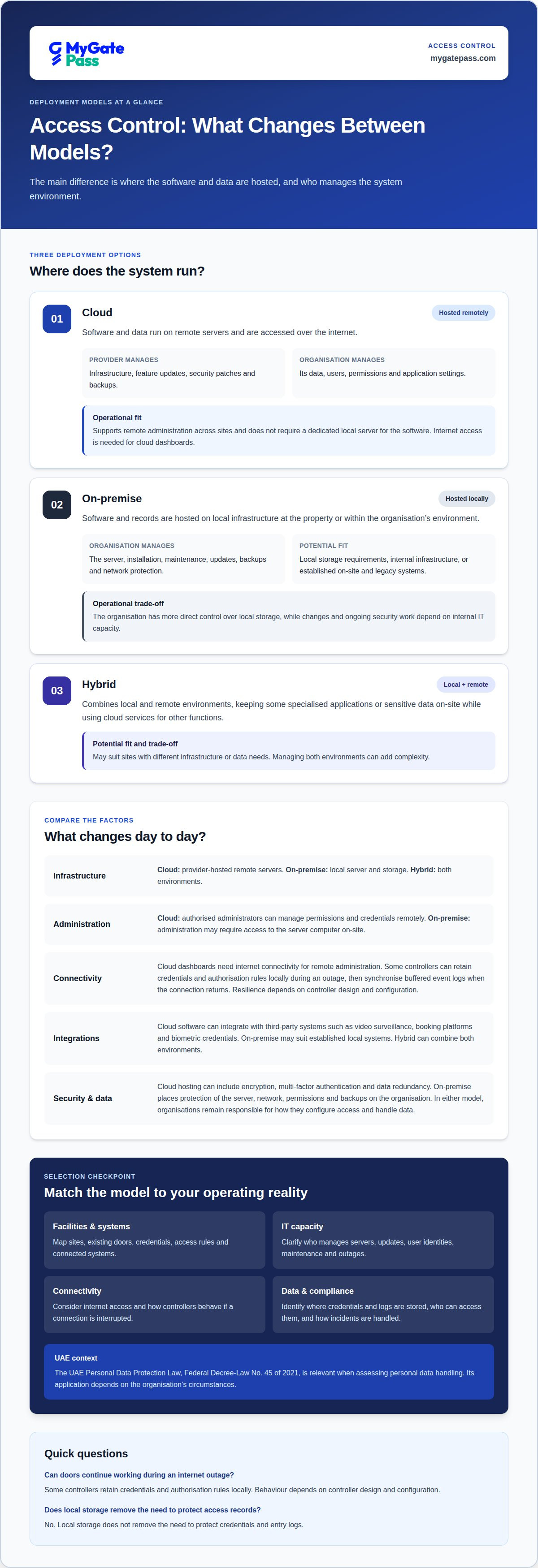
Cloud-based access control hosts software and data on remote servers, accessed through the internet. On-premise systems host them locally at the property, with the organisation managing the infrastructure. The core difference is where the system runs and who maintains its environment.
Cloud hosting can reduce the need for a dedicated local server and support remote administration across sites. Providers may host data on AWS or Microsoft Azure. On-premise systems give an organisation more direct control over local storage and can be tailored to existing on-site technology, such as legacy systems. The best fit depends on IT capacity, connectivity and data-handling requirements.
Integration needs also shape the choice. Cloud software can integrate with third-party systems such as video surveillance, booking platforms and biometric credentials. On-premise access control may suit a property that relies on established local systems. A hybrid model can keep sensitive data or specialised applications on-site while using cloud services for other functions, but managing both environments can add complexity.
To migrate from an on-premise system, first map existing doors, credentials, access rules and connected systems. Plan how these will transfer to the cloud platform, test the new setup alongside current operations, then move users and sites in stages. Keeping local systems in place during testing can help teams manage the transition.
| Option | Software and storage | Operational fit | Integration |
|---|---|---|---|
| Cloud | Remote servers | Remote management; internet access needed | Third-party platforms |
| On-premise | Local server and storage | Internal infrastructure management | Existing on-site technology |
| Hybrid | Local and remote environments | Separates specialised and other needs | Combines both environments |
Choose cloud for flexibility and remote management, on-premise for local control and legacy customisation, or hybrid when sites have different needs.
Cloud-based access control: how are infrastructure and management handled?
Cloud-based access control runs on remote servers, so facilities do not need a dedicated local server for the software. The provider manages infrastructure, feature updates, security patches and backups. The organisation remains responsible for its data, users, permissions and application settings.
On-premise systems require a physical server at the property, plus internal IT work to install, maintain and update it. Adding a door or changing a person’s access may require an administrator to use the server computer on-site. Cloud systems reduce this local server workload, while still relying on internet access and clear account-management decisions.
Remote access changes the daily workflow. An authorised administrator can use an internet-connected device to update permissions, manage credentials and revoke access, for example, when a keycard is lost. For organisations using identity providers, cloud platforms may connect through SCIM, allowing onboarding or de-provisioning changes in Okta or Microsoft Entra ID to carry across sites. Access rules and user data still need active management.
Internet dependence matters. Cloud dashboards need connectivity for remote administration, but some controllers retain credentials and authorisation rules locally. Doors can continue authenticating users during an outage, then synchronise buffered event logs when the connection returns. Resilience depends on the controller design and configuration.
With SaaS, the provider manages the underlying infrastructure and software updates. An organisation using a cloud instance may still need to patch its operating system, depending on the service model. That distinction affects IT workload, maintenance planning and responsibility for sensitive systems.
Before selecting a model, map who manages servers, updates, user identities and outage procedures. Include these responsibilities in the operating plan so teams understand their roles.
What should you consider for on-premises control and compliance?
On-premises access control keeps software and records within an organisation’s own environment. This can suit facilities with strict requirements for local data storage or customised security solutions. It also places responsibility for hardware, network protection, updates, backups and access safeguards on the organisation.
That control has trade-offs. An IT team must protect the server and its network, manage permissions, and maintain the platform across locations. Existing infrastructure can be tailored to legacy systems, but changes and security work depend on internal capacity. Local storage alone does not remove the need to protect credentials and entry logs.
Cloud platforms shift hosting and much of the underlying maintenance to a provider. They can offer security features such as encryption, multi-factor authentication and data redundancy. However, organisations remain responsible for how they configure access and handle their data. A provider’s certifications should cover the regulatory requirements that apply to the organisation and service.
In the UAE, the UAE Personal Data Protection Law, Federal Decree-Law No. 45 of 2021, is relevant when assessing personal data handling. Its application depends on the organisation’s circumstances. The European Union’s General Data Protection Regulation (GDPR) is another example of a regulation with security and privacy requirements that cloud access controls can help organisations address; it is not a UAE regulation.
Compare actual responsibilities, not just hosting location. Identify where credentials and logs are stored, who can access them, how incidents are handled, and which party maintains security controls. Then map those answers against internal policies and applicable requirements. For a strict local-storage requirement, on-premises or a hybrid model may fit better. Cloud can suit organisations that accept provider-hosted storage and need centrally managed access across locations.
How do on-premises and cloud access control architectures compare?
Cloud and on-premises systems differ in where their software runs and how capacity expands. Cloud platforms support centralised remote management, while on-site systems depend on local servers and hardware. Hybrid designs split functions between the two.
On-Premises Architecture and Scalability
An on-premises system connects readers and door controllers to a server at the property. The organisation can tailor its software to legacy equipment and keep system operations within its local environment. Scaling means adding and configuring physical components, then updating the server. This architecture can suit sites without reliable external WAN connectivity, but expansion requires site-level infrastructure planning and ongoing maintenance.
Cloud Architecture and Scalability
A cloud system connects access-control hardware to remote servers and a centrally managed platform. Administrators can manage access across multiple locations without installing a separate server at each site. A subscription model supports ongoing software use, while cloud capacity can scale without physical system upgrades. Controllers may also retain credentials and authorisation rules locally during an internet outage, then synchronise event logs after service returns.
Architecture affects more than server placement. Cloud platforms can support live occupancy monitoring and real-time fire muster reporting, bringing those views into remote operations. An on-premises design may better fit an air-gapped site or one without reliable external network access. A hybrid system can keep critical or specialised applications on-site while using cloud services elsewhere, though operating both environments adds management complexity.
Compare how each design handles a new door, a new location and a connection failure. Cloud systems offer central oversight and easier expansion across sites; on-premises systems provide local control but require physical infrastructure changes. Some cloud systems also use local failover, so door security can continue during internet outages.
Choose based on site connectivity, local-control needs and expected expansion. This gives facility teams a practical basis for selecting an architecture that fits their operating model.
How can software support visitor access workflows?
The platform helps facilities manage visitor access and security workflows through software, making it relevant when comparing cloud and on-premises operations. Its Visitor App, Security App and Admin Dashboard support connected visitor and security processes, while UAE Pass integration supports verified visitor identification.
For facilities considering a digital approach, assess how visitor registration, security-team workflows and administration fit existing operations. The software supports these workflows, while physical gate hardware and guarding are outside its scope.
Contact MyGatePass to discuss how its access management software fits your facility’s needs.
How can you turn the comparison into an operating plan?
Your on-premise vs cloud access control decision can shape more than system hosting. It affects how facility teams handle routine changes, exceptions and future site needs. Before selecting a platform, agree who owns access policies, how temporary permissions are reviewed, and what staff should do if normal connectivity or processes are disrupted.
Use those decisions to create a practical implementation brief. Set out the locations and workflows in scope, the systems that need to work together, and the responsibilities your IT and security teams will retain. This gives decision-makers a shared basis for evaluating the architecture against actual operations, rather than choosing on hosting model alone.
If you’re ready to discuss how it could fit your requirements, contact MyGatePass about your access control needs. A clear operating plan is a useful first step towards a setup your teams can manage with confidence.
Frequently Asked Questions
On-Premise Security vs Cloud Security: Which Model Fits Your Organisation?
The right model depends on who needs operational control and how your teams work. Choose on-premises when internal IT needs direct control over system changes or local infrastructure is a firm requirement. Cloud can suit teams managing permissions across sites without maintaining a dedicated access-control server. For a UAE facility, include data-handling policies, network resilience and staff responsibilities in the decision.
Can cloud and on-prem controls be unified?
Yes, a hybrid platform can bring cloud and on-premises applications into a central management view. For example, an organisation could keep access control at a specialised site local while managing other properties through cloud applications. Before combining systems, map which records and permissions must be shared, and define who administers each environment. Running both models can add coordination and support work.
Cloud vs on-prem: Which is more cost-effective?
Neither model is automatically more cost-effective. Compare the full operating picture: on-premises requires local infrastructure and internal maintenance, while cloud shifts hosting and some system upkeep to a provider. A multi-site organisation may value central administration; a facility with established servers may prefer to use existing infrastructure. Include staff time, backup processes and future expansion in the comparison.
What are the upfront and ongoing costs of on-premise vs cloud access control?
On-premises typically involves more upfront spending on local servers and related infrastructure, followed by ongoing maintenance and internal IT work. Cloud access control commonly uses a subscription, with hosting and system upkeep handled by the provider. Overall cost depends on the existing equipment, number of sites, support needs and required integrations. Compare these factors across the system’s expected operating period.
How do cloud access control subscription pricing and licensing work?
Cloud access control is generally offered through a monthly or annual subscription. Licensing terms can depend on the services included and the deployment, so compare what the subscription covers, such as data storage, software access, updates and support. Also identify any infrastructure or operating-system tasks your organisation retains. This helps distinguish a managed software service from cloud arrangements requiring more internal IT work.
What internet connectivity is required for cloud access control, and what happens during an outage?
Cloud access control needs an internet connection for remote administration. During an outage, some controllers can continue authenticating users with credentials and authorisation rules stored locally. They can then synchronise buffered event logs when connectivity returns. Ask how the system behaves at each door during a disruption, and include administrator access and log recovery in the facility’s continuity procedures.


