

A sign-in process can look simple and still leave a security gap at the door. DIY visitor management system risks often arise when visitor details are stored insecurely, emergency records are incomplete, or identity checks and access controls do not work together. The result is less visibility when it matters most.
A home-built setup may seem convenient because it uses familiar tools and fits existing routines. But an easy setup is not the same as reliable oversight: records must be protected, accurate, and available to the people managing an incident.
This article explains how DIY systems can affect visitor privacy and regulatory compliance, emergency roll calls, platform integration, and identity screening in the UAE. You’ll see where gaps can arise, why disconnected records and checks matter, and how a more coordinated digital approach can help. The goal is practical clarity, so you can assess whether your current process gives your team a dependable view of who is on site.
Key Takeaways
- Limit visitor-data collection and access, and make clear how information is used and retained.
- Build emergency procedures around accurate, accessible visitor records and clear responsibility for accounting for guests.
- Consider how visitor check-in connects with access control and safety processes, since disconnected systems can leave gaps.
- Use identity checks that fit the visitor and site’s risk, rather than relying on a handwritten sign-in alone.
Data privacy, regulatory compliance and secure storage
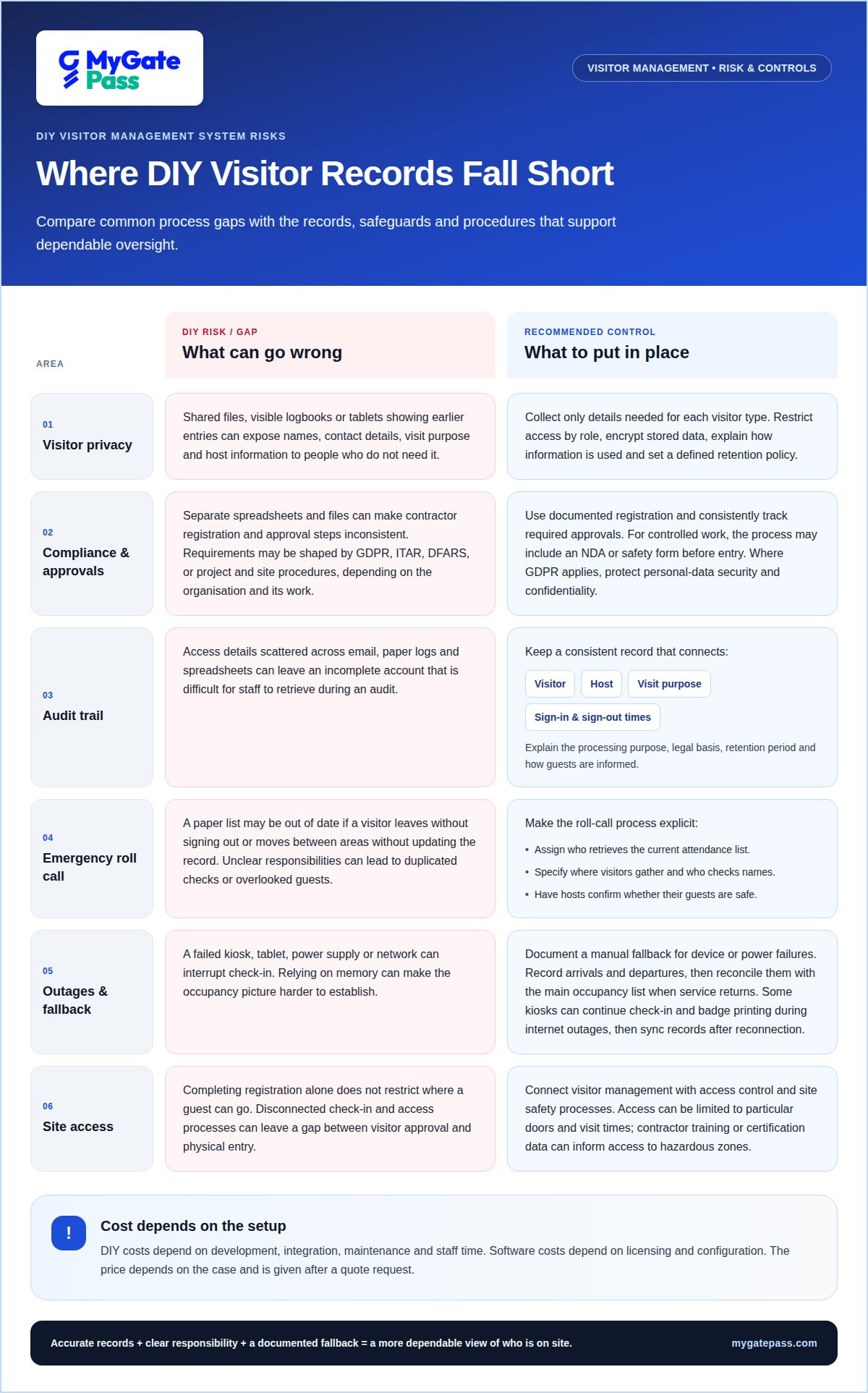
DIY visitor management system risks include exposed visitor data and incomplete compliance records. GDPR, ITAR, and DFARS may shape requirements, depending on the organisation and its work.
Visitor Data Privacy
Visitor data privacy means controlling what information registration collects, who can access it, and how it is stored. It matters because names, contact details, visit purpose, and host information can identify a guest. A shared file or visible logbook may expose details to people who don’t need them. Where GDPR applies, EUR-Lex says personal-data processing must protect security and confidentiality, including against unauthorised access. Collect only details needed for each visitor type, and explain how information is used.
Compliance Frameworks and Contractor Requirements
Compliance frameworks set requirements that can affect how a workplace records and manages external access. ITAR and DFARS may apply in enterprise environments, while project or site procedures can also create obligations for contractors. For example, a contractor arriving for controlled work may need to complete documented registration and sign an NDA or safety form before entry. A DIY spreadsheet can make these steps inconsistent, especially when teams track approvals in separate files.
Audit Readiness and Compliance Records
Audit readiness means producing clear records of how visitor access was managed. One practical DIY visitor management system risk is having access details scattered across email, paper logs, and spreadsheets. A useful record connects the visitor, host, visit purpose, and sign-in and sign-out times, rather than relying on a name alone. A visitor policy should explain the processing purpose, legal basis, retention period, and how guests are informed. Consistent records help staff retrieve a complete account for an audit.
Sign-In Method Risks and Safeguards
Spreadsheets can be copied or shared beyond authorised staff, while paper logs may expose earlier visitors’ details to anyone at reception. Shared tablets can also reveal information if previous entries remain visible. For UAE businesses, practical safeguards include collecting only necessary details, restricting access by role, encrypting stored data, and explaining to visitors how their information is collected and used. A defined retention policy and clear privacy notice make registration more transparent and records easier to manage.
Emergency preparedness and accurate visitor records
During an evacuation, staff need a dependable picture of who is inside each facility. Visitor records support this only when sign-ins, departures, and emergency responsibilities are clear.
Emergency Evacuation and Visitor Accountability
Visitor accountability means matching each guest’s arrival and departure records against the people present during an evacuation. A paper list may be outdated if a visitor leaves without signing out or moves between areas without updating the record. Accurate digital records can provide an occupancy list for a roll call, helping staff identify visitors who may still need assistance.
A written visitor procedure should assign specific actions. For example, it can identify who retrieves the current attendance list, where visitors gather, and which host confirms whether their guest is safe. Without those steps, staff may duplicate checks or overlook a visitor whose host is elsewhere. A DIY process also needs a fallback for power or network outages, so the team knows how reception records arrivals when the usual device is unavailable.
Incident Response and Visitor Records
Visitor records support incident response by showing who entered, when they arrived, whom they were visiting, and whether they signed out. During a fire alarm or other urgent event, these details help responders and workplace teams distinguish visitors from employees and direct follow-up to the right host. Incomplete or delayed tracking makes that picture harder to establish.
Keep the response process straightforward: designate who accesses the latest occupancy list, who checks visitor names at the assembly point, and how hosts report their guests’ status. An automated notification can alert a host to a visitor’s arrival, but it doesn’t replace a roll-call procedure or a plan for unavailable systems. A visitor management app can support a more connected check-in process, while clear emergency roles remain essential.
For each facility, document how reception handles a failed kiosk, tablet, or network during an emergency. Record arrivals and departures through the fallback process, then reconcile those entries with the main occupancy list when service returns. This preserves an accurate account without relying on memory.
Integration with access control and safety platforms
Digital visitor management works best when check-in connects with physical access control and site safety processes. Without that connection, a completed registration may not control where a guest can go.
The price depends on the case and is given after a quote request. DIY costs depend on development, integration, maintenance, and staff time; software costs depend on licensing and configuration.
During internet outages, some kiosks can continue check-in and badge printing, then sync records when connectivity returns. Device or power failures require a separate fallback, such as a documented manual process.
System Integration and Site Access
System integration connects digital visitor management with access control and other operational platforms. It matters because visitor registration alone does not restrict entry to physical areas. For example, an approved guest could receive access limited to particular doors and visit times, while a contractor’s training or certification data could inform access to hazardous zones.
Different groups need different permissions. Staff, contractors, students, and visitors may follow separate approval processes, so a DIY setup must keep those workflows distinct. If a check-in record does not communicate with access control, staff may need to issue permissions manually, creating gaps between the recorded visit and actual site entry. Aligning the system with emergency procedures also helps teams understand which permissions apply during an incident.
Unauthorized Access and Badge Controls
Badge controls define which areas a visitor can enter and when that permission ends. A badge that remains active beyond its approved visit can allow unintended access. Temporary badges can be restricted to authorised areas and set to expire at check-out or at the end of the day.
Visitor type can guide permissions: a meeting guest may need access to reception and a meeting room, while a contractor may require access to approved work areas. A DIY process relying on generic badges can blur these distinctions. Clear approval steps, restricted door access, and timely badge deactivation connect each credential to its intended visit. Include badge handling in the site’s access and emergency procedures, so staff know what to do when a visit changes or ends.
Visitor identity verification and watchlist screening
Identity verification compares a visitor’s claimed identity with an approved credential or registration record. One DIY visitor management system risk is relying on a handwritten name without a reliable way to match the person at reception to the expected guest. This can weaken screening and make badge issuance less dependable.
A defined check-in workflow can collect the details needed for a visit, verify identity, record the host, and issue a badge. Tailor checks to visitor type and requested access. A meeting guest and a contractor entering a controlled work zone may need different approval steps. Clear, proportionate checks help staff follow a consistent process while keeping the visitor experience welcoming.
Watchlist screening compares visitor details against designated lists before access is approved. A digital system can support automated screening and route a potential match for further review, approval, or notification. An unresolved match should not be treated as confirmed identity. Assign a reviewer and document the decision, so reception staff do not have to make unsupported assumptions under time pressure.
Identity integrations can connect registration with a verification service, reducing reliance on visual checks alone. For UAE businesses, screening should fit site policy, visit purpose, and requested access level. Collect only relevant details, limit access to screening results, and record who reviewed an exception. Another DIY visitor management system risk arises when checks happen outside the registration record, leaving staff unable to explain a decision later.
Badges should make approved access clear to staff. Depending on site procedures, they can show a visitor’s name, photo, host, and visit time. Match badge permissions to approved areas, then deactivate credentials when the visit ends. This connects identity verification to access control instead of treating badge printing as the final security step.
MyGatePass: MyGatePass Visitor App
MyGatePass Visitor App offers a digital way to manage visitor check-ins, helping replace disconnected sign-in steps with a coordinated process. It’s a natural next step when manual records make it difficult to keep visitor and security teams aligned.
The wider MyGatePass ecosystem includes MyGatePass Security App for security personnel and MyGatePass Admin Dashboard for centralised administration. The Delivery Management System supports a separate delivery process, keeping it distinct from visitor arrivals. Together, these offerings address different facility-management workflows without treating identity checks or emergency procedures as one-size-fits-all.
Consider a connected visitor process when your current approach makes records difficult to manage across reception and security. Contact MyGatePass to discuss your visitor management needs.
Make visitor management part of your operating plan
Addressing DIY visitor management system risks starts with treating visitor access as an ongoing operational responsibility, not a one-time setup. As your workplace changes, review whether your process still fits its visitor types, approval paths, and security priorities. Clear ownership helps teams keep the system aligned with real conditions instead of relying on informal workarounds.
Choose an approach that supports your team’s workflow while keeping decisions visible and manageable. A useful next step is to map where visitor check-in connects with reception, security, and facility operations, then identify handoffs that need stronger coordination. This gives you a practical basis for improving the experience without losing sight of oversight.
MyGatePass can help bring visitor management into a more connected digital process. If you’re ready to discuss a suitable approach for your workplace, contact MyGatePass about visitor management. A clearer process can make every arrival easier to manage.
Frequently Asked Questions
What are the main security risks of a DIY visitor management system?
Main risks include unauthorised viewing, inaccurate records, weak identity checks, lingering badge permissions, and failures between visitor registration and access control. For example, a spreadsheet copy may remain accessible after an employee’s role changes. Map who can create, approve, edit, and close visitor entries, then review those permissions whenever responsibilities change.
What privacy and data protection risks come with collecting visitor IDs and personal details?
Collecting ID numbers, images, or contact details creates records that need a clear purpose and careful handling. Extra copies can appear in email, downloads, or shared devices, increasing exposure when access is poorly controlled. Decide which fields each visitor type genuinely needs, restrict who can view sensitive details, and include copies and exports in the organisation’s retention and deletion process.
What UAE data protection laws apply to visitor management systems?
For UAE visitor systems, identify the data-protection requirements that apply to your entity and processing activities before collecting ID details. The relevant framework may depend on the organisation’s legal jurisdiction and sector. Use that assessment to guide visitor notices, permitted fields, retention schedules, and access controls, and document the basis for your approach. Review it if the system or its purpose changes.
How should a DIY visitor system securely store and delete visitor data?
Use access controls to limit records to staff who need them, and protect stored information with encryption. Set a retention schedule based on the collection purpose and applicable legal or contractual duties. Deletion should cover more than the main record: include downloaded files, exports, and backups in the organisation’s deletion process, and document completed actions so administrators can account for the data lifecycle.
How can a DIY system prevent unauthorized access, impersonation, and tailgating?
Get host approval and verify identity before issuing a badge, then match it to the approved visitor and permitted areas. Reception procedures can also require each arriving guest to check in separately, rather than treating a group as one entry. Tailgating involves physical entry behaviour, so software records alone cannot prevent it; staff procedures and site controls matter too.
What are the risks of integrating a DIY visitor system with access control or building security?
Integration errors can send incorrect permissions, leave access active after a visit, or create mismatched records between systems. Test the full access lifecycle: approval, entry, visit changes, checkout, and permission removal. Include failure scenarios such as a rejected update or lost connection, and define how staff record decisions until the systems show consistent information again.


