
A system that still opens doors can still hold your operation back. The right time to upgrade is when outdated or unsupported technology, recurring faults, security concerns, or limited management options make access difficult to manage reliably. Knowing when to upgrade your access control system means looking beyond its age to how well it supports your people, sites, and daily workflows.
It’s understandable to keep a familiar system that appears to work. But rising maintenance demands, disconnected tools, and manual processes can make access harder to manage as your organization changes. An upgrade doesn’t always mean replacing everything; the right approach depends on the condition of your existing setup and what you need it to do.
This article covers eight practical reasons to consider a change, from reliability and security risks to easier administration across locations. You’ll also learn how maintenance needs and management options can help you decide whether an upgrade makes sense for your organization in the UAE.
Key Takeaways
- Look beyond system age: recurring faults, unsupported components, and hard-to-find parts can signal that change is worth considering.
- Compare retrofitting with replacement by weighing the condition of existing equipment against the features and integrations your organization needs.
- Choose cloud or on-premises management based on how your team handles user changes, remote oversight, connectivity, and system maintenance.
- Plan an upgrade around continuity: account for staff training, temporary access, and testing that doors, schedules, and emergency interfaces work as intended.
1. 8 Reasons to Upgrade Your Access Control System: Time for a Change?
A practical way to decide when to upgrade your access control system is to check whether it connects smoothly with the tools your facility uses. Older platforms may not integrate well with visitor management, intrusion detection, elevator controls, HR databases, mobile applications, or building automation. When teams have to switch systems to review an entry or respond to an alert, everyday operations become harder to coordinate.
A modern access control system should support clear credential management, mobile access, useful audit trails, and integration with relevant security and building systems. It should also make permissions straightforward to update when employees join, change roles, or leave. Define the tasks and connections your sites need before choosing features, so the upgrade addresses practical workflow gaps.
Integration with IP camera systems can connect access events to footage from a particular entry point. For example, a security team reviewing an unusual access event can use its timestamp to locate related camera footage. Building-management integrations can coordinate access schedules with lighting or climate controls. Aligning operating hours may help facilities teams identify avoidable after-hours energy use, although savings depend on building operations.
Software integration also matters as facilities connect information technology and operational technology. The International Organization for Standardization identifies ISO 27001 as a standard relevant to IT/OT system convergence. The International Electrotechnical Commission identifies IEC 61508 as a functional safety standard for electrical safety-related systems. These standards address different concerns, so assess each within the context of the systems involved.
A qualified control-system integrator should assess existing hardware, software, and infrastructure before planning changes. Request a clear plan covering connected systems, data flows, testing, and commissioning. For example, commissioning can verify door schedules and fire-alarm interfaces. A phased transition can limit disruption while employees and visitors continue using entry points. These checks help clarify when to upgrade your access control system and how to plan the transition around actual site needs.
2. Security risks and maintenance of legacy access control systems
A legacy system can create security exposure when its software or hardware no longer receives manufacturer support. For example, interfaces dependent on retired Internet Explorer may lack security patches and modern browser compatibility. If credentials remain active after an employee leaves, unauthorized entry can also be harder to prevent. Review support status, fault records, and user permissions together, rather than treating them as separate maintenance tasks.
An access control upgrade can reduce cybersecurity risks by replacing unsupported components, restricting network access, and making credential management easier to maintain. Where possible, place access-control devices on a segmented network or VLAN, and don’t expose them directly to the internet. For remote administration, limit access to authorized roles and review permissions regularly.
Security incidents can also reveal operational weaknesses. A system that goes offline may make entry points harder to manage, while repeated faults can interrupt employee and visitor access. After a breach or attempted unauthorized entry, review access logs, affected credentials, door-level permissions, and incident-response steps. Clear audit trails help teams understand which credentials were used and when.
Consider future security needs alongside long-term maintenance effort. Weigh recurring callouts, hard-to-find spare parts, downtime, and emergency replacements against the work required for an upgrade. A system that functions today may become harder to support as your operations add sites, users, or connected services. Include ongoing monitoring and a maintenance plan in upgrade planning.
For UAE organizations, review user access levels whenever roles change, and promptly remove credentials that are no longer needed. Document administrator roles, access policies, and the steps for responding to a suspected breach. These practices reduce unmanaged access and help teams maintain clearer oversight. Where security personnel need a consistent digital workflow for entry operations, the MyGatePass Security App is a relevant tool to consider.
3. Cloud versus on-premises management
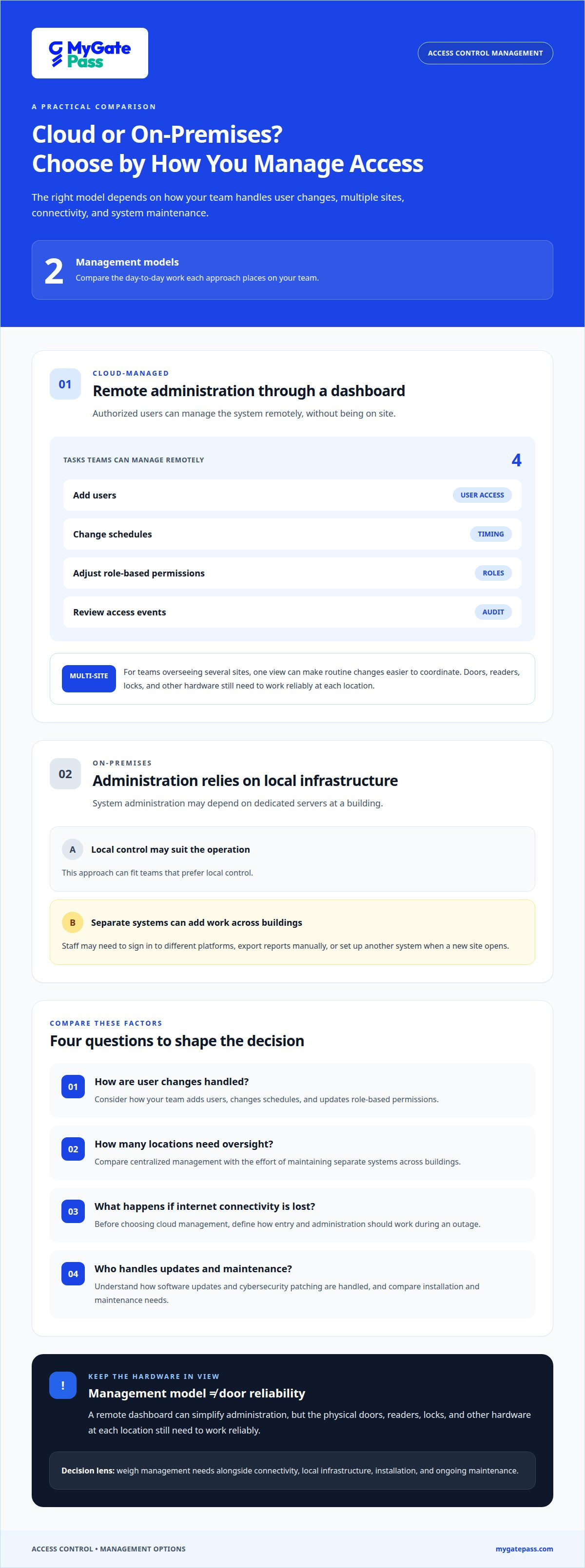
Cloud-managed access control lets authorized users manage the system remotely through a dashboard. Teams can add users, change schedules, adjust role-based permissions, and review access events without being on site. For a facilities manager overseeing several UAE sites, one view can make routine changes easier to coordinate. The physical doors, readers, locks, and other hardware still need to work reliably at each location.
With on-premises management, system administration depends on local infrastructure, such as dedicated servers at a building. This may suit operations that prefer local control, but separate systems can create extra work across multiple buildings. Staff may need to log into different platforms, export reports manually, or set up another system when a new site opens. Compare installation and maintenance needs with the ability to manage locations centrally.
Cloud-based management can streamline remote access management, but connectivity needs to be planned. Before choosing it, define how entry and administration should work if the internet connection goes down. Also understand how software updates and cybersecurity patching are handled. These decisions affect daily access and the team’s ability to respond when connectivity or a device fails.
For a multi-building portfolio, map the devices and management tasks that need to work together. List each location, access point, administrator group, and reporting need. Then decide whether one dashboard can provide the oversight you need or whether local systems better match site operations. Cloud-based access logs can record events in real time and retain them for later review, supporting audits without relying solely on manual exports.
The best fit depends on your buildings, network reliability, staffing, and support processes. Compare how each option handles user changes, schedules, reporting, updates, and outages. A clear list of requirements helps you decide whether remote convenience outweighs dependence on internet connectivity, or whether local hardware and administration better suit your operations.
4. Signs that an access control system needs upgrading
Repeated faults are a clear warning. If readers fail regularly, doors don’t respond consistently, or staff must reset the system often, operations can suffer. Track each malfunction by door, date, and effect on entry. A pattern of downtime matters more than one isolated fault, especially when employees or visitors can’t use their usual access points.
Manufacturer support is another key signal. Outdated software, unsupported hardware, and hard-to-find spare parts can turn routine maintenance into emergency replacement. Check which components still receive support and whether they work together. If one failing controller disrupts several doors, replacing or refreshing the system may be more practical than repeated repairs.
How often should access control systems be upgraded? There’s no fixed upgrade interval that suits every building. Review system performance and support status regularly, then act when reliability, security needs, or maintenance demands change.
Security incidents call for a prompt review. After a breach or unauthorized entry, examine access records, affected credentials, and permissions for the relevant doors. Mechanical locks and basic codes may also fall short as access needs change. For example, a growing office may need clearer individual permissions than a shared entry code can provide.
Organizational change can expose limitations, too. Adding locations, consolidating teams, relocating, or rebranding may require new credentials and consistent access policies. Audit, insurance, or operational requirements can also prompt a review. Consider replacement if an upgrade would cost 50% or more of a new unit’s cost. Match that decision to system condition, necessary features, and the disruption involved.
Use a practical decision test: document faults, unsupported components, security gaps, and upcoming changes. Then compare the cost and disruption of continued maintenance with the benefit of a reliable, manageable system. If existing hardware still works and only a specific capability is missing, a retrofit may address the need; outdated or unreliable equipment may call for a fuller refresh.
MyGatePass: Delivery Management System
MyGatePass offers a Delivery Management System for organizations bringing delivery workflows into their digital facility operations. It may be relevant when deliveries create extra coordination for reception or security teams as part of broader access-management planning.
The MyGatePass Visitor App, MyGatePass Security App, and MyGatePass Admin Dashboard support digital visitor and facility management through dedicated apps and centralized administration. Together, they help organizations manage visitor and security workflows in a more connected way. They complement access control planning, but don’t replace decisions about physical doors, readers, or controllers.
If delivery handling or visitor processes are part of your upgrade plans, consider how these workflows fit your facility’s needs. Contact MyGatePass to discuss the Delivery Management System and related digital management options.
Make Your Next Access Decision With Confidence
Deciding when to upgrade your access control system is also a chance to shape how people will move through your facilities. Think beyond replacing equipment: define the experience you want for employees, visitors, and delivery teams, then align digital workflows with those priorities. A phased plan can keep daily operations moving while your organization makes deliberate decisions about next steps.
For the digital side of facility management, MyGatePass offers the MyGatePass Visitor App, MyGatePass Security App, and MyGatePass Admin Dashboard. These tools support visitor and security workflows through dedicated apps and centralized administration. They can form part of a broader access-management plan, while physical access equipment remains a separate consideration.
Bring your priorities and operational needs into the next conversation. Contact MyGatePass to discuss your access control needs, and take a clear, practical step toward a better-managed facility.
Frequently Asked Questions
8 Reasons to Upgrade Your Access Control System: Time for a Change?
Common reasons include unsupported equipment, recurring faults, security incidents, limited integrations, difficult credential administration, poor multi-site visibility, changing operational needs, and costly maintenance. The practical trigger is the effect on daily operations. For example, if a staff member must use separate systems to review entry records and manage visitor access, document the extra steps and assess whether a connected workflow could address them.
Is it better to replace equipment entirely or just upgrade the controls?
Upgrade the controls when existing doors, readers, wiring, and other components remain compatible and dependable. Replacing the system may make more sense if essential hardware is failing, unsupported, or incompatible with required features. Compare component condition, integration needs, disruption during the work, and ongoing maintenance. A written inventory of reusable and failing components helps clarify which approach suits the building.
What causes control systems to fail more frequently as they age?
Age can wear down readers, controllers, power supplies, and door mechanisms, while unsupported software can make faults harder to resolve. Changes elsewhere in a building may also affect performance, such as network equipment updates or altered door hardware. Review fault records by component and location. This helps distinguish a failing device from a wider compatibility or maintenance issue.
What is the typical retrofit process?
A retrofit usually starts with an assessment of existing hardware, software, wiring, and infrastructure. The project then defines required features and identifies components that can remain. The work plan covers installation, credential and management-data setup, staff training, and temporary access arrangements. Commissioning checks that each door responds correctly and that schedules and emergency interfaces work as intended before normal operations rely on the updated system.
What safety and cybersecurity standards apply to control system upgrades?
Applicable standards depend on the systems, risks, and requirements involved, so no single standard automatically covers every access-control upgrade. The International Electrotechnical Commission identifies IEC 61508 as a functional safety standard for electrical safety-related systems. The International Organization for Standardization identifies ISO 27001 as relevant to IT/OT system convergence. Treat these as distinct considerations when defining project requirements and system interfaces.
What are the signs that an access control system needs upgrading?
Look for recurring entry failures, unsupported components, gaps in access records, and workarounds that rely on shared codes or manual logs. A useful test is to follow a routine task, such as removing a departing employee’s access, from request to completion. If the process is unclear, delayed, or difficult to document, the system may no longer support your operational needs effectively.


