

A visitor log is more than a record of who walked through the door. Digital visitor log software can capture check-in details, the host, the visit purpose, and arrival and departure times, giving teams a clearer view of who is on site. The key difference is how each system handles identity, access, data, and the visitor experience.
Paper logs may seem simple, but they can expose one visitor’s details to the next person who signs in. A digital process can make check-in smoother while giving teams more control over visitor information and access records.
This guide explains what digital visitor logs do and compares the options that shape how they work, from integrations and security controls to technologies such as AI, biometrics, mobile access, and cloud services. You’ll see what each approach can add, where its limits matter, and which criteria help match a system to your facility’s needs in the UAE.
Key Takeaways
- Understand how digital logs record visits, and why data isolation and a clear retention policy matter for visitor privacy.
- Compare calendar, messaging, and access-control integrations by how well they connect arrival details with host notifications and entry decisions.
- See how current visitor records and clear access rules can support security oversight and emergency evacuation planning.
- Weigh AI, biometrics, mobile access, and cloud options against your facility’s needs, then explore how MyGatePass connects visitor and security apps with an admin dashboard and UAE Pass integration.
What are digital visitor logs?
A digital log records guest details electronically, replacing a paper logbook with searchable visitor data. It can organize workplace arrival information while limiting other guests’ exposure to individual records.
Data Retention and Privacy Controls
Retention controls define what visitor data is collected, who can access it, and when records are deleted. Unlike a manual logbook, a digital system can separate records by visitor and apply targeted deletion. The European Union explains that GDPR sets no fixed retention period: organisations should keep personal data only as long as necessary for its purpose, then delete it. GDPR may affect collection, use, and protection where it applies.
Visitor Data and Signed Documents
A visitor record can include the guest’s name, host, visit purpose, and check-in and check-out times. Signed documents serve a different purpose: they record an acknowledgment or agreement rather than simply documenting entry. If a system stores both, restrict access to each record type and set retention according to its purpose. A tablet can make sign-in easier, but shouldn’t expose earlier guests’ information.
How do leading platforms compare? Assess data isolation, deletion controls, signed-document handling, and integration options. UAE businesses can find locally and internationally supplied visitor-management platforms, with features that vary. Compare them against your facility’s workflow.
What UAE privacy rules apply? Requirements depend on the framework governing the organisation and its data processing. Where GDPR applies, the European Union says visitor data should be retained only as long as necessary. This is not a fixed UAE retention period.
| Option | Privacy control | Retention | Signed documents |
|---|---|---|---|
| Paper logbook | Visible entries may expose details | Manual handling | Separate paper storage |
| Digital visitor log | Access can be controlled | Deletion settings | May be stored digitally |
| Integrated system | Can connect visitor workflows | Policy-based handling | Depends on system functions |
To set up a digital log, define required fields, access permissions, retention purposes, and deletion steps before check-in begins. Replacing paper can improve confidentiality and searchability, but it also requires setup and access management. Choose a system based on the privacy controls and document handling your workplace needs.
Integration with calendars, messaging, and access control
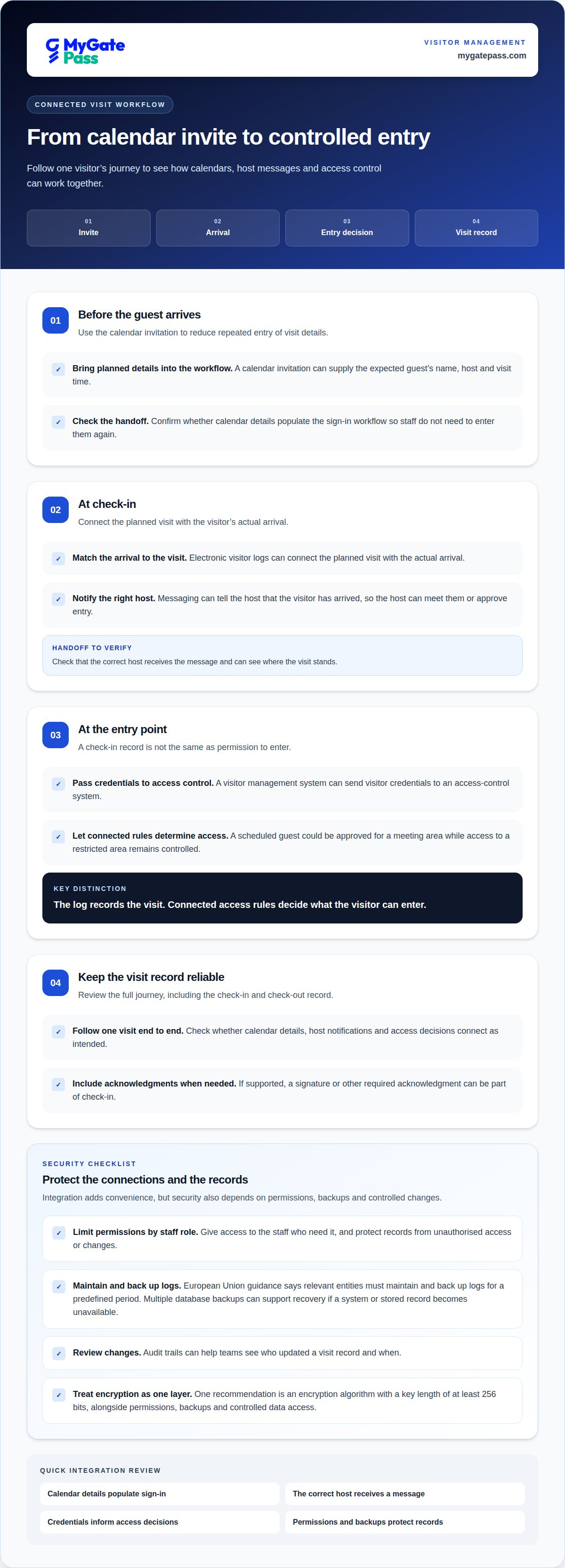
Integration connects visitor management with the tools staff already use. A calendar invitation can supply an expected guest’s name, host, and visit time. When the guest arrives, a messaging notification can tell the host to meet them or approve entry. At the front desk, electronic visitor logs can connect the planned visit with the actual arrival.
Access-control integration adds an important decision point. A visitor management system can pass visitor credentials to an access-control system, which can allow or restrict entry based on those credentials. For example, a scheduled guest could be approved for a meeting area while access to a restricted area remains controlled. A check-in record alone doesn’t grant access; connected rules determine what happens next.
Compare integrations by following one visit from invitation to departure. Check whether calendar details populate the sign-in workflow, the right host receives a message, and access decisions use the visitor’s credentials. Clear handoffs reduce duplicate entry and help staff see where a visit stands. If the system supports it, a signature or other required acknowledgment can also be included in the check-in sequence.
Security depends on the connections as well as the log. Limit system permissions to staff roles that need them, and protect visitor records from unauthorised access or changes. European Union guidance says relevant entities must maintain and back up logs for a predefined period. Multiple database backups can support recovery if a system or stored record becomes unavailable.
For stronger encryption, one recommendation is an algorithm with a key length of at least 256 bits. Treat this as one part of security, alongside permissions, backups, and controlled data access. Audit trails can help teams review changes, such as who updated a visit record and when. For a connected front-desk workflow, explore visitor-management options that bring check-in and access processes together.
Security, access rules, and emergency evacuation
A digital visitor record supports security only when it shows who is inside and where access is allowed. The European Union says visitor records should capture arrival and departure dates and times, while visitors should have limited access. That makes check-in and check-out records useful for both routine monitoring and emergency response.
During an emergency, a current list can help staff identify visitors who may still be on site. Digital logs can provide real-time monitoring of people entering secure areas, while notifications can alert hosts when visitors arrive or an emergency occurs. These functions support coordination, but staff still need clear procedures for responding to alerts and accounting for guests.
Plan the evacuation workflow before relying on the log. Decide who reviews the current visitor list, how staff share it with response teams, and how they record each visitor’s departure or evacuation status. A searchable record can make it easier to find a guest by name or host than scanning a paper sign-in sheet. It can also help audits show how entries were recorded.
- Set access rules so visitors can reach approved areas only.
- Keep arrival and departure records current throughout each visit.
- Assign responsibility for reviewing visitor records during an emergency.
- Manage badges consistently and collect them when visitors leave.
Badges matter, too. Consistent issuing and collection help staff distinguish visitors from employees and identify unreturned passes. Pair badge procedures with digital records to give the front desk a clear process, rather than relying on a paper sign that may be difficult to review quickly.
After an evacuation drill or incident, review whether records were complete, notifications reached the right people, and staff could account for visitors. Use the findings to refine access rules and response steps. A log supports emergency preparedness, but it doesn’t replace practiced procedures or on-site response responsibilities.
AI, biometrics, mobile access, and cloud solutions
What features should visitor management software include? Start with accurate entries, clear access control, and a dashboard that helps employees manage arrivals. Then compare identity options, mobile check-in, and cloud access against reception workflows and privacy needs.
AI, photo capture, and biometrics are different capabilities. Some electronic visitor systems can capture a visitor’s photo during check-in, but a photo alone doesn’t establish biometric identity verification. Assess AI and biometric features by what they do, the data they use, and how staff handle that data. Clear explanations at sign-in help guests understand the process.
Mobile access can move check-in from a shared reception screen to a visitor’s own device, or keep it at a staffed desk. The practical choice depends on guest expectations, device access, and whether employees can assist visitors who need help. Consider how each option records arrival and departure, and how it connects with access control. A completed form is not permission to enter.
Cloud solutions can make visitor records available through a connected system, while a local deployment keeps the system within an organisation’s chosen environment. Compare who can access the dashboard, how permissions are assigned, and how records are backed up. These controls matter whether reception manages one entrance or employees coordinate visitors across several areas.
For a useful comparison, map each option to a visitor journey: identity capture, sign-in, host notification, access decision, and record management. Choose AI or biometric functions only when their purpose is clear; prioritize straightforward mobile entry when reducing reception steps matters most. A cloud setup may suit teams needing shared access, provided its controls fit their security requirements. Explore a connected visitor-management workflow to see how digital entry can fit into daily operations.
MyGatePass: MyGatePass Visitor App
MyGatePass Visitor App is a practical next step for UAE organisations replacing manual visitor records with a connected visitor-management workflow. It works alongside the MyGatePass Security App and MyGatePass Admin Dashboard, bringing visitor and security operations into a centralized digital ecosystem.
Consider this setup when reception, security personnel, and administrators need coordinated visitor management. The UAE Pass Integration Module supports verified visitor identification, connecting identity checks with the wider entry process. Together, these tools help teams manage visitor interactions and facility records through dedicated apps and a dashboard, rather than relying on a paper logbook alone.
If your priority is a more organized digital visitor process, contact MyGatePass to discuss your requirements.
Shape a visitor process that can grow with your workplace
Your next step is to turn the capabilities you need into a clear operational plan. Identify who manages visitor records, which teams handle entry, and how the process should adapt as your workplace changes. These decisions help you choose digital visitor log software that fits daily operations without adding unnecessary complexity.
MyGatePass brings together the MyGatePass Visitor App, MyGatePass Security App, and MyGatePass Admin Dashboard to support connected visitor and facility management. Consider how these tools could fit your reception and security workflows, and where a more coordinated digital process could make interactions easier for staff and guests.
Start with the needs that matter most to your organisation, then explore a practical next step. Contact MyGatePass to discuss visitor logs and how a digital approach could support your workplace. A well-planned process can make welcoming visitors feel simpler and more organized.
Frequently Asked Questions
What is Visitor Management Software?
Visitor management software helps an organisation coordinate guest registration and entry records. Depending on its features, it can support pre-registration, check-in, host coordination, and visitor history. For example, a reception team can prepare for an expected contractor visit, then record the guest’s arrival. The aim is to make visitor handling more organized than using disconnected paper forms.
Can I filter or sort visitor data?
Yes, if the platform provides filtering and sorting tools. Useful fields often include visitor name, host, visit purpose, and arrival date. For example, a facility administrator could filter a list to show contractor visits for a particular day. Before relying on a filtered view, consider which staff roles need access and whether the displayed records suit their tasks.
Can I search an electronic visitor log by date or visitor?
Search depends on the log’s available fields and interface. A searchable record may let an authorized user find an entry by visitor name or visit date, rather than scan paper pages. Consistent spelling and complete check-in details make searches more useful. For a past appointment, a host name or visit purpose can also help locate the right record if those fields are captured.
How does visitor log monitoring work?
Monitoring means reviewing visitor activity as it is recorded, using the tools available in the system. For example, reception staff may review arrivals while a facilities administrator checks who remains on site. Assign clear responsibilities: decide who reviews active visits, handles an incorrect entry, and updates a record when a guest leaves earlier than planned.
Ready to choose the right visitor log?
Start by mapping a typical visit, from invitation through departure. Note who registers the guest, who needs the record, and what should happen when plans change. Then compare systems against that workflow, including permissions, search tools, integrations, and record handling. A short trial with reception and security staff can show whether the process stays clear during a busy arrival period.
What is digital visitor log software and how does it work?
Digital visitor log software records and manages guest visits electronically. Staff or visitors enter details through the check-in process, and the system creates records for authorized users to review. Depending on the platform, it may also connect registration with host communications or entry workflows. Its value depends on how well it fits the organisation’s actual visitor process.


