

A visitor’s privacy can be undermined before they enter the building if the gate collects personal details without explaining why. Securing visitor personal information starts with a clear notice at check-in that says what’s collected, how it’s used, who may access it and how long it’s kept. Keep collection limited to details needed for the visit, and protect records with restricted access and encryption.
Visitors should be able to enter smoothly without being left in the dark about their personal data. This article explains how clear gate communication builds trust, which security practices can help protect visitor records, and how QR code messages can make privacy information easier to find. You’ll also learn why encryption matters while information moves between check-in devices and systems and while it is stored. Together, these practices make visitor management more transparent and secure without adding unnecessary friction at the entrance.
Key Takeaways
- Make privacy information visible at the gate, with a QR code that gives visitors a quick way to read the full notice.
- Use role-based access and audit trails to make visitor records easier to protect and monitor.
- Build data minimisation into check-in: each requested detail should serve a clear access or safety purpose.
- Choose encryption and retention practices that protect records throughout their lifecycle, then remove information when it’s no longer needed.
Visitor Data At The Gate: Is Your Estate Communicating Clearly Enough?
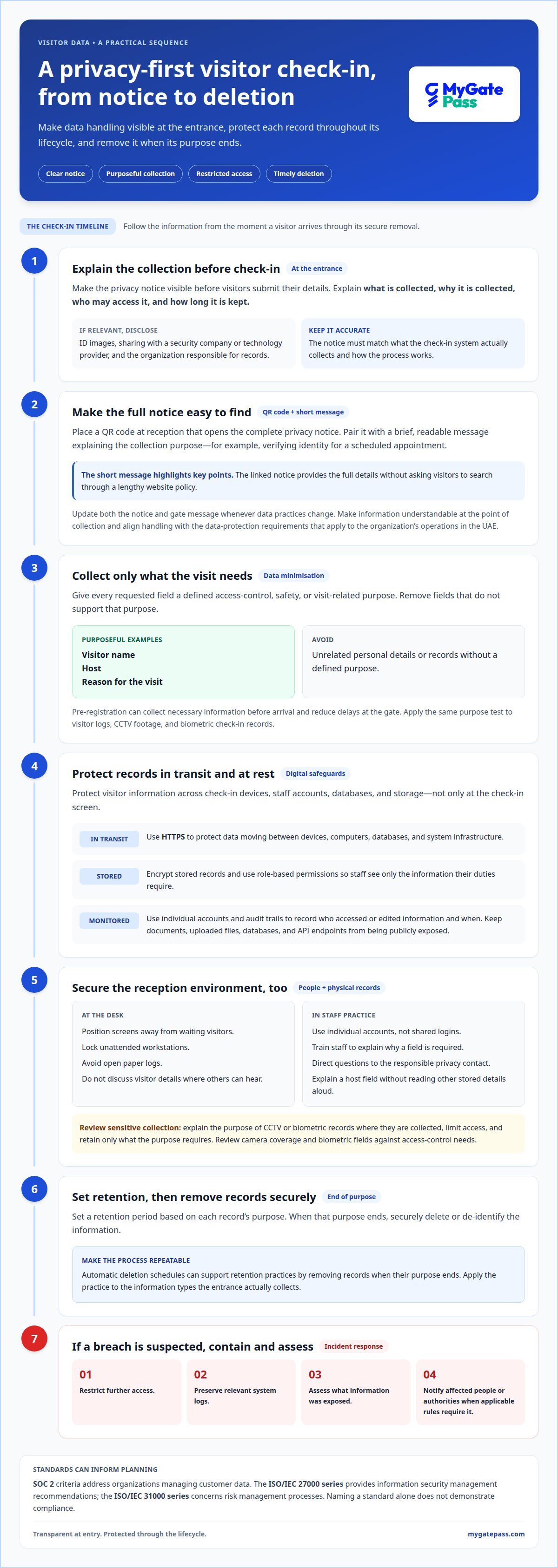
At a UAE entrance, explain data collection before check-in begins. A clear privacy notice connects each requested detail to its purpose and explains how the site handles it.
Minimising Visitor Data Collection
Data minimisation means collecting only the details needed for a defined visit or access-control purpose. A workplace, for example, may need a visitor’s name, host and reason for the visit, but not unrelated personal details. Pre-registration can gather necessary information before arrival and reduce delays at the gate. Keep every field purposeful, and remove requests that do not support entry, safety or the visit itself.
Aligning Privacy Notices With Data Practices
A privacy notice should explain what the entrance collects, why it is collected, who can access it and how long it is kept. If check-in captures an ID image or shares records with a security company or technology provider, say so plainly. A QR code can open the full notice, while a short gate message highlights key points. Update both whenever practices change.
Securing and Deleting Visitor Records
Protect records with encryption and access controls that let staff view visitor data only when their role requires it. Set a retention period based on each record’s purpose, then securely delete or de-identify the data when that purpose ends. If a breach is suspected, restrict further access, preserve relevant system logs, assess what information was exposed, and notify affected people or authorities when applicable rules require it.
Protecting Visitor Logs, CCTV, and Biometric Check-In
In UAE facilities, apply clear privacy practices to identifiable visitor logs, CCTV footage and biometric check-in records. Explain the purpose of each collection where it happens, limit access, and retain only what that purpose requires. For example, a paper logbook left open at reception can expose earlier visitors’ details to people waiting to check in. Review camera coverage and biometric fields against access-control needs, and avoid collecting records without a defined purpose.
Information security and risk management standards
Protect visitor records across devices, staff accounts and storage, not just at the check-in screen. Risk management standards can help organizations identify weak points and plan suitable security measures. A structured approach to securing visitor personal information connects technical safeguards with the everyday way reception teams handle records.
Visitor Management Software and Cloud Storage
Visitor management software records check-ins digitally, while cloud storage can support remote access, scalability and frequent updates. These features help teams manage visitor information across locations, but do not replace careful configuration. Use HTTPS to protect data moving between check-in devices, computers, databases and system infrastructure. Encrypt stored records and limit access to staff who need it for their roles. Keep documents, uploaded files, databases and API endpoints from being publicly exposed.
Privacy-Focused System Features
A privacy-focused management system combines limited access, encryption and clear records of how information is handled. Role-based permissions help ensure reception staff see only what their duties require, while audit trails can record who accessed or edited visitor information and when. Automatic deletion schedules can support retention practices by removing records when their purpose ends. These controls offer practical ways to support securing visitor personal information in day-to-day use.
Securing Reception Desks and Digital Systems
Reception teams can reduce exposure by positioning screens away from waiting visitors, locking unattended workstations and avoiding open paper logs. In digital systems, use individual accounts and role permissions rather than shared logins. The SOC 2 criteria address organizations managing customer data. ISO/IEC 27000 series standards provide information security management recommendations, while the ISO/IEC 31000 series concerns risk management processes. Standards can inform planning, but naming one alone doesn’t demonstrate compliance. To support a more organized check-in workflow, explore digital visitor management as part of your entry process.
Visitor privacy communication via QR codes and messages
A QR code at reception can give visitors direct access to a privacy notice before they submit their details. Pair it with a short message explaining the collection purpose, such as verifying identity for a scheduled appointment. Keep the message easy to read on a phone, and make the full notice available without requiring visitors to search a lengthy website policy.
In the UAE, organizations should align visitor data handling with the data-protection requirements that apply to their operations. Explain what information is collected, how it will be used, who may receive it and how long it will be stored. Make these details easy to understand at the point of collection, rather than relying only on a lengthy policy visitors may not see before check-in.
A security policy should reflect the actual check-in process. If a visitor message says only names are collected but the system also captures identity documents or visit reasons, revise the notice. Identify the organization responsible for the records and explain whether security teams or technology providers can access them. A QR code can link to the complete policy, while a brief gate notice highlights its most relevant points.
Privacy communication also happens in conversations at the entrance. Train reception staff to explain why a field is required, avoid discussing visitor details where others can hear, and direct questions to the responsible privacy contact. For example, a receptionist can explain that a host’s name helps route an arrival without reading other stored information aloud. Review staff scripts and written notices together whenever visitor management practices change, so spoken explanations, digital messages and policies remain consistent.
Encryption of stored personal information
Encryption makes visitor records unreadable without the right key, reducing exposure if storage or a device is accessed improperly. Apply it to information at rest in databases, backups and exported files, as well as during transfer between check-in devices and the visitor management system. HTTPS helps protect information moving between systems. These are separate protection points, so securing only the database leaves data in transit exposed.
For stored records, encryption should cover sensitive fields, not just an entire disk. Driver’s licence numbers and street addresses are examples of high-risk information that may receive additional encryption, such as AES encryption. Limit access to decryption keys to authorised roles, and keep keys separate from the records they protect. This strengthens protection for securing visitor personal information if someone obtains a stored file.
Encryption and anonymisation serve different purposes. Encryption protects a person’s identity while allowing authorised staff to retrieve the record when needed. Anonymisation removes identifying details when a building system only needs operational information, such as visitor volume by time period. Choose the approach according to whether identifying a visitor remains necessary for the purpose.
Decide what happens to encrypted records at the end of their retention period. Delete records and associated copies using the system’s secure deletion process, and document who handles the task. Encryption does not replace access controls, retention rules or incident response. If exposure occurs, preserve relevant logs, assess the affected records, and determine whether notification is required under applicable regulatory requirements.
For a digital check-in workflow that supports managed visitor records, explore the MyGatePass Visitor App and its role in your entry process.
Businesses across the UAE may collect and store visitor information through QR code, digital or mobile entry processes, so encrypt collected visitor data and limit access to authorised personnel.
MyGatePass: MyGatePass Visitor App
MyGatePass Visitor App offers a practical way for organizations to move visitor check-in into a digital workflow. It is part of a wider visitor and facility management platform that streamlines visitor operations through dedicated visitor and security apps and a centralized admin dashboard.
For UAE sites that need verified visitor identification, the UAE Pass Integration Module connects the platform with UAE Pass. Together, these offerings bring visitor entry, security workflows and administration into a connected system. They support organized management, while clear notices, appropriate data collection and sound retention practices remain essential to protecting visitor records.
Planning a more connected visitor management process? Contact MyGatePass to discuss your requirements.
Make Privacy Part of Every Visit
Strong privacy practices are not a one-time configuration. They need to keep pace with changing entry workflows, visitor needs and the way teams use information day to day. Assign clear ownership for reviewing notices and system settings, and include reception staff in those discussions. Their experience can reveal where a process is unclear or collects details that no longer serve a purpose.
That ongoing attention makes securing visitor personal information part of a thoughtful arrival experience, not a technical task hidden from view. It also helps visitors understand how their information supports their visit, building trust alongside efficient access.
If you’re ready to shape a more connected visitor management process, contact MyGatePass to discuss how its digital ecosystem can support your organization. A clearer, more welcoming entry experience can start with the next improvement you make.
Frequently Asked Questions
What visitor personal information should businesses collect, and what should they avoid collecting?
Collect details that serve a specific visit purpose, such as a visitor’s name, host, appointment time or access requirement. A delivery driver may need a delivery reference, while a scheduled guest may need a host’s name. Avoid fields that do not help manage the visit, and do not make optional details seem necessary for entry. Review fields whenever check-in processes change.
What privacy notices and consent are required when collecting visitor personal information?
At collection, give visitors a clear notice explaining the purpose, information requested, intended use and how to raise a privacy question. Consent is a separate issue: don’t treat a displayed notice as consent, or assume every check-in requires the same consent process. In the UAE, the applicable requirements depend on the organization’s circumstances and relevant data-protection rules, so design notices and consent flows for the actual activity.
What are the risks of collecting visitor personal information, and how can data breaches be prevented?
Excessive or exposed details can create risks such as impersonation, unwanted disclosure or misuse of identity information. Reduce exposure by limiting printed lists, clearing temporary downloads from reception devices, and training staff not to share check-in details in open conversations. If an incident occurs, restrict access, preserve relevant records, establish what information was affected, and follow applicable response and notification requirements.
How can visitor management software vendors be evaluated for privacy and security?
Evaluate a system through realistic scenarios, not feature names alone. Consider whether administrators can assign role-based permissions, review access activity, set retention rules and manage record deletion. Ask how the system protects data in transit and storage, handles exported files, and identifies service providers that may process information. Clear explanations of these controls help you assess how well the system fits your organization’s visitor workflow and privacy practices.


