

Office security protects people, property, information, and daily operations from unauthorized access and disruption. Common security breaches in office buildings include tailgating through controlled entrances, break-ins, theft, vandalism, phishing, outdated software, and misconfigured access settings. These risks often overlap: a gap in a process or technology can turn a routine delivery, visitor check-in, or software update into a weak point.
A secure office should also be easy to use. Staff, visitors, and delivery teams need to move through the building smoothly, while access to private areas and information remains controlled.
This guide explains what office security covers and how breaches happen, from weak visitor controls to gaps in digital protection. It also outlines practical ways to reduce risk through clear access processes, effective oversight, and well-managed security settings, helping make the building welcoming without leaving avoidable openings.
Key Takeaways
- Strong access controls help prevent unauthorized entry; clear visitor check-in and access permissions make everyday movement easier to manage.
- Office security covers both people and information, including risks such as theft, phishing, visitor-management failures and data breaches.
- Thoughtful camera placement and attention to vulnerable entrances can help deter break-ins, theft and vandalism, while supporting incident reviews.
- Outdated software and incorrect settings can leave security gaps, so regular technology reviews and careful configuration are important.
1. Access control systems
Access control determines who can enter an office building and which areas they can use. Key cards and biometric identification, such as fingerprint scans, can restrict entry to authorized employees. A broken lock or outdated access-card record can undermine these safeguards and lead to one of the common security breaches in office buildings: unauthorized entry.
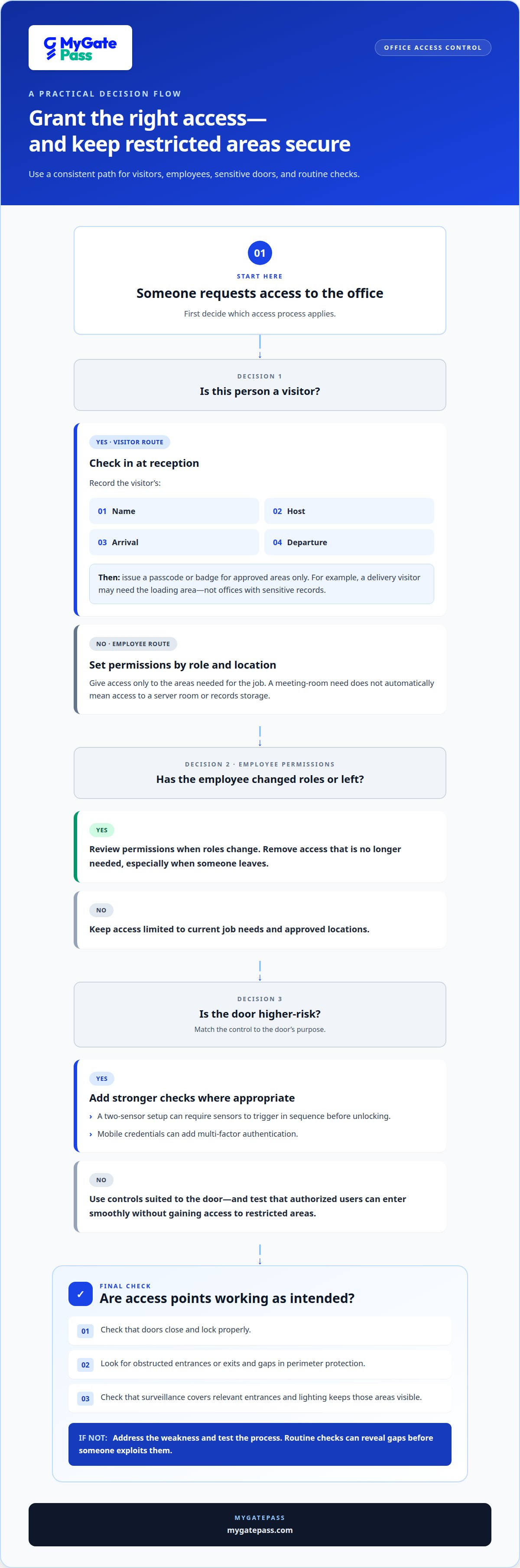
Standardize visitor check-in at reception. Record each visitor’s name, host, arrival, and departure, then issue a passcode or badge that grants access only to approved areas. A delivery visitor, for example, may need the loading area but not offices containing sensitive records. Consistent procedures help staff recognize expected guests and notice unapproved movement.
Set permissions by role and location. Employees who need access to a meeting room may not need entry to a server room or records storage. Review permissions when someone changes roles or leaves, and remove access that is no longer needed. Restricting sensitive areas also reduces the chance that misplaced credentials will expose company assets.
Inspect the property perimeter and access points during routine building checks. Look for obstructed entrances or exits, gaps in perimeter protection, and doors that do not close or lock properly. Check that surveillance covers relevant entrances and that lighting keeps these areas visible. Regular checks can reveal weaknesses before someone exploits them.
For higher-risk doors, a two-sensor setup can require sensors to trigger in sequence before unlocking. Mobile credentials can add multi-factor authentication, making access harder to misuse if a device or login is compromised. Match each control to the door’s purpose and test the process, so authorized users can enter smoothly without gaining access to restricted areas.
2. What is office security?
Office security combines measures that protect people, physical spaces, devices, and information. A breach might involve stolen equipment, unauthorized entry, a visitor wandering beyond reception, a phishing email, or exposed company data. Any of these incidents can disrupt routine operations and put employees, clients, or business records at risk.
Physical and digital threats can overlap. An unattended delivery door, for example, may let someone inside, while a deceptive email could expose login details. Security systems, clear visitor protocols, employee awareness, and controlled access each address a different weakness. No single measure covers every threat.
Insider threats also require attention. A current or former employee might access sensitive files without authorization, remove property, or deliberately disrupt operations. Limit data access to job needs, update permissions when roles change, and provide a clear way to report suspicious activity. Workplace violence, harassment, fires, and medical incidents also require response procedures, not just entry controls.
Conduct an annual security threat assessment of the office and its facilities. Map entry points, visitor routes, sensitive records, connected systems, and incident-response responsibilities. Rank risks by likely impact, then address practical gaps such as shared credentials, unchecked visitors, or unclear escalation steps.
In the UAE, applicable security requirements depend on the emirate, property, and information handled. Establish the relevant building and data-protection obligations before setting office procedures. One checklist may not cover every location or business.
Office security system and prevention costs in the UAE are provided after a quote request. They depend on factors such as building size, entry points, existing technology, and the level of integration required.
There is no single frequency that describes every office breach. Available figures indicate that 28% of businesses saw physical security incidents increase in recent years, while 94% of businesses fell victim to phishing attacks in 2023. These figures are not specific to UAE offices, so use them as context, not a local incident rate.
3. Break-ins, theft and vandalism
A forced entrance can result in stolen laptops, damaged doors, missing equipment, and interrupted operations. The financial impact includes replacing assets and restoring work areas, as well as time lost while staff report and investigate the incident. Clear procedures for reporting missing property help management identify patterns and respond consistently.
Visible cameras may deter as many as 60% of would-be intruders. Place cameras to cover entrances, exits, reception, storage areas, and building perimeters. Position them to capture useful views of doors and movement, not just empty corridors. CCTV can also help detect suspicious activity and provide footage for an incident review.
Pair surveillance with detection measures. Door and window sensors can alert building teams to unauthorized entry, while motion detectors can flag activity in restricted areas. Glass-break sensors can detect a possible forced entry through a window. These tools work best when alerts have a clear response path, including who receives them and how they communicate the incident.
Access control systems can help prevent unauthorized entry, but they also need to support daily operations. Review who can enter storage rooms and other areas where assets are kept, and remove permissions that are no longer needed. Secure delivery points, too: a door left open for a courier can create an easy route into the office.
Vandalism may involve damaged signs, walls, windows, or shared equipment. Record damage promptly, note its location and timing, and preserve relevant camera footage. These records can help identify repeat locations and guide improvements. Review lighting and camera coverage around vulnerable areas, such as a poorly visible side entrance.
Physical security incidents increased in recent years for 28% of businesses. That figure highlights why prevention and detection need to work together: visible cameras, working sensors, clear reporting policies, and timely communication can help teams respond before further damage occurs.
4. Outdated software and misconfigured settings
Software that manages door permissions or connected cameras can become a weak point when updates are missed. Unpatched systems may expose vulnerabilities, while incorrect settings can leave accounts active or allow unauthorized access to sensitive data. For example, a former employee’s enabled login could provide access after their role ends.
Cybersecurity breaches affecting access control include phishing, malware, stolen credentials, and unauthorized network access. An attacker who obtains an administrator’s login may change permissions or interfere with connected security systems. Strong passwords, multi-factor authentication, secure network protocols, and limited administrator access can reduce these risks.
Schedule a quarterly review of security technology. Confirm that software is current, access settings match employee roles, and camera feeds cover their intended areas. Test the procedure for disabling a lost credential, too. Record the review and any corrective action to help teams track recurring gaps and protect operations.
Outdated equipment can also weaken protection. A camera with an obstructed view, a failing door sensor, or an unreliable access reader can create blind spots. Include each device in maintenance records, note faults, and prioritize repairs according to the area’s sensitivity and the equipment’s role.
Procedures need regular maintenance, too. Review emergency contact lists, escalation steps, and visitor instructions whenever building operations or responsible staff change. Directions to an old reception point can confuse visitors, while an obsolete emergency number can delay communication during an incident. Keep one current version available to relevant staff.
These checks help limit security gaps that can lead to operational disruption or financial loss. To make visitor processes easier to manage, streamline visitor check-in workflows alongside regular technology reviews.
MyGatePass: MyGatePass Security App
MyGatePass Security App gives security personnel a dedicated digital tool within a broader visitor and facility-management system. It supports a more organized approach to security workflows, while the MyGatePass Admin Dashboard provides a centralized place to manage operations.
For buildings that need clearer visitor processes, MyGatePass Visitor App supports visitor management, and the UAE Pass Integration Module enables verified visitor identification. These tools help teams coordinate visitor information and security operations digitally. They complement physical security measures but do not replace cameras, building inspections, or cybersecurity practices.
If you’re reviewing office access and visitor workflows, contact MyGatePass to discuss your requirements.
Make security part of everyday operations
A practical next step is to align building access and visitor processes with the way your team works. Assign clear responsibility for reviewing permissions, updating procedures, and recording incidents. This keeps security decisions visible as staff, visitors, and business needs change.
Common security breaches in office buildings often emerge when everyday processes and oversight do not align. Digital tools can help organize these workflows, while physical safeguards and staff awareness remain essential to a complete approach.
MyGatePass offers the MyGatePass Visitor App, MyGatePass Security App, and MyGatePass Admin Dashboard to support visitor and facility management. Consider how these tools fit your building’s access and operational needs, then take the next step toward a more coordinated process.
Contact MyGatePass about office security to discuss your requirements and explore a practical path forward.
Frequently Asked Questions
What is office security?
Office security combines the processes and safeguards that protect a workplace, its occupants, and its information. It includes physical measures, such as controlled entry, and digital practices, such as protecting work accounts. A building may need procedures for an unexpected visitor, a suspicious email, and a misplaced company laptop, with a clear reporting route for each situation.
How Should Employees Be Trained to Support Site Security?
Train employees to recognize risks and respond with simple, repeatable actions. Use practical examples: report a door propped open, avoid sharing credentials, and forward suspicious messages through the company’s reporting process. Explain what to do if they see someone without a visible visitor pass. Scenario-based exercises can help employees remember whom to notify without putting themselves at risk.
What are the most common security breaches in office buildings?
Common security breaches in office buildings include unauthorized entry, theft, vandalism, phishing, malware, and exposure of company data. Some incidents start physically, such as when an unapproved person follows an employee inside; others start digitally, such as when a worker enters login details on a deceptive page. Incident records can help building teams spot recurring patterns and strengthen the relevant process.
How do unauthorized visitors and tailgating compromise office building security?
Tailgating occurs when someone follows an authorized person through a controlled entrance without completing the normal check-in process. They may reach shared work areas, approach private offices, or access unattended property before anyone notices. Employees can avoid holding secure doors for unknown visitors and direct guests without passes to reception. A calm, consistent procedure helps protect entrances without escalating the encounter.
What are common office building break-in and theft methods?
Break-ins may exploit an unsecured door or window, a poorly monitored entrance, or a delivery point left open. Theft can also occur without forced entry, such as when a laptop is left unattended in a meeting room or equipment is removed during a busy move. Keep valuable items out of public view, secure rooms after use, and report damage or missing property promptly.
How do lost or stolen access cards create security risks?
A lost access card may let another person enter areas assigned to its owner, especially if staff do not report it promptly. Notify the designated building contact so the credential can be disabled, then review relevant entry records for unfamiliar activity. Request a replacement through the established process, and never lend a card to a colleague or visitor, even for a brief task.


