

Moving from spreadsheets to a VMS is easier when you begin with the visitor process, not a bulk copy of old records. When visitor details sit across workbooks, email threads, and separate files, it can be difficult to spot duplicate or incomplete entries. Teams may also worry that a new check-in process will slow arrivals.
That hesitation makes sense. A successful migration keeps the records and routines your team relies on while making registration more consistent. First establish what information you need, who uses it, and what should happen at each step of a visit. That way, you can improve the workflow instead of transferring old workarounds unchanged.
This guide covers a practical migration plan, from reviewing records to testing the new workflow before rollout. It also explains what to assess in a VMS, including security, usability, administration, and integrations. For organizations in the UAE, a centralized dashboard connecting visitor and security workflows may help bring separate processes into one view. UAE Pass integration may also be relevant, depending on your requirements. The goal is a more organized entry experience without unnecessary complexity.
Key Takeaways
- Clarify that this guide focuses on visitor management systems, then define the visitor journey and information your team needs to manage.
- Make moving from spreadsheets to a VMS more manageable by inventorying, cleaning, mapping, and testing records before rollout.
- Compare spreadsheets and a VMS based on access, consistency, oversight, and how easily each fits your changing needs.
- Start with one defined visitor workflow, assign clear owners, and gather feedback before expanding the rollout.
- Assess workflow fit, usability, integrations, and administration, including how visitor, security, and dashboard capabilities can work together.
Moving from spreadsheets to a VMS starts with the visitor workflow
Before transferring records, define the process the new system needs to support. A visitor management system is software for recording, processing, and overseeing visitor access, from a planned visit through arrival and departure. A spreadsheet can store names and dates, but it does not coordinate the steps, responsibilities, and updates involved in managing a visit.
A visitor VMS manages the visitor journey and its access records; a digital spreadsheet stores information in rows and columns. The acronym VMS can also mean vendor management system, which covers a different business process. This guide focuses on visitor management, a category described in this visitor management system overview.
As a process grows, the same guest may be entered more than once, fields may vary between workbooks, or staff may be unsure which file is current. When records are split across email and spreadsheets, administrators may also have limited visibility into who was expected, who arrived, and whether a visit has ended. Start by tracing the workflow, not by choosing a file format.
Which visitor processes should leave the spreadsheet?
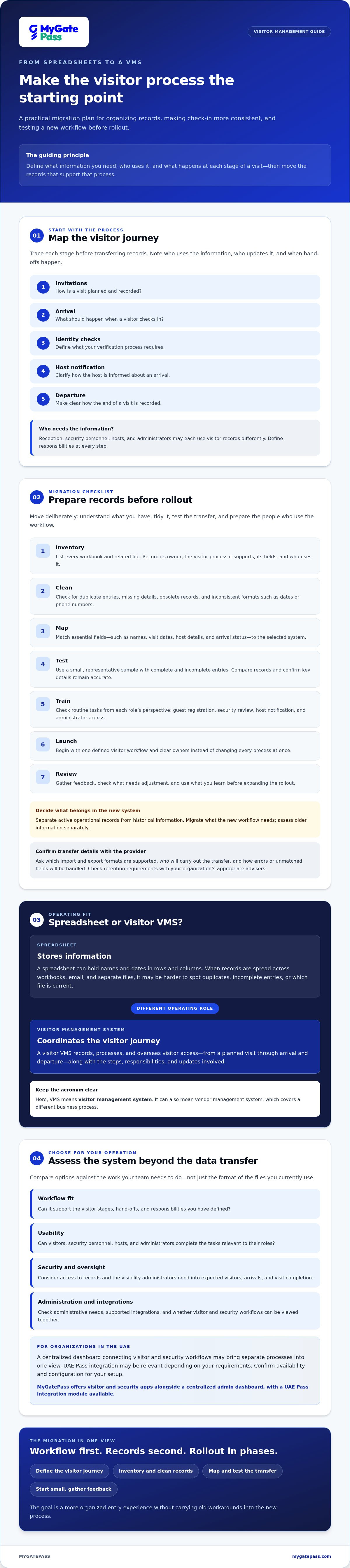
Map each stage before deciding what to transfer: invitations, arrival, identity checks, host notification, and departure. For each stage, note how reception, security personnel, hosts, and administrators use the records. Record who updates each detail and when. This makes hand-offs and missing information easier to identify before they interrupt check-in.
Separate active operational records from historical information. Migrate the records the new workflow needs, and assess older information separately rather than assuming every row belongs in the new system.
What should a visitor VMS improve first?
Prioritize changes your team can observe: more consistent registration, clear responsibility for each step, and easier retrieval of visitor records. Consider each role in the process. What must visitors provide? What do security personnel need to review? What information do administrators need to oversee?
For identity verification, define what your process requires and check which capabilities fit your setup. MyGatePass offers visitor and security apps alongside a centralized admin dashboard, with a UAE Pass integration module available. Read more about UAE Pass integration for buildings; confirm availability and configuration against your requirements.
How to prepare visitor spreadsheets for a safe VMS migration
Moving from spreadsheets to a VMS is more manageable when the transfer follows clear checkpoints: inventory, clean, map, test, train, launch, and review. Before transferring information, check why each field exists, whether it is accurate, who should access it, and whether it still needs to be retained. Confirm applicable retention requirements with your organization’s appropriate advisers instead of assuming old spreadsheet practices should continue.
Audit and map spreadsheet fields
Start by listing every workbook and related file. For each one, record its owner, the visitor process it supports, the fields it contains, and who uses it. Check for duplicate entries, missing details, obsolete records, and inconsistent formats, such as dates or phone numbers entered in different ways. A published visitor policy can offer useful prompts about defining procedures around practical needs such as access and protection as you prepare visitor spreadsheets.
Next, map essential fields to the selected system. Decide how names, visit dates, host details, and arrival status should be represented. Ask administrators which optional fields support an actual workflow and which can be left behind. Before committing to a transfer, ask the provider which import and export formats are supported, who will carry out the transfer, and how errors or unmatched fields will be handled.
Test the migration before changing daily check-in
Use a small, representative sample that includes both complete and incomplete entries. Compare the original records with their migrated versions, check that key details remain accurate, and confirm that excluded fields were left out intentionally. Then test routine tasks from each role’s perspective: guest registration, security review, host notification, and administrator access. A useful test verifies not only the data transfer but also that people can complete the workflow.
Before launch, train the staff who will use the new process and give affected hosts clear instructions. Choose a launch point, assign someone to resolve issues, and keep a controlled fallback until the team confirms the new check-in workflow works as expected. After launch, collect feedback and record discrepancies so the process can be adjusted without returning to scattered, competing files.
- Inventory: List workbooks, owners, fields, and dependent processes.
- Clean and map: Resolve data issues and agree which fields belong in the new workflow.
- Test and train: Validate sample records and prepare users before go-live.
- Launch and review: Keep a controlled fallback, monitor issues, and refine the process.
If you are assessing how visitor-facing, security, and administrative workflows could connect, explore the MyGatePass visitor management platform and confirm the relevant import options and configuration for your needs.
Spreadsheet versus visitor management system: compare the real operating fit
A spreadsheet can be a practical starting point for a narrow visitor process with few users and clear ownership. As requirements grow, however, separate copies, manual updates, and limited role-based oversight can make consistent handling harder. A visitor management system is designed around the visitor process, but its value depends on how well its workflows fit your operation.
Choose the tool that fits the workflow: spreadsheets organise visitor information, while a visitor VMS can structure how teams record and oversee visitor access. Compare the day-to-day experience, not just the feature list.
| Area | Spreadsheet | Visitor management system |
|---|---|---|
| Setup | Can be quick to start if fields and process are simple. | Requires workflow configuration and decisions about roles and records. |
| Concurrent access | Shared editing and version handling depend on the tools and practices in use. | Assess how different users access the current visitor information. |
| Process consistency | Users may enter information or follow steps differently. | Check whether registration and review steps can follow a defined process. |
| Oversight | Visibility may depend on file access, updates, and manual checks. | Evaluate what administrators can oversee and retrieve centrally. |
| Scalability | May remain workable for a small, stable process; coordination can become harder as needs expand. | Assess whether workflows and administration can accommodate expected growth. |
When can spreadsheets remain a reasonable option?
A spreadsheet may still fit a low-volume process with one clear owner, limited access needs, and few hand-offs. Keeping one is not automatically a problem. The team still needs disciplined permissions, version control, and record handling so staff know which file is current and who may view or update it. Reassess the approach if these practices become difficult to maintain.
What should a visitor VMS evaluation include?
Test registration, security review, administration, reporting, and any integrations your workflow requires. Consider the experience for guests and staff: can each role get the information it needs without unnecessary steps? MyGatePass includes visitor and security apps with an admin dashboard; confirm which capabilities and configuration match your requirements. For related gate-pass considerations, see the digital gate pass apps guide.
Use realistic scenarios during evaluation: a planned guest, an arrival requiring security review, and an administrator locating a record. Moving from spreadsheets to a VMS makes sense when the system supports these responsibilities more clearly than your current setup, not simply because it has more features.
Plan a phased VMS rollout that keeps visitor check-in moving
A controlled rollout gives the team room to learn without changing every visitor process at once. Choose one defined workflow for the pilot, such as pre-arranged guest visits, and agree what success looks like before configuration begins. Moving from spreadsheets to a VMS works best as a managed change: test the process, resolve friction, then expand using what the team learned.
Assign clear owners so key tasks do not fall between teams:
- Configuration: Set up the agreed workflow and roles.
- Data quality: Check migrated records and flag gaps or mismatches.
- Staff communication: Explain what is changing and where to get instructions.
- Testing: Run routine and exception scenarios before cutover.
- Approvals: Confirm the process is ready to launch and define who can approve changes.
Prepare teams for the new visitor workflow
Make training relevant to each person’s tasks. Visitors need clear registration instructions. Security personnel need to know how to review arrivals and handle exceptions. Hosts need to understand how they will be notified, and administrators need to know how to manage records and permissions. Keep guidance concise and name a contact for questions or escalation.
During the pilot, gather feedback from each role. If staff are unsure which record to use or what to do when a host cannot be reached, fix the instructions or workflow before expanding. Track whether users complete the process consistently, what staff report, and whether authorized users can find the records they need.
Protect continuity during cutover
Set a cutover point and tell everyone which system is the current source of truth. Avoid an open-ended period in which staff update both spreadsheets and the new system, since the records can diverge. Define a limited fallback for an outage or incomplete migration, identify who may use it, and document any visitor details handled that way so they can be reconciled later.
Review access permissions before launch. Once the new workflow is established, remove obsolete spreadsheet sharing where appropriate, while following your organization’s record-handling decisions. Expand only after the pilot team confirms that the process is usable and that issues have a clear resolution path.
Planning a visitor workflow pilot? Explore MyGatePass visitor management options and assess which configuration fits your team’s roles and rollout needs.
Choose a VMS that connects visitor, security, and admin workflows
Your migration plan gives you a basis for building a practical shortlist. Check whether a system supports the visitor journey you defined, is straightforward for each user group, fits required integrations, and gives administrators an appropriate way to oversee records and access. A polished interface matters, but it also needs to work for people registering visitors, reviewing arrivals, and managing the process.
MyGatePass offers a Visitor App, Security App, and Admin Dashboard, bringing visitor-facing, security, and administrative workflows into one software ecosystem. A UAE Pass integration module is also available for verified visitor identification. Confirm which features and integrations are available for your configuration, then assess them against your organization’s requirements. Delivery management and staff attendance are related modules, not prerequisites for a visitor-record migration.
Questions to ask during a VMS demonstration
Bring representative records and everyday scenarios to the discussion. Ask the provider to explain the migration process, including who handles each step and what your team needs to prepare.
- Which export formats and import options are supported for our current visitor files?
- How will you identify or handle duplicate, incomplete, or unmatched records?
- Can you demonstrate visitor registration, security review, host notification, and administrator tasks?
- How do user roles and permissions work, and which integrations are available for our configuration?
- What onboarding support and configuration steps are included, and what responsibilities remain with our team?
- How can we test exceptions, such as a visitor whose host is unavailable or whose details need correction?
Look for direct answers rather than assumptions. If a capability is essential, ask to see it in the workflow and confirm any dependencies before making a decision.
Move from shortlist to a practical next step
Before requesting a demonstration, write down your must-have workflows, migration questions, and pilot success measures. For example, decide how you will check whether staff follow the registration process consistently, feedback is addressed, and authorized users can retrieve the records they need. This gives the evaluation a clear purpose and makes it easier to compare options fairly.
Moving from spreadsheets to a VMS does not require choosing the most complex platform. It means finding a workable fit for visitor registration, security handling, and administration, then confirming the details with the provider. MyGatePass is one software option for connected visitor and facility management workflows. Explore MyGatePass to review the platform and consider how its capabilities may align with your organization’s requirements.
Make your next visitor workflow easier to manage
A smooth move from spreadsheets starts with the process, not the platform. Define how visitors should be registered and reviewed, prepare only the records your team needs, and test a focused workflow before expanding. Clear ownership and a practical fallback help keep check-in moving while staff adapt.
That is the principle behind moving from spreadsheets to a VMS: build a consistent visitor journey while making information easier for the right people to manage. MyGatePass brings together visitor and security apps with a centralized admin dashboard. UAE Pass integration is available for verified visitor identification, while delivery management and staff attendance are related modules for broader operational needs. Confirm the features and configuration that suit your organization.
Once you have defined your priorities, take a considered next step. Explore MyGatePass and discuss your visitor-management workflow to assess how its capabilities may fit your requirements. A clear plan can make the transition more manageable and help create a welcoming, well-organized entry experience.
Frequently Asked Questions
What does VMS mean when moving from spreadsheets?
For visitor records, VMS means visitor management system: software for recording, processing, and overseeing visitor access. The abbreviation can also mean vendor management system, which handles a different business process. In this guide, it refers to visitor management. Unlike a spreadsheet, a visitor VMS is designed to support the steps and responsibilities involved in a visit, not just store information in rows and columns.
How do you move visitor data from spreadsheets to a VMS?
Start by inventorying the workbooks and identifying who owns them and which visitor processes depend on them. Clean duplicate, incomplete, outdated, or inconsistently formatted entries, then map essential fields to the new system. Moving from spreadsheets to a VMS should also include checking access permissions and record-handling needs, testing representative records and daily scenarios, training users, and launching with a defined review and fallback process.
Can a VMS import data from Excel spreadsheets?
Some systems may support spreadsheet imports, but formats and capabilities vary by provider and configuration. Do not assume an Excel workbook can be transferred directly or that every field will map automatically. Ask the provider which file types are supported, how fields are matched, who completes the transfer, and how errors or duplicates are handled. Test a representative sample and compare it with the source before relying on migrated records.
How long does it take to move from spreadsheets to a VMS?
There is no reliable fixed timeline for every migration. The effort depends on factors such as the number and condition of workbooks, how many workflows need configuration, the provider’s import options, and the amount of testing and staff training required. Ask the provider to clarify responsibilities and dependencies, then build a schedule around data review, testing, approvals, and a controlled launch instead of setting a date before assessing the work.
Is a visitor management system more secure than a spreadsheet?
Not automatically. Security depends on how each option is configured and managed. A VMS may provide role-based access or central administration, but confirm its available controls, permissions, and record-handling options with the provider. A spreadsheet also needs careful access management and version control. Compare the actual setup, who can view or change visitor details, and how your organization will manage those records.
What visitor information should we migrate into a VMS?
Migrate information needed for active visitor workflows, such as visitor details, visit date, host, and arrival status, if those fields support your process and the system can accommodate them. Review each field’s purpose, accuracy, access needs, and retention requirements before transfer. Separate active operational records from historical information, and do not copy every old row by default. Confirm applicable data-handling requirements with the appropriate advisers.
How can we avoid disrupting visitor check-in during a VMS migration?
Test the new workflow before changing daily check-in. Use sample records to verify registration, security review, host notification, and administrator access, then train each user group on its tasks and exception steps. Choose a clear cutover point and tell staff which system is the current source of truth. Keep a limited, documented fallback for outages or incomplete migration, and review pilot feedback before expanding the rollout.


