

What if a receptionist’s salary is only the most visible part of reception costs? The hidden costs of manual reception desk processes can spread across a team as staff log visitors, notify hosts, correct mistakes and search through paper records.
It’s easy to focus on the staffing line. But in UAE facilities, the full picture can also include time diverted from other work, check-in supplies and the effort needed to review or reconcile records. These costs are hard to see without a clear way to track them.
This article shows how to use your own operational data to estimate those costs and compare manual, digital and hybrid processes fairly. We’ll cover what to measure, where errors and delays add work, and how digital visitor management tools, including the MyGatePass Visitor App and Admin Dashboard, can make check-in activity more visible while keeping human support part of the experience.
Key Takeaways
- The hidden costs of manual reception desk processes extend beyond salaries to include staff time, repeated follow-up, record retrieval and process overhead.
- Map each step from visitor arrival to record keeping to find where repeated data entry and interruptions add work.
- Compare manual, digital and hybrid workflows by task ownership, staff involvement, visibility and how each handles exceptions.
- Use observations, staffing data and clearly stated assumptions to estimate operational costs. Keep unpriced risks separate from measured expenses.
- Digital visitor management can make check-in workflows more structured and visible, while reception and security teams continue to provide human support.
What are the hidden costs of manual reception desk processes?
The hidden costs of a manual reception desk include staff time, administrative friction and operational exposure beyond visible staffing expenses. Salary is the clearest budget line, but it doesn’t show how much time goes into registering visitors, finding records or following up on incomplete details.
Reception teams do more than process arrivals. They welcome guests, answer questions and help people feel expected and supported. That human service matters. The question is whether repetitive administration leaves enough time for it, and whether staff can find essential information when they need it.
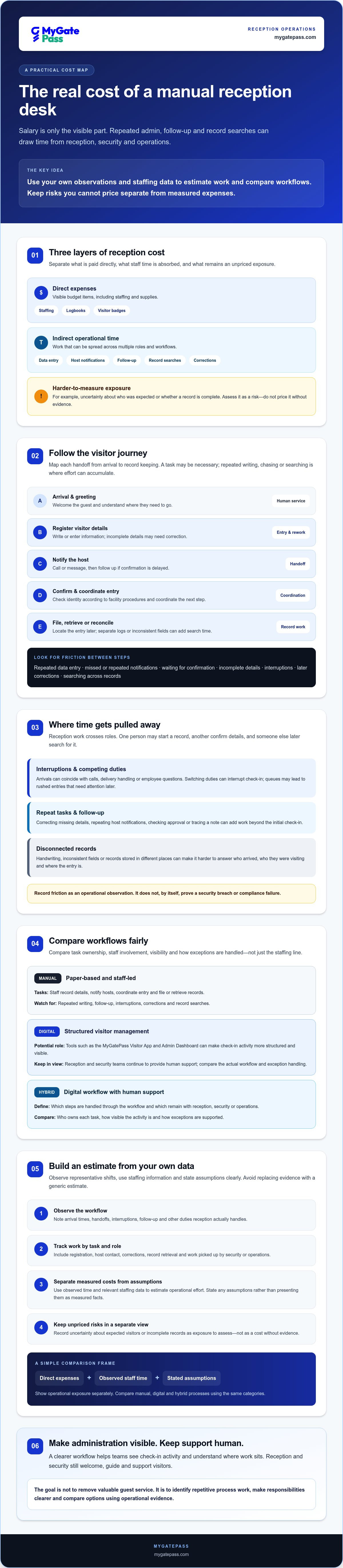
Separate costs into three categories. Direct expenses include staffing and supplies such as logbooks or visitor badges. Indirect costs include time spent on data entry, host notifications and record searches, including work picked up by security or operations colleagues. Harder-to-measure exposure may include uncertainty about who was expected or whether a record is complete. Treat that exposure as a risk to assess, not a cost to price without evidence.
Which reception activities create costs beyond salary?
Follow a visitor’s journey from arrival to departure. Staff may register details, notify the host, check identity according to facility procedures, coordinate entry and later retrieve or reconcile the record. Each step may be appropriate. Repeated writing, chasing a response or searching across separate logs is where administrative effort can accumulate.
Include delivery handling or recurring questions only if reception staff actually manage them. Then distinguish guest service from process work: greeting someone and helping them reach the right person is valuable human support, while copying the same information into multiple records may be avoidable friction.
Why do these costs stay hidden in facility budgets?
The work often crosses roles. Reception may start a visitor record, security may confirm details, and an operations colleague may later look for the log. When each task sits in a different workflow, no single budget line shows the total time involved or where a delay began.
Paper logs and disconnected records can also make workload difficult to review. A manager may see the final entry but not the interruptions, follow-up or corrections behind it. Tracking these steps creates a clearer baseline. For context, a visitor management system describes an electronic alternative to pen-and-paper visitor records, but the right choice depends on a facility’s needs and the human support it wants to retain.
Where do manual reception processes consume time and create avoidable overhead?
A visitor’s check-in can involve several handoffs: greeting them, recording details, contacting the host, waiting for confirmation, coordinating entry and filing the record. Each step has a purpose, but repeated information or manual follow-up can stretch the process. The hidden costs of manual reception desk workflows often build in the gaps between these steps.
One arrival may require a receptionist to write details in a log, call or message a host, then update the record when approval comes through. If the visitor’s name or host information is incomplete, staff may need to make another call or amend the entry. Copying the same details into separate records uses time that could otherwise go toward welcoming the next guest.
How do queues, interruptions, and repeat tasks affect capacity?
Reception rarely operates in isolation. An arrival peak can coincide with incoming calls, delivery handling or questions from employees. Switching between these duties can interrupt check-in, while a queue may prompt staff to rush through entries and revisit them later.
Look for specific rework: correcting missing details, repeating host notifications, confirming whether a visitor has approval, or tracing a note left for another team. Before changing the process, observe real workflows across representative shifts. Record arrival times, handoffs, interruptions and follow-up, and note when reception handles deliveries or other duties. This gives managers a grounded view of busy periods without relying on assumptions.
What can inconsistent visitor records mean for follow-up?
Paper logs and disconnected records can make a simple question harder to answer: who arrived, who were they visiting, and where is the relevant entry? Handwriting, inconsistent fields or records stored in different places may add time when staff need to check an event or reconcile information. That friction alone doesn’t prove a security breach or compliance failure.
Keep operational observations separate from legal conclusions. For UAE facilities, have qualified legal advisers review which data-protection obligations apply to the organisation and its visitor records before making claims about compliance. In the meantime, document what information is collected, who handles it, where records are kept and how staff retrieve them. That process map can reveal practical gaps without overstating legal risk.
If the review points to a need for more structured check-in records, explore how digital visitor management workflows could support reception and security teams while leaving human staff available for questions, exceptions and a warm welcome.
Manual vs digital reception: what changes, and what should stay human?
Moving from paper to software changes how repeatable steps are recorded and shared. It doesn’t remove the need for a welcoming person, sound judgement or a clear response when something doesn’t follow the usual path. The right choice depends on visitor volume, workflow, configuration and how a new system fits with existing processes.
| Area | Manual | Digital | Hybrid |
|---|---|---|---|
| Task ownership | Staff record and pass on visitor details. | Software supports digital registration and structured workflows. | Software supports repeatable steps; staff manage handoffs and exceptions. |
| Staff involvement | Staff guide visitors through most steps. | Staff remain available, with their role shaped by the setup. | Staff welcome guests and assist when a person needs help. |
| Visibility | Records may be spread across paper logs or separate files. | Administrative tools can provide a more central view of records and activity. | Digital records are paired with staff context and follow-up. |
| Exceptions | Staff assess and resolve issues directly. | Unusual cases still need a defined human response. | Staff handle judgement calls, complex needs and escalation. |
Which reception tasks can visitor management software support?
Digital visitor registration can give staff and security teams a more structured way to manage check-in information. An administrative dashboard can make records and workflow activity easier to review. MyGatePass offers visitor and security apps alongside an admin dashboard. Facilities considering its UAE Pass Integration Module should verify the current feature and exact identity-verification workflow before relying on it.
Keep the scope relevant. A Delivery Management System may be worth considering if reception also handles deliveries. Staff Attendance Tracking may fit if attendance is part of the same operational review. Neither needs to be included if those tasks sit elsewhere.
When is a hybrid reception model a better fit?
A hybrid approach can work well when a facility wants consistent records without making every guest navigate the process alone. Software can structure routine steps, while staff help visitors who need personal assistance, answer questions, use judgement or resolve exceptions. Define who takes over when an approval is unclear or a visitor needs extra support.
Before choosing, compare guest accessibility, arrival patterns, security-team responsibilities and the systems already in use. Consider the effort of configuring and maintaining a new workflow alongside the time it may make visible or reduce. The hidden costs of manual reception desk processes are only one part of the decision. Fit and service quality matter too. Software should support the reception team, not be treated as a replacement for every person or task.
How can you calculate the hidden costs of your manual reception desk?
Start with the work, not an assumed industry average. A practical audit of manual reception desk costs uses your own observations, staffing data and clearly labelled assumptions. Choose a baseline period that reflects normal operations, including busy and quieter periods. If the period is unusual, record why before using it as a comparison point.
What data should a reception-cost audit collect?
Track the process, not unnecessary visitor details. For each task, record its type, frequency, staff time, handoffs and any rework. Tasks might include registration, host notification, approval follow-up, record searches or delivery handling when reception manages deliveries. Note the shift or operating conditions to see whether workload changes with arrival patterns.
Keep measured observations separate from estimates. Use a simple log or spreadsheet with fields such as:
- Task and frequency: What happened, and how often during the observation period?
- Time and ownership: Which role handled it, and how much active staff time did it take?
- Handoffs and rework: Did another team member need to act, or was the task repeated or corrected?
- Evidence and assumptions: Was the time observed directly, drawn from staffing records, or estimated?
For a basic labour estimate, use: observed task time × frequency × relevant loaded hourly cost. If host notifications take a recorded amount of staff time and occur repeatedly, multiply the time per task by the observed frequency, then by the applicable hourly cost for the role. Use your organisation’s own cost basis in AED and state what it includes. Don’t treat the result as a guaranteed saving. It estimates labour associated with the observed work.
How should managers compare the results fairly?
Compare today’s workflow with a proposed manual, digital or hybrid process using the same task boundaries and observation conditions. Include the same roles and handoffs in both views. Mark opportunity costs, such as time redirected from other work, as estimates rather than cash expenses. Record operational risks separately and don’t assign them invented monetary values.
Include software subscription, setup or implementation inputs only when they’re verified for the specific proposal. Also note assumptions about configuration, existing systems and which steps staff will still handle. This keeps the comparison useful without overstating potential savings.
To assess a structured visitor workflow against your audit findings, explore MyGatePass visitor management as one option for your facility.
How can digital visitor management reduce manual reception overhead?
Digital visitor management can make check-in steps more structured and give facility teams clearer visibility into visitor and security workflows. This can help managers identify where information is recorded and who owns each step. It won’t resolve every exception or replace the need for human judgement, physical security personnel or welcoming reception staff. The aim is to support the team, not remove the human element.
MyGatePass provides visitor and security apps alongside an admin dashboard. Facilities can assess whether these tools suit their registration, security-team and administrative needs. The UAE Pass Integration Module may support verified visitor identification. Confirm its current availability and precise verification process before including it in a proposed workflow.
What should facilities check before choosing a visitor-management system?
Start with the actual workflow. Check whether a system can support the visitor registration steps your facility needs, whether security personnel can use it as intended, and whether administrators can access the oversight or reporting information they require. Confirm feature availability, UAE Pass processes and any required integrations directly with the provider. Don’t assume a feature or connection is included without verification.
Review data handling before rollout. Clarify what information the process collects, who can access it, how long records are retained and how access is managed. Ask qualified advisers to assess applicable UAE obligations for your organisation. A software workflow can help structure records, but it doesn’t by itself establish legal compliance.
How can a facility introduce digital check-in without losing hospitality?
Begin with a defined workflow, such as routine pre-arranged visitor check-in, and pilot it before expanding. Explain the process to reception and security teams, then gather feedback from staff and visitors. Look for unclear handoffs, confusing steps and cases where someone needs personal help. Use the findings to adjust task ownership and escalation paths.
Keep an accessible alternative for visitors who need assistance or can’t use the digital process. Reception staff can remain available to answer questions, welcome guests and respond to exceptions, while software supports repeatable administrative steps. If deliveries or staff attendance are part of the facility’s scope, assess those workflows separately rather than adding modules by default.
The hidden costs of manual reception desk processes are easier to evaluate when you compare them with a clearly defined alternative. Review the workflow, requirements and data-handling questions with your teams, then explore the MyGatePass platform for visitor and facility-management workflows.
Make your reception workflow clearer, one step at a time
The hidden costs of manual reception desk processes often sit in repeated administration, scattered records and time shared across teams. A practical audit helps show where that effort goes, while a fair comparison of manual, digital and hybrid workflows reveals which steps could be more structured.
Digital tools can support visitor, security and administrative workflows, but they don’t replace every reception task. Keep people available to welcome guests, assist with complex needs and handle exceptions. If you’re assessing MyGatePass, review how its connected software platform fits your facility’s needs, and confirm current features and the UAE Pass identity-verification workflow before making decisions.
Explore MyGatePass visitor and facility-management software as one option for making visitor processes more visible. Start with the workflow you’ve measured, ask your teams what would make check-in easier, and build from there. A clearer process can support smoother operations and a more welcoming experience.
Frequently Asked Questions
What are the hidden costs of a manual reception desk?
The hidden costs of a manual reception desk can include staff time spent registering visitors, notifying hosts, retrieving records, coordinating deliveries and correcting incomplete entries. Some effort can be measured by observing tasks; reduced capacity for welcoming guests or assisting employees is harder to price and should be assessed separately. Track your own workflow and staffing inputs rather than relying on generic savings claims or assuming every administrative task can be removed.
How do you calculate the cost of manual visitor check-in?
Track how long each check-in task takes, how often it occurs and which staff role handles it. Multiply observed task time by frequency and your organisation’s relevant internal labour-cost assumption. Record rework, such as correcting an incomplete entry, as a separate task so it isn’t counted twice. Document the observation period, roles included and assumptions used, and keep direct measurements distinct from estimates such as time redirected from other work.
Can a digital visitor management system replace a receptionist?
Not necessarily. Software can support repeatable steps such as digital visitor registration and security workflows, while reception staff continue to welcome guests, answer questions and handle exceptions. Some visitors may need personal assistance, and unusual situations still require human judgement. Assess each responsibility individually, then decide which steps suit digital support and which should remain staff-led. The right balance depends on the facility, visitor needs and operating model.
Is manual visitor registration a security risk?
Manual registration can make records harder to standardise, retrieve or review, but that alone doesn’t establish that a process is insecure or non-compliant. Risk depends on the facility’s procedures and how visitor information is managed. Review who can access records, where they’re stored and how long they’re retained. For legal or policy conclusions, ask qualified advisers to assess the requirements that apply to your organisation in the UAE.
What should a reception desk cost audit include?
Include visitor volume, task frequency, staff time, interruptions, handoffs, rework and time spent retrieving records. Add delivery handling or staff-entry tasks only if reception actually manages them. Observe busy and quieter periods that reflect normal operations, and avoid collecting personal details that aren’t needed for the audit. Label direct observations and estimates separately, then compare current and proposed workflows using the same task definitions.
Does digital check-in improve the visitor experience?
Digital check-in can make some steps more structured, but the experience depends on how the process is set up and supported. Provide clear instructions, consider accessibility and privacy expectations, and keep a staffed alternative for visitors who need help or can’t use the digital route. Test the workflow with visitors, reception staff and security personnel before expanding it, then use their feedback to clarify confusing steps and improve handoffs.
What should UAE facilities check before adopting visitor-management software?
Map the current workflow, then confirm which features are available and whether they fit your registration, security and administrative needs. If UAE Pass is relevant, verify the current integration availability and exact identity-verification workflow directly with the provider. Review data access, retention and security practices, and consult qualified legal or privacy advisers about applicable obligations. Software can support organised processes, but it doesn’t by itself guarantee compliance or remove operational responsibility.


