

What if an access record shows that a door opened but can’t tell you which credential was used, when it happened, or whether anyone reviewed the event? A reliable audit trail for building access connects identities, access decisions, timestamps, and follow-up, helping teams investigate events without piecing together scattered logs.
Manual records can be difficult to search or reconcile, while digital systems aren’t automatically complete or trustworthy. A sound process makes events easier to review while protecting personal data and limiting access to records.
This guide explains what a useful access audit trail should include and how to compare manual and digital recordkeeping. You’ll also learn how to establish practical review, privacy, and accountability practices. For UAE organisations considering connected visitor and security workflows, we’ll cover what to verify before choosing a platform, including which events it records and what search, export, permissions, and retention options it offers.
Key Takeaways
- A useful audit trail for building access connects an event to its time, location, and outcome. Include identity details only when they serve a clear purpose.
- Compare paper logs, spreadsheets, and digital tools by how easily staff can find records, correct mistakes, and identify who reviewed them.
- Make the process manageable by defining why records are needed, deciding which events to capture, and assigning responsibility for review.
- Collect only the personal information needed for your stated access-management purpose, and check the UAE privacy requirements that apply.
- Digital visitor and security workflows can help organise access information. Verify a platform’s recorded fields and audit features before choosing it.
Building Access Audit Trails: Definition and Purpose
An access audit trail is an organised record of access-related events and decisions that authorised people can review to understand what happened, where, and when. It provides a history to examine, not a barrier that prevents unauthorised entry by itself. An access control system determines who may enter a place and under what conditions. An audit trail documents relevant events and decisions made during that process.
These records differ from related tools. A live access-control system manages permissions and responds to entry attempts. A visitor list may show who was expected or checked in, but not necessarily the full sequence of events. An incident report documents a particular concern and its follow-up. An audit trail can help connect relevant records when someone needs to investigate an exception, answer a question, or identify where a process could be clearer.
For example, if a visitor’s approval is unclear, a reviewer may need to establish whether check-in was recorded, what decision followed, and whether entry or departure was logged. The records can help clarify the sequence, but they don’t explain a person’s intent or prove why an event occurred.
Which building access events might be recorded?
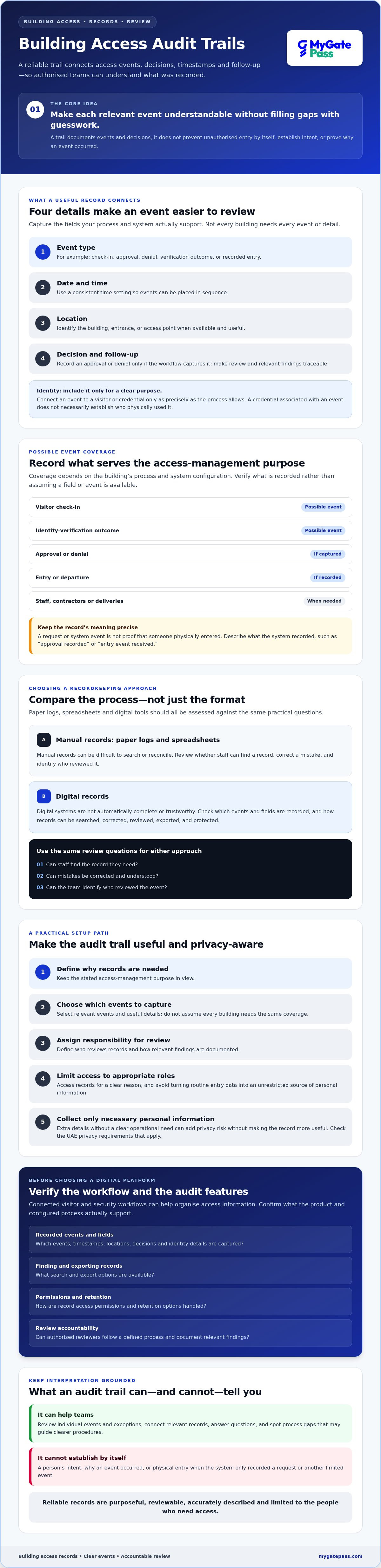
Depending on the building’s process, records may cover visitor check-in, an identity-verification outcome, approval, entry, or departure. Staff, contractors, and deliveries may also be included if the organisation needs those records for access management. Not every building needs to capture every event or detail. Coverage depends on the system and its configuration, so verify what is recorded rather than assuming a particular event or field is available.
Keep the purpose in view. A host or visit purpose may help explain an approval, but collecting extra personal details without a clear operational need can add privacy risk without making the record more useful.
Who uses an access audit trail?
Security teams can use an audit trail for building access to review individual events and exceptions, such as a denied request or a missing departure record. Facility managers can look for recurring process gaps, such as approvals that aren’t consistently documented. These patterns can guide improvements to procedures, but a log should be treated as an account of recorded activity, not proof of intent.
Authorised administrators can make reviews more consistent by following a defined process: access records for a clear reason, document relevant findings, and limit access to people with an appropriate role. This supports accountability without turning routine entry data into an unrestricted source of personal information.
What Should a Reliable Building Access Audit Trail Record?
A useful record should help an authorised reviewer understand an event without filling gaps with guesswork. For each relevant event, capture the details your process and system actually support:
- Event type: For example, check-in, approval, denial, verification outcome, or recorded entry.
- Date and time: Use a consistent time setting so events can be placed in the correct sequence.
- Location: Identify the building, entrance, or access point when that detail is available and useful.
- Decision: Record an approval or denial only if the workflow captures that outcome.
These are practical criteria, not a guarantee that every platform records every field. Check the configured workflow and product documentation before stating that a particular event, field, search function, or record is available. For broader guidance on maintaining useful physical security logs, see SDM Magazine’s best practices for security logging.
Identity, timestamps, and access decisions
Connect an event to the visitor or credential involved only as precisely as the process allows. A credential associated with an event doesn’t necessarily establish who physically used it. Likewise, an identity-verification outcome should describe what the system recorded, without implying more certainty than that result provides. Labels such as “approval recorded” or “entry event received” help reviewers distinguish system data from confirmed physical activity.
Consistent time settings and event labels make sequences easier to interpret, especially when records come from more than one workflow. If a system records an access request but not the door’s physical state, don’t describe the request as proof that someone entered.
Context, corrections, and accountability
A host, visit purpose, or exception note can help explain an event, such as a delivery being directed to a particular recipient. Collect these details only when they support a stated access-management need. Extra personal information can make records harder to manage without improving a review.
A complete access record is identifiable, time-stamped, contextual, and reviewable, while clearly separating recorded facts from assumptions. If a correction is needed, document what changed and why rather than presenting the corrected value as the original event. Whether a platform preserves that history depends on its capabilities, so confirm the correction process before relying on it. MyGatePass’s visitor and security workflows may help organisations assess how digital records could fit their process. Verify the specific fields and audit features directly at MyGatePass’s access management platform.
Manual Logs vs Digital Access Trails: Which Approach Fits Your Building?
The right recordkeeping method depends on how your building operates, not simply on whether the tool is paper-based or digital. A low-volume site with a clear routine may manage well with a controlled paper log. More complex visitor flows or reviews involving multiple people may benefit from digital tools, provided the workflow is configured and maintained carefully.
Where manual records help, and where they become difficult
Paper logs are simple to introduce and can suit a small process with clear ownership. Spreadsheets make entries easier to organise and sort, but still depend on people entering information consistently. In either format, usefulness comes down to practical controls: defined fields, legible entries, a known record owner, and a clear way to handle corrections.
As activity grows, handwriting may be hard to interpret, fields may be left blank, and retrospective searches may take longer. These are risks to assess, not reasons to assume every manual log is insecure. Consider how often staff need to reconcile records and whether the current process can reliably support that work.
What to evaluate in digital access software
Digital systems can make records easier to organise and search, but digitisation alone doesn’t guarantee accuracy, completeness, or trustworthy review. Assess paper logs, spreadsheets, and software against the same practical questions:
- Completeness: Does the process capture the events your building needs to review?
- Searchability: Can authorised reviewers find a relevant event without manually scanning unrelated entries?
- Corrections: Is there a clear way to correct mistakes while keeping the record understandable?
- Accountability: Can you identify who entered or reviewed information, if required?
- Workload: How much effort does recording, checking, and retrieving information add to staff routines?
Before selecting software, verify whether it supports the specific events and responsible-user details you need. Check permissions, correction history, search, export, and retention options directly with the provider. Don’t assume they’re included. For identity verification, confirm exactly what the workflow does and what outcome, if any, it records. MyGatePass offers a UAE Pass integration guide for buildings, but product-specific audit fields and capabilities should still be verified.
The components of a reliable audit trail can also inform your evaluation. Records are most useful when their events can be understood and reviewed consistently. Match the approach to visitor volume, operating complexity, and your organisation’s capacity to govern records. A digital system that no one checks, or a manual process with clear ownership and disciplined review, may not deliver the result you expect. Choose a method your team can use consistently.
How to Set Up a Useful, Privacy-Aware Access Audit Trail
A dependable audit trail for building access starts with a clear process, not a software setting. Decide what the records are for, which access events matter, who may review them, and how long information should be kept. Then choose a recordkeeping method that supports those decisions and that your team can use consistently.
Define the recordkeeping policy before choosing tools
Start by mapping the scope: which people, access points, and events belong in the process? A building might include visitor approvals and entry events, while recording staff, contractors, or deliveries only where access-management needs require it. Keep the information proportionate to that purpose. If a detail doesn’t help manage access or review an event, consider whether it needs to be collected.
Assign ownership next. Specify which roles are authorised to review records, explain how access is granted, and establish a process for documenting exceptions. Set retention and deletion rules only after checking the requirements that apply to your organisation and records. UAE obligations can depend on the organisation and context, so consult qualified advisers and applicable official sources rather than relying on a generic retention period.
Configure and review the process
Configure record fields and access permissions to match the policy, then confirm what the chosen system actually supports. Don’t assume a digital tool includes a particular event history, correction record, search function, or retention control. Set a review frequency and escalation route suited to your building’s operations. A process with frequent visitor activity may need a different cadence from a low-volume site, but there’s no universal interval for every organisation.
Test the workflow before relying on it. Run realistic scenarios and check that staff know what to record and how to handle missing details or exceptions:
- An approved visit, followed by the events your process records.
- A denied visit, including how staff document the decision where applicable.
- A record with missing information, to see how it is flagged and followed up.
- A correction or incident review, to confirm the steps are clear and accountable.
Use what you learn to refine instructions and remove unnecessary data collection. For additional visitor-process context, see this digital visitor gate pass guide. If you’re assessing software for visitor and security workflows, explore MyGatePass visitor and security apps, and verify directly which records and review features meet your organisation’s needs.
How Digital Visitor Management Can Support Building Access Records
Digital visitor and security workflows can give an organisation a more structured way to manage access-related information than scattered forms or separate logs. But a digital process is useful as an audit trail for building access only if it captures the events your organisation needs and staff can review the records consistently. Features vary by platform and configuration, so verify them rather than assuming they’re included.
Questions to ask during a platform evaluation
Bring your own access scenarios to the discussion. Ask providers to demonstrate the actual workflow, including what information is recorded and how staff actions appear. Check whether the system supports your organisation’s review and privacy practices:
- Which visitor events are recorded, and can you distinguish a request, approval, and recorded entry?
- How are staff actions associated with a record, where that information is captured?
- What identity-verification methods are available, and what outcome is recorded?
- Can authorised users search for records and correct errors while keeping changes clear?
- What permission, export, and retention options are available?
- Can the provider demonstrate these functions using your access scenarios and privacy requirements?
Use the answers to compare the workflow with your recordkeeping policy, not just a feature list. Explore MyGatePass’s software suite as one option to assess.
Assessing MyGatePass for your access workflow
MyGatePass is a UAE software platform offering a Visitor App, Security App, and Admin Dashboard. It also offers a UAE Pass Integration Module, which may be relevant when assessing identity verification. These offerings shouldn’t be taken as confirmation of specific audit-trail fields, recorded verification outcomes, search tools, permissions, exports, or retention controls. Ask for a demonstration and verify each requirement directly.
The Delivery Management System and Staff Attendance Tracking are also available modules. Treat them as related facility-management workflows, not as confirmed audit-trail functions. If you’re considering a connected digital process, first map the records your organisation needs. Then ask providers to show how those records are created, reviewed, corrected, and managed over time. A clear demonstration makes it easier to assess whether the workflow fits your building and privacy expectations.
Make Your Access Records Easier to Trust
A dependable audit trail for building access isn’t just a collection of entries. It’s a practical process that helps your team understand recorded events, review exceptions consistently, and keep personal information aligned with a clear operational purpose. The right approach depends on your building’s activity and your team’s capacity to manage records.
Before choosing a tool, define what you need to record, who can review it, and how corrections and retention will be handled. Then ask providers to demonstrate those requirements using your workflows. Digital tools can bring visitor and security processes into a more organised experience, but verify specific record fields and controls rather than assuming they’re available.
MyGatePass offers visitor and security apps, a centralised admin dashboard, and a UAE Pass integration module. Confirm the identity-verification workflow and audit features directly as you assess whether the platform fits your needs. Explore MyGatePass’s visitor and security software and take the next step toward clearer, more manageable access records.
Frequently Asked Questions
What is an audit trail for building access?
An audit trail for building access is an organised record of access-related events and decisions that authorised people can review later. Depending on the process, it may document visitor check-in, an approval decision, or an entry event. It differs from a live access-control system, which manages permissions, and from an incident report, which records a specific concern and its follow-up. A log supports review but doesn’t prove intent.
What information should a building access audit trail include?
Include the information needed to understand an event: its type, date and time, relevant access point, and recorded decision or outcome. Identity details, host information, or visit purpose may help with review when there’s a clear operational need. Avoid collecting extra personal information by default. Available fields depend on the recordkeeping method and system configuration, so confirm what’s actually captured before relying on it.
Are digital access logs more reliable than paper visitor books?
Not automatically. Digital logs may be easier to search and organise, while paper books can work for a low-volume process with clear ownership and consistent entries. Either method can produce incomplete or unclear records if staff skip fields or don’t follow the process. Compare options by completeness, searchability, correction practices, reviewer accountability, and staff workload, then choose the method your organisation can manage consistently.
Can an access audit trail prove who entered a building?
Not by itself. A record may show that a credential was used, a visitor was approved, or an entry event was received, but those details don’t necessarily confirm which person physically entered. Interpret each record according to what the system actually captured. During a review, distinguish recorded facts from conclusions and compare relevant records only where your organisation is authorised to do so.
How long should building access records be kept in the UAE?
There isn’t one retention period that can be recommended for every UAE organisation and building based on the information available here. The appropriate period may depend on the organisation, purpose, and requirements applicable to its records. Set a retention and deletion policy after checking relevant official sources and consulting a qualified adviser. Don’t keep personal access information indefinitely just because a system can store it.
What happens if an access log contains incorrect information?
Check the entry against available context, then follow your organisation’s correction process. Record what was wrong and why a change was made. If the system supports it, preserve the original entry and make the correction traceable rather than silently overwriting the record. Restrict access to authorised reviewers and document relevant follow-up. Confirm how your chosen tool handles corrections before depending on it for reviews.


