

What if the visitor process seems smooth at the front desk but loses accuracy with every handoff? The challenges of managing visitors manually often begin with small gaps: incomplete details, inconsistent records, or information that is difficult to find when someone needs it. During busy arrival periods, those gaps can lead to queues and interruptions for staff.
Paper logs and informal sign-in routines may feel familiar, and a simple process can be easier for visitors and employees to follow. But simplicity should not come at the expense of clear records or visibility into who has arrived and who needs to be notified. When information is scattered or updates are delayed, managers may not have a timely picture of visitor activity.
This article explains where manual visitor workflows can break down and how to identify the issues causing the most friction or uncertainty in your facility. You’ll find practical ways to review handoffs and record-keeping, along with criteria for deciding whether digital visitor management tools could help. The goal is a more reliable entry process that supports a welcoming experience and operational clarity.
Key Takeaways
- Trace each step from arrival to departure to see where visitor information or handoffs can become unclear.
- The challenges of managing visitors manually depend on your setting, so compare your process with your actual visitor patterns and needs.
- Audit your workflow by observing arrivals, reviewing records, and noting where staff need to pass information along.
- Use your findings to decide which improvements matter most, rather than changing processes based on assumptions.
- Before considering digital tools, define what you need from check-in, record retrieval, staff handoffs, and oversight.
Challenges of Managing Visitors Manually Start at the First Check-In
A visitor arrives for a scheduled meeting, but the receptionist can’t immediately find the host. They check a paper register, call a department, and wait for someone to confirm the visit. Each task is manageable on its own. Repeating them as arrivals overlap can lead to delays and missed handoffs.
Manual visitor management is the process of registering and coordinating visitor arrivals through people-led tasks and tools such as paper records, spreadsheets, phone calls, or verbal updates, rather than a dedicated digital workflow. Facilities may combine several methods. The term describes how visitor information is handled, not the broader decision about whether someone is permitted to enter or the physical security measures used at a site. For a neutral overview of the broader field, see Visitor management systems.
What counts as manual visitor management?
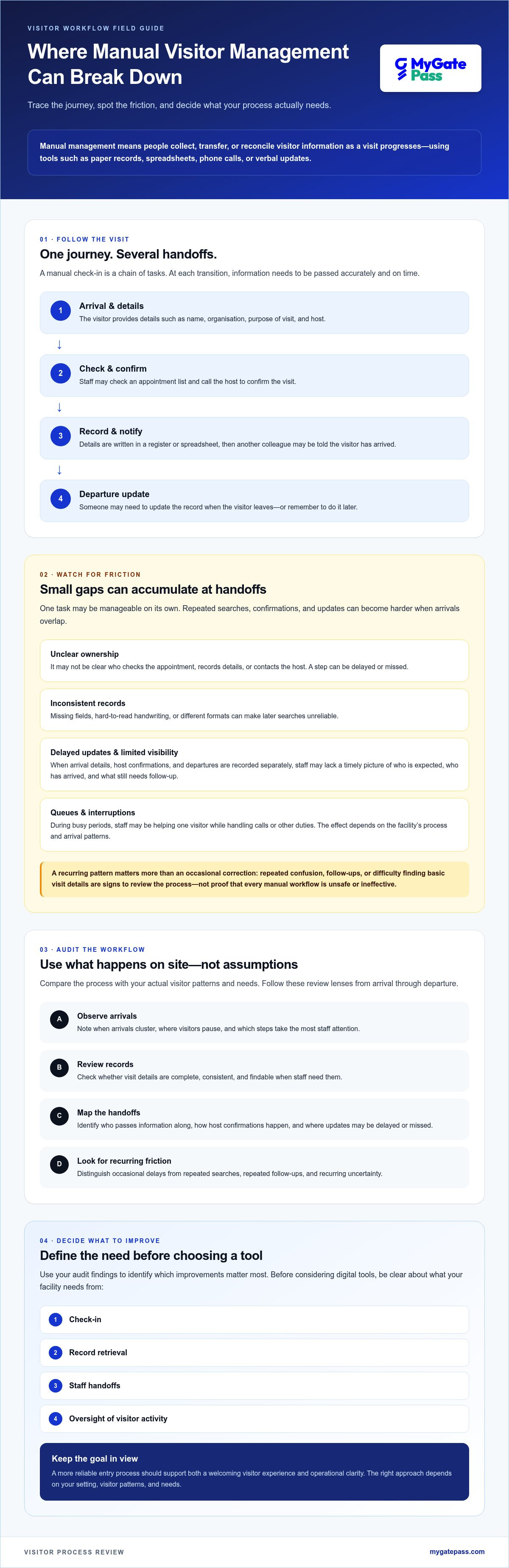
A typical process might ask a visitor for their name, organisation, purpose of visit, and host. Staff may check an appointment list, call the host to confirm, write the details in a register or spreadsheet, and then tell another colleague that the visitor has arrived. On departure, someone may need to update the record or remember to do it later.
Not every facility uses every step, and manual doesn’t always mean paper-only. A spreadsheet might hold the records while phone calls or face-to-face updates handle confirmations. The defining feature is that people must collect, transfer, or reconcile information as the visit progresses.
Where does the process begin to break down?
The first strain can appear between arrival and host notification. If it isn’t clear who checks the appointment, records the visitor’s details, or contacts the host, a step may be delayed or missed. The visitor might have to repeat information, or staff may be unsure whether the host has been reached. These are workflow gaps, not proof that every manual process is unsafe or ineffective.
Consistency can also become harder when arrivals overlap or visitors have different purposes, such as attending a meeting, making a delivery, or visiting regularly. Staff may record similar visits differently, use varying formats, or forget to update a record when plans change. An occasional correction is normal. Recurring confusion, repeated follow-ups, or difficulty finding basic visit details are stronger signs that the process needs review. The challenges of managing visitors manually often become visible at handoffs, where information must pass clearly from one person to another.
How Manual Visitor Processes Create Delays, Errors, and Information Gaps
A manual check-in involves a chain of tasks: a visitor arrives, provides details, staff record them, someone contacts the host, an entry decision is made, and the departure is noted. Each handoff depends on information being passed accurately and on time. If one step is delayed or unclear, the next person may need to make another call, confirm details again, or work without a complete picture.
When arrival details sit in a register, host confirmations happen by phone, and departures are recorded separately, staff may not have one timely view of who is expected, who has arrived, and which updates are outstanding. Facility access guidance, such as federal best practices for facility access, offers a useful benchmark for reviewing how access processes are organised. Each facility should still assess its own requirements.
Why can check-in slow down during busy periods?
If staff must collect details and contact a host for each visitor in turn, overlapping arrivals can form a queue. A receptionist may be helping one person while answering a call or handling another duty. That makes it harder to give each visitor clear attention and keep other tasks moving. The effect depends on the facility’s process and arrival patterns, so measure them locally instead of relying on a universal wait-time estimate.
Note when arrivals cluster, which steps take the most staff attention, and where visitors pause. This can help show whether delays are occasional or a recurring process issue. For example, if visitors regularly wait while staff search for a host or appointment, review how that information is organised and who is responsible for retrieving it.
How do inconsistent records affect follow-up?
Hard-to-read handwriting, missing fields, or different formats for names and organisations can make later searches unreliable. Staff may be unsure whether a visitor was expected, whether a host was contacted, or whether a record refers to the right person. Re-entering details in both a register and a spreadsheet creates another opportunity for mismatches.
Identity checks should also be distinguished from simply recording a name. MyGatePass’s UAE Pass Integration Module supports verified visitor identification. Facilities exploring that option can read the UAE Pass integration guide for buildings. For a broader look at how software may support visitor processes, explore MyGatePass visitor management software.
Is Manual Visitor Management Really Simpler Than a Digital Process?
It can be. A familiar paper register may work well where visitor numbers are low, arrivals are predictable, one staff member is responsible for check-in, and past records are rarely needed. Not every facility needs software. The more useful question is whether the process remains clear and manageable as visitor patterns and handoffs change. The challenges of managing visitors manually tend to become more noticeable when a once-simple routine has to serve more people, steps, or staff.
When might a manual process still be adequate?
Assess the pattern, not just the format. Consider how many visitors arrive, whether they tend to arrive together, how many people handle check-in, and how often staff need to retrieve records. A manual process with clear ownership and consistent fields may be easier to manage than a digital tool added to unclear procedures. If records are easy to find and handoffs are reliable, there may be no pressing reason to change.
What changes when visitor records become digital?
A digital workflow may use structured fields to capture information consistently and centralised records to make visitor activity easier to review. Depending on the tool and setup, relevant staff may also have a shared view instead of relying on separate notes or verbal updates. These are workflow possibilities, not automatic outcomes. Staff still need clear procedures, appropriate data practices, and judgement when handling unusual situations.
| Process area | Manual workflow | Digital workflow |
|---|---|---|
| Consistency | Depends on staff using the same fields and steps. | May support standardised data capture, depending on setup. |
| Record retrieval | May involve checking a register, spreadsheet, or separate notes. | May make records searchable in a shared system. |
| Handoffs | Often rely on calls, messages, or verbal updates. | May provide shared information for relevant staff. |
| Oversight | Can require staff to bring records together for a broader view. | May offer centralised visibility, depending on the tool. |
| Staff effort | Can involve repeated entry, follow-up, and record searches. | May reduce some repeated steps, but still requires staff input and oversight. |
For hospitality teams considering digital processes, the UAE digital gate pass standards guide offers a related example to explore. Use it as a starting point, then compare any option against your own arrival patterns, staff roles, and record needs. Digital tools can support a well-designed process, but they can’t resolve unclear responsibilities or inconsistent data practices on their own.
How to Audit Your Manual Visitor Management Process
A useful audit starts with what actually happens at your facility, not assumptions about how a visitor process should work. Follow a visit from arrival to departure, note where information moves between people or records, and look for repeated friction. This helps distinguish an occasional hiccup from a recurring weakness among the challenges of managing visitors manually.
Which steps and records should you review?
Map each task and its owner: who collects visitor details, confirms the visit, contacts the host, records arrival, communicates the entry decision, and notes departure? Then observe arrivals at different times and across different visitor types. Record where staff pause, repeat questions, make calls, or aren’t sure who handles the next step.
Review a sample of existing records using privacy-conscious practices. Limit access to authorised reviewers, avoid copying personal details into audit notes unless necessary, and follow your organisation’s policies for handling and retaining records. Check whether staff use consistent fields, know where records are stored, and can retrieve information they’re authorised to access. Confirm how long records are kept, and check current UAE requirements that apply to your organisation before changing retention or handling practices.
How can you prioritise the problems you find?
Keep a simple issue log. For each observation, note what happened, how often it occurred during the review, its operational impact, and who or what was affected. Look for recurring queues, missing details, repeated calls, unclear ownership, and delays finding records. Avoid recording more visitor information than the review needs.
- Frequency: Is this a one-off exception or a repeated pattern?
- Impact: Does it interrupt visitor service, distract staff, or leave a handoff uncertain?
- Effort to address: Could a clearer instruction, consistent form, or assigned responsibility resolve it?
Start with proportionate fixes. If staff follow different steps, a documented procedure and brief training may help. If the process repeatedly depends on transferring details between records or people, assess whether a digital workflow could support more consistent information capture and shared visibility. Software won’t resolve unclear ownership by itself, so define the process first and then decide what support it needs.
Measure the process at your facility, then choose improvements in proportion to the problems the evidence reveals. If centralised visitor information is one of the needs your audit identifies, explore the MyGatePass Admin Dashboard as a software option for visitor and facility management.
Moving Beyond Manual Visitor Management Without Losing the Human Touch
A digital process should make arrivals clearer, not colder. Start with what your audit showed needs attention: perhaps staff need a consistent way to capture details, clearer handoffs, easier access to records, or better visibility of visitor activity. The challenges of managing visitors manually don’t mean every facility needs software. A digital option is worth considering when recurring coordination or information needs are difficult to address with simpler procedural changes.
What should a visitor-management solution support?
Evaluate the experience for both visitors and staff. A system should fit your facility’s entry process, the types of visitors you receive, and the way teams communicate. Ask providers specific questions before deciding:
- Can visitors and staff understand and use the proposed workflow?
- How are visitor details captured, and what options are available for identity verification?
- How do authorised administrators review visitor information and activity?
- How does the workflow support handoffs between the people involved?
- What data is collected, how is it handled and retained, and what integrations are available?
- What changes would your existing procedures and staff responsibilities need?
Confirm data-handling, retention, and integration details directly with the provider. Check current UAE requirements that apply to your organisation rather than assuming a tool alone ensures compliance. Clear ownership and practical staff guidance still matter after digitisation.
How does MyGatePass fit into a digital workflow?
MyGatePass is a UAE software option for visitor and facility management. Its platform includes a Visitor App, a Security App, and a centralised Admin Dashboard. The UAE Pass Integration Module supports verified visitor identification. Delivery management and staff attendance tracking are also available modules.
These components may be relevant to facilities reviewing how visitor and staff information is managed, but suitability depends on your requirements. Ask how the tools align with your procedures, what information they handle, and which details you need to confirm before adopting a digital workflow. Software can support clearer coordination while staff continue to provide the welcome, context, and judgement that shape the visitor experience.
If you’re assessing digital options after reviewing your process, explore MyGatePass visitor management software.
Make Your Next Visitor Process More Reliable
The challenges of managing visitors manually aren’t the same for every facility. Start by mapping your actual check-in journey, reviewing how records and handoffs work, and identifying which recurring issues create the most friction. A clear process for a manageable visitor flow may remain suitable. Where coordination or visibility needs persist, a digital workflow is worth assessing.
Technology should support clear procedures and a welcoming experience, not replace staff judgement. MyGatePass offers visitor and security apps alongside a centralised admin dashboard, and its UAE Pass integration supports verified visitor identification. Consider how these tools fit your needs, and confirm data-handling and workflow details before choosing a solution.
Explore MyGatePass visitor management software to learn more about the platform. With a clear view of your process and priorities, you can take practical steps towards a more organised visitor experience.
Frequently Asked Questions
What are the main challenges of managing visitors manually?
The main challenges are inconsistent records, slower check-ins during busy periods, repeated staff follow-ups, and limited visibility across handoffs. Details may be recorded differently or left incomplete, making them harder to retrieve later. A process that relies on calls or verbal updates can also leave staff unsure whether a host has been notified. The impact varies by facility, so review your visitor patterns and workflow before deciding what needs to change.
Can manual visitor management create security or privacy risks?
Yes, depending on how information is recorded, stored, and accessed. A paper register left where other visitors can view it may expose names or other details, while unclear access to records can make oversight harder. Incomplete or inaccurate entries may also limit the usefulness of visit records. These risks aren’t automatic, but they deserve attention. Check the current UAE requirements that apply to your organisation and follow appropriate internal policies for access, handling, and retention.
How does a paper visitor log differ from a digital visitor management system?
A paper log records information by hand, while a digital visitor management system captures and stores it electronically. Depending on the tool and setup, digital records may use structured fields, be searchable, or provide authorised staff with centralised visibility. Paper can be straightforward for a small, predictable process, but finding older entries may mean searching the register manually. Neither format guarantees accurate records or effective procedures. Staff still need clear steps and responsibilities.
Is manual visitor registration suitable for a small facility?
It can be suitable if visitor numbers and arrival patterns are manageable, responsibilities are clear, and staff can retrieve records when needed. A consistent register with agreed fields and a named person responsible for each step may serve a simple process well. Review whether visitors often arrive together, multiple staff members handle check-in, or record searches cause difficulty. If these needs are modest, a manual workflow may remain proportionate. Software isn’t essential for every facility.
How can manual visitor check-in cause delays?
Check-in can slow when staff collect details, search for an appointment, contact the host, and record the visit one person at a time. If arrivals overlap, each visitor may wait while the same staff member completes those tasks or handles interruptions from other duties. Delays depend on the facility’s process and arrival patterns, so don’t assume a standard wait time. Observe busy periods and note where visitors pause or staff need to repeat steps.
What information should a visitor log record?
A visitor log should capture the details your facility needs to coordinate and review visits, such as the visitor’s name, organisation if relevant, host or department, visit purpose, and arrival and departure times. Define consistent fields so staff know what to record and where. Collect only information that serves a clear operational purpose, and set access and retention practices according to your organisation’s policy and applicable UAE requirements. Needs vary, so verify current requirements rather than assuming a universal template.
When should an organization move from manual to digital visitor management?
Consider a digital workflow when your review finds recurring coordination or visibility problems that clearer procedures don’t resolve. Examples include repeated calls to confirm visits, inconsistent records, unclear handoffs, or difficulty retrieving information for authorised staff. Compare available tools against visitor usability, staff responsibilities, record access, data handling, and integration needs. MyGatePass offers visitor and security apps, a centralised admin dashboard, and UAE Pass integration for verified visitor identification. Confirm suitability and details with the provider.


