

What should a digital gate pass system do to make entry more secure and manageable without slowing people down? A pass or QR code alone isn’t enough if reception teams still rely on disconnected records, unclear approval steps, or manual updates. In UAE facilities, a smoother arrival depends on connecting visitor, security, and administrator workflows from invitation to check-out.
It’s reasonable to expect faster check-ins and clearer records while keeping the process straightforward for guests and staff. This guide explains how a digital gate pass system can support each stage of entry, what to evaluate across operations, identity verification, and administration, and what to confirm before choosing and rolling out a platform. Follow the visitor journey from pre-registration through arrival records, consider how UAE Pass integration and data handling fit into your evaluation, and see when additional workflows such as deliveries or staff attendance may be relevant. The goal is a more organized entry process, with better visibility for managers and fewer unnecessary hurdles at the gate.
Key Takeaways
- See which visitor tasks a digital gate pass system can organize, and where software ends and physical access equipment or guarding begins.
- Map the connected steps from invitation and identity checks to check-in, review, and recordkeeping, while confirming which features a platform actually supports.
- Compare visitor, security, and administrator needs separately to spot usability gaps before choosing a system.
- Prepare for rollout by documenting visitor categories, required information, exception handling, and who makes entry decisions.
- Explore how MyGatePass’s visitor app, security app, admin dashboard, and UAE Pass integration can support connected workflows.
What Is a Digital Gate Pass System, and What Does It Manage?
A digital gate pass system is software that organizes visitor pre-registration, check-in, and entry records. It links information prepared before a visit with the steps taken when someone arrives, giving visitors, security personnel, and facility teams a shared process to follow.
The system manages the workflow, not the physical entrance itself. A digital pass doesn’t manufacture or operate gates, turnstiles, or scanners, and it isn’t a guard service. Those may be separate parts of a facility’s entry setup. The software supports access control by helping authorized personnel review visit details and document entry outcomes. The exact checks and equipment depend on the facility and platform.
How a digital pass moves from invitation to arrival
A typical visit follows a few connected steps. The exact pass format and identity checks vary by system, so confirm how a specific platform handles them before setting expectations for visitors.
- Initiate: A host or administrator creates or registers a visit and provides the information the facility requires.
- Prepare: The visitor receives instructions and, where the platform supports it, a digital pass or other arrival details.
- Arrive: The visitor presents or uses the pass according to the facility’s process. Security personnel review the visit information and follow the site’s entry decision procedure.
- Record: The entry outcome is documented in the system, creating a digital record for authorized facility users to review.
This sequence clarifies responsibilities: the host supplies visit details, the visitor follows arrival instructions, and security handles the on-site review. A pass doesn’t automatically grant access. The facility’s procedures still guide the decision.
Who uses a gate pass system inside a facility?
Each role needs different information. Visitors need clear instructions and a straightforward arrival experience. Security personnel need to find visit details, check them against facility procedures, and record what happened. Facility teams coordinate the process across hosts and entry points, while administrators oversee workflow configuration and record management.
These needs are connected. If visitor instructions are unclear, security may need to resolve questions at the entrance. If responsibilities or exception steps aren’t defined, teams may handle similar arrivals differently. A well-planned digital gate pass system helps make the workflow more consistent while leaving entry decisions with the appropriate facility personnel.
How Do Digital Gate Pass Workflows Connect Visitors, Security, and Administrators?
A connected workflow gives each person a clear next step instead of requiring visit details to be passed between disconnected records. The overall pattern is similar across systems, but pass formats, identity checks, notifications, and record controls depend on the platform and the facility’s configuration.
At each stage, hosts or administrators prepare visit details, visitors follow the instructions provided, security personnel review arrivals and record outcomes, and administrators oversee the process and make facility-level decisions about records and exceptions.
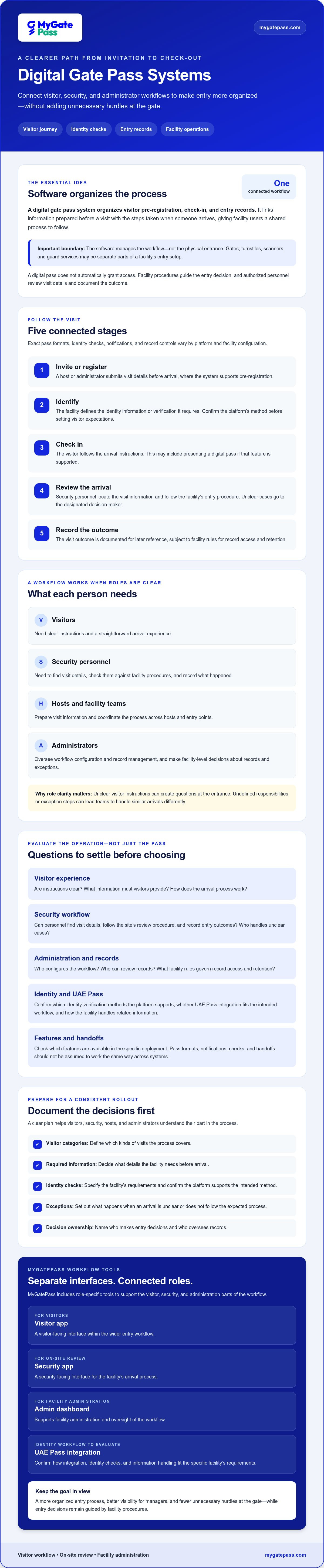
- 1. Invite or register: A host or administrator submits visit details before arrival, where the system supports pre-registration.
- 2. Identify: The facility determines what identity information or verification it requires. Confirm any platform-specific method before including it in visitor instructions.
- 3. Check in: The visitor follows the arrival process, which may involve presenting a digital pass if that feature is supported.
- 4. Review: Security personnel locate the visit information and follow the facility’s entry procedure, referring unclear cases to the designated decision-maker.
- 5. Retain records: The visit outcome is recorded for later reference, subject to the facility’s rules for access and retention.
MyGatePass includes a visitor app, security app, and admin dashboard. These provide distinct interfaces for different roles, while the dashboard supports facility administration. Confirm which features and handoffs are available in the specific deployment rather than assuming every workflow works the same way.
What happens before a visitor reaches the gate?
Before arrival, the host or administrator prepares visit information through the workflow selected by the facility. Where supported, the visitor may receive instructions or a pass in advance. Keep those directions easy to follow, and define who reviews missing or inconsistent details so security staff aren’t left to improvise at the entrance. If identity verification is part of the process, confirm the exact steps with the platform provider before explaining them to visitors.
What should happen during check-in and after entry?
At check-in, security staff use the available visit information to apply the facility’s procedure and document the outcome. A digital record can help authorized teams refer back to what was recorded, but its usefulness depends on clear responsibilities and sound administration. Decide who can access records, how long they’re retained, and how exceptions or escalations are handled. These are facility-level decisions, not assumptions to make about a software feature.
To see how dedicated visitor and security interfaces can fit into a connected entry workflow, explore the MyGatePass visitor and security apps.
How to Compare Digital Gate Pass Systems for Your Facility
Compare platforms against the same real-world tasks, not just feature lists. A digital gate pass system should fit how visitors, security personnel, and administrators work, including when a visit doesn’t follow the usual path. Ask each provider to demonstrate a routine arrival, a visitor with missing details, and how an authorized administrator can review the resulting record.
| Area | What to assess | Question to ask |
|---|---|---|
| User roles | Whether visitors, security personnel, and administrators have clear, suitable steps. | Can each role complete its tasks without relying on another person’s account or process? |
| Visitor steps | How visits are submitted, instructions are shared, and arrivals are handled. | What happens if details are missing or the visitor arrives without a pass? |
| Administration | Which views, settings, and modules are included in the proposed deployment. | Can the facility manage its intended workflow, and who can change its settings? |
| Identity | Whether the platform supports the facility’s required identification process. | What steps are involved, and what needs to be configured for UAE Pass? |
| Support needs | How users get help, how issues are escalated, and what support arrangements apply. | What support is included, and how are service expectations documented? |
Which identity and access workflows need to fit?
Start with the facility’s identification requirements, then confirm the platform’s supported process from start to finish. If UAE Pass is relevant, ask the provider to explain the visitor journey, deployment requirements, and any facility actions needed. Don’t assume an integration works identically across platforms or configurations. For more identity and compliance context, read the UAE Pass integration guide for buildings.
How do you judge usability and operational fit?
Test each role separately. Have visitors try the journey on devices and in languages relevant to your intended users. Ask security personnel to complete routine check-ins and work through common exceptions, such as missing details or an unclear visit. Administrators should review the views and settings they’ll use instead of relying on a presentation alone.
During demonstrations, note where users hesitate, need help, or hand information to another team. Then confirm which administrative views, modules, and configuration options are included in the proposed deployment. Check support arrangements and document unresolved questions. A practical comparison shows whether the workflow fits your facility, not just whether a feature appears in a brochure.
How to Prepare and Roll Out a Digital Gate Pass System
A smoother rollout starts before configuration. Map how entry works today, agree on who makes decisions, and define what the first stage should cover. The key readiness inputs are workflows, roles, data, and training. Clear answers help teams avoid transferring uncertainty from paper records to a screen.
Use this checklist to prepare:
- 1. Map current entry steps: Record how visits are requested, reviewed, handled at arrival, and documented. Note where staff pause to clarify information or seek approval.
- 2. Define the first scope: Decide which visitor categories and workflows are included initially. Identify whether staff attendance or delivery workflows are also in scope, rather than assuming every module must be part of the first stage.
- 3. Assign decision owners: Name who initiates visits, who reviews arrivals, who resolves exceptions, and who approves process changes. Make escalation paths clear to the teams using them.
- 4. Specify information and records: List the details needed for each visitor category, then agree with appropriate internal stakeholders on who can access records and how long they should be retained.
- 5. Prepare people and communications: Plan role-specific staff onboarding and visitor instructions before changing live entry procedures.
What should facility teams map before configuration?
Start with the handoffs. For example, document who reviews a visit when required details are missing and who can make the entry decision if the usual contact isn’t available. Separate routine steps from exceptions, and identify which visitor and staff workflows are actually needed at launch. Confirm record access and retention requirements with the relevant internal stakeholders rather than leaving those decisions to be inferred during setup.
How can teams introduce the system with less friction?
Choose a clearly scoped first deployment and test the process before replacing existing live procedures. Walk through typical arrivals as well as less common situations, such as an unexpected visitor or incomplete information. Train security and administrative users with scenarios that reflect their responsibilities, then gather feedback and refine instructions. Expand to additional categories or workflows only after the initial process is understood and workable for the people using it.
Keep a simple issue log during testing: what happened, who handled it, and whether the written process was clear. This helps facility teams distinguish a training gap from a configuration question or an unresolved policy decision. A digital gate pass system supports an organized workflow, but the facility still needs to set the rules, responsibilities, and record practices around it.
Planning a rollout for your facility? Explore MyGatePass visitor and facility management as you define your workflow requirements.
How MyGatePass Connects Digital Gate Pass Workflows
Once a facility has mapped its entry process and defined what to assess, it can compare those requirements with a specific platform. MyGatePass brings together software components for visitor, security, and administrative workflows, with UAE Pass integration available to support verified visitor identification. The right fit depends on whether the features in a proposed deployment match your facility’s documented needs.
Which MyGatePass components support the entry journey?
The MyGatePass Visitor App supports the visitor side of the workflow, while the MyGatePass Security App is intended for security personnel. The MyGatePass Admin Dashboard supports facility administration. Together, these components connect different roles around a digital process. Confirm the exact features and handoffs available in the deployment you’re evaluating, including how they align with your entry procedures.
The UAE Pass Integration Module supports verified visitor identification. Before setting expectations for visitors or staff, ask the provider to confirm the precise identity-verification journey and any deployment requirements. Don’t assume particular screens, steps, or checks without verifying them.
MyGatePass is a software platform. It supports facility workflows, but it doesn’t provide physical security guards or manufacture gates and other access hardware. Facilities should assess software alongside any separate physical equipment or personnel their entry procedures require.
When should a facility explore related gate pass use cases?
If hospitality operations are in scope, consider whether their visitor processes require different instructions, roles, or review steps. The digital gate pass hospitality standards guide offers additional context for exploring that use case. MyGatePass also offers a Delivery Management System and Staff Attendance Tracking as additional modules. These aren’t universal requirements for every visitor-entry deployment.
Before requesting a demonstration, compare your requirements with the available components and confirm which features are included. Bring your visitor categories, required information, identity process, exception paths, record access and retention decisions, and staff training needs. This gives both teams a practical basis for discussing fit, focused on your facility’s actual workflow rather than a generic feature list.
Ready to explore how the documented process could align with MyGatePass? Discuss your facility’s workflow with MyGatePass.
Make Your Next Entry Workflow Clearer
A well-chosen digital gate pass system connects the visitor journey with the work of security personnel and facility administrators. Start by mapping who initiates visits, what information is needed, how exceptions are handled, and who can access records. Then compare platforms through real-world demonstrations and plan staff onboarding before changing live procedures.
MyGatePass brings together dedicated visitor and security apps with a centralized admin dashboard. Its UAE Pass integration supports verified visitor identification, while delivery management and staff attendance tracking are optional modules to consider if they fit your facility’s needs. Confirm which components and features are available for your intended deployment.
With clear workflows and responsibilities in place, you can assess platform fit without adding unnecessary steps for visitors or staff. Explore how MyGatePass can support your facility's entry workflows, then decide what makes sense for your requirements. A more organized arrival process starts with a plan your whole team can follow.
Frequently Asked Questions
What is a digital gate pass system?
A digital gate pass system is software for organizing visitor registration, check-in, and entry records. It can connect information prepared before a visit with the arrival process, so visitors know what to do and facility teams can follow a defined workflow. It doesn’t replace the facility’s entry rules or decision-makers. The specific pass format, identity checks, and administrative features depend on the platform and its configuration.
How does a digital gate pass system work?
A digital gate pass system typically follows a sequence: a host or administrator registers a visit, the visitor receives instructions or a pass if supported, and security personnel review visit information at arrival. Staff then follow the facility’s entry procedure and record the outcome where the platform allows. Administrators oversee the process and related records. Confirm the exact steps with the provider, since features vary between platforms and deployments.
Can a digital gate pass system integrate with UAE Pass?
Yes, some platforms offer UAE Pass integration. MyGatePass offers a UAE Pass Integration Module that supports verified visitor identification. Before selecting a system, ask the provider to explain the precise visitor journey, what the facility needs to configure, and which capabilities are included in the proposed deployment. Don’t assume that every system uses UAE Pass or follows the same verification steps. Confirm those details before updating visitor instructions.
Is a digital gate pass system the same as access control hardware?
No. A digital gate pass system is software that helps organize visit information and entry records. Access control hardware refers to physical equipment such as gates or other devices used at an entrance. The software doesn’t necessarily operate that equipment, and it doesn’t replace physical security personnel. Treat these as distinct parts of an entry setup, and confirm separately how any software and existing hardware work together.
What should I look for when choosing a digital gate pass system?
Assess the workflow for visitors, security personnel, and administrators separately. Check how visits are registered, what happens when details are missing, which identification methods are supported, and what administrative views or modules are included. Ask the provider to demonstrate a routine arrival, an exception, and record review. Also clarify support arrangements, user permissions, and retention options with the provider and relevant internal stakeholders rather than assuming they’re standard.
How can a digital gate pass system reduce delays at the entrance?
It may help prevent avoidable hold-ups by preparing visit information before arrival, giving visitors clear instructions, and making it easier for staff to locate relevant details during check-in. Clear roles and a defined process for missing information can also reduce repeated questions or inconsistent handoffs. Results depend on the facility’s workflow, user readiness, and system configuration, so test typical and exception cases before changing live entry procedures.
What information should we prepare before implementing a digital gate pass system?
Document visitor categories, the information required for each, who initiates visits, who reviews arrivals, and who resolves exceptions. Define escalation paths, the identification process, and which visitor or staff workflows belong in the initial rollout. Agree with appropriate stakeholders on who may access records and how long they should be retained. Prepare role-specific staff training and visitor instructions, then test the process before introducing it into live operations.


