

What if faster check-in still leaves your visitor management system falling short? Measuring visitor management system success means looking beyond the front desk: a smooth arrival matters, but so do reliable identity checks, timely host notifications, clear records, and a positive visitor experience. If success criteria are vague or records are split across manual logs and systems, it’s hard to tell whether performance has truly improved.
A useful measurement plan follows the whole access journey, not just one speed metric. This guide explains how to choose practical KPIs for security, efficiency, and visitor experience, set a fair baseline, and compare results without relying on vanity metrics. You’ll also learn how to present findings as a credible improvement case stakeholders can understand.
We’ll trace the journey from pre-registration and check-in through host notification and departure, then look at connected workflows such as deliveries and staff attendance. For organisations in the UAE using tools such as MyGatePass Visitor App, Security App, UAE Pass Integration Module, and Admin Dashboard, the aim is to make operational performance easier to assess while keeping the experience welcoming.
Key Takeaways
- Define success through security, efficiency, visitor experience, and operational visibility, not check-in totals alone.
- Build a focused KPI set by linking each measure to an operational goal, setting a baseline, and reviewing whether it remains useful.
- When measuring visitor management system success, compare equivalent time periods and visitor categories to avoid misleading conclusions.
- Use a before-and-after scorecard that records the baseline, current result, change, and any caveats affecting the comparison.
- Assign clear metric owners and consider how visitor, security, and administrative workflows connect across the facility.
What Does Visitor Management System Success Actually Mean?
A visitor management system is successful when it helps an organisation meet clear operational goals across the full entry journey. Those goals may include recording visitor details consistently, supporting required identity checks, reducing avoidable manual work, and making arrival straightforward for guests and hosts. The Visitor Management System Wikipedia entry provides a general overview, but success at a specific facility depends on the outcomes its stakeholders agree to measure.
A successful visitor management system improves agreed security, efficiency, and experience outcomes while giving teams better operational visibility, without adding unnecessary friction for visitors or staff. This definition shifts attention from whether the software is being used to whether it helps people do the work well.
Total check-ins, invitations sent, or app launches are activity counts. They can show adoption or demand, but not whether entries are accurate, queues are shorter, or visitors know what to do next. Measuring visitor management system success means connecting system activity to outcomes, then checking whether those outcomes hold across the entire visitor journey.
Which outcomes should a visitor management system improve?
Start with four connected areas. Security is reflected in accurate, consistent visitor entries and a clear account of who arrived and why. Efficiency can be assessed through processing time, repeated data entry, and the amount of manual work required at reception. Experience includes whether arrival instructions are easy to follow and visitors can complete required steps without avoidable confusion. Operational visibility means relevant teams can understand what is happening at the entrance and use consistent records to coordinate their work.
These outcomes influence one another. Extra checks may support security but also slow arrivals. The aim isn’t to make every step as fast as possible; it’s to find a sensible balance. For example, a facility might review whether visitor details are recorded consistently, how long routine arrivals take, and whether guests need staff help to complete check-in.
Why do visitor management KPIs need context?
A metric only becomes useful when its conditions are clear. An office, a residential building, and a site with scheduled appointments may have different visitor patterns and entry procedures. Volume matters too: comparing a quiet week with a peak period could make a process look more or less efficient for reasons unrelated to the system. Operating hours and the mix of visitor types also affect what counts as a fair comparison.
Separate software performance from changes around it. A new reception rota, revised identity-check policy, staff training, or a temporary rise in visitors can influence processing time and record quality. Note these factors alongside the result rather than automatically crediting or blaming the system.
Finally, agree which outcomes matter to each stakeholder. Security teams may prioritise dependable records; facilities teams may focus on smooth arrivals; administrators may want less repetitive work. Leadership should see measures tied to organisational priorities, not a dashboard full of numbers without a decision attached. That shared context turns KPIs into a practical way to spot trade-offs and choose what to improve next.
How to Choose the Right Visitor Management KPIs
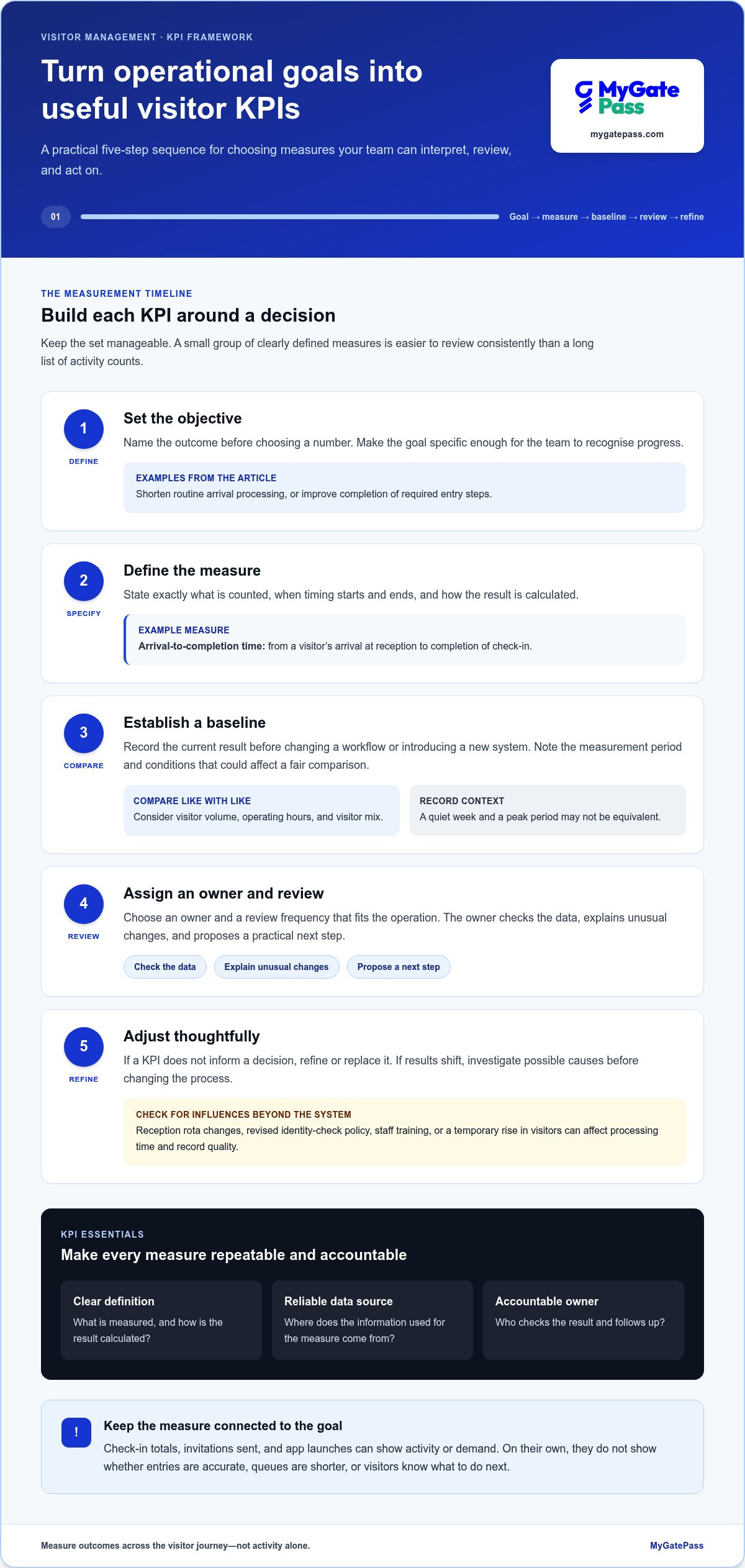
A useful KPI turns an operational goal into a measure people can interpret and act on. Keep the set manageable: a small group of well-defined measures is easier to review consistently than a long list of activity counts. To measure visitor management system success, build each KPI around a decision your team needs to make.
- Set the objective. Name the outcome first, such as shortening routine arrival processing or improving completion of required entry steps. Make the goal specific enough that the team can recognise progress.
- Define the measure. State exactly what is counted, when timing starts and ends, and how the result is calculated. For example, arrival-to-completion time could run from a visitor’s arrival at reception to completion of check-in.
- Establish a baseline. Record the current result before changing a workflow or introducing a new system. Note the measurement period and conditions that could affect comparisons.
- Review the result. Assign an owner and a review frequency that fits the operation. The owner checks the data, explains unusual changes, and proposes a practical next step.
- Adjust thoughtfully. If a KPI doesn’t inform a decision, refine or replace it. If results shift, investigate possible causes before changing the process.
Every KPI needs a clear definition, a reliable data source, and an accountable owner. Document these details alongside the calculation and review frequency. This makes the measure repeatable, helps teams interpret it consistently, and keeps responsibility visible instead of leaving a number on a dashboard without follow-up.
Which operational KPIs reveal efficiency?
Track the median arrival-to-completion time, not just the average. A few unusually long check-ins can pull an average upward, while the median shows the midpoint of observed arrivals. Pair it with counts or rates for manual corrections, incomplete records, and repeated data entry. Where records support it, segment results by visitor type or process, such as scheduled guests versus walk-ins, so different workflows aren’t blended into one misleading figure.
How can security and experience be measured together?
Measure completion of required identity and entry steps, then review that result alongside visitor wait time or recorded abandonment. A high completion rate alone doesn’t reveal whether the process is clear or unnecessarily slow. Add brief visitor feedback, such as a consistent satisfaction question, to capture the human experience. Feedback adds perspective, but it shouldn’t replace operational records: each measure answers a different question.
Choose measures that lead to useful conversations across security, facilities, and administration. A coordinated digital workflow, such as MyGatePass visitor management, helps teams frame goals across visitor, security, and administrative processes. Define the KPI first, then assess results against the agreed baseline.
How to Measure Results Without Misreading the Numbers
A before-and-after comparison is only useful when both sides describe comparable work. Match the measurement period, visitor categories, process steps, and operating conditions as closely as possible. If a change appears after implementation, report its timing and context, but don’t claim the system caused it unless the evidence supports that conclusion. Careful comparisons make measuring visitor management system success more credible to stakeholders.
How do you establish a useful baseline?
Before changing the process, document each step, the KPI definition, its data source, and the observation period. Check whether historical records are complete and consistently recorded; missing arrival or completion times may make a comparison unreliable. Also note staffing, visitor volume, access-policy changes, and unusual operating conditions during both periods. If records aren’t comparable, begin collecting consistent data before drawing conclusions.
Use a simple scorecard to show the result and its limits. The figures below are placeholders, not benchmark targets:
| Measure | Baseline | Current result | Change | Caveat |
|---|---|---|---|---|
| Median arrival-to-completion time | Record value | Record value | Calculate difference | Visitor mix or volume changed? |
| Incomplete visitor records | Record count or rate | Record count or rate | Calculate difference | Were recording steps consistent? |
| Required entry steps completed | Record count or rate | Record count or rate | Calculate difference | Did policy or staffing change? |
Compare like with like. A period with more scheduled guests may not be comparable to one dominated by walk-ins, and a seasonal increase in visitor volume can affect waiting time. Where records allow, compare the same visitor categories and similar operating periods. If categories can’t be matched, state that limitation rather than treating the overall figures as a direct comparison.
Keep a change log alongside the scorecard. Note staffing or training changes, revised access policies, altered operating hours, and unusual peaks or closures. If a metric improves after a software change but staffing also increased, report that the result improved during the period and identify both changes. This distinguishes a useful contribution from an unsupported cause-and-effect claim.
How should privacy shape performance measurement?
Collect only information needed for a defined operational purpose, and limit access to identifiable visitor records to appropriate roles. For routine performance reviews, use totals, rates, or grouped results where individual details aren’t necessary. Before setting retention, access, or reporting practices, verify which UAE privacy requirements apply to your organisation and its data-handling context.
For identity workflows, the UAE Pass building integration and compliance guide offers relevant context. Keep performance reporting focused on whether defined steps are completed, not on exposing personal information that isn’t needed for the review.
How to Build a Repeatable Visitor Management Review
A review creates value when it leads to a clear decision. Set a recurring cadence that matches the pace of your facility and the reliability of its data. A team with steady visitor flows might review trends monthly; a site with seasonal peaks or frequent process changes may need additional check-ins around those periods. Keep the schedule realistic so owners can validate results instead of rushing through a report.
Bring the right people into the review. Security can interpret entry-step completion and exceptions, facilities can explain arrival bottlenecks, and administration can identify record-quality or workflow issues. One person should coordinate the scorecard, while each metric has an owner responsible for validating its data and proposing follow-up. This shared view helps teams assess connected workflows, from visitor arrivals to identity steps and related facility processes.
What belongs in a visitor management scorecard?
Keep the scorecard concise. Include a small mix of efficiency, security-process, and visitor-experience indicators, with each result shown beside its baseline, latest value, direction of change, and measurement period. Add a target only when the team has agreed on a meaningful one. Flag incomplete data, staffing changes, policy revisions, or visitor-volume shifts beside the affected result so readers can interpret it fairly.
Make the scorecard easy to scan without stripping away context. A useful entry might show that check-in time increased while visitor volume rose, then identify the period and affected visitor category. This gives leaders a reason to investigate rather than treating a single movement as proof of success or failure. Consistent definitions also make reviews more useful over time.
How should teams turn findings into improvements?
Start with the pattern, not the fix. If delays or manual exceptions recur, trace where they happen in the visitor journey and ask the responsible teams what is driving them. Visitor journey design should balance clear arrival steps with appropriate entry processes. The digital gate pass guide for UAE hospitality standards provides related context for shaping that experience.
Where practical, change one process element at a time. Record what changed, who owns the follow-up, and when the team will review the same KPI definition again. If several adjustments happen together, note that it may be difficult to isolate which one influenced the result. This disciplined cycle turns measuring visitor management system success into an ongoing operational practice, not a one-off presentation.
Use this short checklist at each review:
- Validate: Confirm the data period, completeness, and any relevant operational changes.
- Interpret: Compare the result with its baseline and agreed target, then discuss likely explanations.
- Act: Name one practical next step, its owner, and a review date.
- Recheck: Apply the same definition after the adjustment and record what changed.
MyGatePass brings visitor, security, and administrative workflows together in a facility-management approach. Learn more about MyGatePass facility management.
How MyGatePass Supports Measurable Visitor Operations
Measuring visitor management system success works best when measures follow real workflows, not just the moment a guest checks in. MyGatePass brings together the MyGatePass Visitor App, MyGatePass Security App, and MyGatePass Admin Dashboard as parts of a coordinated entry process. Teams can set separate measures for visitor-side registration, security-side handling, and administrative oversight, then review how each stage contributes to agreed operational goals.
The UAE Pass Integration Module adds an identity-verification step to the workflow. Teams can assess whether required identity steps are completed and consider that result alongside arrival time or visitor feedback. This provides a way to evaluate security and convenience together, without assuming that integration alone will improve a particular KPI. Set the measure first, then interpret results in the context of the process and visitor group being reviewed.
Which MyGatePass workflows can teams evaluate?
Separate workflows before comparing results. Visitor registration and security-side entry handling are distinct stages, so a delay or incomplete record can be investigated at the relevant point. Delivery Management System workflows should be measured separately from guest check-ins, while Staff Attendance Tracking should be assessed against its own objectives. This keeps each measure tied to the people, process, and outcome it’s meant to describe.
- Visitor App: Review registration completion and the time needed to complete visitor-side steps.
- Security App: Assess how consistently required entry steps are handled and recorded.
- UAE Pass Integration Module: Measure completion of the identity-verification step as part of the defined entry process.
- Delivery and attendance modules: Define separate measures for delivery handling and staff attendance, based on each workflow’s operational purpose.
How can teams evaluate platform fit?
Start with your priority KPIs and map each to the relevant app or module, the records needed to calculate it, and the team responsible for review. Then check that the same definitions can be applied consistently across review periods. The centralized Admin Dashboard supports coordinated administration. Base calculations on appropriate records and use consistent definitions for each KPI.
This mapping also helps identify where a workflow crosses team boundaries. For example, visitor registration may involve administration before arrival and security at entry; assign clear ownership to each step so the review doesn’t blur responsibilities. Delivery and attendance measures should remain distinct, even when they sit within a broader facility operations plan. A connected platform brings these processes into the same operational conversation without treating every activity as one visitor KPI.
Use the fit review to confirm that each chosen measure has a usable source, a responsible owner, and a clear purpose. If a record doesn’t support a reliable comparison, refine the measurement plan before drawing conclusions. Explore MyGatePass as a connected visitor and facility management platform for coordinating these workflows.
Make Your Next Review the Starting Point
Turn measurement into a steady operating habit. Choose one priority workflow, confirm who owns its next review, and record the decision your team will make if results change. That commitment keeps measuring visitor management system success connected to real improvements, rather than leaving useful observations in a report.
As your measurement plan develops, consider whether your tools support a joined-up view of the facility. MyGatePass connects visitor and security apps through a centralized admin dashboard, with UAE Pass integration for verified visitor identification and separate modules for delivery management and staff attendance. These connected workflows help teams look beyond reception while keeping each operational measure tied to its own purpose.
Identify the visitor or facility workflow you want to evaluate, then align the measure with the people responsible for it. Explore how MyGatePass can support clearer visitor and facility operations. Start with one meaningful outcome, learn from the results, and build from there.
Frequently Asked Questions
What are the most important KPIs for a visitor management system?
The most useful KPIs are the ones tied to your facility’s main operational risks and priorities. A practical starting set could include arrival-to-completion time, incomplete or corrected visitor records, completion of required entry steps, and a brief visitor feedback measure. Choose measures that answer specific questions, such as whether guests can complete registration independently or where staff most often need to intervene. Measuring visitor management system success is about useful evidence, not a crowded scorecard.
How do you calculate visitor check-in time?
Subtract the visitor’s arrival time from the time they complete the defined check-in process. For example, if arrival is recorded at reception and completion means all required registration and entry steps are finished, the difference is that visit’s check-in time. Use the same start and end points for every observation. Review the median as well as the range, since a small number of unusually long arrivals can distort the average.
How long should you measure visitor management system performance?
Measure for long enough to include a representative mix of operating conditions, visitor types, and routine demand patterns. The right observation period depends on how often visitors arrive and how stable the process is. For instance, a site with occasional scheduled guests may need a longer collection period than one with steady daily arrivals. After a workflow change, continue tracking the same measures through comparable conditions before deciding whether the result is consistent.
How can you tell whether a visitor management system improves security?
Look for evidence that required identity and entry procedures are completed consistently, and check whether records contain the details staff need to review an arrival. You can also track exceptions, such as missing information or cases that require manual follow-up. A low incident count by itself doesn’t prove that security improved, since incidents may be rare or recorded differently. Interpret process evidence alongside incident and exception records.
How do you measure visitor satisfaction without slowing check-in?
Keep feedback separate from the arrival process. Offer a short optional question after the visit, such as whether the arrival instructions were clear, through a follow-up channel your organisation already uses. Avoid asking visitors to complete a long survey at reception, where it could create a queue or affect their rating. Review response volume and comments alongside check-in records, since people who choose to respond may not represent every visitor.
Can a visitor management system measure deliveries and staff attendance too?
Yes, when the platform includes dedicated workflows for those activities. Treat delivery handling and staff attendance as separate measurement areas rather than folding them into visitor check-in totals. For deliveries, a team might examine whether receipt and handover steps are recorded consistently. For attendance, it could assess whether records support the organisation’s defined attendance process. MyGatePass includes delivery management and staff attendance modules for these distinct operational needs.
How do you prove the ROI of a visitor management system?
Build an ROI case from documented costs and measurable operational benefits over a defined period. Estimate staff time saved from reduced manual tasks, then value that time using your organisation’s own cost assumptions. Add other evidenced benefits only when they can be credibly measured, and subtract the system’s relevant implementation and ongoing costs. Show assumptions clearly, avoid assigning a monetary value to unverified security improvements, and use AED for any financial figures in a UAE business case.


