

What if an employee directory update reaches your visitor management system but also triggers access that person shouldn’t have? That’s the risk to avoid when integrating VMS with employee directory data. Disconnected systems can leave host details out of date, while manual updates create duplicate records and extra work. A smoother process starts with a clear boundary: sync reliable identity details, but keep access permissions governed by the appropriate approval process.
To keep employee records and visitor workflows in step, decide what information should move, how updates are controlled, and who approves access. This guide explains how to choose a practical integration pattern and plan a secure, manageable data sync without blurring the roles of your identity source and visitor system.
We’ll cover directory data cleanup, field mapping, provisioning options such as SCIM, and the difference between provisioning and sign-in authentication. You’ll also learn how to set rules for employee changes, departures, permissions, and exceptions. In the UAE, MyGatePass brings visitor, security, delivery, and staff attendance workflows together through a central admin dashboard, helping teams coordinate facility operations.
Key Takeaways
- Define which employee identity and status fields the VMS needs, and keep the directory, visitor system, and access approval process in distinct roles.
- Compare direct connections, middleware, and scheduled file exchanges to balance data freshness, complexity, and oversight.
- Plan integrating VMS with employee directory data around clear workflows, reliable source records, and a monitored rollout.
- Protect privacy and prevent access errors with limited data sharing, role-based permissions, secure transfers, and auditable changes.
- See how MyGatePass visitor, security, delivery, and staff attendance workflows support coordinated facility operations.
What Does Integrating a VMS with an Employee Directory Actually Mean?
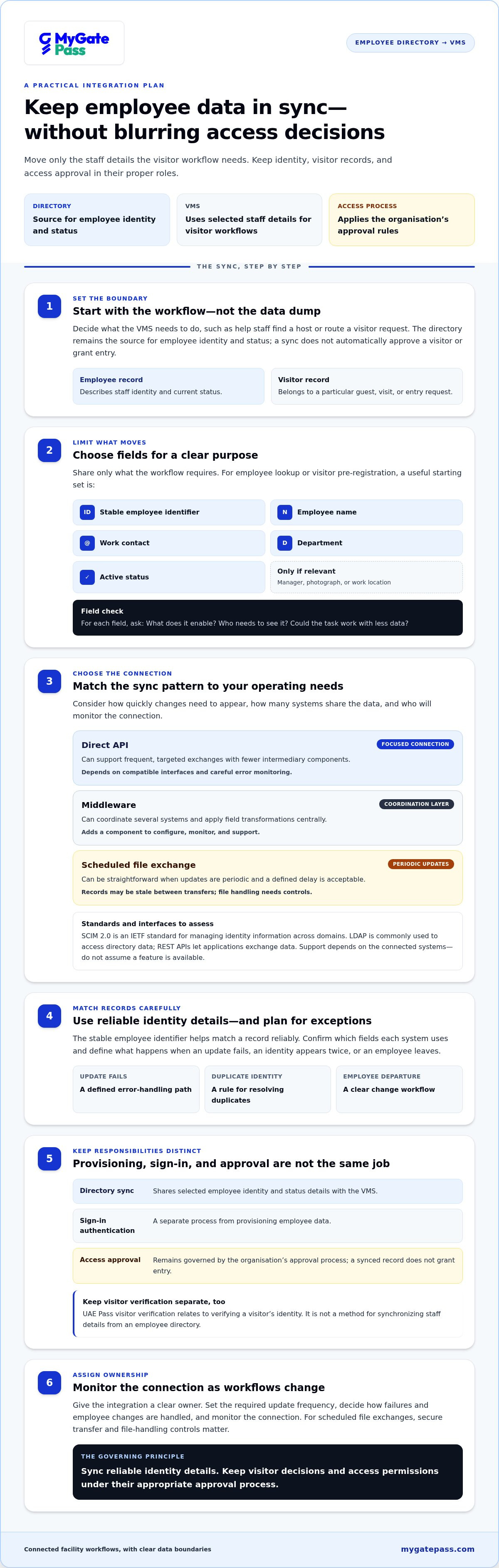
Integrating VMS with employee directory data means setting up a controlled exchange of selected staff details between an organisation’s employee directory and its visitor management system. The directory remains the source for employee identity and status. The VMS can use those details to help staff find a host or route a visitor request. A Visitor Management System (VMS) supports the management of visitor information and related entry processes, but it shouldn’t become the authority for every identity or access decision.
Put simply: employee records describe staff and their current status; visitor records describe a guest’s specific visit or entry request. Synchronization can reduce duplicate typing and keep host details current, but it doesn’t automatically approve a visitor or grant permission to enter. The security team oversees operational review, while the access-control process applies the organisation’s approval rules. Keep those responsibilities clear, even when systems share data.
Which employee directory data might a VMS need?
Start with the workflow, then share only the fields it requires. For employee lookup or visitor pre-registration, a useful starting set may include the employee’s name, work contact, department, a stable employee identifier, and active status. The identifier helps match a record reliably; name and work contact help staff locate or notify the right host.
Separate matching essentials from optional details. A manager, photograph, or work location may be relevant to a specific process, but shouldn’t be included by default. For each field, ask what it enables, who needs to see it, and whether the same task can work with less data. This keeps the sync focused and limits unnecessary copies of employee information.
How employee records differ from visitor and UAE Pass records
An employee directory is an organisational source for staff identity and employment status. A visitor record is created for a particular guest, visit, or entry request, and should stay tied to that purpose rather than become a substitute staff profile. Clear record types help teams find the right information and avoid treating a guest as an employee or a host record as entry approval.
UAE Pass visitor verification is a separate identity workflow. It relates to verifying a visitor’s identity, not synchronizing staff details from an employee directory. In a connected facility workflow, these processes serve different needs: staff data helps identify or contact a host, while visitor records and verification support the guest’s visit. Keeping those sources distinct makes the process easier to understand and manage.
Which VMS and Employee Directory Integration Pattern Fits Your Organization?
The right design depends on how quickly employee changes need to appear, how many systems share the data, and who will monitor the connection. Before choosing a method for integrating VMS with employee directory records, document the workflows and fields involved. Then compare the available patterns with your directory’s capabilities and your team’s ability to support them.
API, middleware, or scheduled sync: what changes?
A direct API connection can exchange selected records between applications when both systems support the required interfaces. Middleware adds a coordination layer that can transform fields or manage flows across several systems. A scheduled file exchange may be simpler to operate, but changes won’t reach the VMS until the next transfer. Each approach needs a clear plan for errors, duplicates, and employee departures.
SCIM, LDAP, and REST APIs are examples to assess, not features to assume. SCIM 2.0 is an IETF standard for managing identity information across domains; LDAP is commonly used to access directory data, while REST APIs provide a way for applications to exchange data. A standard or interface is useful only when the connected systems support it and the design meets your workflow needs.
| Approach | Strengths | Limitations | Best-fit conditions |
|---|---|---|---|
| Direct API | Can support frequent, targeted exchanges with fewer intermediary components. | Depends on compatible interfaces and careful error monitoring. | A focused connection between systems with suitable API support and clear ownership. |
| Middleware | Coordinates multiple systems and can apply transformation rules centrally. | Adds another component to configure, monitor, and support. | Several applications need shared identity data or use different field formats. |
| Scheduled file exchange | Can be straightforward to operate when updates are periodic. | Records may be stale between transfers; file handling needs controls. | Workflows can tolerate a defined delay and the organisation can manage secure transfers. |
How to choose an integration approach
Use operational needs to narrow the options. If host records must reflect employee changes quickly, assess whether an API or middleware flow can support the required update frequency. If periodic updates are sufficient, a scheduled exchange may be easier to manage. In every case, assign an owner to monitor the connection and define what happens when an update fails, an identity appears twice, or an employee leaves.
Keep access decisions separate from synchronization. A successful data transfer should update the relevant employee record, not silently approve entry. For a broader view of coordinated visitor, security, delivery, and staff attendance workflows, explore MyGatePass facility management.
How to Integrate a VMS with an Employee Directory Step by Step
A reliable rollout starts with the work people need to do, not with a connector or protocol. Whether the goal is staff attendance, employee lookup, or authorised visitor pre-registration, define the workflow first. Then build the data exchange around it.
- Identify the use cases and owners. Document who will use the employee information and what they need it for. For example, reception staff may need to find an employee host, while a staff attendance workflow may need to recognise active employees. Assign an owner for directory data, VMS configuration, security review, and operational support.
- Map the fields and their sources. For every field, record its source of truth, format, destination, and purpose. Specify how identifiers are matched, how often updates should run, and which changes trigger a sync. Avoid mapping fields just because they’re available.
- Set rules for employee changes. Decide how the workflow handles a new hire, a changed work contact, an inactive account, or duplicate records. Define whether an incomplete or ambiguous record is held for review instead of matched automatically. The directory should own employee identity and status; the VMS should follow its own governed rules for visitor workflows and permissions.
- Configure the exchange and safeguards. Apply the approved field map and matching rules to the selected integration pattern. Document how failed updates are surfaced, who corrects them, and how a correction is verified. Keep administrative changes traceable, and prevent a successful identity sync from acting as automatic access approval.
- Test identity matching and permissions separately. Confirm that the right employee record is matched, then independently test whether the VMS and relevant approval process apply the intended permissions. Include representative records, missing fields, duplicate matches, changed details, and inactive employee status.
- Pilot, launch, and monitor. Start with a controlled group or workflow before expanding to other users or sites. Track failed or delayed updates, review corrections, and assign escalation ownership. Agree in advance on conditions for pausing or rolling back the sync, such as repeated mismatches or unexpected permission changes.
Prepare the data map and synchronization rules
Make the field map a shared working document for directory, VMS, and security owners. For each item, note the format, permitted destination, matching logic, and update trigger. This gives teams a practical reference during configuration and makes exceptions easier to resolve without creating competing employee records.
Test, launch, and monitor the connection
Use test cases that reflect real data conditions, not just a clean sample record. During the pilot, compare source and destination records and confirm that exceptions reach the right owner. Record correction steps and rollback criteria so the team can respond consistently as the integration scales.
How to Protect Privacy and Prevent Access-Control Errors
A directory sync should update employee information, not silently become an access grant. An active employee record may help the VMS identify a host or support a staff workflow, but it doesn’t by itself approve a visitor, assign a VMS role, or authorise entry. Keep those decisions within the organisation’s defined approval and access-control processes.
That boundary matters when integrating VMS with employee directory data. Accurate identity records help teams work from consistent information; permission decisions require their own rules, oversight, and review. Design both sides deliberately.
Limit data exposure and secure the data flow
Give integration accounts only the access needed for their assigned task. Limit shared fields to documented purposes, and avoid passing sensitive or irrelevant employee details into the VMS simply because they’re available in the directory.
- Restrict permissions: Limit which systems and administrators can read or change synced records.
- Protect transfers: Include encryption in transit and secure credential storage in the integration design.
- Keep an audit trail: Log administrative changes and relevant access to integration settings so teams can investigate unexpected updates.
- Plan retention: Define when records should be reviewed, archived, or deleted because they no longer support an active workflow.
These controls make the data flow easier to oversee. They also help distinguish a routine employee detail update from a sensitive change to permissions or approval rules.
Keep employee status, VMS roles, and visitor verification distinct
Set separate rules for three questions: Is the employee active in the directory? What role can that person perform in the VMS? Is a particular visitor approved for a visit? A status change may prompt a review or deactivation of an employee’s VMS account, but it shouldn’t automatically erase unrelated visitor history. Apply the appropriate retention and access rules to each record type.
Visitor identity verification is another distinct workflow. UAE Pass integration supports verified visitor identification, but that process isn’t a substitute for synchronizing employee records or assigning staff permissions. For more context, see the guide to UAE Pass integration for buildings.
Make these boundaries visible in system configuration and in the responsibilities assigned to administrators. To explore how visitor, security, and staff workflows can be coordinated, discover MyGatePass facility-management tools.
How MyGatePass Fits into Connected Employee and Visitor Workflows
Employee-directory planning is one part of a broader facility workflow. MyGatePass brings together visitor and security apps, an admin dashboard, delivery management, and staff attendance tracking. These tools help teams coordinate everyday activity and manage facility operations, while the directory remains the organisation’s source for employee identity and status.
When integrating VMS with employee directory data, define which approved staff details support the task and how each system is responsible for handling them. MyGatePass provides visitor, security, delivery, and staff attendance tools for facility workflows; the organisation’s integration plan should set the data flow and system responsibilities for the process being managed.
Coordinate staff, security, and facility operations
Staff attendance tracking gives teams a dedicated way to manage attendance information. The security app and admin dashboard help organise facility workflows and provide visibility across relevant activity. Together, these capabilities support coordinated processes without treating every record as the same kind of identity.
Delivery management is relevant when a delivery workflow needs employee or recipient coordination, such as routing a delivery to the intended person. Keep the data shared for that purpose limited to what the workflow needs. A delivery record, an employee profile, and a visitor request serve different operational roles, even when they relate to the same person or location.
UAE Pass visitor verification is distinct from employee-directory synchronization. It supports a visitor identity workflow; it doesn’t serve as the source of staff records or decide employee permissions. For further context on visitor identity, explore the guide to UAE Pass integration for buildings. The broader guide to digital gate pass apps in the UAE can also help frame how visitor workflows fit into facility operations.
Plan a focused evaluation before expanding
Start with one priority workflow, such as employee lookup for visitor pre-registration or a staff attendance process. Define the small set of employee fields needed, name the directory and VMS owners, and keep approval decisions separate from identity updates. A focused pilot makes it easier to assess whether the workflow is accurate and understandable before extending it.
- Data accuracy: Are employee details matched to the intended staff records?
- Administrative effort: Does the workflow reduce duplicate entry and correction work?
- Exceptions: Can staff identify and resolve missing or conflicting records?
- User experience: Can employees and operational teams complete the task clearly?
Use the pilot findings to refine field selection, ownership, and handling rules before expanding to additional workflows. A practical next step is to map one priority task and list only the employee data it requires.
Build a More Connected Facility Workflow
Successful integration of a VMS with an employee directory starts with a focused purpose: decide which employee details support a specific workflow, define how updates are handled, and keep access approvals separate from identity synchronization. Choose an integration pattern that fits your systems and support capacity, then test matching, exceptions, and permissions before expanding.
Connected operations can extend beyond employee lookup. MyGatePass brings together visitor and security apps through a centralized admin dashboard, alongside staff attendance tracking and delivery management. Its UAE Pass integration supports verified visitor identification as a distinct visitor workflow, not a replacement for employee-directory records.
Start with one priority use case and a clear, minimal data map. Explore how MyGatePass supports coordinated facility operations: Explore MyGatePass visitor, security, and facility workflows.
With clear ownership and thoughtful controls, identity data can make everyday processes easier to manage while keeping access decisions deliberate. Start small, learn from the workflow, and build from there.
Frequently Asked Questions
What is an employee directory integration with a VMS?
It’s a controlled exchange of selected employee details between an organisational directory and a visitor management system. The VMS might use fields such as an employee’s name, work contact, department, identifier, and active status to support host lookup or visitor pre-registration. The directory remains the source for employee identity and status, while VMS permissions and visitor approvals follow their own defined rules.
Can a visitor management system sync with Active Directory or Microsoft Entra ID?
It can if the directory and VMS support a compatible connection method and the data exchange is configured for the intended workflow. Options may include a supported API, middleware, or scheduled file transfer; SCIM or LDAP may also be relevant depending on system capabilities. Document the fields, update frequency, and error handling as part of defining the integration requirements.
How does an employee directory integration improve visitor management?
It can make host lookup and visitor pre-registration more consistent by reducing repeated manual entry and helping keep employee details current. For example, reception staff may be able to find a host using an up-to-date work contact or department. The benefit depends on accurate source data and clear workflows. Integration should support these tasks without automatically approving visitors or granting building access.
What employee data should a VMS receive from a directory?
Share only fields needed for a documented purpose. A starting set could include employee name, work contact, department, a stable employee identifier, and active status. The identifier can help match records, while name and contact details support host lookup. Include optional information only when a defined workflow requires it. Avoid copying unrelated profile details into the VMS simply because the directory contains them.
Does syncing an employee directory automatically grant building access?
No. Synchronization updates selected employee information; it shouldn’t silently grant site entry or approve a visitor. Keep directory status, VMS user roles, visitor approvals, and building access permissions governed by their respective processes. For example, a record marked active may help identify an employee host, but an access decision should still follow the organisation’s separate approval rules.
How often should employee records synchronize with a VMS?
Set the sync frequency according to how quickly each workflow needs accurate employee details and what the connected systems can support. A workflow affected by frequent staff changes may need updates more often than one where occasional delays are acceptable. Define the maximum tolerable delay, monitor failed updates, and make sure the chosen schedule doesn’t create unnecessary processing or administrative complexity.
What happens if an employee leaves or their directory record changes?
Define in advance how changes should affect the VMS. A departure may trigger review or deactivation of the employee’s VMS profile, while a changed contact detail may update host information. Neither event should automatically alter unrelated visitor records or erase visit history without applying the organisation’s retention rules. Test these cases, including missing or duplicate matches, and assign an owner to resolve exceptions.


