

What if the slowest part of a visit isn’t the gate, but the uncertainty before it? With a digital gate pass system UAE organizations can coordinate invitations, identity checks, approvals, and arrival procedures in one clearer journey. Visitors need to know how to access their pass, while security teams need a process they can manage consistently.
Convenience and security should work together. A well-planned digital process helps visitors understand what to expect and gives security personnel and administrators better visibility over entry workflows. Clear identity verification and transparent data handling matter just as much as an efficient arrival.
This guide explains the typical digital gate pass journey, from receiving an invitation to presenting a pass at the gate. It also covers what to evaluate before choosing a system and how residents, visitors, security teams, and administrators can coordinate their roles. Connected tools, such as visitor and security apps, an admin dashboard, and UAE Pass integration, can support an organized experience without unnecessary steps.
Key Takeaways
- A digital gate pass is a managed access workflow, not simply a digital identity check. Verification can be one part of the process.
- Visitors, residents, security personnel, and administrators each need access to the channels and tasks assigned to their roles.
- Compare a digital gate pass system UAE by usability, identity options, approvals, security tools, and reporting.
- Map user roles and visit steps before setup, then test routine visits, deliveries, and exception scenarios before rollout.
- MyGatePass connects its visitor app, security app, and admin dashboard to support coordinated gate operations.
What a Digital Gate Pass System in the UAE Does Before Anyone Reaches the Gate
A digital gate pass system UAE organizations use coordinates visitor details, visit approvals, and arrival handling. It gives each visit a defined path, from the initial request to the record of what happened at entry. Think of it as the workflow around access, not simply a digital badge or identity check.
The system can bring hosts, administrators, visitors, and security personnel into a shared process. This supports the broader principles behind access control systems, where access is managed according to defined permissions. The software organizes information and decisions. It doesn’t necessarily operate physical gates, turnstiles, or locks.
A typical visit follows a sequence: invitation or request, approval, arrival, security review, and a visit record. The exact steps depend on the organization’s configured workflow. Keeping visit details in a shared system can reduce repeated manual data entry, but it can’t guarantee a wait-free arrival. Incomplete information, approval delays, or questions at the gate may still need attention.
How a visitor pass moves from invitation to entry
A host or administrator creates a visit request or reviews one submitted through the system. Once approved, the visitor receives instructions through the configured communication channel. At arrival, security personnel check the relevant pass or visitor record and follow the site’s review process. This creates a connected handoff, with each person acting on the visit information relevant to their role.
For example, a visitor follows the instructions they received, while security staff look up the corresponding visit record instead of relying only on a handwritten note or verbal message. If details need clarification, staff have visit context to refer to. The pass helps organize entry, but it doesn’t remove the need for a security review.
Digital gate pass versus UAE Pass identity verification
UAE Pass is the UAE’s national digital identity service. A building’s gate pass workflow is a separate process that manages who is visiting, whether the visit is approved, and how arrival is handled. Identity verification can be one component, but verifying an identity alone doesn’t approve a visit or authorize entry. Those decisions belong to the organization’s configured access workflow.
This distinction helps clarify what a system does: identity, host approval, and entry authorization are related, but they aren’t interchangeable. For a closer look at how the identity service can connect with building workflows, read the UAE Pass integration guide for buildings.
How Digital Gate Pass Login and Access Work for Each User
There isn’t one universal login route for every digital gate pass system UAE organizations use. The assigned channel, sign-in method, and available actions depend on how the organization has configured its workflow. In general, users open the invitation or assigned app, authenticate as instructed, select the relevant visit or record, and follow the steps shown. Screens can differ, so start with the instructions you received rather than assuming every system works the same way.
What visitors and residents typically need to access a pass
Visitors should start with the invitation or access instructions sent by their host or property. Residents may use a designated channel to create or manage invitations for their guests. Before trying again, check that the name, visit details, and access date match the invitation. If the link or account doesn’t work, use the property’s established support route so the team can help resolve the access issue.
What security teams and administrators access
Security staff use their assigned channel to review relevant visitor records and approvals during arrival processing. Administrators work through a dashboard to manage user permissions, configure workflows, and maintain operational visibility. Separating these roles helps each person see the information and tasks relevant to them, instead of relying on one shared login or scattered messages.
If access fails, try these checks:
- Expired invitation: Check the visit date and ask the host or property team whether the invitation needs updating.
- Incorrect details: Compare the information entered with the invitation, including the visitor’s name and visit details.
- Account access issue: Reopen the assigned channel and follow its sign-in instructions. If the problem continues, use the property’s established support route.
Expect the process to vary by system
Login screens, authentication methods, and visit instructions differ between platforms and facilities. Follow the steps supplied for your specific visit, and don’t rely on instructions intended for another system or user role. The basic approach is straightforward: use the assigned channel, confirm the visit details, and follow the guidance provided.
For an example of how visitor access, security review, and administration can connect in one software ecosystem, explore MyGatePass access workflows.
How to Compare Digital Gate Pass Systems Without Confusing Security with Friction
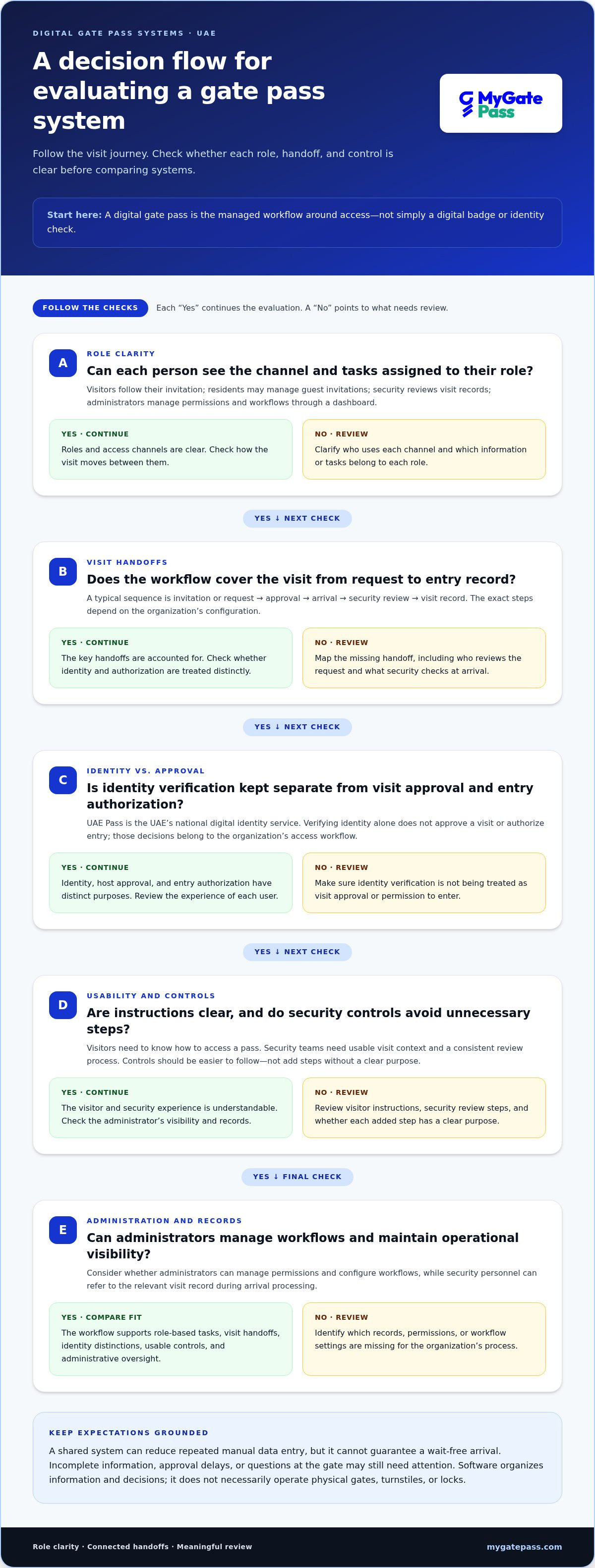
A useful comparison looks beyond whether a system can issue a pass. Assess how it supports each person’s part of the visit journey, from clear visitor instructions to usable records for security teams and meaningful oversight for administrators. The right digital gate pass system UAE organizations choose should make controls easier to follow, not add steps without a clear purpose.
Visitor usability: Can visitors understand the instructions and complete the required steps? Check what happens when someone needs assistance or can’t easily use the primary channel.
Identity options: Does the system offer identity verification options, including UAE Pass integration where appropriate? Treat verification as one capability, not a replacement for visit approval or the organization’s access policies.
Approval flow: Can the relevant host or administrator review requests and apply the organization’s approval process without unnecessary handoffs?
Security tools: Can security personnel see the visitor details and approval information needed to process an arrival? Check whether the workflow gives staff a clear way to review each visit.
Reporting: Can administrators review visit records and understand how the process is working? Consider whether information is easy to find and useful for day-to-day oversight.
Which capabilities matter across the visitor journey
Look for continuity between the visitor experience and the security team’s work. Visitors should receive understandable instructions and know where to turn if they encounter a problem. Security personnel should have access to relevant visit information instead of piecing it together from separate messages or records.
Consider the wider operation, too. If deliveries and staff attendance are part of the facility’s workflow, connected delivery management and attendance tools can help administrators coordinate related tasks in one operational ecosystem.
How to weigh security, privacy, and convenience
Compare a connected digital workflow with manual records across three practical areas:
- Visibility: A shared workflow can make visit status easier for authorized users to follow. Separate manual records may require staff to search different sources.
- Consistency: Configured steps can help teams follow the same process, while paper records or ad hoc messages can leave details recorded differently.
- Administration: Centralized records can reduce duplicate entry. Manual updates may require information to be copied between logs.
Review role permissions, who can see different data, and how retention practices are managed. Fewer repeated steps can make entry more convenient while preserving defined approval controls. For a related view focused on hospitality experiences, explore this UAE digital gate pass app guide.
How to Set Up and Troubleshoot a Digital Gate Pass Workflow
A successful rollout starts with the process, not the software settings. Before configuring a digital gate pass system UAE organizations should map who initiates, approves, reviews, and administers each type of visit. A visitor appointment, delivery, and contractor visit may need different steps, so define those distinctions before inviting users into the workflow.
A measured rollout for residents, visitors, and security teams
Use a controlled rollout to find confusing steps before the process reaches everyone. A practical sequence is:
- Map roles: Document who creates each request, who approves it, who checks it at arrival, and who manages the workflow.
- Define visit steps: Set out what happens from request through arrival, including how exceptions are handled.
- Configure access: Assign permissions and set up the relevant workflows in the platform. Settings and screens vary, so follow the platform’s current guidance instead of assuming a universal setup.
- Test scenarios: Try a routine visitor journey, a delivery, and an exception such as a detail mismatch or an unapproved request. Confirm that each role can complete its part.
- Communicate and refine: Give residents, visitors, and security teams short, plain-language instructions. Gather feedback during the initial rollout and adjust steps that cause confusion.
Keep instructions focused on the next action: where to begin, which details to use, and where to get help. Clear guidance reduces uncertainty without suggesting that digital entry will eliminate every delay.
Common access problems and sensible first checks
If an invitation is missing or a user can’t complete access, check the basics before escalating. Confirm the invitation was sent through the expected channel, compare the visitor’s details with the request, and make sure the visit timing is correct. If authentication is required, check that the user is following the assigned sign-in process and can access the relevant account.
- Missing invitation: Ask the host or administrator to check the request and resend instructions through the designated channel if needed.
- Details don’t match: Have the host or administrator review the record and correct it through the normal process.
- Access still fails: Direct the user to the property’s designated administrator or support route for help.
Keep sensitive identity details and authentication codes out of informal messages. Use the organization’s established process for resolving access issues, and make sure staff know where to direct users when basic checks don’t solve the problem.
For a connected approach to visitor, security, and administrative workflows, explore MyGatePass solutions.
When MyGatePass Fits a UAE Digital Gate Pass Operation
MyGatePass connects visitor access with security-team workflows and centralized administration. To assess how it fits your operation, map the full process: visitor instructions, identity options, approvals, arrival review, and the records administrators need to oversee. This gives you a practical basis for comparing your current process with the platform’s capabilities.
Match platform capabilities to operational needs
The MyGatePass Visitor App and MyGatePass Security App support different parts of the visitor journey. Visitors use a dedicated channel for their access experience, while security personnel use their app to work with visitor information and security processes. The MyGatePass Admin Dashboard gives administrators a centralized view for managing the operation. Together, these tools form a connected software ecosystem rather than a set of disconnected tasks.
Other modules support related facility workflows. The UAE Pass Integration Module provides an option for verified visitor identification, while the Delivery Management System and Staff Attendance Tracking address delivery and staff processes. These capabilities are useful when an organization wants to coordinate those activities alongside visitor access instead of treating every operational task as an isolated system.
Next steps for evaluating a digital gate pass system
Before choosing a digital gate pass system UAE teams can use, compare your current process with the needs each platform is designed to address. Consider:
- User journey: Can visitors and residents understand what to do at each step?
- Verification: Do the available identity options align with your organization’s process?
- Security workflow: Can security personnel review the information and approvals they need?
- Administration: Can administrators manage roles and workflows from a clear central view?
- Operational visibility: Can the team keep track of visitor activity and related facility processes?
Map your answers against the roles and visit types identified during setup. This practical comparison helps clarify whether connected visitor, security, and administration tools would simplify your operation, and whether delivery or attendance modules belong in the same ecosystem.
Ready to explore how these workflows come together? Explore the MyGatePass platform.
Make Every Visit Easier to Coordinate
A well-designed digital gate pass system UAE organizations use connects the steps before arrival with the work at the gate. Clear invitations, defined approvals, and a shared view of visit records help visitors and teams understand what happens next, without treating identity verification as a substitute for access decisions.
As you assess your process, focus on usability, role-based workflows, and the visibility administrators need to manage daily operations. MyGatePass brings together dedicated visitor and security apps with a centralized admin dashboard, alongside UAE Pass integration for verified visitor identification. Delivery management and staff attendance modules can also support related facility workflows.
Start with your real visitor journey, then explore how connected tools could support it. Explore MyGatePass digital access workflows and take a practical next step toward a more organized entry experience.
Frequently Asked Questions
How does a digital gate pass system work in the UAE?
A digital gate pass system UAE facilities use coordinates visit requests, approvals, visitor instructions, and arrival handling in a digital workflow. A host or administrator submits or approves a visit, then the visitor follows the instructions provided. At arrival, security personnel review the relevant record. Identity verification may be included, but a pass, identity check, and permission to enter are distinct steps defined by the facility’s process.
How do I log in to a digital gate pass system?
Start with the invitation or access instructions provided for your visit or account. Open the designated app or link, follow its authentication prompts, and check that the visit details match your invitation. The screens and sign-in method vary by platform and user role. Visitors, residents, security personnel, and administrators may use different access routes, so follow the instructions for your account rather than assuming one login process applies to everyone.
Is UAE Pass the same as a digital gate pass?
No. UAE Pass is the UAE’s national digital identity service, while a digital gate pass system manages a facility’s visit and entry workflow. A system may use UAE Pass as an identity verification option, but that doesn’t itself approve a visit or grant entry. Host approval, visitor instructions, and security review are separate parts of the process, each serving a different purpose within the facility’s configured workflow.
Can visitors use a digital gate pass without a UAE Pass account?
The required sign-in depends on the facility’s configured process and the access method used for that visit. Some workflows include UAE Pass for identity verification, while others provide instructions through an invitation or another supported method. Don’t assume every pass requires the same sign-in. Follow the instructions for your visit, and use the facility’s designated support route if you’re unsure which steps apply.
What should I do if my digital gate pass login is not working?
First, check that you’re using the correct invitation or access link, that the visit details are accurate, and that the visit is within its permitted time. Review authentication prompts carefully and confirm you’re using the intended account. If access still fails, contact the facility administrator or use the support route in your instructions. Don’t share authentication codes or sensitive identity details through informal messages.
Can a digital gate pass system manage deliveries as well as visitors?
Some platforms support delivery workflows alongside visitor management, helping teams organize different types of arrivals. The available features and steps depend on the system and its configuration. Consider whether delivery handling belongs in the same operational workflow as visitor processing, and how security personnel and administrators will review each record. MyGatePass includes a Delivery Management System as part of its digital facility operations offering.
How should an organization choose a digital gate pass system?
Start by mapping who uses the system and what happens from invitation to arrival. Compare visitor usability, identity options, approval controls, security-team tools, administrator visibility, and support for related workflows such as deliveries. Review role permissions, data visibility, and retention practices, then test routine visits and exception scenarios. A suitable system should make responsibilities clearer and reduce unnecessary steps without weakening the organization’s defined approval process.


