

What if the biggest entry bottleneck isn’t the gate, but the gaps between visitor check-in, security decisions and administration? A gatehouse portal works best when these steps connect. Paper logs, separate messages and unclear handoffs can make it harder to track arrivals, coordinate teams and give visitors a smooth welcome.
The right digital approach brings entry information into a clearer, more manageable workflow. This guide explains what a gatehouse portal should do and how to compare its capabilities with the way your site operates. You’ll explore visitor registration, security workflows, administrative oversight and related facility tasks, so you can identify what matters for your operation. In the UAE, UAE Pass integration can support visitor identity verification as part of the entry process. MyGatePass brings visitor and security apps together with an admin dashboard, alongside delivery management and staff attendance modules. The goal is practical: more coordinated operations and a welcoming arrival experience.
Key Takeaways
- Assess a gatehouse portal as software for coordinating entry and administration, distinct from physical barriers or on-site security decisions.
- Compare visitor handling, security workflows, administration, operational visibility and identity verification.
- Trace real entry workflows from arrival to recordkeeping to spot handoffs a connected digital process could simplify.
- Plan selection and rollout around users, workflow priorities, adoption needs and practical measures of success.
- See how visitor and security apps, an admin dashboard, UAE Pass integration, delivery management and staff attendance can support connected facility workflows.
What Is a Gatehouse Portal, and What Should It Manage?
A gatehouse portal is a digital interface for coordinating visitor entry and related administrative workflows at a building or site. It can help capture visitor details, share entry information with security personnel and make visit records accessible to administrators.
Separate the software from the physical parts of entry when comparing solutions. A portal manages information and workflows; a barrier, turnstile or reader is physical access-control hardware. Security personnel handle on-site decisions and interactions. The wider concept of an access control system includes deciding who can access a place and under what conditions, but a visitor portal doesn’t automatically operate every door or gate.
Which gatehouse tasks can a digital portal support?
A portal can give visitors a way to submit details before or during arrival. Security personnel can then review the information and handle the next step according to the site’s process. This creates a clearer handoff than relying only on paper logs or separate messages.
Administrative oversight may include viewing or managing visit records through a dashboard. MyGatePass brings visitor and security apps together with a centralized admin dashboard, while its UAE Pass integration supports verified visitor identification.
Who uses the portal during a typical entry journey?
The visitor provides the requested information and follows the site’s check-in instructions. Security personnel review the entry details, communicate with the visitor or relevant contact as needed, and record the outcome through their workflow. Administrators can use a dashboard to oversee records and support consistent processes across the facility.
Illustrative scenario: A guest arrives for a scheduled meeting. They submit their details through the visitor-facing process, security reviews the entry information, and the visit is recorded. An administrator can later access the record through the portal’s dashboard.
Typical journey:
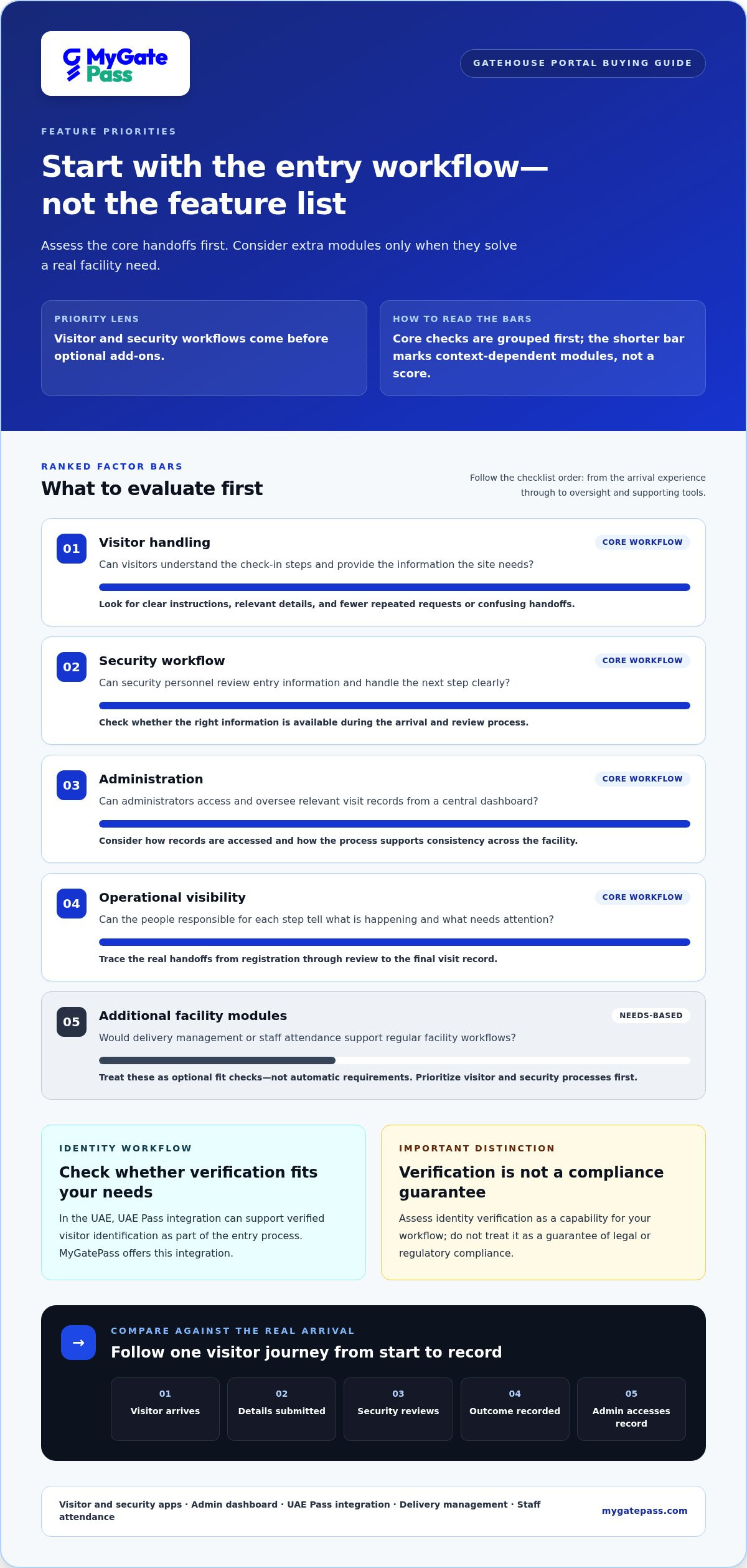
Visitor arrives → Details are submitted → Security reviews entry → Entry outcome is recorded → Administrator can access the record
The portal supports coordination, not a one-size-fits-all security policy. Start by identifying who needs information at each step and how an arrival should move from check-in to a clear record. This makes it easier to spot missing handoffs before choosing software.
Which Gatehouse Portal Features Matter Most in a Buying Decision?
Start with the work your facility needs to manage, not the longest feature list. A gatehouse portal should make entry steps understandable for visitors, usable for security personnel and visible to administrators. Additional modules matter when they address real operational needs, not simply because they appear in a product catalogue.
How should visitor and identity workflows be evaluated?
Walk through check-in from the visitor’s perspective. Are the requested details and next steps clear? Can security personnel access the information they need to handle an arrival? Note any repeated requests for information, unclear instructions or points where the visitor has to wait for guidance. A simple, connected process can reduce confusion without making the welcome feel impersonal.
For identity workflows, consider whether UAE Pass integration supports your visitor-verification needs. MyGatePass offers integration to support verified visitor identification. Treat this as a verification capability, not a guarantee of legal or regulatory compliance. For more context, read this UAE Pass integration guide.
What should security and administration tools make easier?
Security personnel need a clear way to handle entry information during their workflow. Administrators need a useful view of records and facility activity. A centralized dashboard can support oversight, while dedicated apps can give visitor and security tasks distinct interfaces. Physical security programmes also involve broader responsibilities; Penn State’s overview of managing systems and programs offers an institutional example of this wider context.
Use this checklist to distinguish core workflow fit from additional capabilities:
- Visitor handling: Can visitors follow the check-in steps and provide the information the site needs?
- Security workflow: Can security personnel review entry details and handle the next step clearly?
- Administration: Can administrators access and oversee relevant records through a central dashboard?
- Operational visibility: Can the people responsible for each step understand what is happening and what needs attention?
- Additional modules: Would delivery management or staff attendance support day-to-day operations at this facility?
Treat delivery and attendance as needs-based modules rather than automatic requirements. They may be useful where deliveries and staff presence are part of regular facility workflows; otherwise, prioritize the visitor and security process first. MyGatePass offers delivery management and staff attendance alongside its visitor and security apps and admin dashboard. Explore MyGatePass’s connected facility workflows as you map the capabilities your operation needs.
How to Compare Gatehouse Portals Against Real Entry Workflows
Compare a gatehouse portal with the way people actually enter and move through your facility, not with an idealized feature list. Map each handoff from invitation or registration to the final entry record. A residential community may focus on guest arrivals, a commercial building on meetings and deliveries, and a shared facility on coordinating several user groups. The same questions apply, but the priority of each workflow will differ.
How does a visitor’s journey reveal portal fit?
Walk through four stages: invitation or registration, arrival, identity handling, and recording the entry outcome. At each stage, consider both the visitor’s effort and the information security personnel need. A digital workflow may bring details together, but it doesn’t remove the need for people to review information or make decisions. Note each point where someone has to switch tools, repeat details or ask for clarification. For more context on visitor-facing tools, see this digital gate pass app guide.
How can buyers assess security and administrative visibility?
Test the security workflow separately from the administrator’s view. Security personnel need a clear way to process an arrival; administrators need to find and oversee relevant records. A connected workflow can reduce fragmented handoffs by giving roles a shared process. A disconnected approach may leave information spread across paper logs, messages or separate records. Focus on what happens in the actual walkthrough rather than assuming every software product works the same way.
Use this table to structure a walkthrough or product demonstration. Ask users from each role to follow a realistic scenario and note where they pause, switch tools or need clarification.
| Workflow | User | Evaluation question | Evidence to look for |
|---|---|---|---|
| Invitation or registration | Visitor or host | Are the steps and requested details easy to understand? | Compare repeated or separately recorded details with a clear, connected registration path. |
| Arrival and identity handling | Visitor and security personnel | Can the visitor follow instructions, and can security review the information needed for the next step? | Observe the handoff. Note whether information is easy to locate or must be pieced together from separate sources. |
| Entry record | Security personnel and administrator | Is the outcome recorded in a way the administrator can later access? | Check whether the record is findable through the relevant workflow or depends on manual follow-up. |
| Deliveries and staff activity | Security personnel and administrator | Do these records belong in the same operational picture? | Identify whether delivery management or staff attendance is relevant to this facility’s daily process. |
Software shouldn’t add steps without making responsibilities clearer. Include visitors, security personnel and administrators in the evaluation, then note which tasks feel straightforward for each role. This practical test reveals whether a connected digital workflow fits the facility and which handoffs still need attention.
How to Select and Roll Out a Gatehouse Portal
A good selection process starts with the people and tasks the system needs to support. Map the real entry journey first, then choose capabilities that make it clearer for visitors, security personnel and administrators. This helps keep a gatehouse portal useful without adding modules or steps that don’t fit the facility.
What should a gatehouse portal evaluation plan include?
Use the same realistic scenario to compare options, such as a visitor arriving for a meeting while a delivery is being received. Follow each step and note who acts, what information they need and where the record should be accessible.
- Map the users. List the visitors, security personnel and administrators involved. Include delivery and staff workflows if they are part of daily operations.
- Document the current process. Trace registration, arrival, identity handling, entry decisions and recordkeeping. Mark handoffs, repeated details and points where responsibilities are unclear.
- Prioritize capabilities. Separate essential visitor, security and administrative workflows from modules for less frequent tasks. Delivery management or staff attendance may be valuable when they address a defined operational need.
- Plan adoption. Decide who needs to learn each workflow and how visitors will receive clear instructions. Give security personnel and administrators role-specific guidance for their tasks.
- Review operations. After rollout, gather feedback from each user group and check whether the process works as intended. Adjust instructions or workflows where people encounter confusion.
Keep evaluation consistent. Ask each option to demonstrate the same scenario, then assess both the steps it supports and the points where people must make a decision or communicate. This makes workflow differences easier to see than a feature list alone.
Define success in practical terms before adoption. Decide how the team will assess process clarity, whether responsibilities are understood, and whether relevant visit records are accessible to the people who need them. These measures give the facility a shared basis for reviewing the experience and refining the workflow without relying on arbitrary targets.
How can teams prepare for a smooth digital transition?
Introduce the change by role. Visitors need concise directions for completing their part; security personnel need a clear sequence for processing arrivals; administrators need to understand how to oversee records. Brief training and easy-to-follow instructions help each group use the system with confidence. For related visitor-workflow context, explore the digital gate pass app guide.
To connect entry and facility workflows, explore MyGatePass digital workflows.
How MyGatePass Connects Gatehouse, Visitor, and Admin Workflows
A gatehouse portal is most useful when visitors, security personnel and administrators can each follow a clear part of the entry process. MyGatePass brings these roles together through a digital facility management platform with dedicated visitor and security apps and a centralized admin dashboard. Each serves a different user while supporting a more coordinated view of entry workflows.
How do MyGatePass tools support connected entry operations?
The MyGatePass Visitor App supports the visitor-facing part of the journey, while the MyGatePass Security App gives security personnel a dedicated digital workflow for handling entry. The MyGatePass Admin Dashboard provides centralized facility administration. Together, these tools connect the people and records involved while leaving on-site decisions with the people responsible for them.
For facilities that include identity verification in their process, the UAE Pass Integration Module supports verified visitor identification. Assess this capability against your workflow needs; it is not a blanket claim of regulatory compliance.
Other modules can extend the platform to related operations where they fit:
- Delivery Management System: supports delivery-related facility workflows.
- Staff Attendance Tracking: supports staff attendance processes.
These capabilities can bring relevant tasks into a broader facility-management picture. Their value depends on whether deliveries and staff attendance are part of day-to-day operations. Prioritize the workflows that matter most rather than adding modules without a clear use.
What is the next step for a gatehouse portal decision?
Use the selection criteria from this guide to focus your evaluation: workflow fit, ease of use for each role, identity verification needs and administrative visibility. Consider how visitor and security tasks connect, what records administrators need to access, and whether delivery management or staff attendance belongs in the same operational approach.
MyGatePass provides software for visitor, security and administrative workflows. Physical entry equipment and on-site security decisions are separate from the digital tools used to coordinate information and records.
Map your facility’s users and daily entry tasks, then explore how the MyGatePass platform’s apps and modules align with them. Explore MyGatePass for your facility workflows.
Make Your Entry Workflow More Connected
The right gatehouse portal is shaped by real workflows: clear visitor steps, practical tools for security personnel and accessible records for administrators. Compare solutions using the same entry scenarios, then prioritize capabilities that fit your operation rather than features you may not need.
MyGatePass brings dedicated visitor and security apps together with a centralized admin dashboard. UAE Pass integration supports verified visitor identification, connecting identity checks with facility administration.
Explore the MyGatePass platform to see how its digital workflows can support your facility’s needs and make entry operations more coordinated.
Frequently Asked Questions
What is a gatehouse portal?
A gatehouse portal is a digital interface that supports entry-related workflows at a property or facility. It can help coordinate visitor information, security-team actions and administrative oversight. It’s software, not a physical gate or a guarding service. Assess the tasks and user roles a portal supports rather than relying on the product label alone.
How does a gatehouse portal work?
A gatehouse portal organizes steps in an entry journey, such as handling visitor details, supporting security personnel and making relevant records available to administrators. The exact process depends on the software and facility setup. Map how visitors, security teams and administrators interact, then assess whether the platform addresses each handoff clearly. This helps reveal workflow gaps before choosing a system.
What features should a gatehouse portal include?
Start with the tasks your facility needs to manage: visitor handling, security workflows, administrative oversight and accessible records. Identity verification may also matter. Depending on day-to-day operations, delivery management or staff attendance could be relevant modules. Prioritize capabilities by walking through real user journeys, then separate essential requirements from optional additions. This keeps the comparison focused on operational fit rather than feature volume.
Can a gatehouse portal verify visitor identity with UAE Pass?
Some visitor-management platforms integrate with UAE Pass to support verified visitor identification. MyGatePass includes a UAE Pass Integration Module for this purpose. Consider how verification fits into the facility’s visitor process and how related records are handled. An integration alone doesn’t guarantee compliance with applicable requirements, so assess the complete workflow and your organization’s relevant obligations before deciding how to use it.
Is a gatehouse portal the same as access-control hardware?
No. A gatehouse portal is software for coordinating digital workflows, while access-control hardware is physical equipment used at an entry point. They can play complementary roles, but they aren’t interchangeable. Clarify whether your priority is managing visitor and security processes, physical entry equipment, or a coordinated setup involving both. This distinction helps keep software requirements separate from decisions about barriers, readers or other hardware.
How do I choose the right gatehouse portal for my facility?
Choose by mapping the entry journey and identifying the people involved, including visitors, security personnel and administrators. List essential workflows, then compare usability, identity handling, record visibility and relevant operational modules. Consider how each group will learn and use the process. A consistent, workflow-based comparison can show whether the software fits daily operations more clearly than a long feature list alone.
Can a gatehouse portal manage deliveries and staff attendance?
Some platforms include delivery and staff-management workflows alongside visitor handling. MyGatePass offers a Delivery Management System and Staff Attendance Tracking as modules. Consider whether these tasks belong in the same operational environment for your facility. Then assess how the relevant users will interact with each workflow and whether administrators need visibility of these records alongside visitor activity.


