

What if the biggest security gap at a gated community isn’t the gate itself, but the handoffs between residents, visitors, and the security team? When arrivals trigger calls, paper logs, or repeated checks, entry can slow down and records can become inconsistent. Effective gated community security solutions connect these everyday decisions, so each arrival follows a clear process.
Security still depends on people and clear procedures. Residents, security personnel, and property managers also need a shared, timely view of who’s expected, what has been authorized, and how entry activity is recorded. When those workflows are disconnected, deliveries and staff attendance can add to the administrative load.
This guide explains how to build a layered approach that balances consistent checks with a smoother arrival experience. You’ll learn how visitor authorization, UAE Pass identity verification, security-team workflows, delivery management, and staff attendance tracking can work together through digital tools such as MyGatePass. You’ll also see how centralized records support operational oversight and help make everyday entry more organized.
Key Takeaways
- Look beyond the entrance: identify the people, shared spaces, and daily operations your security approach needs to cover.
- Compare gated community security solutions by how they support clear approvals, usable workflows, organized records, and administrative oversight.
- Keep human judgment and physical safeguards central. Digital tools support security operations, they don’t replace them.
- Plan a practical rollout by documenting entry processes, assigning responsibilities, and introducing workflows in a clear sequence.
- Connected visitor, security, and administrator tools can help make access processes more consistent and manageable.
What Gated Community Security Solutions Need to Protect
A gate controls a physical entrance, but it can’t make every access decision or coordinate activity across a community. Security is a connected set of measures for managing entry, protecting shared spaces, supporting residents, and responding to incidents. A gated community commonly has controlled entrances, boundaries, and shared amenities, so its security plan needs to account for more than the point where vehicles or pedestrians enter.
Access control is the process of deciding who may enter, where they may go, and under what conditions. The wider security plan connects those decisions with visitor records, surveillance, people, and incident response. In short, access control governs entry; community security coordinates the measures around it.
Why a gate alone does not manage community access
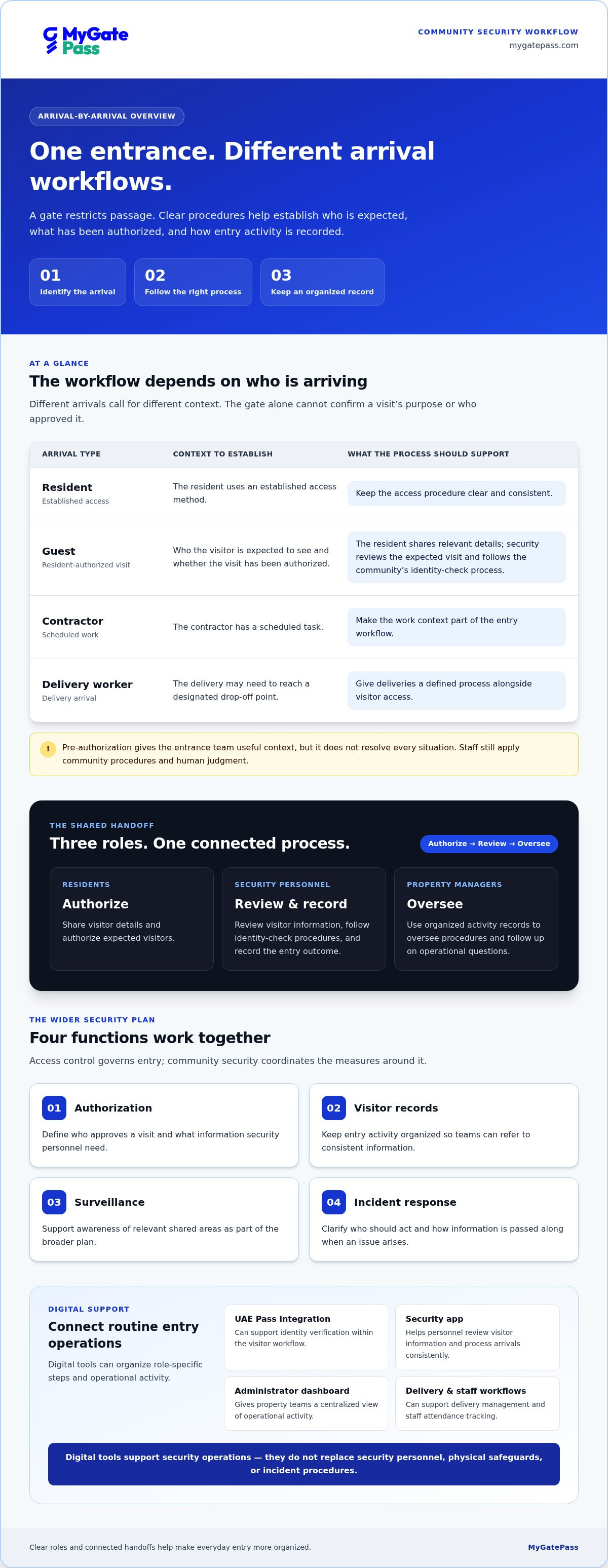
Different arrivals call for different workflows. A resident may use an established access method, while a guest needs resident authorization. A contractor may have a scheduled task, and a delivery worker may need to reach a designated drop-off point. A gate or barrier can restrict passage, but it can’t confirm the purpose of a visit, identify who approved it, or ensure the arrival is recorded consistently.
Those details matter in daily operations. If approvals are handled through scattered calls or records are incomplete, security personnel may need to repeat checks, and managers may find it difficult to understand what happened later. Clear procedures help teams handle each type of entry consistently. No single tool or checkpoint can prevent every unauthorized entry; effective security depends on coordinated processes and human judgment.
What residents and property managers need from security
Residents need a straightforward way to authorize expected visitors without turning each arrival into a lengthy exchange. Security personnel need clear information to review requests and record entry. Property managers need organized activity records to oversee procedures and follow up on operational questions.
These needs are connected. When responsibilities are clear, approved visitors can be welcomed while checks remain consistent. Residents know how to share access details, security teams know what to verify, and administrators can see how workflows are being used. That shared understanding supports accountability and can reduce avoidable back-and-forth.
Effective gated community security solutions connect four practical functions:
- Authorization: Define who approves a visit and what information security personnel need.
- Visitor records: Keep entry activity organized so teams can refer to consistent information.
- Surveillance: Support awareness of relevant shared areas as part of the broader plan.
- Incident response: Clarify who should act and how information is passed along when an issue arises.
The aim isn’t to make everyday entry feel restrictive. It’s to make roles and handoffs easier to understand, so convenience and careful oversight can coexist.
How Digital Gated Community Security Solutions Connect People and Entry
A digital workflow links each step of a visit, from the resident’s invitation to the security team’s review and the entry record. Residents, security personnel, and administrators can follow processes designed for their respective roles instead of relying on disconnected calls or paper notes. This makes access decisions easier to follow while keeping human review part of community security.
Visitor authorization and identity verification
A typical visit can begin when a resident submits or shares an invitation with relevant details. When the visitor arrives, security personnel can review the expected visit, follow the community’s identity-check process, and record the outcome. Pre-authorization gives the entrance team useful context, such as who the visitor is expected to see, but it doesn’t automatically resolve every situation. Staff still apply community procedures and judgment.
UAE Pass integration can support identity verification within this workflow. The process should make clear what staff do when identity details need review or an invitation can’t be matched. For more on identity workflows in buildings, see this UAE Pass integration guide.
Security apps, administrator dashboards, and operational records
A security app can help personnel review visitor information and process arrivals consistently at the entrance. A visitor app supports the guest-facing part of the interaction, while an administrator dashboard gives property teams a centralized view of operational activity. Each role can work with the information and steps relevant to its responsibilities, helping reduce repeated handoffs and scattered records.
The same approach can support other routine operations. Delivery management gives deliveries a defined process alongside visitor access, while staff attendance tracking helps administrators manage another entry-related workflow. These records support oversight and follow-up; they don’t replace physical safeguards, security personnel, or incident procedures.
When evaluating gated community security solutions, look for a clear handoff: residents authorize, security personnel review and record, and administrators oversee activity. MyGatePass brings visitor and security apps together with an administrator dashboard, UAE Pass integration, delivery management, and staff attendance tracking. Explore MyGatePass community workflows to see how these tools can support a connected entry process.
How to Compare Gated Community Security Solutions Without Overlooking the Human Layer
Compare the whole workflow, not just the technology at the entrance. Ask whether residents can authorize visitors clearly, security personnel can process arrivals consistently, and administrators can access organized operational information. Consider how the process handles deliveries and staff attendance alongside visitor access.
Which capabilities matter in a community security platform?
Use these questions to assess a connected digital workflow against a process based on separate messages, calls, or manual records. Manual logs can work when maintained consistently. The key is whether each approach gives people the information they need at the right point.
| Capability | What to assess |
|---|---|
| Visitor approvals | Can residents authorize expected visitors, and can entrance staff review the relevant details? |
| Identity workflow | Can identity checks fit into the process, including UAE Pass integration where appropriate, without treating verification as a guarantee? |
| Staff usability | Can residents, visitors, security personnel, and administrators understand the steps relevant to their roles? |
| Records | Is visitor activity and its outcome recorded in an organized way, digitally or through a consistently maintained manual process? |
| Operational visibility | Can administrators review relevant activity, including delivery workflows and staff attendance, without piecing together separate records? |
A connected platform can bring these workflows into clearer view. MyGatePass combines visitor and security apps with an administrator dashboard, UAE Pass integration, delivery management, and staff attendance tracking. Assess how well these capabilities fit the community’s day-to-day process, not simply how many features appear on a list.
Why people and procedures remain part of the security design
Digital access tools complement on-site security by organizing information and handoffs; they don’t replace human judgment, physical safeguards, or security personnel. A platform can make an approval or record easier to review, but staff still need procedures for identity questions, exceptions, and emergencies. Gates, cameras, physical guarding, and emergency response have distinct roles in a wider security plan.
Before comparing gated community security solutions, map the community’s existing procedures. Define who reviews an unclear identity, how staff handle an arrival that doesn’t match an invitation, and who receives information during an incident. Then assess whether digital workflows support those steps without making routine entry harder. The best fit is a process people can use consistently, with clear responsibility for decisions.
How to Plan and Introduce Gated Community Security Solutions
A successful rollout starts with the community’s actual routines, not a software setup screen. Document how visitors, deliveries, contractors, residents, and staff currently enter, who handles each step, and where delays or unclear handoffs occur. This baseline helps managers shape digital workflows around real responsibilities rather than forcing every arrival into the same process.
Map access workflows and assign responsibilities
Use this sequence to plan gated community security solutions in a practical, people-first way:
- 1. Map entry types. Record the current process for residents, invited guests, deliveries, contractors, and staff. Note what information is needed and where exceptions tend to arise.
- 2. Define roles. Clarify who authorizes visits, who reviews arrivals, who records outcomes, and who oversees activity. Assign responsibility at each handoff.
- 3. Configure workflows. Set up distinct processes for visitor approvals, deliveries, and staff attendance. Include steps for unplanned arrivals, mismatched details, and operational disruptions.
- 4. Brief users. Give residents, visitors, security personnel, and administrators guidance for their roles. Explain the normal process and what to do when something doesn’t match expectations.
- 5. Review results. After implementation, review process consistency, user friction, and operational records. Use feedback to clarify confusing steps and refine workflows.
Build privacy into the plan from the start. Identify what information each step needs, who should be able to view it, how it will be used, and when it should be deleted. Explain the purpose of collecting visitor information through suitable community procedures. Before setting data-retention periods or privacy notices, verify applicable UAE legal and regulatory guidance with an authoritative source. Don’t assume a retention timeline without checking the requirements relevant to the community.
Roll out digital processes and review their performance
Introduce each role’s experience in a clear sequence. Residents need to know how to authorize a visit; visitors need straightforward instructions; security personnel need a consistent way to review and record arrivals; administrators need to understand how to oversee workflows and maintain records. Keep the process practical and provide a clear route for exceptions, so users aren’t left guessing.
As digital passes become part of the workflow, this digital gate pass guide offers related context. MyGatePass connects visitor and security apps with an administrator dashboard and workflows for deliveries and staff attendance. Explore MyGatePass community workflows to see how these tools can support a coordinated rollout.
How MyGatePass Supports a More Connected Community Security Workflow
MyGatePass provides a digital operations layer for community access, connecting visitors, security personnel, and administrators through tools designed for their roles. The platform brings visitor invitations, entrance reviews, and administrative records into a more coordinated workflow. This helps clarify responsibilities while keeping security decisions with the people responsible for them.
Connect visitor access with security-team operations
The MyGatePass Visitor App supports the visitor-facing part of the process, while the MyGatePass Security App supports security personnel handling access workflows. Visitor information can help the entrance team review an expected arrival and follow community procedures. Residents can manage visitor access, security personnel can process arrivals, and administrators can oversee activity.
The MyGatePass Admin Dashboard gives administrators a centralized view for operational oversight. Organized digital records can help teams review activity and manage routine administration without relying solely on scattered messages or paper records. UAE Pass integration supports verified visitor identification within the workflow. Identity verification is one step, not a guarantee of security or a replacement for staff judgment.
Extend oversight to deliveries and staff attendance
Community operations include more than guest visits. The MyGatePass Delivery Management System supports a dedicated delivery workflow alongside visitor access, helping administrators manage another recurring facility process. It is an operational tool, not a physical security measure.
Staff Attendance Tracking supports the administrative task of recording staff attendance. Alongside visitor and delivery workflows, it gives property teams a way to manage related activity through the platform’s digital operations layer. Each workflow still needs clear procedures and assigned responsibility, especially when an arrival or record requires human review.
For communities exploring gated community security solutions, MyGatePass brings visitor and security apps, an administrator dashboard, UAE Pass integration, delivery management, and staff attendance tracking into one connected platform. The software supports coordination; it doesn’t replace security personnel, physical safeguards, or established response procedures. Explore a connected MyGatePass workflow for your community’s visitor and facility operations.
Build a More Connected Community Security Workflow
Strong gated community security solutions connect everyday access decisions with clear procedures, capable security teams, and useful operational records. A gate is only one layer. Residents need a convenient way to authorize visitors, security personnel need a consistent process for reviewing arrivals, and property managers need visibility across community workflows.
Digital tools can bring those steps together without replacing human judgment or physical safeguards. MyGatePass supports visitor and security apps alongside a centralized administrator dashboard. UAE Pass integration supports verified visitor identification, while dedicated delivery management and staff attendance modules help organize related facility processes. Together, these capabilities connect access workflows with day-to-day administration.
Start by reviewing how current processes work, clarifying who handles each decision, and identifying where connected digital workflows could make coordination easier. Choose an approach that supports careful oversight and a welcoming arrival experience.
Explore MyGatePass for connected community operations and take a practical step toward clearer, more coordinated workflows.
Frequently Asked Questions
What are the most important security solutions for a gated community?
The most important solutions work together across entry, shared spaces, and incident response. A community may combine clear visitor authorization, identity checks, organized entry records, suitable surveillance, physical safeguards, and trained on-site personnel. Digital visitor management can help coordinate approvals and records, while defined procedures guide staff when an arrival is unexpected or an incident occurs. The right mix depends on the community’s layout, routines, and operational needs.
Can digital visitor management replace security guards in a gated community?
No. Digital visitor management supports security operations, but it doesn’t replace security personnel, physical safeguards, or human judgment. Software can help staff review visitor information and record access activity, while on-site personnel apply procedures, handle exceptions, and respond to situations that need assessment. Treat technology as one layer in a wider security approach, alongside clear responsibilities for people and processes.
How does visitor management improve gated community security?
Visitor management helps make authorization and entry records more consistent. Residents can provide visit information in advance, and security personnel can review the expected arrival and record what happens at the entrance. This gives staff useful context and can reduce reliance on scattered calls or handwritten notes. Gated community security solutions work best when digital records support clear procedures, rather than being treated as proof that every visit is risk-free.
Is UAE Pass suitable for visitor identity verification in residential communities?
UAE Pass can be part of a visitor identity-verification workflow when the community’s process and the visitor’s circumstances support it. MyGatePass integrates with UAE Pass for verified visitor identification. Verification is one step, not a guarantee of security, and communities should define how staff handle cases where details need further review. Managers should also assess applicable privacy and data-handling requirements rather than assume integration alone establishes compliance.
How can a community manage deliveries without slowing down entry?
Give deliveries a defined workflow instead of processing every drop-off as a standard guest visit. Document how delivery arrivals are handled, what information staff need, and where the delivery should go or be received under community procedures. A Delivery Management System can support this operational process alongside visitor access. Clear roles and consistent records help reduce repeated questions at the entrance while keeping staff involved in decisions and exceptions.
What should managers compare when choosing gated community security software?
Compare how the software supports resident approvals, identity workflows, entrance staff usability, organized records, and administrator visibility. Check whether related tasks, such as delivery management and staff attendance, fit the community’s operational needs. Consider each user’s experience, from resident authorization to security review and administrative oversight. The goal is a clear, connected workflow that people can follow, not simply a long list of features.
How should a gated community introduce new security technology?
Start by documenting current processes for residents, visitors, deliveries, contractors, and staff. Assign who authorizes visits, reviews arrivals, and oversees records, then configure workflows around those responsibilities. Brief each user group on the steps relevant to them, including how to handle exceptions. After rollout, review process consistency, user feedback, and operational records, then refine unclear steps. Consider privacy and data-handling needs during planning, and verify relevant UAE guidance.


