

What if the biggest risk in a new security rollout isn’t the software, but the workarounds employees create when it gets in their way? Getting employee buy-in for new security software starts with recognising a familiar concern: added controls can feel inconvenient, confusing, or intrusive when their purpose and impact aren’t clear.
That concern is reasonable. If people don’t understand what’s changing or how it affects their day, even a well-intended rollout can create mistrust and slow essential tasks. Adoption takes more than an announcement. Employees need a clear explanation of the value, workflows that make sense, and a way to raise issues before they become habits.
This guide explains how to frame the change around what matters to employees, identify friction before launch, and build lasting use through feedback, practical support, and clear measures of progress. You’ll also see how transparent, connected processes can help security and facility teams coordinate more smoothly, without making security feel like a barrier to getting work done.
Key Takeaways
- Read resistance as useful feedback: it can point to extra steps, unclear data use, or missing context that needs attention.
- For getting employee buy-in for new security software, connect the security goal to practical benefits employees can recognise in their daily work.
- Assess usability, workflow fit, accessibility, support, integration, and reporting alongside security needs.
- Use a representative pilot to surface friction, gather focused feedback, and make adjustments before a wider launch.
- Explore how connected visitor, security, and administrative workflows can make facility processes clearer for the people who use them.
Why employees resist new security software - and what that resistance signals
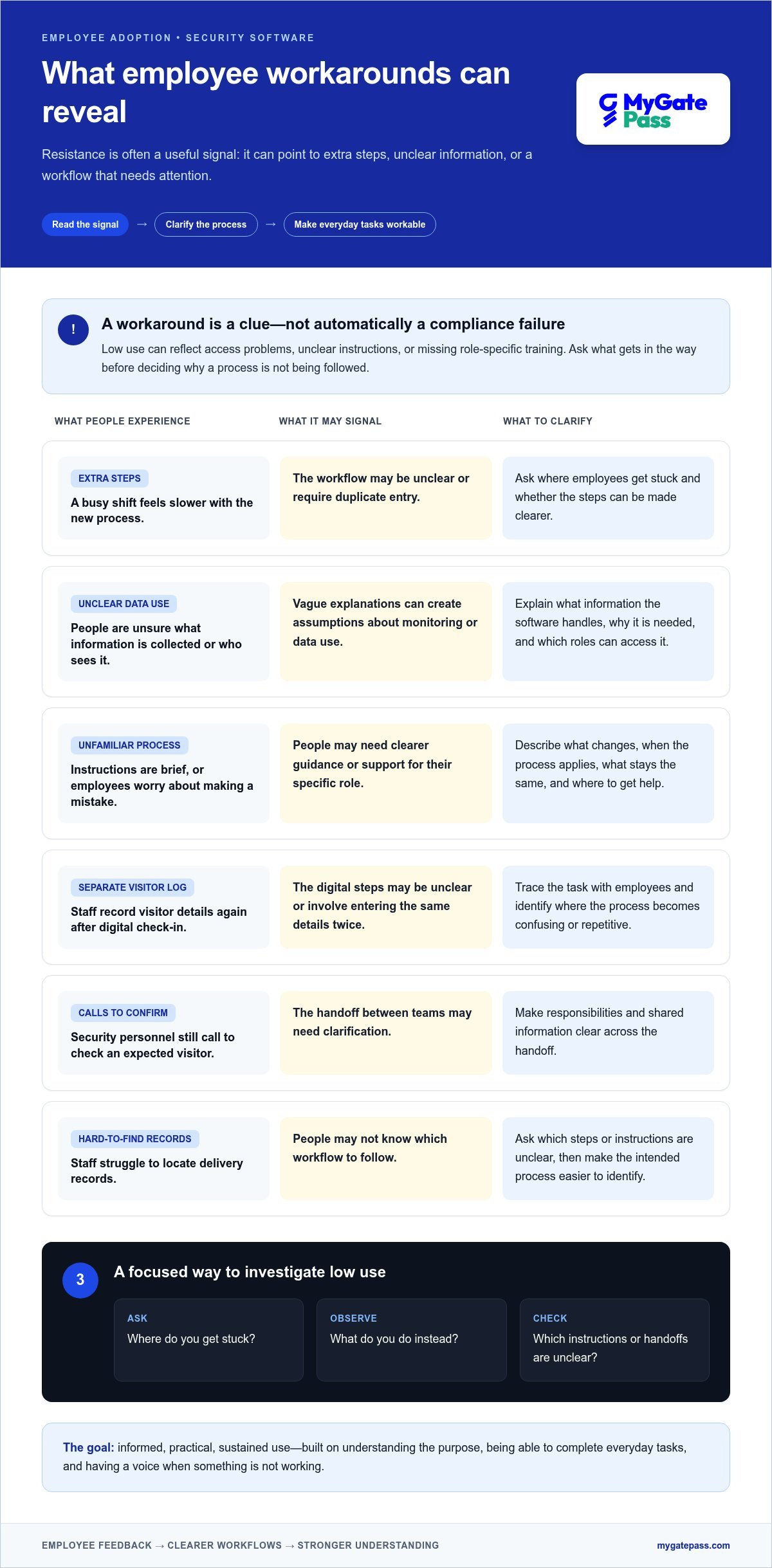
Extra steps during a busy shift, unclear explanations of what information is collected, or a process that feels unfamiliar can all make new security software difficult to welcome. These concerns deserve a clear response, not a label of “resistance.” Employees are often closest to the day-to-day workflow, so their questions can show where the rollout needs more explanation or a simpler path.
Acceptance is shaped in part by whether people see a tool as useful and manageable. The Technology Acceptance Model explores these factors, offering a helpful lens for understanding why explaining the purpose of a change matters as much as introducing its features.
What employees may worry about when security software changes
Employees may wonder whether a new process will slow down their work, whether it’s easy to use on the devices available to them, or whether their role and responsibilities are changing. They may also worry about making a mistake, especially if instructions are brief or support is hard to find.
Questions about data use are reasonable, too. Explain what information the software handles, why it’s needed, and which roles use it. If those details are vague, employees may assume the system collects more than it does or that it will be used to monitor them. That uncertainty can weaken trust and participation. Clear, accurate communication helps distinguish what the software does from what people fear it might do.
How resistance can reveal implementation problems
Repeated workarounds can point to specific problems. If staff record visitor details in a separate log after using a digital check-in process, the steps may be unclear or require duplicate entry. If security personnel still rely on calls to confirm an expected visitor, the handoff between teams may need clarification. If delivery records are hard to locate, staff may not know which workflow to follow.
Start by identifying what’s behind low use. Intentional refusal is different from being unable to access the app, not knowing how to complete a task, or lacking training for a role-specific process. Ask employees where they get stuck, what they do instead, and which instructions are unclear. Look for patterns across teams before treating adoption as a compliance failure.
Employee buy-in is informed, practical, sustained use built on understanding the purpose, being able to complete everyday tasks, and having a voice when something isn’t working. That definition shifts the goal from simply getting people to accept a tool to making its use clear, workable, and worthy of trust.
How to build a credible case for security software employees will use
A convincing case connects a real security or operational need to a change employees can understand. Keep the process practical: identify the problem, map the roles affected, explain the benefits, invite input, and decide how you’ll measure whether the new approach is working. For example, if visitor details move between paper records and staff messages, focus the case on making the handoff clearer rather than claiming the software will solve every security risk.
The reason for the change explains what the organisation needs; the expected impact explains what employees will experience. Keep both parts visible. This helps managers explain the purpose without overstating how much a new tool will change daily work.
Explain what changes, why it matters, and what stays the same
Use plain language to describe the problem and the new steps. Say what employees will do differently, when the process applies, and where they can get help if they’re unsure. Be just as clear about what stays the same, including responsibilities that aren’t affected by the rollout.
If the software handles personal or operational information, explain what data it uses, why it’s needed, and which roles can access it, where applicable. Don’t make broad assurances without evidence. Practical guidance on how to gain employee buy-in also highlights the value of awareness and transparency. Invite questions before launch, then share answers where everyone affected can find them.
Make the case specific to each employee group
One message won’t answer every role’s questions. Tailor the explanation to the tasks people perform and the decisions they make:
- Employees: Show how the new process fits a routine task and what to do if something doesn’t work as expected.
- Security teams: Explain how defined steps and shared information can support coordination, without presenting the software as a replacement for people or a tool for surveillance.
- Managers: Provide concise talking points, a clear contact for unresolved concerns, and a way to pass recurring feedback to the rollout team.
- Administrators: Clarify how they’ll manage relevant workflows and what information they need to communicate to others.
For each group, ask about likely bottlenecks before finalising the process. Then choose useful measures, such as whether staff can complete the intended task, where they need support, and which steps still cause confusion. Avoid treating login counts alone as proof that a workflow is working.
For facility teams, MyGatePass brings together visitor and security apps, an admin dashboard, and facility-management modules. Reviewing how these workflows fit together gives teams concrete examples to discuss when assigning responsibilities and planning handoffs. Explore MyGatePass facility workflows as you consider how to make a change understandable in day-to-day operations.
How to evaluate security software through the employee experience
Security strength and a manageable user experience belong in the same evaluation. A tool may meet a technical requirement, but if routine tasks are confusing, inaccessible, or poorly supported, employees may struggle to use it as intended. As part of getting employee buy-in for new security software, test how real users complete their work, not just how the system performs in a demonstration.
Compare workflow fit, usability, and support
Use the same questions across the options you’re assessing. Include employees who will use the software in different ways, then walk through routine tasks from start to finish. Check whether the steps are clear and proportionate, whether the system fits existing processes, and how users can get help when something goes wrong.
| Criteria | What to evaluate |
|---|---|
| Usability | Can users understand the next step and complete common tasks without unnecessary effort? |
| Workflow fit | Does the process support each role’s routine work, or create duplicate entry and extra handoffs? |
| Accessibility | Can users access and navigate the software with the devices and work conditions relevant to their roles? |
| Support | Are onboarding, help materials, issue reporting, and ongoing support arrangements clear? |
| Integration | How does the software connect with the organisation’s existing systems and processes? |
| Reporting | Can managers see useful information about task completion, recurring issues, and adoption? |
Don’t assume every organisation uses the same systems or follows identical workflows. Map the current process first, then assess what changes for each user group. For example, a visitor-management workflow may involve a visitor, security personnel, and an administrator. Check that the handoffs and responsibilities make sense for all three.
Assess trust, privacy, and measurable adoption
Trust needs to be part of the evaluation, not an afterthought. Document what user data the software collects, why each type is needed, how it’s handled, and which roles can access it. Check that access aligns with job responsibilities. Clear answers help employees understand the process and reduce uncertainty about how information is used.
Define useful measures before rollout. Track whether users can complete intended tasks, whether they return to the software for recurring work, and which questions or support requests keep coming up. Review these signals together: repeat use may look positive, but persistent requests for help can reveal confusing steps. The aim isn’t to promise effortless adoption. It’s to choose a secure tool with workflows people can understand, access, and use consistently.
How to roll out new security software with less friction
A smoother rollout is planned with employees, not simply announced to them. A pilot gives the organisation a chance to test real tasks, find confusing steps, and address concerns before the change reaches everyone. It also gives employees a visible role in improving the process. That feedback loop is central to getting employee buy-in for new security software.
Run a pilot that gives employees a real voice
Choose participants who reflect different roles, levels of confidence with software, and day-to-day workflows. Ask them to try realistic tasks and note where they hesitate, lose time, or need to repeat information. Invite questions about privacy and data use, too. A useful pilot surfaces both usability issues and gaps in the rollout explanation.
Close the loop. Keep a simple record of feedback, changes made, and issues that remain. Share the summary with participants so they can see how their input shaped the rollout. If a suggestion can’t be acted on, explain why and clarify what will happen next.
Support adoption after launch
Keep help close to the task. Provide short, role-specific instructions, an accessible route for reporting problems, and reminders at relevant moments rather than sending repeated general announcements. Review support requests for patterns. If several people ask about the same step, the guidance or workflow may need an update.
Use a clear rollout sequence:
- Prepare: Map affected roles, current workflows, support routes, and the purpose of the change.
- Pilot: Test routine tasks with a representative group and explain what feedback you’re collecting.
- Listen: Gather observations on confusing steps, delays, access barriers, and unanswered questions.
- Adjust: Fix practical issues and refine instructions before expanding access.
- Communicate: Tell employees what changed, what to expect, and where to get help.
- Launch: Roll out the agreed process with role-specific guidance and clear support.
- Review: Check task completion and repeat use alongside support requests, reported friction, and workarounds.
Login counts alone don’t show whether employees can complete the work or trust the process. Review adoption measures alongside friction indicators, then share progress honestly, including changes made in response to feedback. For facility teams, MyGatePass brings visitor, security, and administrative workflows together as part of facility operations. Explore MyGatePass workflows when considering how to coordinate these everyday processes.
Make security software part of a clearer facility-management workflow
For facility teams, security software affects everyday interactions: welcoming visitors, coordinating with security personnel, handling deliveries, and keeping administrative records organised. Getting employee buy-in for new security software is easier when each person can see where their task fits and how information moves between the people involved. Clear roles and connected steps can reduce uncertainty without adding unnecessary process.
Connect visitor and security workflows without adding unnecessary friction
Think of the workflow in distinct touchpoints. A visitor app supports the visitor-facing part of the process, while a security app gives security personnel a dedicated workflow. An admin dashboard provides a central place for facility administration. When responsibilities and handoffs are easy to understand, staff can spend less time working out what happens next.
Related operational tasks matter, too. Delivery management and staff attendance tracking can sit alongside visitor and security workflows, helping teams coordinate different facility processes. The aim isn’t to force every task into one path. It’s to make each step clear to the people responsible for it. For practical background on digital passes in the UAE, see this digital gate pass app guide.
Build confidence with transparency and a clear next step
Explain what each workflow is for, what information is used, and which roles handle it. For example, UAE Pass integration supports verified visitor identification. Describe that purpose plainly and distinguish it from employee monitoring. Clear explanations help staff understand how the feature relates to visitor processing and where it fits into their responsibilities.
Use the UAE Pass integration guide for building-security context as a prompt to discuss how visitor identification, staff tasks, and administrative steps connect in your facility workflow. Make space for questions, and explain how employees can raise a confusing step or suggest a better handoff.
MyGatePass brings visitor and security apps together with an admin dashboard and facility-management modules. These tools offer a practical example to consider when mapping the touchpoints in your workflow. If you’re considering how connected workflows could support clearer coordination in your facility, Explore MyGatePass.
Make the next security change easier to adopt
Successful adoption starts by treating employee concerns as useful information. Questions about extra steps, data use, or unfamiliar tasks can reveal where communication or workflows need attention. Explain the reason for the change in plain language, show how it affects each role, and give employees a voice before and after launch.
For getting employee buy-in for new security software, assess the everyday experience alongside security needs. Test routine tasks with a representative group, make support easy to find, and review task completion and recurring friction, not login counts alone. Adjustments guided by employee feedback can make a new process clearer and more practical to use.
Facility workflows benefit from the same thoughtful approach. MyGatePass brings visitor and security apps together with a central admin dashboard, UAE Pass integration for verified visitor identification, and delivery management and staff attendance tracking modules. These tools help teams consider how everyday facility processes connect.
Explore MyGatePass to see how its workflow modules could fit your facility operations. With clear communication, practical support, and continued listening, your team can make security changes with greater confidence.
Frequently Asked Questions
How do you get employees to use new security software?
To get employees to use new security software, connect its purpose to daily tasks, explain what will change, and provide role-specific guidance and support. Getting employee buy-in for new security software also means inviting feedback before launch and acting on practical issues. For example, test a visitor check-in process with the staff who handle it, then clarify confusing steps and explain what changed. Keep a simple route open for questions after rollout.
Why do employees resist new security software?
Employees may resist because a new tool adds steps, feels difficult to use, or changes a familiar process without enough explanation. They may also have questions about data use, access, or what the change means for their role. Low use can signal a training or access barrier, not deliberate refusal. Ask what’s getting in the way and look for repeated confusion or workarounds before treating adoption as a compliance issue.
How can you address employee privacy concerns about security software?
Address privacy concerns with clear, specific information about what data the software uses, why it’s needed, and which roles can access it. Explain how the information relates to the task, and avoid making assurances you can’t substantiate. Give employees a place to ask questions and share answers with everyone affected. For instance, clarify whether a visitor workflow handles visitor identification, rather than leaving staff to guess what information is collected or how it is used.
Should you pilot new security software before a full rollout?
Yes, a pilot can reveal workflow issues and unanswered questions before the software reaches the wider organisation. Include people with different roles, levels of confidence, and daily tasks. Ask them to try realistic workflows and report unclear steps, delays, access problems, and privacy questions. Then record what you changed and share the results with participants. A pilot is most useful when feedback can inform the rollout, not just confirm a decision already made.
How do you measure employee adoption of security software?
Measure adoption by checking whether employees can complete intended tasks, return to the software for recurring work, and need repeated support. Pair these signals with friction indicators, such as common help requests, abandoned steps, or workarounds. Login counts alone don’t show whether people understand or can use a process effectively. Review the measures by role where appropriate, then use patterns to improve instructions, access, or workflow design.
What should a security software rollout plan include?
A rollout plan should cover preparation, a representative pilot, employee feedback, adjustments, communication, launch, and post-launch review. Map affected roles and workflows, define what the pilot will test, and make training and support easy to find. Explain what is changing, why it matters, and how employees can report problems. After launch, review task completion alongside support requests and workarounds, then share any changes made in response to feedback.


