

What if a business park could coordinate shared arrivals without forcing every tenant into the same visitor process? Choosing a visitor system for business parks operators manage means balancing site-wide visibility with the different workflows of tenants, buildings, and entry points. A manual sign-in book can record arrivals, but it is harder to use for checking who is expected, directing a visitor to the right tenant, or finding a visit record later.
The right system should make arrivals clear for visitors, security teams, and administrators. It should connect the workflows that need to work together while allowing tenants to follow the steps their operations require. This guide explains how to assess that balance.
Compare visitor and security workflows, administrator visibility, identity options, and related operations such as deliveries and staff attendance. You’ll also see how MyGatePass brings dedicated visitor and security apps together with a central admin dashboard and UAE Pass integration for visitor identity verification. Use the criteria below to compare systems against your site’s actual needs.
Key Takeaways
- Map how tenants, site administrators, and security teams share arrival responsibilities before comparing systems.
- Assess visitor arrival, security handling, administration, and connected facility workflows separately. Not every site needs the same capabilities.
- Compare systems against real operating needs, rather than choosing by feature count alone.
- Plan a practical rollout: map processes, define roles, configure workflows, then review how operations are working.
- MyGatePass connects visitor, security, and administrator workflows, with UAE Pass integration for visitor identity verification.
Why Business Parks Need a Visitor Management System Built for Shared Operations
A business park isn’t a single reception desk with one set of rules. It’s a shared site where tenants welcome their own guests, administrators oversee common areas, and security teams manage entry points. A visitor management system is software that organizes expected visitors, records their arrival, and makes visit information available to the people responsible for site operations. A shared view can help teams coordinate while allowing tenants to retain different arrival procedures.
Paper logs and separate spreadsheets can record visits, but they can make information harder to compare across buildings or find when responsibilities overlap. Visitor management systems have evolved from paper-based methods to digital solutions. The practical question is whether a digital system makes records useful across the site while keeping each tenant’s process clear.
Where business park visitor processes become difficult to coordinate
One tenant may expect scheduled client meetings, another may receive frequent service visits, and a shared facility may host events that bring visitors to different entrances. When someone arrives without a clear host name, destination, or appointment detail, security personnel may need to search for the right tenant or make calls before directing them. The challenge isn’t simply recording a name. It’s connecting the arrival to the right person and place.
Different visit types also need distinct handling. A meeting guest follows a different path from a delivery courier, while staff attendance is part of ongoing workplace operations rather than a one-off visit. Treating all three alike can clutter records and leave it unclear who should respond. Clear categories and assigned responsibilities help teams use information consistently.
What a well-managed visitor journey should accomplish
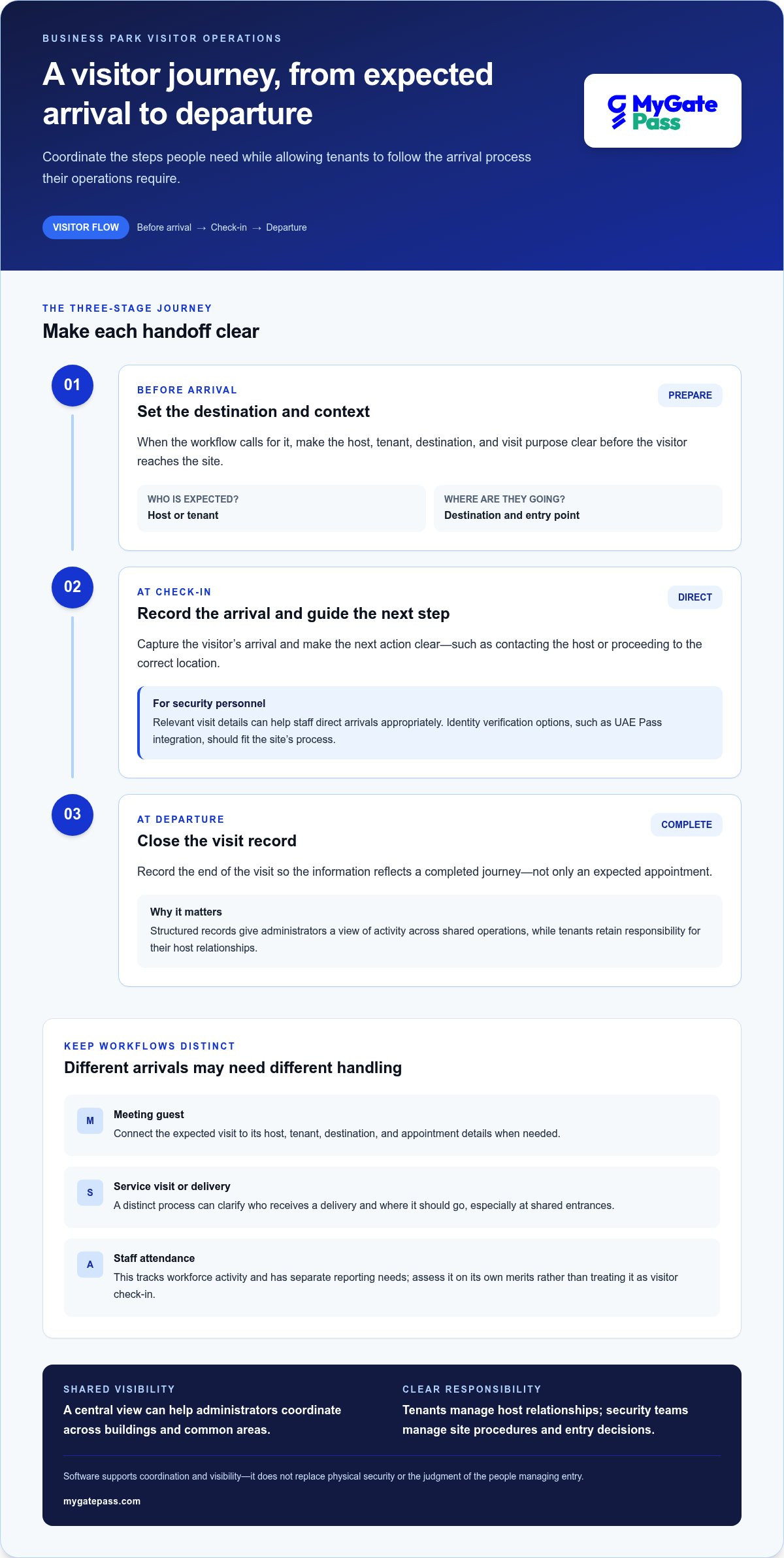
A coordinated journey starts before arrival, when an invitation or visit details are shared, and continues through check-in, host or destination confirmation, and a departure record. Not every site needs the same steps. Define a process people can follow: visitors should understand where to go and what information is needed, while security personnel should have enough visit context to direct arrivals appropriately.
- Before arrival: Make the host, tenant, destination, and visit purpose clear when the workflow calls for them.
- At check-in: Record the arrival and give the visitor a clear next step, such as contacting the host or proceeding to the correct location.
- At departure: Record the end of the visit so the information reflects a completed journey, not just an expected appointment.
Administrators can use structured records to understand activity across shared operations, while tenants retain responsibility for their host relationships. Security teams remain responsible for site procedures and entry decisions. Software supports coordination and visibility; it doesn’t replace physical security or the judgment of the people managing entry.
Which Visitor System Capabilities Matter Across a Business Park?
Start with the work the system needs to support, not the longest feature list. A business park may need shared visibility across buildings while allowing tenants to use different approval steps or host procedures. Separate core requirements, which support regular site operations, from optional capabilities that address a specific need. This keeps selection focused and avoids adding steps that visitors and teams won’t use.
Assess four areas: visitor arrival, security handling, administration, and connected facility workflows. ICT describes how digital visitor systems can automate check-in and capture visit information, but the useful test is whether those capabilities suit your site’s actual processes.
Visitor, security, and administrator workflows
For visitor arrival, consider how the system handles a scheduled meeting, an expected service visit, and someone who arrives without complete details. Are the required steps understandable? Can visitors identify the right tenant or host without guessing? A simple process matters as much as the information it collects.
For security personnel, assess whether relevant visit details are accessible at the point of entry and whether staff can record activity consistently. UAE Pass integration can support visitor identity verification when it suits the site’s process. Treat it as an identity option to evaluate, not a substitute for deciding who reviews information or how exceptions are handled.
Administrators need an appropriate overview of activity and workflows across the park. A centralized dashboard can bring administration into one place, while tenant-specific responsibilities remain clear. Decide which roles need access to which information before configuring the system.
Connected delivery and staff workflows
Delivery handling may belong in the same operational platform if couriers regularly arrive at shared entrances or serve multiple tenants. Consider whether a distinct delivery workflow would clarify who receives an item and where it should go. Staff attendance is different: it tracks workforce activity and has separate reporting needs, so assess it on its own merits rather than treating it as another visitor check-in feature.
Related modules can bring facility processes into a more connected software environment, but don’t assume separate workflows automatically share data or integrations. Decide what should remain distinct and what administrators need to view together.
Use this checklist to compare systems consistently:
- Arrival: Are the steps clear for the visitor types your site receives?
- Security: Can personnel find relevant visit details and record activity?
- Administration: Can administrators oversee the processes they’re responsible for?
- Identity: Would UAE Pass verification suit your visitor workflow?
- Related operations: Do delivery management or staff attendance address a real need?
- Optional features: Is each extra capability useful enough to justify its place in the process?
Score each item against your operating needs, not a competitor’s feature count. To see how visitor, security, and administration workflows can sit within one platform, explore MyGatePass visitor management software.
How to Compare Business Park Visitor Systems Before Choosing
Compare systems against the same scenarios, roles, and priorities. A feature that sounds useful may add little if it doesn’t fit how tenants, site administrators, and security personnel work. Choose the system that fits everyday workflows, not the one with the longest feature list.
For each criterion, score its importance to your site and record whether the capability is demonstrated, documented, or still an assumption. This makes trade-offs visible and stops impressive but irrelevant extras from outweighing practical needs.
Compare usability, access workflows, and identity options
Walk through a pre-arranged visit and an unexpected arrival. Check whether visitors can understand the required steps, security personnel can access relevant visit details, and administrators have suitable oversight. The visitor, security, and administrator interfaces should serve distinct responsibilities without unnecessary hand-offs. Assess each building and tenant process rather than assuming one workflow fits all.
Review identity options in context. UAE Pass integration can support visitor identity verification where it suits the site’s process, but it shouldn’t be treated as proof of broader regulatory compliance. Record which identity steps are essential, which are optional, and what the documented workflow supports.
Compare oversight, reporting, and operational fit
Consider what administrators can view through the dashboard and how responsibilities are managed across tenants and shared areas. Treat delivery management and staff attendance as distinct operational requirements, not extensions of visitor check-in. They may be relevant modules, but each should be assessed for its own users, records, and reporting needs.
Document implementation questions about existing processes, data handling, privacy, and any claimed technical integrations. Distinguish established capabilities from expectations, and substantiate legal or technical claims with appropriate documentation rather than assumptions.
| Comparison criterion | What to assess | Priority score | Evidence or open question |
|---|---|---|---|
| Workflow fit | Scheduled and unexpected arrivals; tenant-specific steps | High / Medium / Low | Documented process or assumption? |
| User roles | Visitor, security, tenant host, administrator needs | High / Medium / Low | Are responsibilities clear? |
| Identity options | Verification steps, including UAE Pass if relevant | High / Medium / Low | What does the workflow support? |
| Administration | Dashboard oversight and role access | High / Medium / Low | What can each role view? |
| Related modules | Delivery and staff attendance requirements | High / Medium / Low | Separate needs or shared visibility? |
Set priority scores based on operational impact, not feature count. Mark optional capabilities clearly. If a capability depends on an integration or process change that hasn’t been verified, keep that uncertainty visible in the comparison. This gives decision-makers a clear basis for weighing site fit, usability, and administration before planning a rollout.
Plan a Practical Rollout for a Business Park Visitor System
A rollout works best when it starts with the way the site operates, not with a software setup screen. Planning should bring tenants, site administrators, and security personnel into the same conversation while keeping their responsibilities distinct. Reviewing one representative workflow can reveal unclear hand-offs before the process is extended across the site.
Map current processes and assign operational ownership
Document how each visitor category enters and how its visit is recorded. Include invited guests, contractors, deliveries, and staff, noting where their paths differ. Then identify who owns each action: tenants may provide host and appointment details, security personnel manage entry procedures, and administrators oversee shared workflows. Clear ownership prevents gaps, such as an arrival with no named host or a delivery with no agreed recipient.
Use four steps to shape the rollout
- Map processes: Record the current arrival, check-in, referral, and departure steps for each visitor category. Note building or tenant variations, shared entry points, and common exceptions.
- Define roles: Assign responsibility for visit details, host responses, entry decisions, delivery handling, and administration. Make clear who updates information when plans change.
- Configure workflows: Set up the agreed steps and instructions for each category. Keep delivery and staff attendance processes distinct from guest visits, even if they sit within a broader facility platform.
- Review operations: Start with a limited workflow review, such as one building or visitor category, before expanding the process. Gather feedback and refine unclear steps first.
Keep the review practical. Note whether visitors arrive with enough information, how often personnel need to clarify a host or destination, whether delivery routing is clear, and which exceptions recur. These observations reveal friction without assuming the software alone will resolve operational issues. They also give administrators a concrete basis for deciding what to adjust before applying the workflow more widely.
Prepare teams and review the workflow after launch
Give tenants, security personnel, and administrators instructions tailored to their roles. Visitors also need concise guidance on what to do on arrival and whom to contact if their host or destination details are unclear. Once the workflow is in use, review recurring questions and available operational records with the teams handling them. Consider small updates that make the process easier to follow.
Include privacy and data handling in the rollout plan. Define what visitor information is collected, who can access it, how it is used, and how long it is retained. Have qualified legal guidance review applicable UAE requirements and relevant policies. Don’t treat a software feature or identity option as proof of compliance. If UAE Pass is being considered, document where identity verification fits into the visitor journey and consult dedicated guidance on UAE Pass integration for building visitor workflows.
Explore how MyGatePass can support your rollout with visitor management software.
How MyGatePass Supports Business Park Visitor and Facility Workflows
A business park needs clear hand-offs between visitors, security personnel, tenants, and administrators. MyGatePass brings dedicated visitor and security apps together with a central admin dashboard, helping each role handle its part of the visitor process within one software platform. For teams assessing a visitor system for business parks Abu Dhabi, the value lies in matching the tools to real responsibilities, not assuming every tenant follows identical steps.
Connect visitor handling with security and administration
The MyGatePass Visitor App supports the visitor-facing part of the workflow, while the MyGatePass Security App is designed for security personnel handling visitor processes. Their roles are distinct but relate to the same arrival journey: visitors need a clear way to engage with the process, and security teams need a dedicated tool for their responsibilities.
The MyGatePass Admin Dashboard provides a centralized administrative view of the platform. Administrators can use it to oversee visitor and security workflows, while tenant hosts and entry teams retain their own operational roles. Before configuring a business park workflow, define which teams are responsible for visitor details, arrival procedures, and exceptions, then align platform use with those assignments.
MyGatePass also offers a UAE Pass Integration Module to support verified visitor identification. Consider whether this identity-verification capability fits the visitor process and how it should be used. It is one part of the workflow, not evidence of regulatory compliance or a replacement for site procedures.
Choose connected modules around your park’s needs
A site receiving deliveries across multiple tenants may need a defined way to manage incoming items and related responsibilities. MyGatePass’s Delivery Management System supports that separate operational need. It can be considered alongside visitor workflows where delivery arrivals are a recurring part of shared site activity, without treating couriers as ordinary guests.
Staff Attendance Tracking addresses workforce recordkeeping, which is different from recording visitor activity. Keeping that distinction clear helps administrators choose the right workflow and records for each group. A connected software platform can bring related facility processes into a broader operational environment while each module serves its own purpose.
For parks considering digital passes as part of arrival coordination, a guide to digital gate passes for visitor management can help frame questions about issuing and using a pass within existing procedures.
Choose the modules that address your actual workflows, then align responsibilities and instructions around them. Explore the MyGatePass platform to see how its visitor, security, administration, delivery, and staff attendance tools can support facility operations.
Build a Visitor Process That Can Grow With Your Park
Turn your comparison into a practical operating plan. Choose one arrival workflow to examine closely, agree who owns each hand-off, and use what you learn to shape a process that can adapt as tenant needs change. This gives your team a useful starting point for evaluating software without making complexity the price of better visibility.
MyGatePass brings together dedicated visitor and security apps with a centralized admin dashboard. UAE Pass integration supports visitor identity verification, while delivery management and staff attendance tracking address related facility workflows. These capabilities give administrators a platform to consider across distinct operational needs.
Explore MyGatePass visitor and facility management software to see how its platform can support your site’s workflows. Start with a clear process and the tools that fit it, so arrivals are easier to manage for visitors, tenants, and site teams.
Frequently Asked Questions
What should a visitor management system for a business park include?
It should support the visitor journey from planned arrival to a clear visit record, while giving site teams useful operational visibility. Check how it handles different visit types, such as a client meeting, contractor appointment, or unplanned guest, and whether each process identifies the right tenant or host. The system should fit the site’s actual entry procedures rather than impose one identical process everywhere.
Can a visitor system support multiple tenants in one business park?
Yes. A system can support a shared operating environment while allowing tenant-specific procedures. For example, one company may receive visitors by appointment, while another regularly welcomes service contractors. Map which information the shared site team needs and what each tenant handles, then use those distinctions to assess the system. Avoid assuming every tenant should see or manage the same information. Align access and responsibilities with the park’s operating model.
How does UAE Pass integration help with visitor management?
UAE Pass integration can support verified visitor identification as part of an arrival workflow. A site might use it where identity verification is relevant to the visit, while retaining its own procedures for confirming the host and destination. Decide which visit categories call for this option and how personnel will handle arrivals that follow a different process. Integration is an identity capability, not a standalone conclusion about legal compliance or site security.
Does visitor management software replace security personnel or gate equipment?
No. Visitor management software supports information handling and coordination; it doesn’t replace the people responsible for site security or physical entry arrangements. Security personnel still follow site procedures, make appropriate operational decisions, and respond to situations that require human judgment. Treat software as one part of the operating environment. Decisions about physical security measures or gate equipment are separate from assessing visitor workflow software.
How should a business park evaluate visitor data privacy?
Start by documenting what information the process collects and why each item is needed. Identify who can access it, how it is used, and the applicable retention approach, then review those practices with qualified legal guidance familiar with relevant UAE requirements. Keep a record of unanswered privacy and data-handling questions during system evaluation. Don’t assume that using digital software or identity verification alone establishes that a particular data practice is appropriate.
Can one platform manage visitors, deliveries, and staff attendance?
Yes. A platform can offer distinct modules for these related facility workflows. MyGatePass includes visitor and security apps, an admin dashboard, delivery management, and staff attendance tracking. The key is whether each process has clear ownership and serves a defined need. Tracking a courier’s delivery and recording a staff attendance event are different tasks, even if administrators consider them within the same wider software environment.
What is the first step in introducing a visitor system at a business park?
Document the current arrival process before configuring software. Follow a representative visit from its expected arrival or first contact through entry and departure, noting who provides details, who handles exceptions, and where information is recorded. Include tenant, security, and administrator perspectives so the process reflects shared responsibilities. This gives the team a concrete workflow to review, refine, and use as a starting point for a broader rollout.


