

More patrols and paperwork do not necessarily make a shift more effective. Practical tools to reduce security guard workload include guard tour systems, mobile reporting apps, and QR or RFID checkpoints. These can simplify task tracking and reduce manual logs, helping guards spend less time on administration while giving supervisors a clearer view of shift activity.
When schedules, patrol records, and incident reports follow separate processes, small administrative tasks can add friction throughout the day. This is familiar to teams balancing site coverage with clear communication and accurate records. This guide explains how guard tour systems support task management, how mobile apps streamline reporting, and how QR or RFID checkpoints verify patrol visits. It also covers attendance and scheduling tools that can support smoother deployments and help managers identify avoidable workload. The goal is practical: make daily operations easier to manage without losing sight of the people doing the work.
Key Takeaways
- Use a guard tour system to organize assignments, record patrol activity, and give supervisors clearer shift visibility.
- Move incident reports and team updates into mobile workflows to reduce duplicate admin and capture details closer to the event.
- Choose QR codes or RFID tags at patrol checkpoints to create consistent visit records and make route completion easier to review.
- For visitor and facility workflows, MyGatePass connects visitor and security apps with an admin dashboard and UAE Pass integration.
1. Guard tour systems for task management and communication
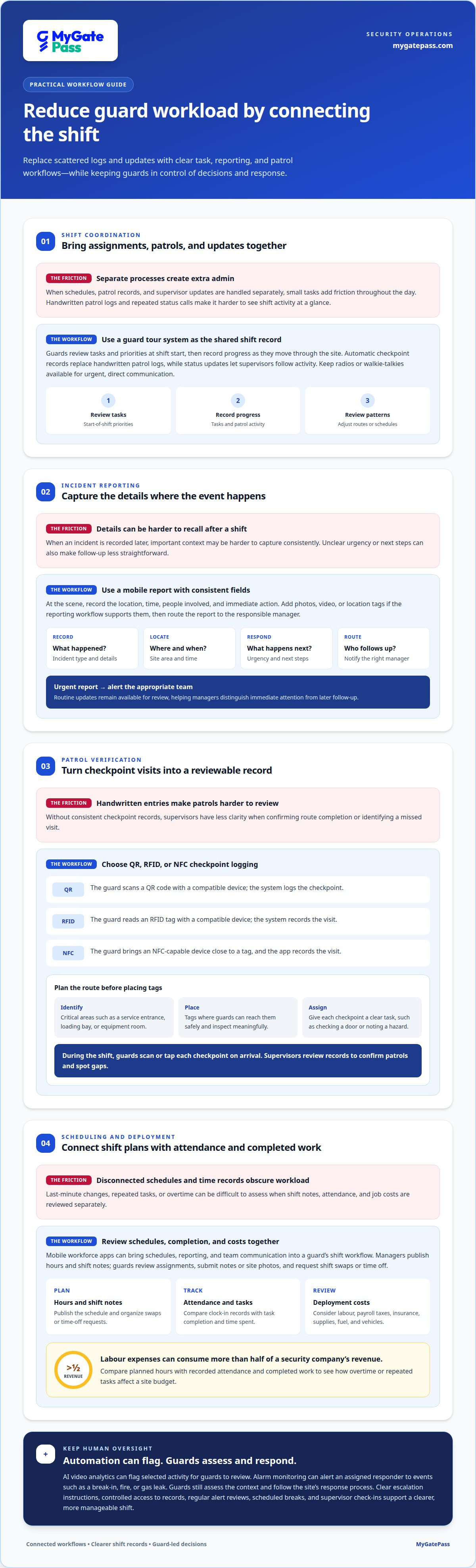
A guard tour system can bring shift assignments, patrol checkpoints, and supervisor updates into one workflow. At the start of a shift, guards review their tasks and priorities, then record progress as they move through the site. Automatic checkpoint records replace handwritten patrol logs, while status updates let managers follow activity without repeated calls. Radios or walkie-talkies remain useful for urgent, direct communication. Regular reviews of tracking data can also show where routes or schedules need adjustment.
For CCTV, drones, and security automation in the UAE, requirements depend on the location, purpose, and technology involved. Before implementation, map camera access and record handling, drone use, and automated actions against the applicable site and emirate requirements. AI video analytics and smart CCTV can flag activity for guards to review, helping teams focus on selected events. Guards still assess the context and decide how to respond.
Patrol robots or drones may handle defined observation or route tasks, reducing repetitive rounds in suitable settings. They do not replace a guard’s judgment, communication, or response to an unfamiliar situation. Before introducing them, consider route coverage, operating conditions, and escalation steps.
Alarm monitoring can flag events such as a break-in, fire, or gas leak and alert the security team. Automation can route the signal to the assigned responder, while guards assess the scene and follow the site’s response process. Clear escalation instructions help prevent alerts from becoming another source of confusion.
Security automation can expose sensitive footage and incident records to privacy or cybersecurity risks if access is poorly controlled. Limit access according to job needs, protect accounts, and set clear handling and retention practices. Risk-based vulnerability management means prioritizing weaknesses by their likely impact rather than treating every alert equally. Review alerts regularly to limit fatigue. To support mental wellbeing, scheduled breaks, brief breathing exercises, and supervisor check-ins give guards practical ways to manage stress and raise concerns.
Guards can receive real-time task assignments on mobile devices, while supervisors can use systems to view real-time reports on status and activity.
2. Incident reporting and mobile workforce apps
An incident-reporting app lets a guard record details at the scene instead of relying on memory after a shift. After a loading-bay spill, for example, they can log the location, time, people involved, and immediate action. Add photos, video, or location tags if the reporting workflow supports them, then route the report to the responsible manager. Keeping the details in one organized record makes follow-up easier.
Set clear fields for incident type, urgency, and next steps. A hazard report about a blocked fire exit should identify the site area and say whether anyone addressed it. Alerts can notify the appropriate team about urgent reports, while routine updates remain available for review. This helps managers distinguish incidents that need immediate attention from records that require later follow-up. Consistent entries also make internal reviews and compliance processes easier to manage.
Mobile workforce apps can bring schedules, reporting, and team communication into a guard’s shift workflow. Managers can publish hours and shift notes, while guards review assignments and submit notes or site photos. Pair each shift with defined tasks, then use completion reports to see what was done and where work took longer. Scheduling tools can also help managers organize shift swaps and time-off requests, reducing last-minute confusion.
Review attendance records alongside job-cost reports when assessing deployment. Digital timekeeping shows who clocked in, while cost reports can include labour, payroll taxes, workers’ compensation, liability insurance, supplies, materials, fuel, and vehicles. Labour expenses can consume more than half of a security company’s revenue, so compare planned hours with recorded attendance and completed work. This can reveal how overtime or repeated tasks affect a site budget.
For a practical rollout, define report fields, assign alert recipients, and review schedule and cost records regularly. A connected workflow can make guard updates easier to manage; explore mobile security workflows as part of a more organized operation.
Mobile workforce apps give security guards on-the-go access to schedules, incident reporting, and team communication. Safety tools can capture incidents, hazards, and near misses with photos, video, and location tags, then notify the appropriate people automatically. Guard tour system reports help managers review task completion and checkpoint times when adjusting future shift schedules.
3. Checkpoint verification using QR codes or RFID tags
Guard tour systems can use QR codes or RFID tags at checkpoints to record patrol visits. A guard scans a QR code or reads an RFID tag with a compatible device, and the system logs the checkpoint. NFC checkpoints work similarly: a guard brings an NFC-capable device close to a tag, and the app records the visit. This creates a digital record without handwritten patrol entries.
Plan the route before placing tags. Identify critical areas, such as a service entrance, loading bay, or equipment room, then assign each checkpoint to a patrol route. Place tags where guards can reach them safely and where they support a meaningful inspection. Each checkpoint should correspond to a clear task, such as checking a door or noting a visible hazard.
During shifts, guards follow the assigned route and scan or tap each checkpoint on arrival. Supervisors can review the resulting records to confirm completed patrols and spot gaps. For example, if a loading-bay checkpoint has no recorded visit, a manager can follow up to clarify whether the route changed or the check was missed. Records also help compare route completion across shifts.
QR codes require a camera scan, while RFID and NFC use a compatible reader or device interaction. Choose a method based on the site layout, device compatibility, and how guards move through the property. Clear labels and simple instructions help the security team use each checkpoint consistently. If a tag is damaged or inaccessible, its record may be missed, so include tag condition in regular site reviews.
Implement the system with a defined route, named checkpoint locations, and brief guard training. Explain what each scan confirms and how to report an unavailable tag. Keep checkpoint records focused on patrol verification, then use them alongside incident reports when reviewing site coverage. These steps make digital tracking useful across shifts and help managers decide where routes need changing and which areas need closer attention.
4. Deployment speed and operating savings
Technology options differ in what they automate and how much staff attention they still require. A guard tour system records patrol checkpoints, while a mobile reporting app streamlines shift notes and incident records. Cameras and alarms can help identify events, but guards still assess the context and respond. Compare each option by the task it removes, the visibility it adds, and the extra work needed to maintain it.
In the UAE, security automation costs depend on the tools selected, site requirements, devices, integration, and ongoing support. Compare proposals in AED, separating setup, equipment, software, and maintenance costs. Then assess effectiveness against the operational challenge. For example, consider whether attendance tracking reduces manual reconciliation or alerts help teams respond to incidents faster. Do not assume automation saves money unless the related workload and operating expenses are measured.
Choose tools by mapping a current shift from deployment through handover. First identify repeated tasks, delays, and reporting gaps. Select one workflow to improve, such as publishing schedules or recording attendance, then define who will use it and what managers need to see. A limited rollout helps teams uncover setup or training challenges before adopting the process across more sites.
During implementation, assign an owner, explain the new steps, and review records regularly. Compare planned shifts with actual attendance, task completion, and overtime. Unnecessary overtime for hourly security employees is frequently not billable to clients, so better visibility into scheduling can help managers spot avoidable coverage gaps. Use the findings to adjust shift plans while maintaining the required site coverage.
Speed comes from removing friction, not skipping operational checks. Keep schedules, assignments, and escalation contacts current so guards can start shifts with clear priorities. Check that alerts reach the right person, and refine settings when repeated notifications distract from critical incidents. Track whether the new workflow reduces duplicate entry or handover delays, then expand it when the process works consistently. A phased approach links each tool to a specific outcome and keeps daily operations manageable.
MyGatePass: MyGatePass Visitor App
MyGatePass Visitor App supports visitor management, while MyGatePass Security App gives security personnel a dedicated digital tool. For facilities seeking a more connected visitor and security workflow, MyGatePass Admin Dashboard brings management into a centralized platform. The UAE Pass Integration Module supports verified visitor identification through UAE Pass.
These tools are useful when visitor processes and security-team workflows need clearer digital coordination. They complement workload-reduction measures by focusing on visitor and facility management, rather than replacing guards or patrol procedures. Choose tools that fit the tasks your team wants to organize, then align their use with existing site processes.
Contact MyGatePass to discuss your visitor and facility management needs.
Make your next shift easier to manage
Choosing tools to reduce security guard workload starts with a practical question: which recurring task interrupts your team most? Use the answer to set a focused priority, assign responsibility for the change, and decide how supervisors will review its impact. A clear starting point makes it easier to refine the process before extending it across more sites.
For visitor and facility workflows, MyGatePass offers the MyGatePass Visitor App, MyGatePass Security App, and MyGatePass Admin Dashboard. Together, these tools support digital coordination between visitors, security personnel, and administrators. Select the workflow that matches your operational need, and involve the people using it as processes evolve.
Ready to discuss a more connected approach for your facility? Contact MyGatePass to discuss your needs. A thoughtful next step can make everyday operations clearer for both managers and security teams.
Frequently Asked Questions
What tools reduce security guard workload?
Useful tools to reduce security guard workload include tour-management software, mobile reporting apps, QR or RFID checkpoints, scheduling tools, and digital attendance records. Choose based on the task creating the most friction. For example, if shift handovers lose key details, prioritize a shared reporting workflow. If patrol records take time to reconcile, start with checkpoint verification. Introduce one workflow, then assess its usefulness with guards and supervisors.
How can access control systems automate visitor and employee screening?
Access control can validate an assigned credential before allowing entry, while visitor workflows can use pre-registration and identity verification to support check-in. MyGatePass’s UAE Pass Integration Module supports verified visitor identification, and its Visitor App supports QR-based entry and digital visitor history. For employees, attendance tracking records attendance, but it is not itself an access decision. Keep entry permissions and attendance records as distinct processes.


