

The agreement need not wait until a visitor reaches the gate. A digital signature for visitor agreements can be completed before arrival by sending the document to the visitor’s phone the day before. This gives them time to review and sign before reaching reception.
Paper agreements can take 3 to 5 minutes of gate time per visitor, so moving the signing step earlier can help make check-in smoother. You’ll learn how pre-arrival signing fits into the entry process, what happens when a visitor still needs to sign at the gate, and how signed agreements can be retained and retrieved. We’ll also explain the role of signature certificates and audit logs, so you can understand how the process supports a clear, organized visitor record.
Key Takeaways
- Plan how visitors can complete agreements before arrival, with a clear step at check-in for any signatures still outstanding.
- Organize signed documents around visit records so staff can retrieve the right agreement without searching through paper files.
- Understand how signature certificates and audit logs help show a document’s signing history and support transparent record-keeping.
- Consider the agreement’s purpose and signing process when assessing how electronic signatures apply to visitor documents in the UAE.
Retention of signed agreements
A signed agreement is useful only if staff can find it for the right visit. Create a record for each visit and link the signed document to the visitor, host, visit date, and agreement version. Use a consistent file-naming method, such as “visitor name, host, visit date,” rather than leaving documents in an unlabelled folder. Restrict access to staff responsible for visits or records.
Test retrieval, not just storage. A paper-drawer request may take 20 to 40 minutes per request. The practical target for a signed document linked to a visit record is under a minute. Once a quarter, retrieve a randomly selected past signed visit document and note how long the search takes. If an NDA from a visit three months earlier takes more than five minutes to retrieve, investigate the paper-based process and its filing steps.
Use a simple retention workflow:
- Save the signed version with its visit record, not as a loose attachment.
- Keep the agreement version and signing status identifiable.
- Restrict access to staff with a work-related need.
- Apply the organization’s retention schedule, then dispose of records securely when appropriate.
For scale, consider one R&D site with 60 visitors per week, each signing a three-page agreement. At 52 weeks per year, that example produces 9,360 pages printed per year. A digital record changes how staff file and retrieve those agreements, but a clear retention process still matters. Decide who owns the records, how visit documents are organized, and how staff handle a retrieval request.
A visitor agreement should identify the visitor and host, explain the visit’s purpose, and state relevant confidentiality or site rules. Consent clauses should clearly describe what personal data is collected, why it is used, who may access it, and how the visitor can raise a concern.
Disputes can stem from mistaken identity, an outdated agreement, unclear consent, or missing signing evidence. Reduce these risks by linking the signed document to the visit record, presenting the current version before signing, and keeping the completed agreement accessible.
Signature certificates and audit logs
A signature certificate links a completed agreement to evidence about its signature. It can help verify that the document followed the stated signing process and has not changed since signing. Some systems use signing keys stored in a hardware security module. If the signed document is altered, the signature becomes invalid, making subsequent changes detectable.
Some signed documents include Long-Term Validation, or LTV, timestamps. These help preserve information used to validate a signature later, instead of relying solely on a live connection to the signing service. A timestamp does not replace the agreement itself. Keep the signed file, certificate information, and related visit record together so staff can review them as one record.
An audit log provides a chronological record of key actions. For a visitor agreement, useful entries can show when the document was sent, opened, signed, and stored. Consent capture and audit logs may be part of the signing process. Review the available record to understand what it captures and how staff can retrieve it.
- Confirm the signed file matches the visitor and visit record.
- Review certificate and timestamp information when validating a signature.
- Use the audit log to trace the document’s signing sequence.
- Restrict record access and retain evidence under the organization’s process.
For example, if a host disputes whether an agreement was signed before entry, staff can review the visit record and its audit trail. If a visitor questions a later copy, the certificate and alteration check can help distinguish the signed version from a changed file. These records support review, but they cannot clarify ambiguous wording or replace a sound consent process.
For a connected visitor workflow, explore digital visitor management alongside agreement records. Keep the certificate, timestamp, and log accessible to authorized staff, and define who reviews them when a signing question arises.
Digital signatures as part of visitor check-in
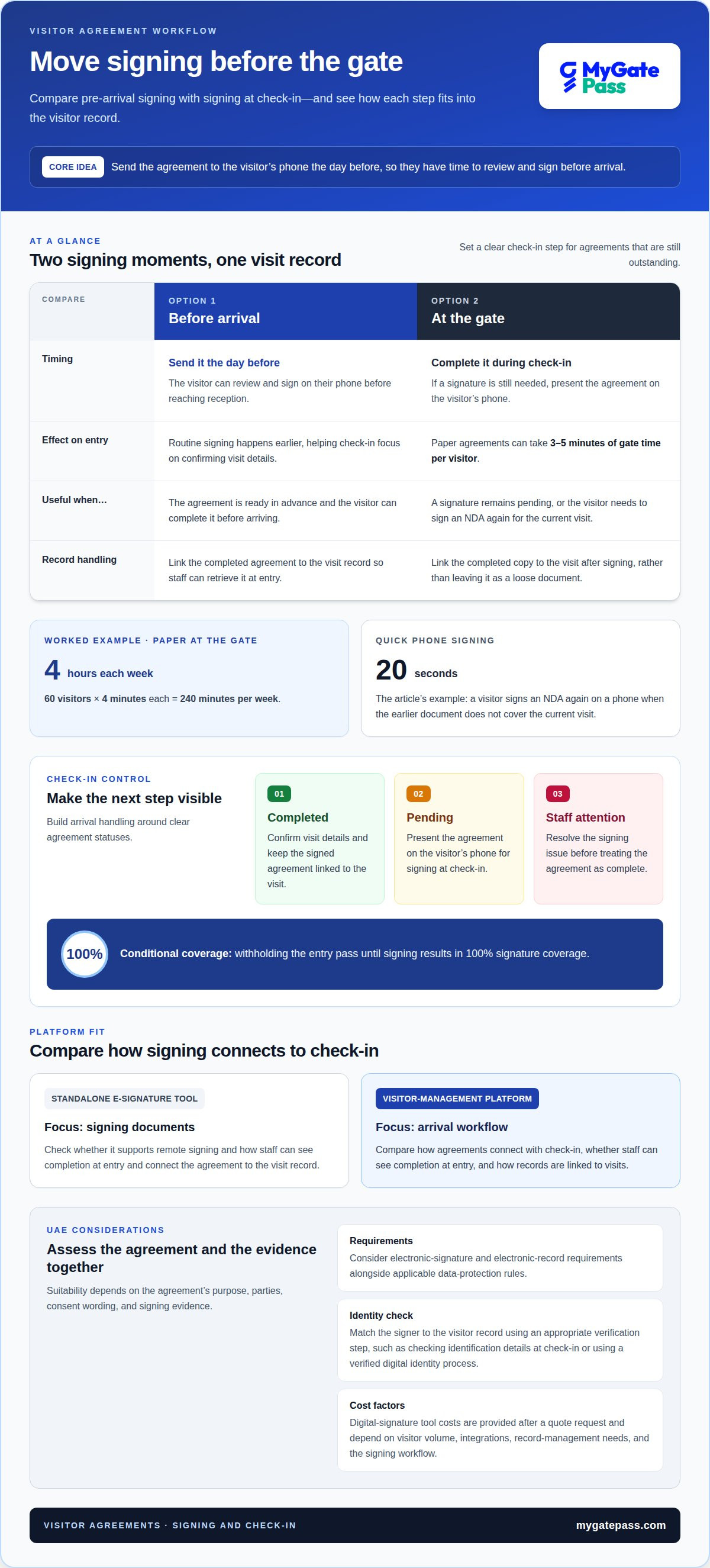
Visitors can sign before arrival. Send the agreement to their phone the day before, giving them time to read it. Paper agreements can take 3 to 5 minutes of gate time per visitor. In a worked example, 60 visitors signing at four minutes each use 240 minutes per week, or four hours.
Platforms that support visitor agreements differ in how they connect signing with check-in. Compare whether visitors can sign remotely, whether staff can see completion at entry, and how the system links agreements to visit records. A standalone e-signature tool may focus on signing documents, while a visitor-management platform connects agreements to the arrival workflow.
In the UAE, consider electronic-signature and electronic-record requirements alongside applicable data-protection rules. The agreement’s purpose, parties, consent wording, and signing evidence all matter when assessing its suitability. To confirm identity, match the signer to the visitor record using an appropriate verification step, such as checking identification details at check-in or using a verified digital identity process.
Digital-signature tool costs in the UAE depend on the case and are provided after a quote request. Factors include visitor volume, required integrations, record-management needs, and the signing workflow.
Build the arrival process around clear statuses: completed, pending, or requiring staff attention. If the visitor signed in advance, staff can focus on confirming visit details rather than guiding them through the document. If a signature is still needed, present the agreement on the visitor’s phone and link the completed copy to the visit.
Withholding the entry pass until signing results in 100% signature coverage. For a visitor who must sign an NDA again, signing on a phone takes twenty seconds. That makes a phone-based step useful when a prior document does not cover the current visit, while pre-arrival signing keeps routine check-in moving.
Are digital signatures legally valid for visitor agreements in the UAE?
For a UAE visitor agreement, assess the signing method in light of the document’s purpose, wording, and evidence. An electronic signature alone does not resolve every question about who agreed, what they accepted, or whether the agreement applies to that visit. Treat the agreement and its signing record as parts of one process.
Start with the document. Identify the visitor and organization, describe the obligations related to the visit, and make consent clear before signing. Keep the final signed copy linked to the relevant visit. If a visitor disputes a confidentiality clause, for example, staff should be able to find the exact agreement version and the signer’s recorded action.
Before launch, review these points with the person responsible for legal or compliance matters:
- Purpose: Does the agreement cover a site visit, confidentiality, safety, or another specific matter?
- Consent: Can visitors read the terms and understand what signing indicates?
- Identity: Does the process connect the signature to the intended visitor?
- Evidence: Can staff produce the completed document and its signing record?
- Records: Are access and retention handled under the organization’s applicable requirements?
Keep the handling of visitor records distinct from the validity of a signature. A signed document does not, by itself, explain why personal information was collected, who can access it, or how long records should be retained. Set out those details in the relevant notice and follow the organization’s UAE data-handling process.
For a straightforward site acknowledgement, clear wording and a traceable signing record may be central to review. A visitor NDA or agreement involving sensitive obligations needs closer attention to its terms and intended use. Document the approval process, keep the current version available, and ensure staff know how to handle questions at check-in.
Build a visitor workflow that links agreements with arrival records through visitor check-in management.
Reviewing an electronic signature means considering the document’s purpose, wording, consent, identity, and signing evidence. Handle visitor records in line with applicable requirements and the organization’s UAE data-handling process, with legal or compliance review where needed.
MyGatePass: MyGatePass Visitor App
The MyGatePass Visitor App helps organizations manage visitors through a digital workflow. Teams planning how agreements fit into check-in can use it alongside the MyGatePass Security App and MyGatePass Admin Dashboard. The UAE Pass Integration Module connects visitor identification with UAE Pass for verified identification.
This approach is useful when reception, security staff, and administrators need a coordinated view of visitor operations. Plan how agreement signing connects with invitations, arrival checks, and the organization’s record-retention process. Clear roles help staff respond when a visitor arrives with an unsigned document or needs assistance.
To explore how MyGatePass could fit your visitor-management workflow, visit mygatepass.com.
Make your next visitor journey easier to manage
Use the move to digital signing to create a clearer visitor journey, rather than simply replacing paper with a screen. Map each handoff, from invitation and agreement review through arrival and record access. Decide who owns each step, how staff should help visitors, and how the process can remain welcoming while meeting site requirements.
A well-planned digital signature for visitor agreements can make signing feel like a natural part of the visit. Align the agreement wording, visitor instructions, and staff workflow. Then review the experience from both sides: can visitors understand what they are accepting, and can the team handle exceptions without confusion? Small process decisions shape trust as much as the signing technology.
MyGatePass brings visitor and security workflows together through its digital ecosystem. If you’re ready to explore how it could support your visitor process, contact MyGatePass about visitor agreements. A more organized arrival experience starts with a workflow that works for people.
Frequently Asked Questions
Can visitors sign before they arrive?
Yes. Send the agreement to the visitor’s phone the day before the visit so they can review and sign before reaching reception. Include the visit date, host name, and clear signing instructions in the invitation. On arrival, staff can confirm whether the agreement is complete and guide the visitor through any remaining steps without restarting registration.
Is a signature captured on a phone or tablet legally valid in the UAE?
A phone or tablet can capture an electronic signature for a UAE visitor agreement, but the device alone does not establish the agreement’s legal effect. Assess the document’s purpose and terms, how the visitor’s identity and consent are linked to signing, and what evidence is retained. For sensitive or disputed obligations, have UAE legal counsel review the wording before using it in the visitor process.
What is a digital signature for visitor agreements?
A digital signature for visitor agreements lets a visitor indicate acceptance of an agreement electronically, such as site rules or confidentiality terms. The visitor reviews the document on a device and completes the signing action. For example, a contractor could review a site acknowledgement before arrival, with the completed document linked to the relevant visit.
How can a business create and send a visitor agreement for electronic signature?
Draft the agreement for its intended purpose, using plain language and fields that identify the visitor, host, and visit. Prepare the final electronic copy, then send it through the organization’s chosen signing workflow with clear instructions and access to the complete terms. Test the process internally first, including how staff identify completed agreements and handle corrections.
How should signed visitor agreements be stored, secured, and retained under UAE privacy rules?
For UAE visitor records, define what information is necessary, who needs access, and how long each agreement must be kept under the organization’s retention policy. Store the signed copy with its visit record in a controlled system, not an open shared folder. Explain why visitor details are collected, restrict access to authorized staff, and securely dispose of records when the retention period ends.
How can a visitor sign an agreement on a tablet, phone, or reception kiosk?
Show the complete agreement on the device and let the visitor review it before selecting the signing control. On a reception tablet or kiosk, position the screen for private reading and provide staff guidance if needed. On a personal phone, make it easy for the visitor to open the document, complete signing, and access the signed copy afterward.


