

The answer to how to secure building visitor access is to connect visitor management with access control, so each guest is screened, given only the access needed for the visit, and tracked from arrival through departure. Pre-registration and identity checks help establish who is expected; time-limited credentials and real-time visitor records help staff see who is on site. Security should follow the visitor through the building, not stop at reception.
A secure process can still feel welcoming and straightforward. Visitors know what to expect, hosts can respond when guests arrive, and building teams get a clearer view of activity across the premises. This article explains how visitor management systems work, how pre-registration and credential checks support access decisions, and how visitor records help teams manage entry and departures smoothly.
Key Takeaways
- Connect visitor management with access control to coordinate credentials, host notifications, and visit records.
- Make check-in clearer by sharing arrival expectations in advance and using a digital process.
- Use pre-registration and identity screening to prepare for visits and match access to each guest’s purpose.
- Keep a current view of who is on site and use MyGatePass tools to support visitor and facility management.
What is a security visitor management system?
A visitor management system records guest details, coordinates arrivals, and supports building entry decisions. Options range from paper logs to digital platforms linked with access control. Digital tools can streamline record-keeping, while integrated systems connect visitor processing to entry permissions.
Access Control Integration
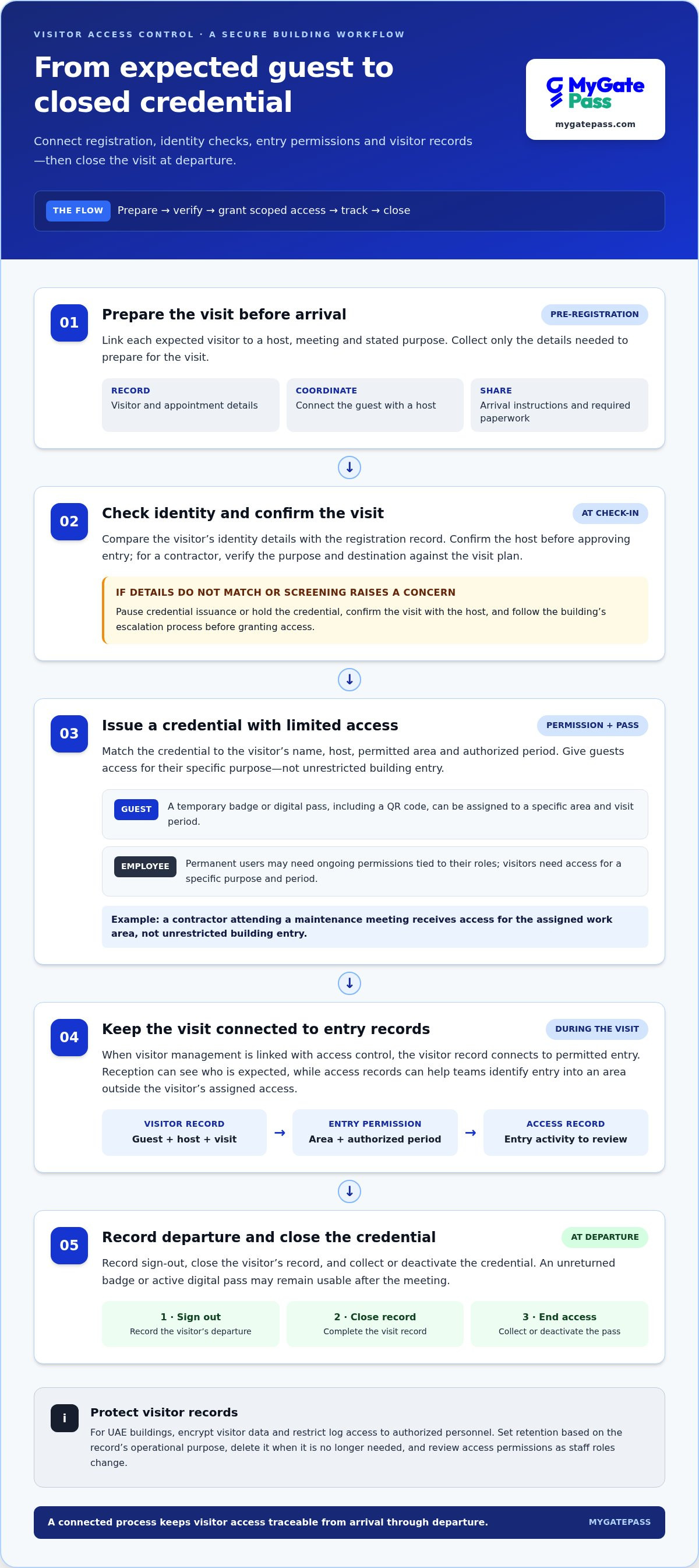
Integration links a visitor’s record with their permitted entry. For example, an approved contractor’s credential can be limited to a designated floor and visit period. Reception can see who is expected, while access records help teams identify whether a visitor entered an area outside their assigned access.
Visitor Log Privacy and Retention
Protect visitor information by limiting its use to defined building-management needs. For UAE buildings, encrypt visitor data and restrict log access to authorized personnel. Set a retention period based on the record’s operational purpose, then delete it when it is no longer needed. Review access permissions as staff roles change.
Options include paper sign-in, standalone digital check-in, and integrated visitor management with access control. Paper logs require manual review; digital systems make records easier to search; integration links visit details to entry permissions. Compare options based on visitor volume, entrances, restricted areas, and how teams need to review records.
Cloud-based systems let authorized teams view digital records through an online dashboard, while wireless configurations can reduce reliance on wired connections at check-in points. To plan for growth, map current entrances and visitor types, then assess whether a platform can support additional buildings, users, or access-control integrations.
Software and hardware costs depend on deployment scope, selected devices, integration needs, and the number of entrances. These factors determine the project cost, which is provided after a quote request.
If an unauthorized visitor appears or access control fails, pause entry, verify the visit with the host, and alert authorized building personnel. Record the incident and follow the building’s escalation process before resuming normal entry.
What Is Visitor Access Control?
Visitor access control brings registration, identity checks, and entry permissions into one building workflow. For UAE commercial facilities, document how staff verify visitors, obtain host approval, manage permitted areas, and record sign-out, then apply the process consistently.
Pre-Registration and Self-Service
Pre-registration records an expected visitor and visit details before arrival; self-service lets guests check in themselves. For a scheduled meeting, the host can enter the guest’s name and appointment information in advance, then share arrival instructions. At reception, the visitor confirms their details and follows the building’s entry process. This prepares staff to handle approvals and exceptions without starting registration from scratch.
Digital and Paper Sign-In
Paper sign-in records arrivals by hand, while digital check-in stores visitor information electronically. A paper sheet may be simple, but staff must review entries manually and keep the record accessible. Digital records are easier to search, helping facilities match a visitor to a host or appointment. Choose a method based on how the property handles records, verification, and compliance tasks.
Check-In Tools and QR Codes
Digital check-in can use a visitor’s phone, a reception kiosk, or a QR code linked to registration. For example, an appointment message can include a QR code that opens the guest’s check-in steps on arrival. A kiosk offers a shared self-service option, while phone-based registration lets visitors enter details before reaching reception. Make sure the workflow directs guests to assistance if they cannot complete a step.
Identity Verification
Identity verification compares visitor-provided details with an identity document or the visit record. Staff can check that the name matches the scheduled guest and confirm the host before approving entry. For a contractor, they can also verify the purpose and permitted destination against the visit plan. To support a smoother digital registration process, explore visitor check-in through MyGatePass.
Visitor pre-registration and credential screening
Before guests arrive, link each expected visitor to a host, meeting, and stated purpose through pre-registration. Collect only the details needed to prepare for the visit, then send arrival instructions and required paperwork in advance. At check-in, compare the guest’s identity details with the registration record. If a name or appointment does not match, pause credential issuance and confirm the visit with the host.
Credentials should reflect whether someone is a permanent user or a temporary guest. Employees may need ongoing permissions tied to their roles, while visitors need access for a specific purpose and period. For example, a contractor attending a maintenance meeting should receive access for the assigned work area, not unrestricted building entry. Keep the permission linked to the visit record where systems support integration.
Temporary credentials can be a badge or digital pass, including a QR code. A QR code can identify an approved visit at an entry point, while a printed badge helps staff distinguish guests from employees. Match each credential to the visitor’s name, host, permitted area, and authorized period. Do not reuse a pass for another guest or appointment.
At departure, record sign-out, close the visitor’s record, and collect or deactivate the credential. This final step matters because an unreturned badge or active digital pass may remain usable after the meeting. For example, reception can check out the guest and confirm that the temporary pass no longer grants entry.
Keep records linking the guest, identity check, host, credential, and entry period. If screening raises a concern, hold the credential, contact the host, and follow the building’s escalation process before granting access. Reviewing completed records can reveal gaps, such as visits without sign-out or temporary credentials that remained active beyond their authorized period.
Real-time visitor tracking
Real-time visitor tracking gives building teams an updated view of recorded guest activity. It can show who checked in, which host they are visiting, and whether they have signed out. Timely, consistent event recording is essential. A status based on a front-desk check-in reflects that recorded event, not necessarily a person’s precise location inside the property.
Connect arrival and departure records with access-point activity where systems support integration. For example, a guest may check in at reception, then enter an approved area using a temporary credential. Entry records can help teams understand movement through controlled doors, while sign-out closes the visit. Without reliable exit records, the system may still show a departed guest as present.
Pre-registration helps reception prepare for expected arrivals, while live monitoring captures changes during a visit. A host can receive a notification when a guest arrives, and staff can review current visitor records if an appointment changes. This helps distinguish an expected visitor from someone whose meeting, host, or access purpose needs clarification.
During an evacuation, a current list of recorded visitors gives response teams a starting point for accounting for guests. They can compare check-in and sign-out records, then follow up with anyone still marked as present. Manual logs can be harder to review quickly, especially if handwriting is unclear or badges are not returned. Regularly comparing visit records with departures helps reveal gaps.
Use monitoring records to spot process issues, such as repeated missing sign-outs or temporary badges left active after visits. Review those patterns with reception and relevant building teams, then adjust check-out reminders or credential handling. For a digital workflow that supports visitor activity management, set up digital visitor tracking.
MyGatePass: MyGatePass Visitor App
MyGatePass Visitor App supports digital visitor management for buildings seeking a more connected way to handle guest access. The wider platform includes the MyGatePass Security App for security personnel and the MyGatePass Admin Dashboard for centralized administration. The UAE Pass Integration Module supports verified visitor identification as part of the visitor journey.
Consider MyGatePass when reception, security staff, and administrators need a shared digital approach to visitor and facility management. The platform brings visitor workflows together with coordinated tools, supporting the building’s visitor process and access needs.
Explore how MyGatePass can fit your building’s visitor management process at mygatepass.com.
Shape a visitor process that can grow with your building
To decide how to secure building visitor access, map the guest journey from invitation to departure. Note where approvals happen, who responds to arrival notifications, and how teams handle exceptions, such as an unexpected contractor or a missed sign-out. This helps identify where clearer responsibilities or a more connected workflow could make the biggest difference.
MyGatePass brings together the MyGatePass Visitor App, MyGatePass Security App, and MyGatePass Admin Dashboard for visitor and facility management. These tools support coordination between guests, security personnel, and administrators. Consider how this structure can fit your building’s existing process and the visitor experience you want to provide, without adding unnecessary friction.
Contact MyGatePass to discuss visitor access and explore a practical next step for your building.
Frequently Asked Questions
How Should Contractors and Deliveries Be Controlled?
Give contractors and delivery drivers access only to the areas their task requires. For example, direct a parcel driver to a designated drop-off point rather than allowing access to office floors. For maintenance work, record the work area and responsible host, and coordinate arrival with the relevant team. Keep delivery procedures distinct from contractor visits so staff can quickly identify each person’s purpose.
How Should Tailgating Be Handled?
Respond to tailgating by alerting the designated building team and following the site’s incident process. Staff should not physically confront someone if doing so could create risk. Record the door, time, and circumstances, then review whether the entry point or visitor instructions contributed. A reminder to have each person present their own credential can reinforce the rule without delaying legitimate guests.
How Should a Site Be Divided Into Access Zones?
Divide the property according to the sensitivity and purpose of each area. A practical layout might separate public reception, meeting rooms, staff workspaces, and restricted rooms. Give each visitor type access only to relevant zones. For instance, a client attending a meeting may need access to a meeting room, while a technician may need a designated equipment area. Clear boundaries help staff explain where guests may go.
Should Every Visitor Be Escorted?
Escort decisions should reflect the visitor’s purpose, destination, and the sensitivity of the area. A scheduled guest visiting a reception meeting room may follow a different process from a technician entering a restricted workspace. Set escort expectations during booking, inform the host, and make responsibilities clear. This helps avoid unnecessary delays while ensuring closer oversight where it matters.
Should I update to a visitor management solution?
Consider an update if staff struggle to find visitor records, coordinate arrivals, or close out visits consistently. Compare the current process with your needs, including multiple entrances, different visitor types, reporting, and connections to existing access control. A digital solution can make records easier to retrieve, but implementation should also define who can access visitor information and how staff handle exceptions.
What are the best practices for securing visitor access to a building?
Securing building visitor access starts with clear ownership: define who approves visits, manages exceptions, and reviews incidents. Test unusual scenarios, such as an unannounced contractor or an unreachable host, so staff know how to respond. After each review, update instructions and brief reception, hosts, and security teams on changes that affect their tasks.


