

A visitor safety briefing should leave a record, not just a memory. An induction is usually 5-15 minutes, and an automated safety briefing for visitors can deliver site instructions digitally and record that a visitor has completed them. It helps teams communicate key precautions before entry while keeping the process consistent.
Reception teams balance welcoming guests with registration and coordination. An automated safety briefing for visitors can reduce repetitive steps, while searchable visit and acknowledgment records make it easier to review what information each visitor received. This article explains how visitor management software can support briefing workflows and digital records, and what to consider when fitting these processes into daily facility operations in the UAE.
Key Takeaways
- Set up visitor workflows around the information each group needs, including site instructions and entry requirements.
- Capture briefing acknowledgments alongside visit details so teams can retrieve clearer records when they need them.
- Use pre-registration and digital check-in steps to reduce manual data entry at reception.
- Explore how MyGatePass Visitor App and its connected visitor-management tools can support a more coordinated arrival process.
1. What is Visitor Safety Management Software ?
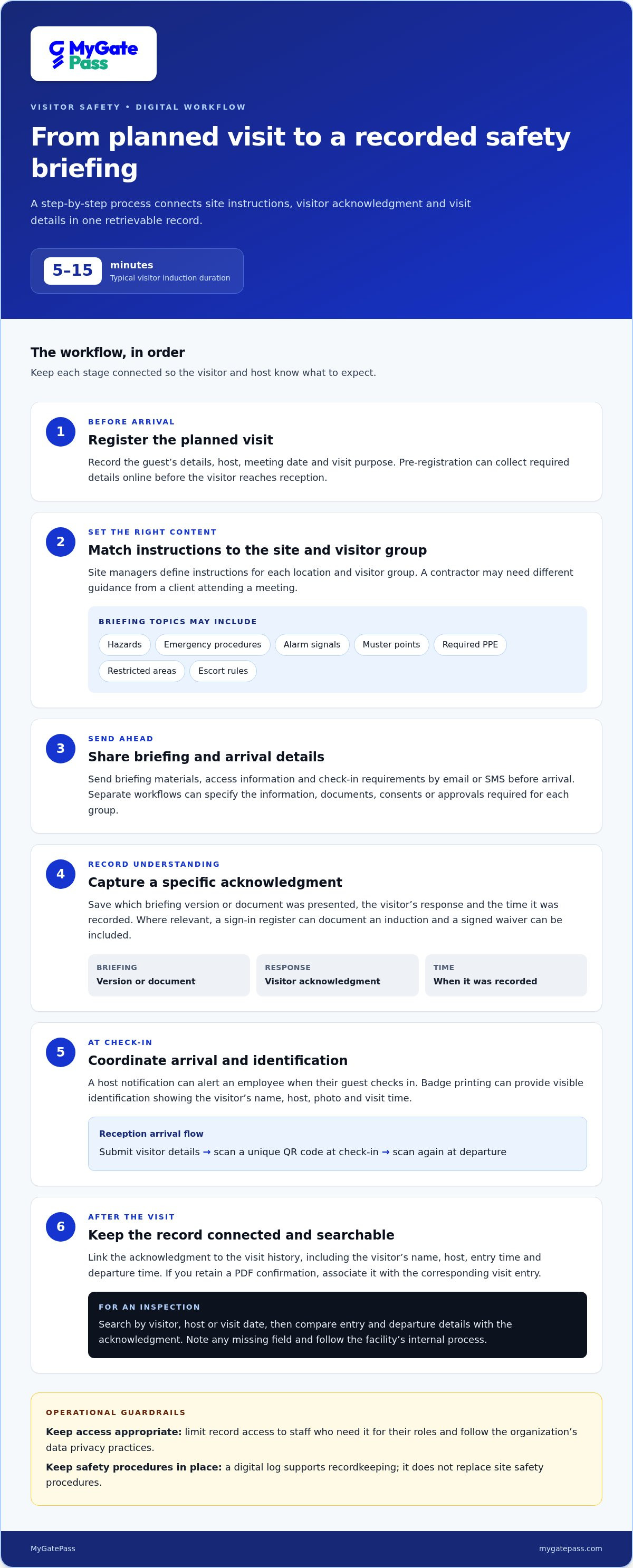
Visitor safety management software coordinates registration, visit details, and safety communication in one digital visitor management process. An automated safety briefing for visitors can send site instructions before arrival and capture acknowledgment. Those instructions can cover hazards, emergency procedures, alarm signals, muster points, required PPE, restricted areas, and escort rules. Visitor inductions usually take 5-15 minutes, so teams can organize essential information into a concise briefing. Site managers define the instructions for each location and visitor group.
Automation can begin when a host registers a planned visit with the guest’s details, meeting date and purpose. The system can send pre-arrival messages with access information and check-in requirements. For example, a contractor may need different safety instructions from a client attending a meeting. Separate workflows can specify the information, documents, consents or approvals required for each group, helping employees provide consistent guidance without relying on a manual handover at reception.
Notifications keep the visitor and host informed at relevant steps. A system can send briefing materials and arrival details by email or SMS, while an automatic host notification can alert an employee when their guest checks in. The message can include the visitor’s name and arrival time, helping the host coordinate the next step. Clear notification rules also reduce missed handoffs, such as a visitor waiting at reception while the employee remains unaware.
Badge printing can link registration with visible identification. A visitor badge may show the guest’s name, host, photo and visit time, helping staff recognize who is on-site. A practical workflow is to register the visit, send instructions, capture acknowledgment, notify the host and issue a badge at check-in. Software can keep these steps connected, while staff handle exceptions such as missing information or changes to the planned visit.
2. Audit-ready visit and safety acknowledgment logs
A useful visitor management record connects a person’s arrival with the safety information they received. Capture the visitor’s name, host, entry time, departure time, and briefing acknowledgment in one visit history. Digital visitor records can help administrators retrieve access records, audit reports, and visitor history for compliance purposes. A consistent operational record also helps teams identify gaps, such as a visit with no recorded acknowledgment.
Make the acknowledgment specific. Save the briefing version or document presented, the visitor’s response and the time it was recorded. For example, a facility could record that a contractor reviewed emergency procedures before entering a restricted work area. A sign-in register can document an induction, while a signed waiver can be included in the visitor management process where relevant.
For a PDF confirmation, staff can retain a copy of the briefing and acknowledgment with the visit record. Use a clear file name, such as the visitor’s name and visit date, and associate the document with the corresponding entry. This gives an auditor a readable record alongside the software entry, rather than a loose file with no clear connection to the visitor or visit.
Before an inspection, use the system’s search and reporting functions to retrieve the relevant visit history. Filter by visitor, host or visit date, then compare the entry and departure details with the acknowledgment. If a record is incomplete, note the missing field and follow the facility’s internal process to resolve it. This helps teams prepare evidence without searching separate paper registers.
Digital records can centralize visitor information for management, analysis and reporting, but access needs careful handling. Limit access to staff who need records for their roles, and follow the organization’s data privacy practices. In a UAE facility, a clear process for storing, retrieving and reviewing visitor acknowledgments supports transparent management. A digital log does not replace site safety procedures.
3. Reducing reception workload
Pre-registration moves routine data entry away from the reception desk. Visitors can enter required details online before arriving, reducing manual transcription by reception staff. For example, an invited guest can provide their name, host and visit purpose in advance. Staff can then focus on exceptions, such as a changed meeting or incomplete registration, rather than copying each detail into visitor records.
A practical arrival flow has three steps: submit visitor details, scan a unique QR code at check-in, and scan again at departure. This creates a visit record without a handwritten register. Pre-registration can also help organizations prepare identification and coordinate verification before arrival. Where access control connects to visitor workflows, permission rules can direct authorized guests to appropriate areas. The setup depends on the facility’s entry process.
The cost of an automated visitor safety briefing system depends on the case and is provided after a quote request. Key factors include visitor volume, facility requirements, workflow complexity, and integration with access control or existing systems.
Automation can reduce repetitive administrative work by limiting manual screening and recording for each visitor. It does not have to remove human contact: reception employees can still welcome guests, explain site-specific details and help visitors who need assistance. Visitors who complete registration may move through routine check-in more smoothly, while staff handle situations that require judgment.
To improve the process, map each reception task before changing it. Mark steps involving repeated data entry, document review or host notifications, then decide which can happen before arrival. For example, a delivery workflow may collect visit details in advance, while an unexpected courier can be directed to a staff member. This approach preserves a personal welcome while reducing avoidable workload.
4. Automated visitor safety briefings and digital records
An automated safety briefing for visitors links a planned visit to relevant site instructions. Before arrival, the visitor receives material about hazards and emergency procedures, then acknowledges completion digitally. The visitor management system stores that response with the visit details, creating a traceable record rather than relying on memory or separate paper forms.
To set up the workflow, first map visitor groups and their site risks. Prepare concise guidance on hazards, alarm signals, muster points, required PPE, restricted areas and escort rules. Assign each group its briefing, acknowledgment step and required documents. Configure delivery before arrival, then test the complete journey with an employee and sample guest, from invitation through departure, before implementation.
Keep the digital record useful by linking each acknowledgment to the visitor, visit and briefing version. For example, a contractor’s record should show which instructions they received and when they acknowledged them. A supervisor can then identify incomplete steps and update briefing content when site procedures change. Store and retrieve records according to the facility’s privacy practices.
Plan content carefully for visitors who need different languages or accessible formats. Prepare professionally reviewed translations for the languages visitors use, and offer plain-language instructions with clear headings. Diagrams can explain muster points or PPE, while readable text and screen-reader-friendly documents support different access needs. Provide a way for visitors to request assistance if a digital format does not work for them.
Review the workflow when site hazards, emergency routes or visitor groups change. This keeps instructions relevant and helps employees follow a consistent process. A well-planned integration links briefing completion with arrival records without treating acknowledgment as a replacement for site-specific guidance or supervision.
Explore digital visitor workflows to see how a coordinated process can support briefing delivery and visit records.
MyGatePass: MyGatePass Visitor App
MyGatePass Visitor App can help organizations bring visitor processes into a connected digital workflow. It works alongside the MyGatePass Security App and MyGatePass Admin Dashboard, providing tools for visitors, security personnel and administrators to coordinate facility management. The UAE Pass Integration Module supports verified visitor identification in the UAE.
Consider this setup when reception teams need a more organized way to manage visitor activity and security staff need a shared operational view. The dashboard provides a centralized place to administer the platform, while the dedicated apps support different roles in the visitor process. Together, these tools can connect visitor management with everyday facility operations without replacing site-specific safety procedures.
To explore how MyGatePass could fit your visitor workflow, visit mygatepass.com.
Make your next visitor workflow more connected
Choose one visitor journey and map how it should work from invitation to departure. Consider where guests need instructions, which acknowledgment to retain and when employees need to take over. A focused workflow gives your team a practical starting point for improving the visitor experience while keeping site-specific safety needs in view.
An automated safety briefing for visitors works best when it fits the way your facility welcomes and manages guests. MyGatePass connects visitor, security and administration workflows through MyGatePass Visitor App, MyGatePass Security App and MyGatePass Admin Dashboard. These tools help teams coordinate visitor activity and manage the process more clearly.
Explore how MyGatePass can support your visitor safety workflow. Contact MyGatePass to discuss visitor safety, and take the next step toward a more organized arrival experience.
Frequently Asked Questions
What is Visitor Safety Management Software?
Visitor safety management software coordinates visitor information and site safety processes through a digital workflow. It can help a facility apply consistent procedures to different visitor categories, such as clients, contractors and delivery personnel. Treat it as an operational layer supporting your site’s health and safety plan, not as a replacement for hazard assessments, supervision or emergency preparation.
How can you improve visitor service without increasing staff?
Make routine decisions easier before guests arrive. Use clear visitor categories and standard instructions so reception staff do not have to repeatedly decide which process applies. Keep a human support route for visitors who need help, have accessibility needs or arrive with an unexpected change. This balances self-service with a welcoming experience and lets employees focus on exceptions and in-person assistance.
How does automation affect security and regulatory compliance?
Automation can make visitor procedures more consistent by applying the same required steps to comparable visits and preserving an activity trail. It can also help staff spot missing acknowledgments or incomplete records. These controls support organized security and compliance work, but do not establish compliance on their own. Organizations still need appropriate access permissions, privacy practices and site-specific safety procedures.
What information should a visitor safety briefing include?
Include instructions visitors need to act safely, not just general policy text. Explain how to raise an alarm, where to go during an evacuation, which areas are off-limits and who to approach for help. Add visit-specific directions, such as where a contractor must wait for an escort. Review the content when site layouts, hazards or emergency arrangements change.
Which platforms or tools provide automated visitor safety briefings?
Look for visitor management tools that support digital registration and connect visit records with briefing workflows. MyGatePass offers the MyGatePass Visitor App, MyGatePass Security App, MyGatePass Admin Dashboard and UAE Pass Integration Module. These tools support visitor and facility management, and organizations can map briefing processes around the roles of visitors, security personnel and administrators.
How can organizations track visitor briefing completion and acknowledgment?
Link the acknowledgment to the individual visit instead of keeping it as a separate, unlabelled file. Record the visitor’s identity, visit reference, completion status and briefing version presented. Make the record searchable by relevant details, such as visitor or host. Periodic reviews can reveal recurring incomplete steps and help managers improve instructions or workflow design.


