

Paper logs can slow down an entrance that’s otherwise well managed. A paperless visitor management system in the UAE replaces handwritten sign-in with digital check-in, while integration with existing building access control depends on an available API. The goal is a smoother arrival without losing visibility over who enters.
It makes sense to want both: a welcoming check-in and a reliable record of visitor activity. This guide explains how digital check-in can use QR codes and identity scans, what to consider when connecting a visitor system to existing access control, and how cloud and on-premise options differ. You’ll also see how replacing paper logs can make visitor information easier to manage, so you can assess which setup fits your building’s entry process.
Key Takeaways
- Map the visitor journey from invitation through arrival and checkout to identify where digital steps can reduce friction.
- Assess whether your current access-control setup exposes an API, then define how visitor approvals should connect to entry permissions.
- Compare cloud and on-premise deployment by considering your building’s infrastructure, data-handling needs, and operational preferences.
- Replace paper logs with a digital process that makes visitor records easier to manage and supports clearer oversight of building entry.
Touchless QR code, facial recognition, and ID-scan check-in
An effective check-in connects advance registration with a clear arrival process for booked guests and walk-ins. In UAE buildings, identity capture and a searchable digital log can replace handwritten visitor details with a managed software workflow.
Contactless QR and Facial Recognition Check-In
A pre-registered guest can receive a QR code linked to their visit and scan it at reception. The system can record arrival and send notifications to the host, reducing manual steps at the desk. If facial recognition is enabled, define when it is used and how staff handle a failed match. For example, keep a manual review step available for guests whose faces the system cannot match.
UAE businesses should choose a vendor whose software supports Emirates ID and passport scans, digital registration, and real-time entry monitoring. Review the guest workflow from invitation to check-out, including how staff resolve scan errors and find visitor records.
ID Scanning and Digital Registration
Digital registration lets guests enter visit details before arrival, while walk-ins can complete the same fields at reception. A UAE visitor system can scan Emirates ID cards and passports to support local security and regulatory requirements. It can also capture a selfie or collect an electronic signature for a privacy or terms agreement during sign-in.
A paperless visitor management system in the UAE should include digital registration, ID verification, real-time monitoring, and searchable visitor logs. Check which fields the system captures and how staff can retrieve a specific visit.
For a pre-registered appointment, staff can use the guest’s QR code to locate the booking and record arrival. For a walk-in, reception can register the guest, notify the host, and create the entry record before access. At departure, a pass number can support check-out. These steps keep visitor data in a digital log rather than a shared paper book, making records easier to search by guest, host, or visit.
Can a visitor management system integrate with existing access control in UAE buildings?
Yes, integration can connect visitor approvals with a building’s existing access control when the systems have a compatible connection. Entry2Exit’s visitor-management integrations with access-control systems require an available API. Map how reception approval should translate into an entry permission before connecting offices, turnstiles, or gate barriers.
For turnstiles and speed gates, define which visitor status triggers entry and which access points that status can open. For example, an approved guest might receive access to reception but not office floors. Badge printing can make that restriction visible, while access-zone rules keep the permission aligned with the visit purpose.
CCTV and access control have different roles. CCTV provides camera views, while access control manages permissions at doors and barriers. If your systems are connected, decide which visitor events staff need to review alongside camera activity, such as an entry or denied access. Consistent identity details and timestamps can help staff follow an incident across systems.
Do visitor management systems support Arabic and English? Language support depends on the visitor-facing screens, invitations, and badge templates provided by the system. Review Arabic text direction, translated prompts, and name display to make sure guests can complete registration and reception can identify the correct record.
Plan an integration by listing your existing access control systems and entry points, then define visitor access zones and test the approval, entry, and revocation workflows. Include a walk-in, a pre-approved guest, and a visitor who is denied access. This helps identify where reception needs to make a manual decision and whether the existing equipment responds as expected.
For buildings reviewing their visitor workflow alongside digital access processes, explore visitor management platform details as a relevant next step.
Is a cloud-based VMS better than an on-premise system for UAE businesses?
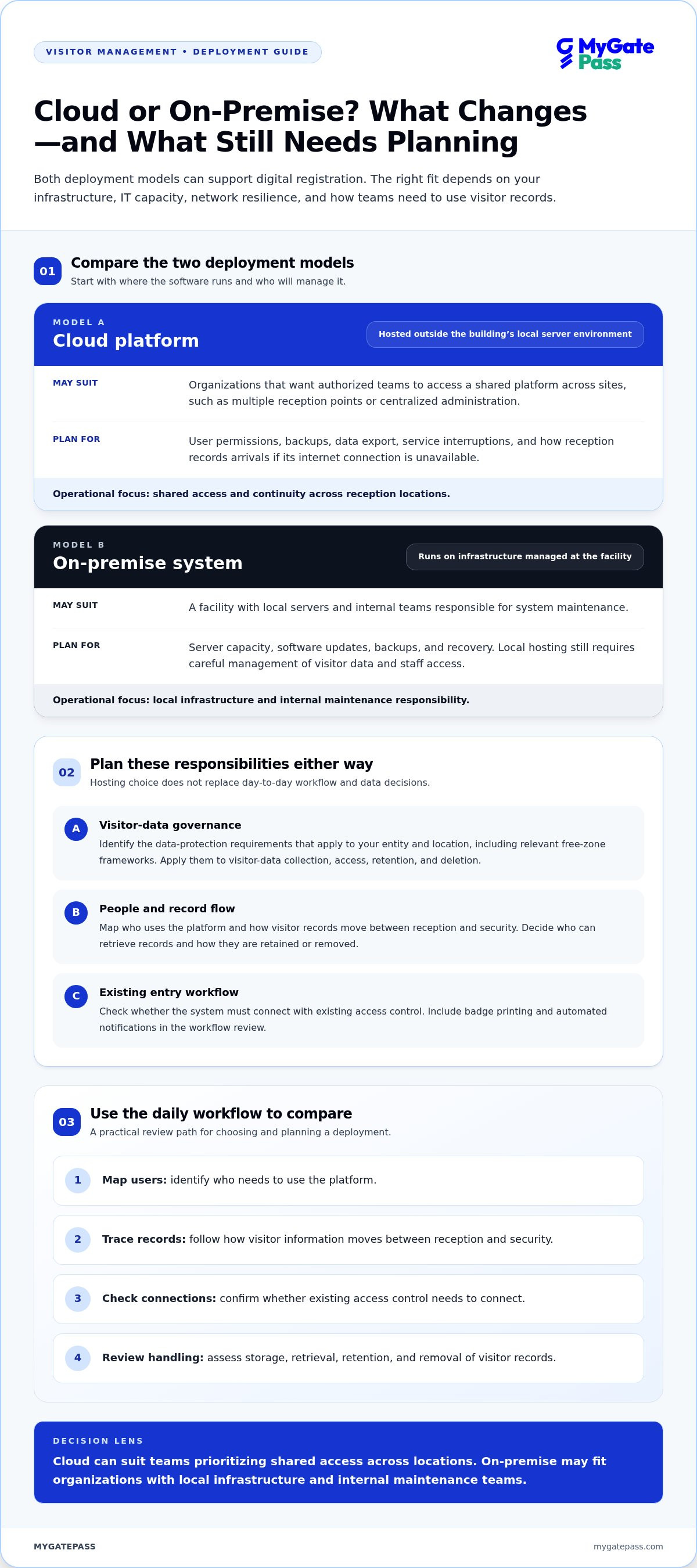
A cloud platform hosts visitor software outside the building’s local server environment. An on-premise solution runs on infrastructure managed at the facility. For UAE offices, the choice depends on existing systems, IT capacity, network resilience, and how staff need to access visitor records. Either model can support digital registration, but each needs defined access, retention, and recovery processes.
Cloud storage can give authorized teams access to a shared platform across sites, which may suit an organization with several reception points or centralized administration. Consider how the system handles user permissions, backups, data export, and service interruptions. Reception should also have a clear process for recording arrivals if its internet connection is unavailable.
An on-premise deployment keeps the software within an organization’s own infrastructure. It may suit a facility with local servers and internal teams responsible for system maintenance. Plan for server capacity, updates, backups, and recovery. Local hosting still requires careful management of visitor data and staff access.
What UAE data protection laws apply to visitor management systems? UAE businesses should identify the data-protection requirements that apply to their entity and location, including relevant free-zone frameworks. Apply those requirements to visitor-data collection, access, retention, and deletion.
Compare deployment options through the daily workflow, not just the hosting label. Map who needs to use the platform, how visitor records move between reception and security, and whether the system must connect with existing access control. Include badge printing and automated notifications in the workflow review. Then assess where visitor data is stored, who can retrieve it, and how records are retained or removed.
Cloud can suit teams that prioritize shared access across locations, while on-premise may fit organizations managing their own server environment. Neither option is automatically more secure. Choose the model whose infrastructure, access controls, backup process, and data-handling practices match your facility’s requirements.
Problems with paper-based visitor logs
A paper log makes each arrival a manual task. At reception, guests may wait while staff find a blank line, decipher handwriting, or call a host. A rushed entry can leave the visitor’s name, visit purpose, or arrival time incomplete. The process also relies on every guest filling in the book consistently.
Finding a record later can take more than locating the right page. Staff may need to scan entries by date and interpret handwritten details. A misspelled name or unclear time can make the search harder. Separate reception desks may also keep separate books, making a facility-wide view difficult to assemble.
Paper creates practical exposure points. A log left open on the reception desk may display earlier visitors’ names and organizations to the next guest. Physical pages can be misplaced, damaged, or accessed by people who don’t need them. In the UAE, businesses should treat visitor information carefully and define who can see records, how long they are retained, and when they are disposed of.
A digital process changes how staff review arrivals. Instead of turning pages, authorized users can search a dashboard by visitor, host, or visit details. Verification can also follow a consistent process, such as checking an identity document and recording the outcome before entry. Clear fields reduce reliance on handwriting and help reception handle walk-ins and scheduled guests through one workflow.
To move away from paper, list what the current book captures, then decide which details the digital registration needs. Set access permissions for reception and security, establish a record-retention process, and test how staff find a past visit. This makes the transition practical rather than simply replacing a notebook with a screen. For organizations seeking a more seamless visitor process across the Emirates, explore digital visitor management.
MyGatePass: MyGatePass Visitor App
MyGatePass supports digital visitor check-in through the MyGatePass Visitor App, with the MyGatePass Security App and MyGatePass Admin Dashboard supporting security and administration workflows. For UAE buildings moving away from paper logs, these tools bring visitor and facility management into a connected digital process.
The UAE Pass Integration Module supports verified visitor identification as part of the entry process. Together, these MyGatePass tools help organizations manage registrations and give security personnel and administrators a shared digital workflow.
Consider MyGatePass if you want to coordinate visitor management through dedicated visitor and security apps and a centralized admin dashboard. Reach out to MyGatePass to discuss your building’s visitor workflow.
Design a Smoother Arrival Process
Start by defining what a successful visitor experience should look like at your building. Consider how guests move from invitation to reception, who makes entry decisions, and what information staff need to manage each visit. These priorities can guide a practical move to a paperless visitor management system in the UAE, with digital steps tailored to your entry process.
MyGatePass offers the MyGatePass Visitor App, MyGatePass Security App, and MyGatePass Admin Dashboard to support visitor and facility management. Together, they provide a digital way to coordinate visitor activity and administration.
When you’re ready to discuss how a digital visitor workflow could fit your building, contact MyGatePass to discuss visitor management. A more organized arrival process starts with a clear picture of what your guests and staff need.
Frequently Asked Questions
Need to Enhance Your Guest Management?
Yes. Map each guest touchpoint, from invitation and arrival to departure, and note where staff repeat tasks or search for information. Decide who approves visits, what details reception needs, and how security handles exceptions. MyGatePass offers digital tools for visitor and facility management, including the MyGatePass Visitor App and Admin Dashboard. A clear workflow helps you see how these tools can support your process.
Who can benefit from using a visitor digital log book?
Organizations with managed entrances can benefit from digital visitor records, including commercial buildings, residential communities, offices, and educational facilities. For example, a property team can review scheduled appointments while reception distinguishes a contractor from a meeting guest. The right workflow depends on visitor volume, entry procedures, and who needs access to records, not simply the organization’s size.
Which paperless visitor management systems are available in the UAE?
Visitor management tools can include visitor apps, security apps, administrative dashboards, and identity-verification integrations. MyGatePass offers the MyGatePass Visitor App, MyGatePass Security App, MyGatePass Admin Dashboard, and UAE Pass Integration Module. Each supports a different part of the process, from guest check-in to security and administration. Compare options by the tasks they cover and how they fit your building’s visitor workflow.
How do UAE visitor management systems handle Emirates ID and passport scanning?
Visitor systems can scan Emirates ID cards and passports as part of digital identity verification and entry management. A building can incorporate the scan into its registration workflow, then use the resulting visitor record to support staff review. MyGatePass offers a UAE Pass Integration Module for verified visitor identification. Establish which identity checks staff perform and how records are handled during the visit.
Where is visitor data stored, and do UAE systems offer local data hosting?
Storage location depends on the system’s deployment and hosting architecture. Cloud systems use hosted infrastructure, while on-premise deployments run within an organization’s environment. Local hosting depends on where the selected system’s servers and backups are located. Before implementation, map the data flow, including visitor records, backups, access permissions, and retention processes, so your organization understands how information is stored and managed.
How does a paperless system compare with a traditional visitor logbook?
A paperless system organizes visit records digitally, while a traditional logbook relies on handwritten entries and manual searches. Digital visitor history can make records easier to find and review. A logbook may be simple to use, but it offers less structure for managing records across reception desks. Compare both approaches against your record-retrieval and oversight needs.


