

A PTW system does more than issue an entry pass: it defines how high-risk work is reviewed, authorized and carried out safely. In the UAE, a Land Permit to Work application requires a risk assessment, method statement, third-party certificates and engineering drawings. A contractors portal for PTW brings these documents and permit steps together in a clearer digital process.
The main task may seem to be submitting paperwork, but a permit also links the job’s hazards, controls and work conditions. This helps contractors and site teams understand exactly what is approved before work begins.
This guide explains what a PTW system does, which documents to prepare, and how permit review, approval, issuance and closure work. It also covers what to consider in a digital permit process, so you can organize submissions and keep work within the approved scope.
Key Takeaways
- Match each risk assessment and method statement to the specific task, hazards, and controls planned on site.
- Prepare the supporting documents, including required licences, certificates, and engineering drawings, before submitting an application.
- Follow the portal’s workflow from contractor registration and document submission through review, authorization, issuance, and closure.
- Understand how permit records can connect with site access, HSE processes, and other operational systems to support clearer coordination.
- Use digital visitor and security management tools to organize contractor entry alongside the permit process.
Job-specific risk assessments and method statements
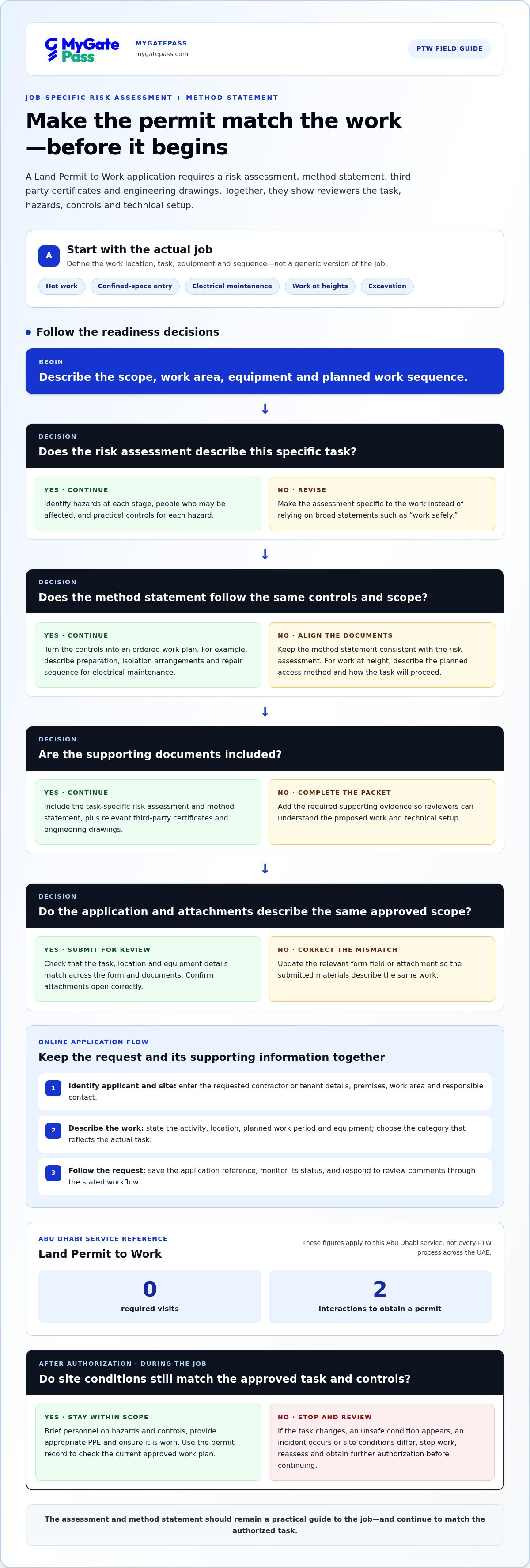
A risk assessment and method statement should describe the actual job, not a generic version of it. A Land Permit to Work application requires a risk assessment, method statement, third-party certificates and engineering drawings. Together, these documents help reviewers understand the task, its hazards, planned controls and technical setup before work begins.
Start by defining the work location, task, equipment and sequence. A permit for hot work, confined-space entry, electrical maintenance, work at heights or excavation should address that specific activity. Identify hazards at each stage, then describe practical measures to reduce exposure for personnel and others nearby. Link every hazard to a control instead of relying on broad statements such as “work safely.”
- Task and scope: Describe what the contractor will do, where the work will happen, and which steps are included.
- Hazards and people: Identify risks to workers, subcontractors, site occupants, and anyone affected by the work area.
- Control measures: Explain the precautions, equipment, and procedures planned for each identified hazard.
- Supporting evidence: Attach relevant third-party certificates and engineering drawings to support the proposed work.
The method statement turns those controls into an ordered work plan. For example, an electrical maintenance job can set out preparation, isolation arrangements, the repair sequence and how the work area will be left afterward. A work-at-height statement should describe the planned access method and how the task will proceed. Keep the sequence consistent with the risk assessment so both documents describe the same job.
Before submitting, compare the documents with the permit scope. In a safe-work permit process, the contractor responsible for a task may act as permit holder. The permit holder must keep the work within the approved scope and conditions. If the task changes, an unsafe condition appears or an incident occurs, stop work and obtain further authorization before continuing.
Use the assessment during the job, not only as an application attachment. Brief personnel on the hazards and controls, provide appropriate personal protective equipment, and ensure it is worn throughout the work. If site conditions differ from the documents, pause and reassess the task. Through a dedicated contractors portal for ptw, the digital permit record can link the risk assessment, method statement and approval, making the current work plan easier for relevant teams to follow.
This makes the current work plan easier to consult alongside its approval. Use the record to confirm that the submitted assessment and method statement still match the authorized task and that personnel are following the stated controls. Any mismatch should prompt a pause and review before work proceeds. The documents should remain a practical guide to the job, not a description that no longer fits.
Many industries require permit-to-work systems to meet local and global safety regulations. A robust system, such as MyGatePass, helps ensure high-risk tasks are carried out safely and in line with regulations. Approval of a Land Permit to Work is mandatory for high-risk activities across regulated facilities. These requirements underline the value of job-specific documents: the scope and controls should be clear enough to support review before work begins and guide the approved task.
How does a contractor register and submit a PTW application online?
For Abu Dhabi’s Land Permit to Work service, contractors and tenants are listed as customer types. The process involves an application and supporting information, with an approved Land Permit to Work request as the output. Online submission keeps the request and its attachments together for review.
Use this sequence to prepare a clear application. Portal screens vary, so follow the fields and instructions in the relevant permit system.
- Identify the applicant and site. Enter the contractor or tenant details requested, then identify the premises, work area, and responsible contact. Keep the company and site information consistent across the application and attachments.
- Describe the work. State the activity, location, planned work period, and equipment involved. Select the permit category that reflects the actual task, rather than choosing a simpler category for convenience.
- Attach the supporting documents. Add the task-specific risk assessment, method statement, third-party certificates, and engineering drawings required for a Land Permit to Work application. Use clear filenames that identify the document and job.
- Review before submission. Check that the work scope matches across the form and documents. Confirm attachments open correctly and include the relevant work area and equipment details.
- Submit and follow the request. Save the application reference and monitor its status through the portal. Respond to review comments by updating the relevant form field or attachment, then submit the revised material through the stated workflow.
In Abu Dhabi, the Land Permit to Work service lists zero required visits and two interactions to obtain a permit. These figures apply to that service, not every PTW process across the UAE. Keep a record of the submitted request and follow-up so the contractor’s supervisor can coordinate the approved scope with site personnel.
Choose the application purpose carefully. A deliveries-only purpose is suitable only for simple deliveries that do not involve plant machinery, lifting equipment, electrical works, power tools or other significant-risk activities. If a delivery includes such work, it is not a simple drop-off: the application must reflect the actual task and its risks.
After submission, keep portal activity aligned with site entry arrangements. A digital visitor management platform can help organize visitor and security workflows alongside permit administration, while the permit process remains responsible for authorizing the work itself.
For Lusail International Circuit, contractors must submit a permit application at least 3 working days before planned work starts. Lusail International Circuit permit application attachments must be submitted as PDF files. A valid Qatar company trade licence, public third-party liability insurance and workmen's compensation insurance are required for the permit application.
Contractors must provide scaffold structure details to the University of Bristol register no later than 48 hours after installation.
What documents are required for UAE contractor PTW approval?
For a Land Permit to Work application, prepare four core attachments: a risk assessment, method statement, third-party certificates and engineering drawings. These show what work is planned, how hazards will be controlled and which technical details support the task. Requirements can depend on the site and activity, so keep the application specific to its actual scope.
Organize the submission as a job file, not a collection of unrelated company records. Include the work location and activity in filenames, then match each attachment to the information in the application. For example, an electrical maintenance request should not include drawings for a separate renovation. A clear document set helps reviewers connect the task, controls and supporting evidence.
- Risk assessment: Identify hazards linked to the specific job and describe control measures for personnel and nearby site users.
- Method statement: Set out the planned work sequence, including preparation, execution, and how the area will be left afterward.
- Third-party certificates: Include certificates relevant to the work or equipment covered by the application.
- Engineering drawings: Attach drawings that help explain the work area, system, or proposed technical arrangement.
Keep business credentials separate from task-safety evidence. A contractor licence identifies the business, while a risk assessment addresses the hazards of a specific job. If the application asks for company licensing information, provide the relevant current document in that field. Do not use a trade licence in place of certificates or technical attachments.
Before uploading, compare the document details with the permit form. The contractor name, site, work area, equipment and activity should describe the same job throughout. If a drawing shows a different location or the method statement covers a wider scope, correct the mismatch before submitting. Use readable files and descriptive names so reviewers can identify attachments without opening unrelated records.
Some site procedures require additional documents for particular work or premises. For example, a SOAMS form requires a DDA permit for full villa renovations. This is a project-specific requirement, not a universal attachment for every UAE PTW application. Keep any additional permit or approval with the relevant job file and identify the activity it supports.
Prepare personnel identification and entry documents separately as an access-readiness step. Contractors must obtain valid photo ID and an entry permit for staff to present to community security when requested. This access paperwork supports site entry; it does not replace the Land PTW application’s risk assessment, method statement, certificates or drawings.
What are the steps for PTW review, approval, issuance, and closure?
A permit passes through defined checkpoints, from application review to safe closure. For a Land Permit to Work, the service output is an approved request. Although portal screens may vary, the review should connect the task, site conditions, controls and responsible personnel before work starts.
- Review the application. A reviewer checks the work scope, location, dates, and supporting records together. For example, an excavation request should describe the excavation, its location, and the planned controls. Gaps or mismatches should be returned for correction before authorization.
- Confirm the controls. The safety manager or supervisor may issue a safe-work permit. Authorized personnel may approve it after ensuring all conditions are met. They assess whether the stated controls address the task and whether the permit’s conditions are clear to the work team.
- Issue the permit. The approved permit records the authorized scope and conditions. The contractor’s supervisor should brief personnel on those conditions before work begins, including applicable precautions and personal protective equipment.
- Monitor the work. The permit holder must keep the task within the approved scope and conditions. If an unsafe condition, incident, scope change, or deviation occurs, contractors must stop work and obtain further authorization.
- Close the permit. Once the task ends, the responsible team should confirm the work area is left in the required condition and record completion through the permit process. Closure distinguishes completed work from permits that remain active or need follow-up.
Use each checkpoint to address a different risk. During review, a missing drawing or unclear work boundary can be corrected before approval. At issuance, the team receives the conditions it must follow. During execution, a changed task requires a pause and renewed authorization, not an informal change to the approved plan.
For example, if maintenance expands beyond the equipment named in the permit, the original approval no longer covers the full task. Stop the affected work, update the scope and relevant controls, then obtain further authorization before resuming. A portal record should make the current permit status and approved version easy for responsible personnel to identify.
At closure, record whether the work finished as approved, whether any issues arose and whether follow-up is needed. This creates a useful handover for site teams and future permit reviews. Digital permit systems can help organizations track requests and support alignment with safety regulations, while clear authorization and safe work practices remain central.
How do PTW portals integrate with access control, HSE, and ERP systems
A PTW portal can work alongside access control, HSE and ERP tools, linking permit information with related site workflows. The aim is a consistent record, not a permit that automatically replaces every system. For example, a permit may identify a contractor, work area, activity and approval status, while access control separately manages entry and exit.
For access coordination, the key connection is between an approved work request and the people expected on site. Security personnel can use relevant permit details to understand why a contractor is arriving and which area the work concerns. Entry approval and PTW authorization remain separate decisions. An entry record does not itself authorize high-risk work.
HSE processes can connect through shared permit references and safety records. A supervisor reviewing an active job can relate the permit to its risk assessment, method statement and any reported changes. If an unsafe condition or scope deviation occurs, work must stop and further authorization is required. A clear record helps responsible teams follow the same status.
ERP connections can support business processes such as contractor records, work orders or project information when systems are configured to exchange relevant data. Before linking records, define which system owns each field. For instance, the ERP may hold a work order reference while the PTW portal tracks review and authorization. Clear ownership reduces conflicting edits.
- Agree on shared identifiers: Use consistent contractor, project, location, and work-order references across systems.
- Set access permissions: Give personnel access to the records needed for their role, such as security viewing entry-relevant details.
- Define status meanings: Distinguish submitted, under review, approved, active, suspended, and closed states.
- Plan exception handling: Decide how teams respond when a permit changes, an entry record differs, or a system is unavailable.
Test a proposed connection with a sample job before relying on it in operations. Follow one request from contractor details through approval, site entry, work updates and closure. Confirm that changes appear in the right workflow and staff can identify the current permit status. Digital PTW systems can help organizations track permits and support alignment with safety regulations.
For delivery visits connected with site operations, use the Delivery Management System to organize delivery workflows alongside permit administration. It supports delivery management; the PTW process remains responsible for assessing and authorizing work.
MyGatePass: MyGatePass Visitor App
MyGatePass helps organize visitor and facility workflows alongside contractor permit administration. The MyGatePass Visitor App supports visitor management, while the MyGatePass Security App and MyGatePass Admin Dashboard support security and administrative workflows. The UAE Pass Integration Module enables verified visitor identification through UAE Pass.
Use these tools to coordinate site visits and entry around approved work. A PTW governs the authorized task and its safety conditions; visitor management supports the separate process of organizing who is expected on site. Keeping these workflows distinct helps teams separate site access from permission to perform work.
For a more connected approach to visitor and security management, visit mygatepass.com.
Build a More Connected Site Workflow
Plan the next step around how permit administration and site access work together. A contractors portal for PTW should fit into a clear workflow, with teams understanding which system handles work authorization and which supports visitor or security processes. This distinction helps keep responsibilities clear as operations evolve.
MyGatePass supports the visitor and security side of that workflow through the MyGatePass Visitor App, MyGatePass Security App and MyGatePass Admin Dashboard. These tools help organize visitor management, security processes and administration alongside a separate permit process.
If you’re reviewing how digital visitor workflows could complement your site operations, contact MyGatePass to discuss PTW and visitor management. A thoughtful next step is to map the people, approvals, and access processes involved, then identify where clearer coordination would help. Keep building a safer, more organized experience for everyone on site.
Frequently Asked Questions
What Is a Permit to Work (PTW) System?
A Permit to Work system is a controlled process for authorizing specified work, especially tasks with significant hazards. It connects the job’s scope with precautions, responsible people and permission to proceed. For example, approval to maintain one piece of equipment does not authorize work on another. A permit supports safe coordination; it does not replace worker training or site procedures.
What is a contractor portal for permit to work (PTW)?
A contractor portal for permit to work is a digital workspace for submitting permit requests and supporting information. It can give applicants a way to follow review status and respond to comments, while site teams manage their part of the workflow. For example, a contractor can update a request when the work location changes, keeping the revised submission linked to that job.
What features should a contractor PTW portal include?
A useful portal makes application requirements clear and keeps each job’s documents and status easy to find. Look for role-based access, searchable permit records, clear review stages and a way to record revisions and decisions. For example, a supervisor should be able to distinguish a permit awaiting review from one that is approved. If access or HSE tools are connected, responsibilities and data ownership should remain clear.
What are common PTW portal risks, delays, and security concerns?
Mismatched or unclear documents, missing attachments and changes to the work scope can delay review or undermine the approved plan. If an unsafe condition, incident or scope change occurs, stop work and obtain further authorization. Keep site-entry arrangements separate from work authorization.
Which contractor PTW portal systems are used in the UAE?
The material identifies Abu Dhabi’s Land Permit to Work service and mentions MyGatePass as a visitor management app, but does not identify specific UAE PTW portal providers.


