

A sign-in sheet can show who arrived, but not necessarily who has left. The risk of using paper visitor logbooks becomes a practical security concern when missing departure times, unreadable handwriting, or incomplete details make it hard to know who is still inside. Consider switching when your team cannot quickly establish a reliable record of visitor entry and exit, especially when responding to an incident.
Paper feels familiar and may work for a small, low-traffic reception where records are completed and checked consistently. But manual sign-in and sign-out depend on visitors remembering each step, and searching a book takes time when answers are needed quickly. This article explains where paper records fall short, how gaps can affect emergency response, and what changes when visitor movements are tracked digitally. It also covers what to weigh when deciding whether a digital visitor management system is a better fit for your UAE facility, from easier record retrieval to a smoother arrival experience.
Key Takeaways
- Spot the record gaps that make paper sign-in sheets hard to rely on, including missing details and unclear handwriting.
- Understand why a current, accessible visitor list matters when staff need to account for people during an emergency.
- Compare the manual effort of paper records with digital tools for retrieving visit details and managing arrivals.
- Learn how dependable entry and exit timestamps can help your team decide when it’s time to move beyond a logbook.
Incomplete or illegible visitor records
A visitor logbook helps reception record who enters, whom they are visiting, and when they arrive. Useful fields include a visitor’s name, company, visit purpose, contact details, and departure time. If a contractor writes an illegible name or skips sign-out, staff may not have a dependable timeline. Even one unclear entry can slow a later record search.
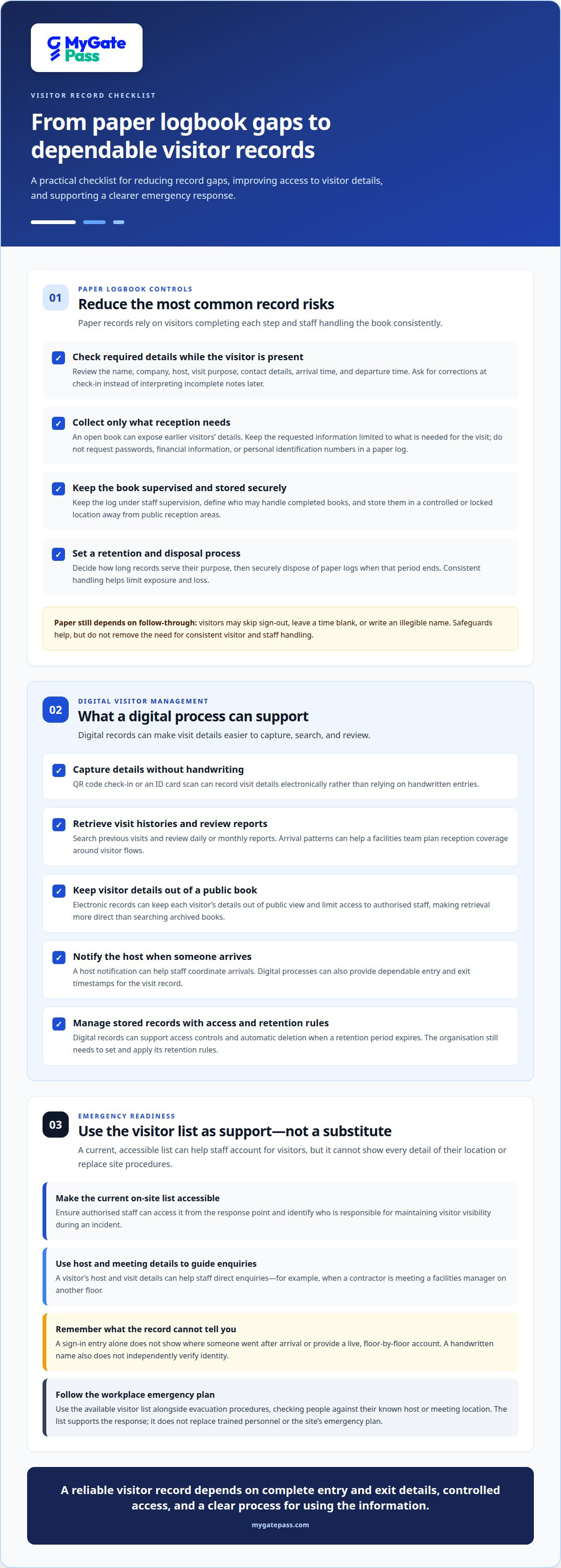
The risk of using paper visitor logbooks is that accuracy depends on each visitor completing every relevant field. A name may be misspelled, a host omitted, or an arrival time left blank. Reception staff can review required fields at check-in and ask for corrections while the visitor is present, rather than trying to interpret incomplete notes later.
A key risk of using paper visitor logbooks is that an open book can expose earlier visitors’ details to anyone signing in afterward. Limit the information collected to what reception needs for the visit, such as a name, company, host, and purpose. Avoid requesting passwords, financial information, or personal identification numbers in a paper log.
Handwritten records can also be altered or copied. For example, someone could change a departure time or photograph a page while the book is unattended. Keep the log under staff supervision and establish who may handle completed books. Clear responsibility makes unusual entries easier to identify and review.
Paper books can be misplaced, damaged, or left in an unlocked cabinet. When an incident requires an older record, a missing volume can leave staff without the details they need. Store completed logs in a controlled location away from public reception areas, and limit access to staff with a work-related need.
Retention also needs a consistent process. Decide how long records serve their purpose, then securely dispose of paper when that period ends. Digital records can support access controls and automatic deletion when their retention period expires. This can make stored information easier to manage, but the organisation still needs to set and apply its retention rules.
Emergency response and knowing who is in the building
During a fire or other emergency, reception needs a usable picture of who may still be inside. A paper visitor logbook shows only what people wrote, and it may not reveal whether someone signed out or moved beyond reception. If a visitor leaves without recording their departure, staff could include them in an evacuation count unnecessarily or overlook someone who remains on site.
Visitor logs are most useful when staff can quickly identify current visitors and provide responders with relevant details. A digital system can show a current on-site list and keep visitor contact information accessible to authorised staff. For example, if a contractor is meeting a facilities manager on another floor, the host and visit details can help staff direct enquiries instead of searching through pages at reception.
Location still matters. A sign-in entry alone does not tell staff where a visitor went after arriving, so a logbook cannot provide a live, floor-by-floor account. During an evacuation, staff can use the available visitor list alongside the workplace’s evacuation procedures, checking each person against their known host or meeting location. The list supports the response; it does not replace trained personnel or the site’s emergency plan.
Credential checks have a separate limitation: a handwritten name does not independently verify identity. If an incident requires staff to confirm who entered, an illegible name or one belonging to someone else can slow the review. A digital visitor record can make details easier to retrieve, while identity verification depends on the check-in process the workplace uses.
To improve readiness, assign a staff member to maintain visitor visibility during an incident and make sure the current list is accessible from the response point. A digital visitor management process can also help staff identify people who may need evacuation support while protecting sensitive details from unnecessary exposure. This balance supports a clearer emergency response and a more considerate visitor experience.
Reasons to switch to digital visitor management
A digital visitor management system can make check-in more consistent and records easier to retrieve. QR codes, ID card scans, host notifications, and searchable visit histories can reduce manual steps at reception.
Digital Visitor Tracking and Reporting
Digital tracking records visitor activity electronically, while reports organise those records for review. A QR code check-in or ID card scan can capture visit details without relying on handwritten entries. Staff can search previous visits and review daily or monthly reports to understand arrival patterns. For example, a facilities team can compare busy periods and plan reception coverage around visitor flows.
Comparing Paper and Digital Logs
Paper logs depend on visitors writing details by hand, while digital logs capture and store information in a searchable format. An open paper book may expose earlier entries to anyone signing in afterward; electronic records can keep each visitor’s details out of public view. Digital visitor management can also limit access to authorised staff, making retrieval more direct than searching archived books.
Practical Steps to Reduce Paper Log Risks
To reduce paper-log risks, keep the book attended, request only necessary details, and review each entry for missing fields. Store completed logs in a locked location, restrict staff access, and securely destroy records when their retention period ends. These steps help limit exposure, but still depend on consistent staff handling and visitor sign-out.
For a digital process, choose a management system that supports QR codes or ID card scans and sends a host notification when someone arrives. The Information Commissioner's Office says visitor sign-in information should be securely managed and protected. A clear process for access, retention, and deletion helps translate that guidance into daily practice, while searchable records make past visits easier to locate.
Visitor entry and exit timestamps
For an incident review, a visitor record is more useful when it shows both arrival and departure. Paper logbooks make those timestamps manual: guests must write them, and staff must notice missing entries. If someone forgets to sign out, the record can make a past visit appear ongoing. That gap weakens visibility into who entered, when they left, and which visitor data is reliable.
Consider a security incident on Tuesday afternoon between 1:00 and 3:00 PM. Staff reviewing paper records may need to find the relevant page, interpret handwriting, and compare arrival and departure entries. A missing sign-out can make it harder to identify who was present during that period. Automatically recorded entry and exit times make visit histories faster to retrieve and compare, supporting a clearer review.
Accurate timestamps also help teams understand daily movement. A searchable digital record can show arrival and departure patterns, help staff locate a specific visit, and support reception planning. Where workplace regulations or internal procedures require visitor records, consistent time fields make those records easier to review. The key is recording both events, not just collecting a name on arrival.
For more accurate timestamps, define one check-in and sign-out process, then make responsibilities clear to visitors and reception staff. With paper logs, staff can prompt guests to record departures and review entries before closing the book. A digital visitor system can capture entry and exit times, reducing reliance on handwritten updates. It still depends on a clear process for recording each visit correctly.
If manual timestamps make incident reviews or daily reporting difficult, explore digital visitor check-in to support more accessible entry and exit records.
MyGatePass: MyGatePass Visitor App
The MyGatePass Visitor App gives facilities a digital option when paper records make visitor tracking difficult to manage. It is part of a visitor and facility management ecosystem, with the MyGatePass Security App for security personnel and the MyGatePass Admin Dashboard for centralized administration.
For UAE facilities seeking verified visitor identification, the UAE Pass Integration Module connects with UAE Pass. Together, these offerings support a connected digital workflow instead of relying only on a logbook. Consider this approach when reception needs a more organized way to manage visitor entry information and security teams need access to digital records.
To explore whether MyGatePass fits your visitor management needs, visit MyGatePass online.
Make visitor records work for your next decision
Use the risk of using paper visitor logbooks as a prompt to review your current process, not simply to replace a book with software. Consider who needs access to visitor information, how staff record departures, and how quickly your team can retrieve a visit history. These questions help define a digital workflow that fits your reception and security needs.
MyGatePass brings visitor management into a digital ecosystem, offering a practical next step when manual records no longer support clear, consistent oversight. A more connected process can help staff manage arrivals and keep visitor information accessible to the people responsible for it.
Ready to discuss a digital approach for your facility? Contact MyGatePass about visitor management and take a considered next step toward a smoother visitor experience.
Frequently Asked Questions
When is it time to switch?
Switch when your team cannot reliably use the logbook to answer routine operational questions. For example, if reception regularly searches old pages to confirm a contractor’s visit, or managers cannot reconcile departures before closing, the manual process may no longer fit. Review how often records need correction, how quickly staff retrieve them, and whether visitors can complete check-in without delaying reception.
What are the main security risks of paper visitor logbooks?
The main risks are exposing visitor details, unauthorised changes, and records becoming unavailable. A visitor waiting at reception could read names or hosts written earlier; a misplaced book could leave staff without a usable history. Consider who can see the log, where completed books are kept, and how staff record corrections. These everyday controls affect how dependable paper records are.
What are the risks of fake entries, illegible handwriting, and incomplete visitor records?
These problems can make it difficult to distinguish a genuine visit from a mistaken or false entry. For instance, a misspelled name may not match an appointment, while someone signing in for another person can create a misleading record. If a field is unclear, staff should resolve it at reception and document corrections transparently, rather than guessing later during a review.
How do paper visitor logbooks affect emergency response and evacuation accountability?
A paper book can slow an evacuation check if responders must interpret entries while coordinating movement. Imagine a visitor has changed meeting rooms, but the reception record still shows only the original host. Staff may need to contact that host or the relevant team to establish the visitor’s whereabouts. Keep the visitor list accessible to the response lead and use it alongside site procedures.
How do paper visitor logbooks compare with digital visitor-management systems for security and privacy?
Paper gives reception a visible record, while digital systems can make records searchable and restrict access to authorised users. Digital storage still needs careful permissions and a defined retention approach; convenience alone does not protect personal information. Compare how each method handles check-in, record access, corrections, retrieval, and disposal. Choose a process that lets staff find necessary details without exposing more visitor data than needed.


