

A gate should do more than open or stay shut. Gate security management software in the UAE helps teams coordinate visitor approvals, manage entry records and send alerts. Identity checks can also support a more controlled arrival process. The right setup connects access decisions to clear, manageable workflows.
Security and convenience should work together, especially when visitors, staff and deliveries use the same entrance. This guide explains how access permissions, alerts and information handling fit into gate management, and what to consider about Emirates ID and passport scanning. It also covers how to assess features for your site and how a connected system can make daily entry easier to manage.
Key Takeaways
- Set clear visitor approval permissions and access policies so entry decisions follow a consistent process.
- Use alert workflows to bring denied attempts, expired passes and other access events to the attention of the right team.
- Shape information handling around who needs access to visitor records and how those records support security operations.
- Explore how UAE Pass integration can support verified visitor identification, alongside a visitor and security app workflow.
Centralized authentication and access governance
Centralized administration brings visitor approvals, access permissions and entry records into one managed process. In the UAE, begin by defining who approves each visit and which areas visitors may enter.
Visitor Badge Permissions
A visitor badge should reflect an approved visit, not grant unrestricted movement. Set permissions by purpose, destination and validity. For example, allow a delivery visitor to reach the receiving area, not staff-only spaces.
Review pass status, pre-registrations, entry records, denied attempts, blocked visitors and expired passes in a single workflow. These records help administrators confirm whether a badge remains valid and apply access practices consistently.
Identity and Access Management
Identity and access management connects a person’s identity to their approval and permitted areas. Compare gate security platforms by how clearly administrators can assign roles, manage approvals and review access activity in the application.
Gate security solutions in the UAE vary in features, integrations and support. Compare their capabilities with your site’s needs. For Arabic interfaces, multiple sites and UAE-based support, assess language options, centralized site administration and support location before selecting a system.
Gate Access Control Integration
Integrated gate infrastructure links an approved access decision to gate operation. Map each step: the visitor presents a badge, the system checks permission, and the authorized gate responds. This workflow helps teams identify where manual review is needed.
In the UAE, software providers and access-control integrators may have different roles. List the integrations, approval rules and site workflows you need, then map them during implementation. Test both valid and denied access scenarios before using the process at each entrance.
Software pricing depends on the project and is provided after a quote request. Cost factors include site count, integrations, features and support scope. When comparing providers in the UAE, assess those factors alongside Arabic capability and multi-site administration, rather than relying on a feature list alone.
Automated alerts and notifications
Gate alerts turn access events into clear prompts for the staff member who can act. Define which events need immediate attention and which belong in a routine review. A denied entry attempt, for example, may need a security response, while an expired pass may require an administrator to review its status. Effective alerts assign each event an owner and a next step.
Build alert rules around recorded events, including pre-registrations, entry records, denied attempts, blocked visitors and expired passes. Identify who receives each notification and what action follows. A message without an assigned recipient can be missed; assigning it to a role gives teams a clear path from notification to response.
- Denied attempt: Notify the security team to review the event and determine whether entry should remain blocked.
- Expired pass: Alert the administrator to assess whether the visitor’s access should stay closed.
- Expected arrival: Use a pre-registration to help staff prepare for a scheduled visitor.
Choose alert settings that help staff distinguish incidents from routine gate activity. If the system supports it, group events by urgency, location or responsible team. A site manager could review repeated access issues, for example, while gate staff handle an individual arrival. Reviewing alert history can reveal unclear ownership and help improve response processes.
Before rollout, map one event from detection to action: select the trigger, assign its recipient, define the response, then test the workflow. This simple exercise helps teams see whether notifications support daily operations or create unnecessary noise. To explore a connected visitor-management workflow, review gate alert management options as part of your assessment.
Data security and information protection
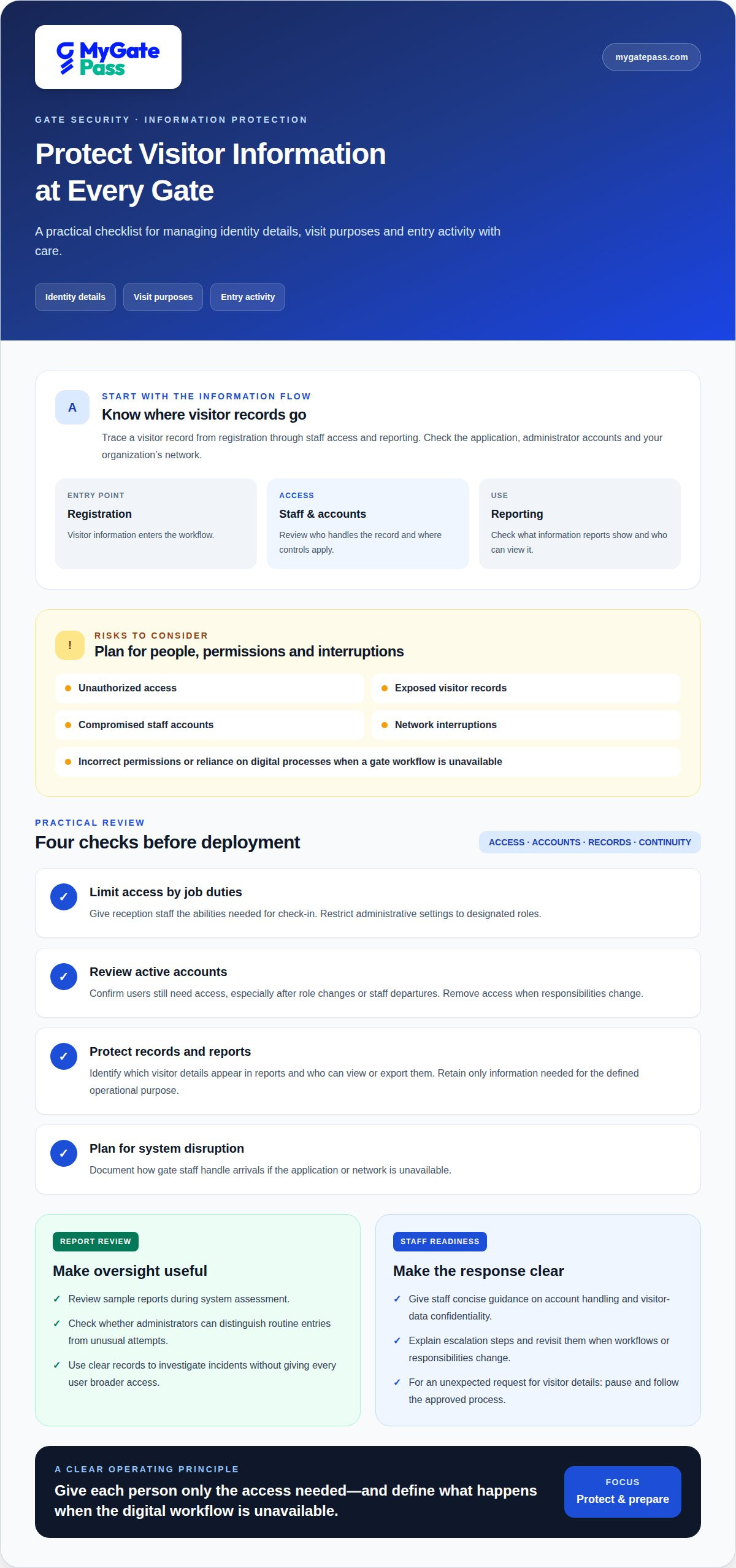
Gate systems handle identity details, visit purposes and entry activity, so protect each deliberately. Map how visitor information moves from registration through staff access and reporting. Trace a visitor record across the application, administrator accounts and the organization’s network to see who handles it and where access controls matter.
Organizations in the UAE should consider unauthorized access, exposed visitor records, compromised staff accounts and network interruptions. Operational risks also include incorrect permissions and reliance on digital processes when a gate workflow is unavailable. Reduce these risks by assigning access according to job duties, removing it when roles change, and defining a manual response to system interruptions.
Use a practical review before deployment:
- Limit access: Give reception staff the abilities needed for check-in, while restricting administrative settings to designated roles.
- Review accounts: Confirm that active users still need access, especially after role changes or staff departures.
- Protect records: Identify which visitor details appear in reports and who can view or export them.
- Plan for disruption: Document how gate staff handle arrivals if the application or network is unavailable.
Reports support oversight when they present access activity in a format the team can use. Review sample reports during system assessment: can an administrator distinguish routine entries from unusual attempts? Clear records help staff investigate incidents without giving every user broader access. Retain only the information needed for the defined operational purpose.
People and technology both shape protection. Give staff concise guidance on account handling, visitor-data confidentiality and escalation steps. A short scenario can build confidence: a staff member receives an unexpected request for visitor details, pauses and follows the organization’s approved process. Revisit these practices when workflows or user responsibilities change.
Before launch, document information flows, account roles, report access and responses to disruptions. Test each workflow with representative staff, then adjust unclear permissions. These steps help teams understand the cybersecurity risks of gate software and make protection part of everyday operations, not an afterthought.
Emirates ID and passport scanning
At a UAE entrance, Emirates ID or passport scanning can streamline visitor registration by capturing document information for an arrival record. The workflow depends on the scanner, software configuration and staff process. Treat a scan as an input to an identity check, not automatic proof that a visitor should receive access.
Before implementation, map the steps for each document type. Decide who scans, what information is needed, how staff handle an unreadable document and how approval connects to entry. A damaged passport page, for example, may need manual review before registration continues. Clear steps help teams manage exceptions without confusing document capture with access authorization.
- Capture: Scan the presented Emirates ID or passport through the configured registration workflow.
- Review: Check that the record matches the visitor and intended visit.
- Approve: Apply the site’s access permissions separately from document capture.
- Protect: Limit record visibility to staff who need it for their role.
For digital identity, UAE Pass integration can support verified visitor identification. Consider how this process works alongside document scanning, including which visitors use each route and how staff handle exceptions. A global enterprise may need a consistent workflow across sites, while each UAE location still needs clear local operating steps.
Information protection remains important after scanning. Restrict access to identity records, review which details appear in reports and define how staff respond to suspected misuse. Cyber threats can target user accounts and connected infrastructure, so monitor access activity and include identity workflows in cybersecurity reviews. Train staff to escalate mismatches rather than bypass checks to speed up entry.
Test the process with representative Emirates ID and passport scenarios before rollout. Confirm that staff can capture information, resolve errors, route approvals and protect records without skipping steps. For a connected identity workflow, explore UAE Pass visitor identification.
MyGatePass: MyGatePass Visitor App
The MyGatePass Visitor App gives visitors a digital route through arrival, while the MyGatePass Security App supports security personnel managing visitor access. The MyGatePass Admin Dashboard centralizes administration, and the UAE Pass Integration Module supports verified visitor identification.
Consider this setup when your team wants visitor registration, security workflows and administration connected in one digital ecosystem. For UAE sites using UAE Pass identification, the integration module can be part of the visitor-management process. Together, these tools help organize the handoff from visitor registration to the security team’s gate workflow.
To discuss how MyGatePass fits your access-management needs, visit mygatepass.com.
Make your next access decision with confidence
Turn your security priorities into a practical rollout plan. If you are considering gate security management software in the UAE, begin by documenting the arrival experience you want visitors and staff to have. Then map it to the roles, approvals and information your team needs to manage. A focused plan helps keep convenience and control aligned as site needs evolve.
MyGatePass brings together the MyGatePass Visitor App, MyGatePass Security App and MyGatePass Admin Dashboard. These tools provide a connected starting point for organizing visitor workflows and administration. Consider how they fit the way your team handles arrivals, supports security staff and oversees daily access activity.
Ready to discuss your access-management needs? Contact MyGatePass to explore a suitable next step for your organization. A thoughtful plan today can make entry processes easier to manage tomorrow.
Frequently Asked Questions
What is gate security management software and what features does it offer?
Gate security management software in the UAE coordinates visitor entry through digital workflows. Depending on the platform, features may include visitor registration, staff processes, identity integrations and administrative oversight. MyGatePass includes visitor pre-registration, QR-based entry, real-time updates and digital visitor history. Match each feature to a site task, such as preparing for an expected guest or reviewing a past visit.
How do UAE gate security systems manage visitor registration and access approvals?
These systems connect registration and approval, with staff or administrators reviewing visit details before entry. A residential building, for example, can use pre-registration to prepare for an invited guest, then have gate staff manage the arrival through their workflow. Define who can approve visits, how exceptions are handled and how arrivals are recorded so the process stays clear across shifts.
Does gate security software in the UAE integrate with Emirates ID, UAE Pass, or government systems?
Identity-related integrations vary by platform. MyGatePass offers a UAE Pass Integration Module for verified visitor identification. Emirates ID or passport scanning and connections to other government systems are separate capabilities, not automatic features of every platform. Before implementation, map which identity route visitors will use and how staff will manage cases that need an alternative registration process.
What hardware is needed for gate security software, such as barriers, cameras, and ID scanners?
When planning gate security management software in the UAE, account for the site’s existing gate setup and intended visitor workflow. A property may have a physical barrier, while registration could use staff-operated devices or an ID scanner. Cameras are separate from visitor-management software. Document existing equipment, staff tasks and required connection points before planning implementation.
What UAE privacy and data protection rules apply to gate visitor records and surveillance?
Organizations should handle visitor records and surveillance data according to the UAE privacy and data-protection requirements that apply to their activities. Document why each data type is collected, who can access it, how long it is retained and how disclosures are handled. For example, separate access to visitor registration records from access to surveillance footage, and make internal procedures clear to staff.
How do leading UAE gate security software solutions compare on features and support?
Gate security solutions in the UAE differ in features, integrations and support. Compare how clearly each manages roles, approvals and access activity, then assess its integrations and support against your site’s needs.


